
MyPChatesme
New member
- Local time
- 3:39 AM
- Messages
- 1
I'm currently having some strange graphical problems with my PC and I need help determining what the problem is and fixing it. Here's a complete breakdown of everything that's going on. Hopefully someone can help me figure out what the issue is.
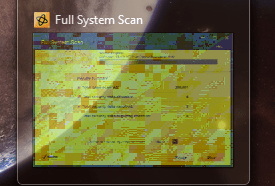
It started about two weeks ago with a few glitches in Windows 7 aero. The preview windows would glitch, I'd get lines across the desktop, and the border of windows would vanish entirely. (screenshots included) Switching themes would temporarily correct the problem, only to have it resurface later. I also noticed that they would only occur while using Internet browsers (both IE and Safari)
Testing with all my games at the time (Including Batman AC, GTA IV, and CoDBO which are the games that push my graphics card the hardest) showed no artifacts or performance problems whatsoever, which leads me to think it's not the graphics card failing.
Unfortunately a few days ago I started getting "amd display driver has stopped responding and has recovered" messages while in web broswers and Terraria. Meanwhile my high end games are still running fine.
Everything I've been able to find about the problem seems to point to it being a corrupt file somewhere. Especially since I get no artifacts or graphical problems while playing high end games.
I've already tried updating the drivers (were already up to date) rolling back the drivers (no effect) repairing the drivers (no issues found) used sfc/scannow in hopes it would fix any directx problems (none found) ran a virus scan (nothing) I even ran the defragger as a last resort (files were 0% fragmented)
I also went to try a system restore, but the oldest restore point I had was AFTER the problem had surfaced. (I wanted to roll it back like 6 months, oldest restore point was 11 days)
Unfortunately I am unable to reformat the OS since I need the disc (PC was a gift, didn't get the disc with it) leaving me stuck trying to find/fix the problem on my own. (and since my PC knowledge is limited that is quite difficult)
Here is my system information
Processor Information:
Vendor: GenuineIntel
Speed: 2653 Mhz
8 logical processors
4 physical processors
HyperThreading: Supported
FCMOV: Supported
SSE2: Supported
SSE3: Supported
SSSE3: Supported
SSE4a: Unsupported
SSE41: Supported
SSE42: Supported
Operating System Version:
Windows 7 (64 bit)
NTFS: Supported
Crypto Provider Codes: Supported 323 0x0 0x0 0x0
Video Card:
Driver: ATI Radeon HD 5700 Series
DirectX Driver Name: aticfx32.dll
Driver Version: 8.982.0.0
DirectX Driver Version: 8.17.10.1140
Driver Date: 27 July 2012
Desktop Color Depth: 32 bits per pixel
Monitor Refresh Rate: 75 Hz
DirectX Card: ATI Radeon HD 5700 Series
VendorID: 0x1002
DeviceID: 0x68b8
Number of Monitors: 1
Number of Logical Video Cards: 1
No SLI or Crossfire Detected
Primary Display Resolution: 1280 x 1024
Desktop Resolution: 1280 x 1024
Primary Display Size: 17.80" x 14.21" (22.76" diag)
45.2cm x 36.1cm (57.8cm diag)
Primary Bus Type Not Detected
Primary VRAM: 1024 MB
Supported MSAA Modes: 2x 4x 8x
Sound card:
Audio device: headset (Realtek High Definitio
Memory:
RAM: 6135 Mb
Any help or insight into what the problem could be and/or how to fix it would be GREATLY appreciated.
It started about two weeks ago with a few glitches in Windows 7 aero. The preview windows would glitch, I'd get lines across the desktop, and the border of windows would vanish entirely. (screenshots included) Switching themes would temporarily correct the problem, only to have it resurface later. I also noticed that they would only occur while using Internet browsers (both IE and Safari)
Testing with all my games at the time (Including Batman AC, GTA IV, and CoDBO which are the games that push my graphics card the hardest) showed no artifacts or performance problems whatsoever, which leads me to think it's not the graphics card failing.
Unfortunately a few days ago I started getting "amd display driver has stopped responding and has recovered" messages while in web broswers and Terraria. Meanwhile my high end games are still running fine.
Everything I've been able to find about the problem seems to point to it being a corrupt file somewhere. Especially since I get no artifacts or graphical problems while playing high end games.
I've already tried updating the drivers (were already up to date) rolling back the drivers (no effect) repairing the drivers (no issues found) used sfc/scannow in hopes it would fix any directx problems (none found) ran a virus scan (nothing) I even ran the defragger as a last resort (files were 0% fragmented)
I also went to try a system restore, but the oldest restore point I had was AFTER the problem had surfaced. (I wanted to roll it back like 6 months, oldest restore point was 11 days)
Unfortunately I am unable to reformat the OS since I need the disc (PC was a gift, didn't get the disc with it) leaving me stuck trying to find/fix the problem on my own. (and since my PC knowledge is limited that is quite difficult)
Here is my system information
Processor Information:
Vendor: GenuineIntel
Speed: 2653 Mhz
8 logical processors
4 physical processors
HyperThreading: Supported
FCMOV: Supported
SSE2: Supported
SSE3: Supported
SSSE3: Supported
SSE4a: Unsupported
SSE41: Supported
SSE42: Supported
Operating System Version:
Windows 7 (64 bit)
NTFS: Supported
Crypto Provider Codes: Supported 323 0x0 0x0 0x0
Video Card:
Driver: ATI Radeon HD 5700 Series
DirectX Driver Name: aticfx32.dll
Driver Version: 8.982.0.0
DirectX Driver Version: 8.17.10.1140
Driver Date: 27 July 2012
Desktop Color Depth: 32 bits per pixel
Monitor Refresh Rate: 75 Hz
DirectX Card: ATI Radeon HD 5700 Series
VendorID: 0x1002
DeviceID: 0x68b8
Number of Monitors: 1
Number of Logical Video Cards: 1
No SLI or Crossfire Detected
Primary Display Resolution: 1280 x 1024
Desktop Resolution: 1280 x 1024
Primary Display Size: 17.80" x 14.21" (22.76" diag)
45.2cm x 36.1cm (57.8cm diag)
Primary Bus Type Not Detected
Primary VRAM: 1024 MB
Supported MSAA Modes: 2x 4x 8x
Sound card:
Audio device: headset (Realtek High Definitio
Memory:
RAM: 6135 Mb
Any help or insight into what the problem could be and/or how to fix it would be GREATLY appreciated.
Attachments

My Computer
At a glance
Windows 7 x64 bit
- OS
- Windows 7 x64 bit


