Help Regarding SFC Scan Corruption [NEED 2 BCD COMPONENTS FILES]

xYagneshx

New member
Local time
1:18 PM
Messages
25
PC RUNS SMOOTH NO PROBLEM AT ALL ONLY

SFC /SCANNOW SHOWS COMPONENTS ERROR


Code:
SFCFix version 2.4.3.0 by niemiro.
Start time: 2015-05-03 22:38:23.550
Microsoft Windows 7 Service Pack 1 - amd64
Not using a script file.


AutoAnalysis::
FIXED: Corruption at C:\Windows\winsxs\x86_wpf-presentationframework_31bf3856ad364e35_6.1.7601.18140_none_706936a5b4549430\PresentationFramework.dll has been successfully repaired from C:\Windows\assembly\GAC_MSIL\PresentationFramework\3.0.0.0__31bf3856ad364e35\PresentationFramework.dll.


CORRUPT: C:\Windows\winsxs\amd64_microsoft-windows-b..environment-dvd-efi_31bf3856ad364e35_6.1.7600.16385_none_313c88fc9e3423aa\BCD
CORRUPT: C:\Windows\winsxs\amd64_microsoft-windows-b..nvironment-dvd-pcat_31bf3856ad364e35_6.1.7600.16385_none_f60cc30a4a2fb068\BCD


SUMMARY: Some corruptions could not be fixed automatically. Seek advice from helper or sysnative.com.
   CBS & SFC total detected corruption count:     3
   CBS & SFC total unimportant corruption count:  0
   CBS & SFC total fixed corruption count:        1
   SURT total detected corruption count:          0
   SURT total unimportant corruption count:       0
   SURT total fixed corruption count:             0
AutoAnalysis:: directive completed successfully.


Successfully processed all directives.
SFCFix version 2.4.3.0 by niemiro has completed.
Currently storing 1 datablocks.
Finish time: 2015-05-03 22:43:32.990
----------------------EOF-----------------------

have to fix this two Windows 7 x64 Ultimate [Can't Find OEM Disc ATM]

CORRUPT: C:\Windows\winsxs\amd64_microsoft-windows-b..environment-dvd-efi_31bf3856ad364e35_6.1.7600.16385_none_313c88fc9e3423aa\BCD

CORRUPT: C:\Windows\winsxs\amd64_microsoft-windows-b..nvironment-dvd-pcat_31bf3856ad364e35_6.1.7600.16385_none_f60cc30a4a2fb068\BCD
 

My Computer

Computer type
PC/Desktop
OS
Windows 7 Ultimate 32bit
Hello when running the sfc /scannow and it finds a problem you should then run the sfc at least 3 times so it can fix what it can.
 

My Computer

Computer type
PC/Desktop
Computer Manufacturer/Model Number
Lenovo
OS
Windows 7 Home Premium 64-Bit SP1
CPU
Intel Core i7 2600
Motherboard
Lenovo
Memory
8.00 GB Dual-Channel DDR3
Graphics Card(s)
1024MB GeForce GT 420
Sound Card
Intergrated Realtex ALC888S
Monitor(s) Displays
LG W40 series Widescreen
Screen Resolution
1920 by 1080 widescreen
Hard Drives
932GB Hitachi HDS TB
External drive 640 GB also
PSU
300W
Case
Tower
Cooling
yes came installed
Keyboard
Lenovo
Mouse
Laser wirless 5000
Antivirus
MBAM / Superantispyware pro paid for.
Browser
Google /
Other Info
PLDS DVD-RW DH16ABSH
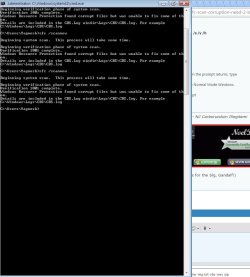
Hello when running the sfc /scannow and it finds a problem you should then run the sfc at least 3 times so it can fix what it can.

i did run it 2 times again trying 3 times it will take some time though

do manually copying those 2 BCD file will mix problem ?

HELP ME BY UPLOAD THOSE FILES attaching checksums

Dir
C:\Windows\winsxs\amd64_microsoft-windows-b..environment-dvd-efi_31bf3856ad364e35_6.1.7600.16385_none_313c88fc9e3423aa\

File: BCD Size:256 KB

CRC-32: e4c46883
MD4: 82ee1a27c926438e1d32817900e92f3e
MD5: 9fe78f8ecc4e9dc54c345b7f0affdb34
SHA-1: 5e973466b8cc2b5272de3624a7e0359c785cf10c

check this link for default size
BCD.


File: boot.sdi Size: 3,096 KB

CRC-32: 209cb6e6
MD4: 45ea60feb6bb81074d7b3b88e971bb35
MD5: 22d9945b4aae36dd59620a918f2e65f4
SHA-1: bb025cedca07887916c4b7e5fa7a641ed3e30c14

2 Dir

C:\Windows\winsxs\amd64_microsoft-windows-b..nvironment-dvd-pcat_31bf3856ad364e35_6.1.7600.16385_none_f60cc30a4a2fb068\

File: BCD Size:256 KB

CRC-32: 969e3c4c
MD4: aae8ad34e4800bbd16f510871053550a
MD5: ec7f9075f332b9a64486cafc65237a32
SHA-1: bcef7956f37a062cbf8ae030531a245b28aeed48

File: boot.sdi Size: 3,096 KB

CRC-32: 209cb6e6
MD4: 45ea60feb6bb81074d7b3b88e971bb35
MD5: 22d9945b4aae36dd59620a918f2e65f4
SHA-1: bb025cedca07887916c4b7e5fa7a641ed3e30c14

both boot.sdi file have same hash

problem is with BCD i think

i used EasyBCD 2.2 for dual booting
 

My Computer

Computer type
PC/Desktop
OS
Windows 7 Ultimate 32bit
There is very rarely any point in running an SFC scan more than once.


I've uploaded a file - ynhaa.zip - to my OneDrive at Noel's OneDrive
Please download and save it.

Right-click on the saved file and select Extract all...
Change the target to C:\ and click on Extract
Close all windows (it would be a good idea to print these instructions!)

Now reboot to the Repair Environment - as soon as the machine restarts, start tapping F8 - this should bring up the Advanced Boot Menu, at the top of which should be the option 'Repair my Computer'
Pick that
You'll have to log in with your username and password.

Pick the option to use a Command Prompt
At the prompt type
DIR C:\ynhaa
hit the enter key - if you get a 'Not Found' error try
DIR D:\ynhaa
or
DIR E:\ynhaa


The drive letter in use when you find the folder will need to be substituted (for<drive>) into the following command...


XCOPY <drive>:\ynhaa <drive>:\windows\winsxs /y /i /s /v /h


(e.g. XCOPY P:\wfire P:\windows\winsxs /y /i /s /v /h )


run the command (it should take almost no time) and when the prompt returns, type
EXIT
and hit the Enter key to exit Command Prompt - reboot to Normal Mode Windows.

Now run SFC /SCANNOW in an Elevated Command Prompt
then reboot and upload the new CBS.log file to your reply
 

My Computer

Computer type
Laptop
Computer Manufacturer/Model Number
Asus K52F or Lenovo B51-80
OS
Win 7 x64 Home Premium (and x86 VirtualBox VM)/Win10
CPU
i3 370M/i7 6500U
Motherboard
Asus/Lenovo
Memory
8GB - finally :)/8GB
Graphics Card(s)
it's an i3, dude!/dual Intel&nVidia
Sound Card
onboard
Monitor(s) Displays
15.6" built-in
Screen Resolution
1366x768/1920x1080
Hard Drives
750GB Seagate internal
Sundry external drives attached to other computers on the local network
1TB SSD on the Lenovo
PSU
n/a
Internet Speed
as much as I can get - usually on a dongle/phone, so <1MB/s
Antivirus
MSE/Defender
Browser
IE11/12/Edge/Chrome/FF(if I must)
There is very rarely any point in running an SFC scan more than once.


I've uploaded a file - ynhaa.zip - to my OneDrive at Noel's OneDrive
Please download and save it.

Right-click on the saved file and select Extract all...
Change the target to C:\ and click on Extract
Close all windows (it would be a good idea to print these instructions!)

Now reboot to the Repair Environment - as soon as the machine restarts, start tapping F8 - this should bring up the Advanced Boot Menu, at the top of which should be the option 'Repair my Computer'
Pick that
You'll have to log in with your username and password.

Pick the option to use a Command Prompt
At the prompt type
DIR C:\ynhaa
hit the enter key - if you get a 'Not Found' error try
DIR D:\ynhaa
or
DIR E:\ynhaa


The drive letter in use when you find the folder will need to be substituted (for<drive>) into the following command...


XCOPY <drive>:\ynhaa <drive>:\windows\winsxs /y /i /s /v /h


(e.g. XCOPY P:\wfire P:\windows\winsxs /y /i /s /v /h )


run the command (it should take almost no time) and when the prompt returns, type
EXIT
and hit the Enter key to exit Command Prompt - reboot to Normal Mode Windows.

Now run SFC /SCANNOW in an Elevated Command Prompt
then reboot and upload the new CBS.log file to your reply

i actually did run it 3 times even i already know it not gonna work (IDK WHY :confused:)

while searching around for those files on internet and all attempt failed :(

trying what u suggested right now

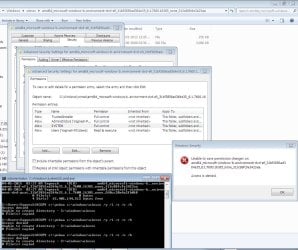
failing acces denied try to take ownership also showing same error

should i try to delete with unlocker ?

or some way to stop service and try again ?
 

Attachments

  • Screenshot_1.jpg
    Screenshot_1.jpg
    120.1 KB · Views: 1
  • Screenshot_2.jpg
    Screenshot_2.jpg
    247.3 KB · Views: 1

My Computer

Computer type
PC/Desktop
OS
Windows 7 Ultimate 32bit
Running sfc /scannow might not correct errors unless their is a reboot after each scan.
 

My Computer

Computer type
PC/Desktop
Computer Manufacturer/Model Number
Home made Desktop
OS
Windows 10 Pro. 64/ version 1709 Windows 7 Pro/64
CPU
Intel i7-6800K @ 4.3
Motherboard
ASUS X-99 Deluxe II
Memory
Corsair Platinum 16 gig @2400
Graphics Card(s)
EVGA GTX 1070 OC
Monitor(s) Displays
Asus 27" LED LCD/VE278Q
Screen Resolution
1920-1080 or 1280-720 HDMI
Hard Drives
INTEL SSD 730-240 Gb Sata 3.0/
PSU
EVGA Platium 1200W
Case
Phanteks Luxe Tempered Glass 8 fans/ one radiator
Cooling
XSPC/ Water Cooled CPU
Keyboard
Das 4 Professional
Mouse
Logitech M705/MX Anywhere 2-S
Internet Speed
100 mbits
Antivirus
Microsoft Security Essentials/ Malwarebytes Premium 3.0/ SAS
Browser
I.E. 11 default/Firefox/ ISP Time Warner Cable/Spectrum
Other Info
LG BluRay Burner/
Sound system-KLipsch-THX/
Icy Dock ssd Hot Swap bays.
Running sfc /scannow might not correct errors unless their is a reboot after each scan.

i don't think it will gonna help still going to try 1 time restarting after this post
attaching whole CBS log folder
 

My Computer

Computer type
PC/Desktop
OS
Windows 7 Ultimate 32bit
You MUST follow the instructions I posted - that gets around permissions problem such as you got
 

My Computer

Computer type
Laptop
Computer Manufacturer/Model Number
Asus K52F or Lenovo B51-80
OS
Win 7 x64 Home Premium (and x86 VirtualBox VM)/Win10
CPU
i3 370M/i7 6500U
Motherboard
Asus/Lenovo
Memory
8GB - finally :)/8GB
Graphics Card(s)
it's an i3, dude!/dual Intel&nVidia
Sound Card
onboard
Monitor(s) Displays
15.6" built-in
Screen Resolution
1366x768/1920x1080
Hard Drives
750GB Seagate internal
Sundry external drives attached to other computers on the local network
1TB SSD on the Lenovo
PSU
n/a
Internet Speed
as much as I can get - usually on a dongle/phone, so <1MB/s
Antivirus
MSE/Defender
Browser
IE11/12/Edge/Chrome/FF(if I must)
You MUST follow the instructions I posted - that gets around permissions problem such as you got

it do fixed problem thanks

can u suggest me latest driver for this

Standard Enhanced PCI to USB Host Controller


hardware id

PCI\VEN_1002&DEV_4396&SUBSYS_50041458&REV_00

see SS

i think something is related to AMD USB FILTER DRIVER FOR USB 2.0

already install latest SATA driver from AMD site
Chipset

Motherboard is GA-78LMT-USB3 (rev. 4.1)
 

Attachments

  • Screenshot_6.jpg
    Screenshot_6.jpg
    65.6 KB · Views: 1

My Computer

Computer type
PC/Desktop
OS
Windows 7 Ultimate 32bit

My Computer

Computer type
Laptop
Computer Manufacturer/Model Number
Asus K52F or Lenovo B51-80
OS
Win 7 x64 Home Premium (and x86 VirtualBox VM)/Win10
CPU
i3 370M/i7 6500U
Motherboard
Asus/Lenovo
Memory
8GB - finally :)/8GB
Graphics Card(s)
it's an i3, dude!/dual Intel&nVidia
Sound Card
onboard
Monitor(s) Displays
15.6" built-in
Screen Resolution
1366x768/1920x1080
Hard Drives
750GB Seagate internal
Sundry external drives attached to other computers on the local network
1TB SSD on the Lenovo
PSU
n/a
Internet Speed
as much as I can get - usually on a dongle/phone, so <1MB/s
Antivirus
MSE/Defender
Browser
IE11/12/Edge/Chrome/FF(if I must)
The is NO reliable driver updater - not even Windows' one.
ALWAYS go to the manufacturer's website for their latest offerings.
 

My Computer

Computer type
Laptop
Computer Manufacturer/Model Number
Asus K52F or Lenovo B51-80
OS
Win 7 x64 Home Premium (and x86 VirtualBox VM)/Win10
CPU
i3 370M/i7 6500U
Motherboard
Asus/Lenovo
Memory
8GB - finally :)/8GB
Graphics Card(s)
it's an i3, dude!/dual Intel&nVidia
Sound Card
onboard
Monitor(s) Displays
15.6" built-in
Screen Resolution
1366x768/1920x1080
Hard Drives
750GB Seagate internal
Sundry external drives attached to other computers on the local network
1TB SSD on the Lenovo
PSU
n/a
Internet Speed
as much as I can get - usually on a dongle/phone, so <1MB/s
Antivirus
MSE/Defender
Browser
IE11/12/Edge/Chrome/FF(if I must)
Ok
i think agree with that

Manufacture do check drivers before uploading

And thanks for helping me out
 

My Computer

Computer type
PC/Desktop
OS
Windows 7 Ultimate 32bit
Back
Top