marksearle
New member
- Local time
- 6:24 PM
- Messages
- 7
Hi there,
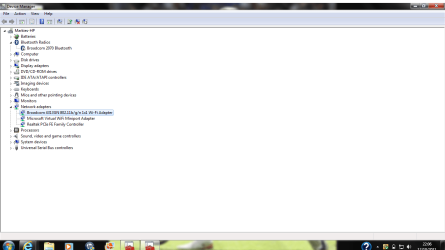
I have recently bought a new computer and have been happily connected to my wireless network for three months. The other day the connection was lost and now I cannot connect to my wireless or parents wireless networks. I can connect via Lan and from this have done an ipconfig print out which I will add below.
I can see my wireless network connections however when I tempt to connect it says windows cannot manage it. I am running windows 7 home premium 64 bit.
All other computers can connect to the wireless just not mine. Any help would be highly appreciated
Microsoft Windows [Version 6.1.7601]
Copyright (c) 2009 Microsoft Corporation. All rights reserved.
C:\Users\Markies>ipconfig/all
Windows IP Configuration
Host Name . . . . . . . . . . . . : Markies-HP
Primary Dns Suffix . . . . . . . :
Node Type . . . . . . . . . . . . : Hybrid
IP Routing Enabled. . . . . . . . : No
WINS Proxy Enabled. . . . . . . . : No
DNS Suffix Search List. . . . . . : lan
Wireless LAN adapter Wireless Network Connection 2:
Media State . . . . . . . . . . . : Media disconnected
Connection-specific DNS Suffix . :
Description . . . . . . . . . . . : Microsoft Virtual WiFi Miniport Adapter
Physical Address. . . . . . . . . : 40-2C-F4-02-2F-CC
DHCP Enabled. . . . . . . . . . . : Yes
Autoconfiguration Enabled . . . . : Yes
Wireless LAN adapter Wireless Network Connection:
Media State . . . . . . . . . . . : Media disconnected
Connection-specific DNS Suffix . :
Description . . . . . . . . . . . : Broadcom 4313GN 802.11b/g/n 1x1 Wi-Fi Ada
pter
Physical Address. . . . . . . . . : 40-2C-F4-02-2F-CC
DHCP Enabled. . . . . . . . . . . : Yes
Autoconfiguration Enabled . . . . : Yes
Ethernet adapter Local Area Connection:
Connection-specific DNS Suffix . : lan
Description . . . . . . . . . . . : Realtek PCIe FE Family Controller
Physical Address. . . . . . . . . : 2C-27-D7-DF-32-6F
DHCP Enabled. . . . . . . . . . . : Yes
Autoconfiguration Enabled . . . . : Yes
Link-local IPv6 Address . . . . . : fe80::10df:ef06:b554:ac09%13(Preferred)
IPv4 Address. . . . . . . . . . . : 192.168.1.67(Preferred)
Subnet Mask . . . . . . . . . . . : 255.255.255.0
Lease Obtained. . . . . . . . . . : 12 October 2011 19:53:29
Lease Expires . . . . . . . . . . : 13 October 2011 19:53:28
Default Gateway . . . . . . . . . : 192.168.1.254
DHCP Server . . . . . . . . . . . : 192.168.1.254
DHCPv6 IAID . . . . . . . . . . . : 288106455
DHCPv6 Client DUID. . . . . . . . : 00-01-00-01-15-77-B2-F8-2C-27-D7-DF-32-6F
DNS Servers . . . . . . . . . . . : 192.168.1.254
NetBIOS over Tcpip. . . . . . . . : Enabled
Tunnel adapter Local Area Connection* 14:
Media State . . . . . . . . . . . : Media disconnected
Connection-specific DNS Suffix . :
Description . . . . . . . . . . . : Microsoft 6to4 Adapter
Physical Address. . . . . . . . . : 00-00-00-00-00-00-00-E0
DHCP Enabled. . . . . . . . . . . : No
Autoconfiguration Enabled . . . . : Yes
Tunnel adapter isatap.lan:
Media State . . . . . . . . . . . : Media disconnected
Connection-specific DNS Suffix . : lan
Description . . . . . . . . . . . : Microsoft ISATAP Adapter #3
Physical Address. . . . . . . . . : 00-00-00-00-00-00-00-E0
DHCP Enabled. . . . . . . . . . . : No
Autoconfiguration Enabled . . . . : Yes
Tunnel adapter Teredo Tunneling Pseudo-Interface:
Connection-specific DNS Suffix . :
Description . . . . . . . . . . . : Teredo Tunneling Pseudo-Interface
Physical Address. . . . . . . . . : 00-00-00-00-00-00-00-E0
DHCP Enabled. . . . . . . . . . . : No
Autoconfiguration Enabled . . . . : Yes
IPv6 Address. . . . . . . . . . . : 2001:0:5ef5:79fb:28e4:2fa:a13f:ae60(Prefe
rred)
Link-local IPv6 Address . . . . . : fe80::28e4:2fa:a13f:ae60%16(Preferred)
Default Gateway . . . . . . . . . : ::
NetBIOS over Tcpip. . . . . . . . : Disabled
C:\Users\Markies>
I have recently bought a new computer and have been happily connected to my wireless network for three months. The other day the connection was lost and now I cannot connect to my wireless or parents wireless networks. I can connect via Lan and from this have done an ipconfig print out which I will add below.
I can see my wireless network connections however when I tempt to connect it says windows cannot manage it. I am running windows 7 home premium 64 bit.
All other computers can connect to the wireless just not mine. Any help would be highly appreciated
Microsoft Windows [Version 6.1.7601]
Copyright (c) 2009 Microsoft Corporation. All rights reserved.
C:\Users\Markies>ipconfig/all
Windows IP Configuration
Host Name . . . . . . . . . . . . : Markies-HP
Primary Dns Suffix . . . . . . . :
Node Type . . . . . . . . . . . . : Hybrid
IP Routing Enabled. . . . . . . . : No
WINS Proxy Enabled. . . . . . . . : No
DNS Suffix Search List. . . . . . : lan
Wireless LAN adapter Wireless Network Connection 2:
Media State . . . . . . . . . . . : Media disconnected
Connection-specific DNS Suffix . :
Description . . . . . . . . . . . : Microsoft Virtual WiFi Miniport Adapter
Physical Address. . . . . . . . . : 40-2C-F4-02-2F-CC
DHCP Enabled. . . . . . . . . . . : Yes
Autoconfiguration Enabled . . . . : Yes
Wireless LAN adapter Wireless Network Connection:
Media State . . . . . . . . . . . : Media disconnected
Connection-specific DNS Suffix . :
Description . . . . . . . . . . . : Broadcom 4313GN 802.11b/g/n 1x1 Wi-Fi Ada
pter
Physical Address. . . . . . . . . : 40-2C-F4-02-2F-CC
DHCP Enabled. . . . . . . . . . . : Yes
Autoconfiguration Enabled . . . . : Yes
Ethernet adapter Local Area Connection:
Connection-specific DNS Suffix . : lan
Description . . . . . . . . . . . : Realtek PCIe FE Family Controller
Physical Address. . . . . . . . . : 2C-27-D7-DF-32-6F
DHCP Enabled. . . . . . . . . . . : Yes
Autoconfiguration Enabled . . . . : Yes
Link-local IPv6 Address . . . . . : fe80::10df:ef06:b554:ac09%13(Preferred)
IPv4 Address. . . . . . . . . . . : 192.168.1.67(Preferred)
Subnet Mask . . . . . . . . . . . : 255.255.255.0
Lease Obtained. . . . . . . . . . : 12 October 2011 19:53:29
Lease Expires . . . . . . . . . . : 13 October 2011 19:53:28
Default Gateway . . . . . . . . . : 192.168.1.254
DHCP Server . . . . . . . . . . . : 192.168.1.254
DHCPv6 IAID . . . . . . . . . . . : 288106455
DHCPv6 Client DUID. . . . . . . . : 00-01-00-01-15-77-B2-F8-2C-27-D7-DF-32-6F
DNS Servers . . . . . . . . . . . : 192.168.1.254
NetBIOS over Tcpip. . . . . . . . : Enabled
Tunnel adapter Local Area Connection* 14:
Media State . . . . . . . . . . . : Media disconnected
Connection-specific DNS Suffix . :
Description . . . . . . . . . . . : Microsoft 6to4 Adapter
Physical Address. . . . . . . . . : 00-00-00-00-00-00-00-E0
DHCP Enabled. . . . . . . . . . . : No
Autoconfiguration Enabled . . . . : Yes
Tunnel adapter isatap.lan:
Media State . . . . . . . . . . . : Media disconnected
Connection-specific DNS Suffix . : lan
Description . . . . . . . . . . . : Microsoft ISATAP Adapter #3
Physical Address. . . . . . . . . : 00-00-00-00-00-00-00-E0
DHCP Enabled. . . . . . . . . . . : No
Autoconfiguration Enabled . . . . : Yes
Tunnel adapter Teredo Tunneling Pseudo-Interface:
Connection-specific DNS Suffix . :
Description . . . . . . . . . . . : Teredo Tunneling Pseudo-Interface
Physical Address. . . . . . . . . : 00-00-00-00-00-00-00-E0
DHCP Enabled. . . . . . . . . . . : No
Autoconfiguration Enabled . . . . : Yes
IPv6 Address. . . . . . . . . . . : 2001:0:5ef5:79fb:28e4:2fa:a13f:ae60(Prefe
rred)
Link-local IPv6 Address . . . . . : fe80::28e4:2fa:a13f:ae60%16(Preferred)
Default Gateway . . . . . . . . . : ::
NetBIOS over Tcpip. . . . . . . . : Disabled
C:\Users\Markies>
My Computer
- Computer Manufacturer/Model Number
- HP Pavillion G6-1155sa
- OS
- Windows 7 home premium 64 bit
- CPU
- intel core i5-2410M