[HELP] SLI questions..

TechTune

New member
Local time
6:22 AM
Messages
29
Hey guys!
Again I'm turning to this forum after the great support I've got the last times needing help.. this time however, it's about SLI.
The computer will come prebuilt from the site I ordered from, with no OS, I already have Win7 Pro 64-bit. The questions are as followed..

1. Does It matter which card you connect the monitor to?
2. Does Win7 detect SLI, or does it need to be enabled through win/nvidia UI?
3. Do the cards rely on the "main" RAM at all?
and another one i just thought of..
4. Can I have 2 PC's running the same Win7 key for private use?

Michael

[EDIT] The two cards are PointofView GTX 285
 

My Computer

Computer Manufacturer/Model Number
Took the blue pill and built this one while Trinity was getting me coffee..
OS
Win7 Professional x64
CPU
i7-930
Motherboard
Asus Rampage Extreme 2
Memory
3*Corsair XMS3 DDR3 1600MHz 6GB CL9
Graphics Card(s)
XFX Radeon HD 5870 CrossfireX
Sound Card
SupremeFX X-Fi
Monitor(s) Displays
BENQ 22" FullHD
Screen Resolution
1920*1080
Hard Drives
Corsair SSD Extreme X64 2,5" 64GB || WD VelociRaptor® 300GB
PSU
Corsair HX 1000W PSU
Case
Antec 1200
Cooling
Windtunnel effect
Keyboard
Logitech G15 gen.2
Mouse
Roccat KONE
Internet Speed
12,5mb/3mb
  1. No I don't think it matters which card yo use. If it does, use the first one, whichever that is.
  2. It may not detect SLI straight off the bat, but once you install NVIDIA drivers SLI should work.

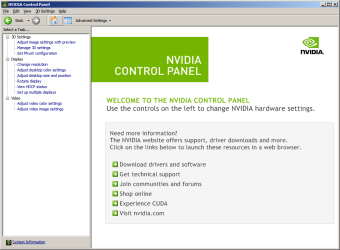
    All you have to do to enter the NVIDIA control panel is right click in the empty space on your desktop and select the NVIDIA control panel there. Once you open the NVIDIA control panel you will see a screen like the image below. You will want to click the icon for 3D Settings.

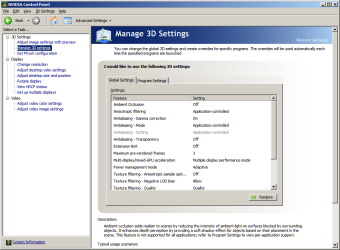
    After you open the 3D Settings box (see below), you will see a link that says Set SLI Configuration on the screen under a bar labeled performance. Click the link to enter the Set SLI Configuration area.
    If your settings already show Enable SLI Technology selected, you don't have to go any further.
    If your settings show Do Not Use SLI Technology, you will need to click the button beside the link labeled Enable SLI Technology. Once you click the enable button a box will appear in the bottom right corner of the screen that says "Apply", you will need to click that apply button to save the settings and enable SLI.
  3. All video cards rely on main ram a little bit, but dedicated video memory is so much faster than sharing the main ram that it's not much to consider IMO.
  4. Not that I know of. In fact, when you enter your cd key it gets fused to your motherboard and cpu. If you upgrade your motherboard, you've got to call up MS and tell them this so that you can get your key released. There are two types of keys, one is OEM, the one that locks onto a machine, the other doesn't but I can't remember the name.
 

Attachments

  • nvcporig.png
    nvcporig.png
    26.8 KB · Views: 60
  • nvcp3d.png
    nvcp3d.png
    36.3 KB · Views: 84

My Computer

Computer Manufacturer/Model Number
Apple Macbook Pro (April 2009)
OS
W7 Ult. x64 | OS X
CPU
Intel Mobile Core 2 Duo 2.93Ghz [T9800 Penryn]
Motherboard
NVIDIA nForce 730i Rev. B1 [Mac-F2268EC8 (U2E1)]
Memory
4096MB Samsung DDR3 Dual Channel [PC3-8500F 1066Mhz]
Graphics Card(s)
NVIDIA GeForce 9600M GT 512MB [G96M Rev. C1]
Sound Card
SB X-Fi Surround 5.1 USB | Onboard Realtek (Disabled)
Monitor(s) Displays
Acer x223wbd 22" | Apple Anti-Glare 17" (Disabled)
Screen Resolution
{Current} 1440x900 {Acer} 1680x1050 {Apple} 1920x1200
Hard Drives
{Internal}
Seagate Momentus 320GB 2.5" 7200RPM [ST9320421AS]

{Externals}
LaCie 320GB USB 2.0 HDD [301284UR]
LaCie 750GB USB 2.0 FW400 eSATA HDD [301314U]
LaCie 1TB USB 2.0 HDD [301304UR]
PSU
Magsafe
Case
Aluminum/Unibody (MBP52)
Cooling
2 x 6000 RPM Fans
Keyboard
Logitech G-15v2 [PN 920-000379]
Mouse
Logitech G-9 [PN 910-000338]
Internet Speed
12Mbps/2.5Mbps w/ 24Mbps Speed Boost [Comcast]
Other Info
Logitech X-540 Speakers [PN 970223-0122]
Sennheiser PC-151 Headset
1. No, as long as it's set as the primary.
2. I believe you have to enable it through the software given by the manufacturer.
3. Not really, they should have their own.
4. No. If you try to activate it on both computers, it will deactivate the other one.

Sniped. :P
 

My Computer

Computer Manufacturer/Model Number
Zen Productions
OS
Windows 7 Ultimate x64
CPU
Intel i7-860
Motherboard
Gigabyte GA-P55A-UD4P
Memory
Corsair Dominator 1600Mhz, 8-8-8-24 1.65v 2x2GB
Graphics Card(s)
ATI Radeon 5770 HD
Sound Card
Intel High Definition Sound
Monitor(s) Displays
Samsung P2570HD
Screen Resolution
1920x1080
Hard Drives
Western Digital Caviar Black 500gb
PSU
Corsair CMPSU-750HX 750W
Case
Antec p183
Cooling
Corsair H50 Water Cooler
Keyboard
Logitech G110
Mouse
Logitech MX Revolution
Internet Speed
768 mb/s
1 No

2 You will need to make sure its enabled in the respective driver control panel (either ATI ((crossfire)) or NVidia ((sli)) ) also not all games support sli , your will be better of selecting or creating an sli profile for your games in the control panel (driver control panel)

3 depends what you mean by "rely". It most certainly needs it . The main ram is utilised when gaming for example , holding information for the GPU , the cpu can communicate directly with the gpu nowadays bypassing the system ram , but only to tell the gpu what to do with the stuff thats in the system memory and its own frame buffer...............if that makes any sense ha ha . hte video ram stores (buffers) info from the system ram and it can process this informatin much faster , the more onboard gpu ram the more it can hold in the frame buffer and the faster it can draw the info (this is all relative of course , putting 1GB of ram on an 8800gt for example is like giving a fish a bicycle ;) )

4 not legally , also when you try to activate the copy on the second pc it will know the key is already in use
 

My Computer

Computer type
PC/Desktop
Computer Manufacturer/Model Number
Custom
OS
Win 10 Home Premium 64 Bit
CPU
I7 5930K @ 4.5
Motherboard
Asus X99 s
Memory
16GB Kingston Hyper X Fury DDR4
Graphics Card(s)
EVGA 980ti SC + ACX 2.0
Sound Card
Onboard
Monitor(s) Displays
ROG Swift PG278Q
Screen Resolution
2560x1440
Hard Drives
Kingston Hyper X 250gb SSD
Samsung 2TB mechanical
PSU
Corsair RM 850
Case
NZXT H440 Red
Cooling
Corsair H100i GTX
Keyboard
Razer Reclusa
Mouse
Logitech G5 Gamer
Internet Speed
34mb
Antivirus
Eset Smart Security
Browser
Firefox
Hey guys!
Again I'm turning to this forum after the great support I've got the last times needing help.. this time however, it's about SLI.
The computer will come prebuilt from the site I ordered from, with no OS, I already have Win7 Pro 64-bit. The questions are as followed..

1. Does It matter which card you connect the monitor to?
2. Does Win7 detect SLI, or does it need to be enabled through win/nvidia UI?
3. Do the cards rely on the "main" RAM at all?
and another one i just thought of..
4. Can I have 2 PC's running the same Win7 key for private use?

Michael

[EDIT] The two cards are PointofView GTX 285

1) The monitor must be connected to the card in the first PCI-E slot when SLI is enabled. The card in the secondary PCI-E slot has its output ports disabled, so no monitor will be able to be connected to this card.

2) You need the Nvidia drivers installed for SLI to be detected. Once the drivers are installed, you will get a notification saying you have an SLI capable system and will let you enable SLI in the Nvidia Control Panel.

3) They don't rely on it, but will use it if the video card RAM is being heavily used. Remember though with SLI, you don't double your video RAM with your graphic cards, you still only have the amount of RAM that's on your primary video card.

4) Like what's been said, you can only use one product key per computer.
 

My Computer

Computer type
PC/Desktop
Computer Manufacturer/Model Number
Custom Built
OS
Windows 8.1 Pro x64
CPU
Intel Core i7 4790k
Motherboard
MSI Z97S Krait Edition
Memory
8GB Corsair Dominator 1600MHz
Graphics Card(s)
MSI TwinFrozr GeForce GTX770
Sound Card
ASUS Xonar DX/XD 7.1
Monitor(s) Displays
Dell 24" S2409W + Dell 20" E207WFP
Screen Resolution
1920x1080 + 1680x1050
Hard Drives
1x 120GB OCZ Agility 3, 1x 750GB Western Digital Caviar Black, 1x 1TB Western Digital Caviar Blue
PSU
Corsair HX850 modular
Case
Fractal Design Define R4
Cooling
Corsair H60 w/ twin Corsair SP120 fans
Keyboard
Logitech G510S Keyboard
Mouse
Logitech G500S Laser Mouse
Internet Speed
40Mbps
Antivirus
Microsoft Security Essentials
Browser
Google Chrome
Other Info
LG Blu-Ray player
1) The monitor must be connected to the card in the first PCI-E slot when SLI is enabled. The card in the secondary PCI-E slot has its output ports disabled, so no monitor will be able to be connected to this card.

^^^^ yes sorry it doesnt matter which card but it must be the one you choose as your primary card , try setting the top card with the b ottom one doing slightly less work it might keep the temps lower in the primary (top card) ((heat rises)) thats just a theory of mine ;)
 

My Computer

Computer type
PC/Desktop
Computer Manufacturer/Model Number
Custom
OS
Win 10 Home Premium 64 Bit
CPU
I7 5930K @ 4.5
Motherboard
Asus X99 s
Memory
16GB Kingston Hyper X Fury DDR4
Graphics Card(s)
EVGA 980ti SC + ACX 2.0
Sound Card
Onboard
Monitor(s) Displays
ROG Swift PG278Q
Screen Resolution
2560x1440
Hard Drives
Kingston Hyper X 250gb SSD
Samsung 2TB mechanical
PSU
Corsair RM 850
Case
NZXT H440 Red
Cooling
Corsair H100i GTX
Keyboard
Razer Reclusa
Mouse
Logitech G5 Gamer
Internet Speed
34mb
Antivirus
Eset Smart Security
Browser
Firefox
This forum is amazing, fast and reliable! Thanks guys, again..
Oh, and another question, since I can't see inside the PC will the first PCI-E slot be the one on top?

Michael
 

My Computer

Computer Manufacturer/Model Number
Took the blue pill and built this one while Trinity was getting me coffee..
OS
Win7 Professional x64
CPU
i7-930
Motherboard
Asus Rampage Extreme 2
Memory
3*Corsair XMS3 DDR3 1600MHz 6GB CL9
Graphics Card(s)
XFX Radeon HD 5870 CrossfireX
Sound Card
SupremeFX X-Fi
Monitor(s) Displays
BENQ 22" FullHD
Screen Resolution
1920*1080
Hard Drives
Corsair SSD Extreme X64 2,5" 64GB || WD VelociRaptor® 300GB
PSU
Corsair HX 1000W PSU
Case
Antec 1200
Cooling
Windtunnel effect
Keyboard
Logitech G15 gen.2
Mouse
Roccat KONE
Internet Speed
12,5mb/3mb
It's usually the one closest to the top of the case, yes.
 

My Computer

Computer Manufacturer/Model Number
Zen Productions
OS
Windows 7 Ultimate x64
CPU
Intel i7-860
Motherboard
Gigabyte GA-P55A-UD4P
Memory
Corsair Dominator 1600Mhz, 8-8-8-24 1.65v 2x2GB
Graphics Card(s)
ATI Radeon 5770 HD
Sound Card
Intel High Definition Sound
Monitor(s) Displays
Samsung P2570HD
Screen Resolution
1920x1080
Hard Drives
Western Digital Caviar Black 500gb
PSU
Corsair CMPSU-750HX 750W
Case
Antec p183
Cooling
Corsair H50 Water Cooler
Keyboard
Logitech G110
Mouse
Logitech MX Revolution
Internet Speed
768 mb/s

My Computer

Computer Manufacturer/Model Number
Took the blue pill and built this one while Trinity was getting me coffee..
OS
Win7 Professional x64
CPU
i7-930
Motherboard
Asus Rampage Extreme 2
Memory
3*Corsair XMS3 DDR3 1600MHz 6GB CL9
Graphics Card(s)
XFX Radeon HD 5870 CrossfireX
Sound Card
SupremeFX X-Fi
Monitor(s) Displays
BENQ 22" FullHD
Screen Resolution
1920*1080
Hard Drives
Corsair SSD Extreme X64 2,5" 64GB || WD VelociRaptor® 300GB
PSU
Corsair HX 1000W PSU
Case
Antec 1200
Cooling
Windtunnel effect
Keyboard
Logitech G15 gen.2
Mouse
Roccat KONE
Internet Speed
12,5mb/3mb
Back
Top