Help Software support telling me its a windows issue, class tomorrow.

ComputerDumby

New member
Local time
2:53 AM
Messages
12
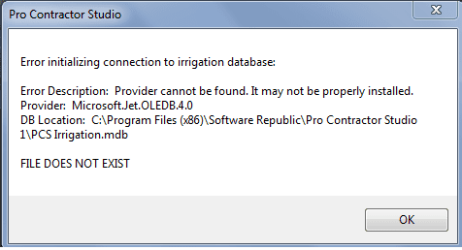
when i try to use my CAD software i get the message shown in box below.

Please help, I have an expensive class and hotel reservation scheduled for tomorrow.
 

Attachments

  • noooo.png
    noooo.png
    7 KB · Views: 24

My Computer My Computer

Computer type
Laptop
Computer Manufacturer/Model Number
HP
OS
Windows 7 Home Premium 64 bit?
why moved, the support ppl said it is windows issue? thx
 

My Computer My Computer

Computer type
Laptop
Computer Manufacturer/Model Number
HP
OS
Windows 7 Home Premium 64 bit?
The software needs re-installing, it got moved because it is a software issue, your best bet is to re-install Pro Contractor Studio and see if you can get it to work (files corrupted).
 

My Computer My Computer

Computer type
PC/Desktop
Computer Manufacturer/Model Number
Custom Build
OS
Windows 7 Ultimate x64 SP1
CPU
Intel Q6600 @ 2.6Ghz
Motherboard
Evga NF78-CK-132-A 3-Way SLI
Memory
4Gb DDR2 Corsair Dominator @ 800Mhz 5-5-5-15
Graphics Card(s)
EVGA 560 GTX SC FTW 1GB
Sound Card
Realtek HD 7.1 Audio, Plantronics GameCom780 7.1 Headset
Monitor(s) Displays
Dell S2409W
Screen Resolution
1920 x 1080
Hard Drives
SanDisk SDSSDHII-120G-G25 120GB SSD
Samsung 7200RPM 750Gb SATA
Samsung 850 EVO 120GB SSD
Western Digital Green 1TB 7200RPM
PSU
Xigmatek 750W Quad sli quad core 80% eff
Case
Antec 900 Gaming Case
Cooling
Zalman CNPS9700-NT NVIDIA Tritium
Keyboard
Logitech generic keyboard, MS wireless keyboard
Mouse
Razor Lachesis Banshee V2 Blue, 4000DPI, MS wireless mouse
Internet Speed
152Mb Virgin Media Fibre Optic
Antivirus
Microsoft Security Essentials
Browser
Google Chrome
Other Info
Wireless Gaming Receiver for Windows, Wireless Xbox 360 Pad
already tried that to no avail.

just got off tech support from CAD software support, they say they are sending me an e-mail with a link to download the "file that they claim should have come with windows 7"

hopefully that works, ill brb
 

My Computer My Computer

Computer type
Laptop
Computer Manufacturer/Model Number
HP
OS
Windows 7 Home Premium 64 bit?
Apparently, according to the message, the computer lacks the Access OleDB driver needed to access a database. The program should include those within its installer, but many times that's not the case. A quick Google search I came across this question:
.net - Where/how can I download (and install) the Microsoft.Jet.OLEDB.4.0 for Windows 8, 64 bit? - Stack Overflow
Which ask pretty much the same under a different context. The answer points to this MS download for the missing DB driver:
Download Microsoft Access Database Engine 2010 Redistributable from Official Microsoft Download Center

Installing this (for the correct bitness of your program) should suffice to fix that error at least. I suppose that those drivers are included in Office, but they're likely not part of Windows itself.

the support ppl said it is windows issue?

Support people from many different staffs are sometimes known to pass the blame on others when they have no idea whats going on :p
 

My Computer My Computer

Computer type
Laptop
Computer Manufacturer/Model Number
Toshiba Sattelite A665-S6092
OS
Windows 7 Ultimate x64
CPU
Intel Core i7-740QM
Memory
8 GB DDR3
Graphics Card(s)
NVIDIA GeForce 330GT
Screen Resolution
1366x768
Hard Drives
Samsung 840 SSD 500GB
1TB USB3 external HD
Cooling
Coolermaster Notepal U3 notebook cooling pad
Internet Speed
3mbps ASDL
Antivirus
ClamWin 0.98.7
Browser
Opera 12.17 x86 (main), Firefox 38 (sec), IE11 (last resort)
Back
Top