
Help: These files can't be opened. Your Internet...

alexdmark

New member
Local time
9:56 PM
Messages
4
Windows 7 Ultimate 32 bit
UAC Disabled
Toshiba Satellite p300

Hi there,

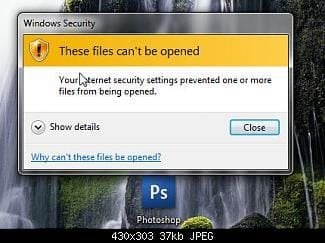
I turned on my computer this morning and suddenly all hell has broken loose. Every time I try and open an exe file I get a Windows Security alert box telling me that:

"These files can't be opened. Your Internet security settings prevented one or more files from being opened."

I've read through every thread I can find on the topic and none of the "answers" have worked for me.

I can start programs (and essentially open exe files) if I open them via an associated file type. For example I managed to start firefox by opening an .html document and I've got thunderbird open through the use of an .eml file.

I can't start cmd, regedit, msconfig etc... unless I boot the computer in safe mode with command prompt. Safe mode by itself still produces the same "Windows Security" dialogue boxes.

I have tried the following common "solutions" with no luck:

1) Right click the exe, click Properties
Click the Unblock button
Click OK

2) Adding exe to Control Pannel > Windows Defender > Tools > Options > Excluded file types

3) Start / Control Panel / Internet Options.
(Internet Options control panel appears)
Click "Security" tab.
Click "Local Intranet"
Drag slider to "Low"
Click "Sites" button.
Click "Advanced" button.
Enter the IP Address of the NAS / SMB/ CIFS / whatever server and click "Add."
Click "Close"

4) Remove the registry key - HKEY_CURRENT_USER\Software\Microsoft\Windows\CurrentVersion\Explorer\FolderTypes\{EF87B4CB-F2CE-4785-8658-4CA6C63E38C6}\TopViews\{00000000-0000-0000-0000-000000000000}

5) Creating a completely new admin profile. - This one was interesting, when I logged into the account there was no aero theme - it went right back to basics.

So any ideas?

Thanks in advance.
 

Attachments
  • 35109d1257422540t-help-these-files-cant-opened-snap2.jpg
    35109d1257422540t-help-these-files-cant-opened-snap2.jpg
    16.6 KB · Views: 31,659

My Computer My Computer

OS
Windows 7 Ultimate 32 bit
Rather than suffer with this problem, I would try a system restore, that is what the feature is for.

In lieu of that, what happened last night? Did you install a new program, was there any other incident that could have caused this?

If there is no other answer, it could be a virus. Run your Anti Virus. Download and use Malwarebytes.

You can also try to disable your A/V, see if that helps.
 

My Computer My Computer

Computer type
PC/Desktop
Computer Manufacturer/Model Number
Dell XPS 420
OS
Windows 10, Home Clean Install
CPU
Intel Core2 processsor Q8200(2.33Ghz 1333FSB) Quad Core Tech
Motherboard
Dell
Memory
6 gb
Graphics Card(s)
ATI Radeon 256MB HD3650
Sound Card
Intergrated 7.1 Channel Audio
Monitor(s) Displays
Dell SP2009W 20"
Hard Drives
640 GB Serial ATA Hard drive
Cooling
Fan
Keyboard
Dell USB Keyboard
Mouse
Dell Premium Optical USB
Internet Speed
DSL 2.85
Unfortunately I can't even run a system restore, presumably because it is essentially an exe.

There were several updates that were installed when I shut my computer down last night so I'm now guessing that's where the problem lies (hadn't even thought about that before). Is there a way to revert back from the updates to see if that really is the problem?

EDIT: I'm uninstalling my last night updates now and will report back with the results.

Thanks
 

My Computer My Computer

OS
Windows 7 Ultimate 32 bit

My Computer My Computer

Computer type
PC/Desktop
Computer Manufacturer/Model Number
Dell XPS 420
OS
Windows 10, Home Clean Install
CPU
Intel Core2 processsor Q8200(2.33Ghz 1333FSB) Quad Core Tech
Motherboard
Dell
Memory
6 gb
Graphics Card(s)
ATI Radeon 256MB HD3650
Sound Card
Intergrated 7.1 Channel Audio
Monitor(s) Displays
Dell SP2009W 20"
Hard Drives
640 GB Serial ATA Hard drive
Cooling
Fan
Keyboard
Dell USB Keyboard
Mouse
Dell Premium Optical USB
Internet Speed
DSL 2.85
Argh, still nothing. I guess I'll try running the last known good configuration. - Thanks
 

My Computer My Computer

OS
Windows 7 Ultimate 32 bit
If that does not work, try this.

Run a virus scan.

Download malwarebytes and run a scan. If no success try to


Go to search

Type CMD do not hit enter

Right click on CMD run as adminitrator

In CMD type sfc /scannow.

If it finds errors, run several times.
 

My Computer My Computer

Computer type
PC/Desktop
Computer Manufacturer/Model Number
Dell XPS 420
OS
Windows 10, Home Clean Install
CPU
Intel Core2 processsor Q8200(2.33Ghz 1333FSB) Quad Core Tech
Motherboard
Dell
Memory
6 gb
Graphics Card(s)
ATI Radeon 256MB HD3650
Sound Card
Intergrated 7.1 Channel Audio
Monitor(s) Displays
Dell SP2009W 20"
Hard Drives
640 GB Serial ATA Hard drive
Cooling
Fan
Keyboard
Dell USB Keyboard
Mouse
Dell Premium Optical USB
Internet Speed
DSL 2.85
If you have the win7 install dvd you can gain access to your restore points by using the repair my computer option after boot - may be worth a try.

There is also access to a command prompt where you can run the sfc if you cannot do so in windows

I also think a malware scan may be in order as soon as you can as this sort of total block on exe files has been due to a virus in the past
 

My Computers My Computers

System One System Two

  • Computer type
    PC/Desktop
    Computer Manufacturer/Model Number
    ChillBlast - Custom to my design
    OS
    Windows 11 Pro x64 [Latest Release and Release Preview]
    CPU
    Ryzen 9 5950X, 3.8 - 5.2 MHz
    Motherboard
    Asus Prime X570-Pro
    Memory
    64GB [2 x 32GB] DDR4 3200MHz
    Graphics Card(s)
    4GB NVIDIA GEFORCE GTX 1650 Ti
    Sound Card
    On-board SPDIF to 5.1 System + HDMI [5.1 system]
    Monitor(s) Displays
    32" UHD 32 Bit HDR Monitor + 43" UHD 4K 32Bit HDR TV
    Screen Resolution
    2 x 3840 x 2160 @60Hz
    Hard Drives
    1TB M2 SSD OS, 500GB Fast Access SSD, 2 x 8TB Data + Various Externals from 1TB to 4TB, 10TB NAS
    PSU
    NZXT C750 80 PLUS Gold 750W Modular PSU
    Case
    Workstation Case [Matt Black]
    Cooling
    NZXT Kraken X63 280mm CPU Cooler +2x Quiet Case fans
    Keyboard
    Logitech Wireless MX Keys & K400 + others
    Mouse
    Logitech Wireless MX Master 3S
    Internet Speed
    920 MB Down 50 MB Up
    Antivirus
    BitDefender Total Security Pro
    Browser
    Chrome (always run latest Non-Beta)
    Other Info
    Also run ...
    Laptop - Quad 8GB - Windows 10 Pro x64
    Nexus 7 Android tablet x2
    Samsung 10.2" tablet
    Blackview TAB 8 4G Android Tablet c/w Keyboard
    Wacom Intuos Pro Medium Pen Pad
    Wacom Intuos Pro Small Pen Pad
    Wacom Expresskeys Remote
    Loopdeck+ Graphics Controller
    Shuttle Pro v2 Control
  • Computer type
    Laptop
    System Manufacturer/Model Number
    Dell XPS 17 10750H
    OS
    Windows 11 Pro x64 Latest RP
    CPU
    Intel I7 10750H 5.0GHz
    Motherboard
    Dell XPS
    Memory
    32GB [2x16GB] DDR4 2933 MHz
    Graphics Card(s)
    nVidia GTX1650Ti 4 GB GDDR6
    Sound Card
    Stock [Realtek] 4 Speaker
    Monitor(s) Displays
    17" IPS UHD+ Infinity Edge Touchscreen
    Screen Resolution
    3840 x 2400
    Hard Drives
    2TB M2 NVMe, 4TB External + various 500GB & 1TB External NVMe (also have access to spinner HDD from
    PSU
    Stock
    Case
    Stock XPS Aluminium & Carbon Fibre
    Cooling
    Stock - Active Fan Control
    Keyboard
    Backlit + Various Logitech
    Mouse
    Stock Track Pad + Logitech MX Trackball
    Internet Speed
    72 MB Down 18MB Up
    Browser
    Chrome
    Other Info
    Also run ...
    Laptop - Quad 8GB - Windows 10 Pro x64
    Nexus 7 Android tablet x2
    10.2" tablet
    Sony Z3 Android Smartphone
    Wacom Intuos Pro Medium Pen Pad
    Wacom Intuos Pro Small Pen Pad
    Wacom Expresskeys Remote
    Loopdeck+ Graphics Controller
    Shuttle Pro v2 Control Pad
    10TB NAS
Solved!

Did lots of scans with malwarebytes etc... and nothing fixed it.

Then I did a system restore back to just before a critical update a couple of days ago and everything's back to normal.

Thanks everyone for all your help!
 

My Computer My Computer

OS
Windows 7 Ultimate 32 bit
Figures, first suggestion. Good luck :D
 

My Computer My Computer

Computer type
PC/Desktop
Computer Manufacturer/Model Number
Dell XPS 420
OS
Windows 10, Home Clean Install
CPU
Intel Core2 processsor Q8200(2.33Ghz 1333FSB) Quad Core Tech
Motherboard
Dell
Memory
6 gb
Graphics Card(s)
ATI Radeon 256MB HD3650
Sound Card
Intergrated 7.1 Channel Audio
Monitor(s) Displays
Dell SP2009W 20"
Hard Drives
640 GB Serial ATA Hard drive
Cooling
Fan
Keyboard
Dell USB Keyboard
Mouse
Dell Premium Optical USB
Internet Speed
DSL 2.85
These files can't be opened

We had the same problem while attempting to open files from the Internet as well. Setting these for both the Internet and Intranet settings should take care of it. The setting I found that was blocking me from opening files on my LAN is “Launching applications and unsafe files”.

Normal Systems and Personal Computers

This is an error from Internet Explorer security settings found under your “Tools” –> “Internet Options” –> “Security” tab –> “Local intranet” or “Internet”.

These files can't be opened. Your Internet security settings prevented one or more files from being opened | iLERTECH
 
Last edited:

My Computer My Computer

Computer Manufacturer/Model Number
Optiplex 960
OS
Windows 7 Enterprise 64bit
CPU
Dual Quad-Core
Memory
8GB
Graphics Card(s)
NVidia Quadro NVS 450
Monitor(s) Displays
3 Monitors - ViewSonic VP2030b 21in-
Hard Drives
Raid configuration with 300GB
Other Info
Also owne a Tablet x61 Lenovo Laptop
Problem : your internet security settings prevented one or more files from being opened
solution:
1. Create another user (admin example A)
2. Switch to the newly-created user
3. Run regedit (typing it in run)
4. Navigate to HKEY_CURRENT_USER\Software\Microsoft\Windows\CurrentVersion\Internet Settings
5. Right-click -> export to C:\ drive as .reg
6. Switch back to your original account
7. go to HKEY_CURRENT_USER\Software\Microsoft\Windows\CurrentVersion\ Internet Settings (
delete internet setting)

8. Run the exported .reg
9. Restart.
 

My Computer My Computer

OS
Windows 7 Ultimate x64
your internet security settings prevented one or more files from being

1. Create another user (admin example A)
2. Switch to the newly-created user
3. Run regedit (typing it in run)
4. Navigate to HKEY_CURRENT_USER\Software\Microsoft\Windows\CurrentVersion\Internet Settings
5. Right-click -> export to C:\ drive as .reg
6. Switch back to your original account
7. go to HKEY_CURRENT_USER\Software\Microsoft\Windows\CurrentVersion\ Internet Settings (
delete internet setting)

8. Run the exported .reg
9. Restart.
 

My Computer My Computer

OS
Windows 7 Ultimate x64
Same issue. Nothing is helping!

Thanks for all the tips folks but nothing seems to work.
@Alex - I can not run a system restore. Do I have to try it in Safe mode or something?
@UJK - I cannot create another user. :(

@Everyone - I tried Repair etc. It is asking for password and doesn't accept mine.

FYI: I have Ubuntu installed too.

Would really appreciate your help.

Thanks in advance.

-- Maitreya
 

My Computer My Computer

OS
Windows 7 Ultimate x64
Wow, I was having the same problem, couldn't even update the time/date because of the popup window, ran multiple av scans with no success, tried this little trick, and it worked

thanks ujk
 

My Computer My Computer

Computer Manufacturer/Model Number
Toshiba A505-S6980
OS
Windows 7 Ultimate 32bit SP1
CPU
Intel(R) Core(TM)2 Duo CPU T6600 @2.20GHz
Motherboard
Toshiba
Memory
4 Gigs
Graphics Card(s)
Intel
Sound Card
Realtek HD Audio
Monitor(s) Displays
Generic
Screen Resolution
1366 x 768 - 32 bit

My Computer My Computer

Computer Manufacturer/Model Number
Asus K42JA Series Notebook
OS
Windows 7 Ultimate x64
CPU
Intel Core i5 - 460M 2.53 GHZ
Motherboard
Asus K42JA Series
Memory
4GB
Graphics Card(s)
ATI Mobility Radeon HD 5730 (2 GB)
Sound Card
Realtek ALC269
Monitor(s) Displays
14" 16:9 HD (1366x768) LED backlit
Hard Drives
500 GB, 5400 RPM, SATA-II, 2.5''
PSU
Li-Ion 47520 mWh
Thanks Rich

Malware helped me solve the issue. It has some virus residing in the registry.
 

My Computer My Computer

OS
Windows 7 Professional 32bit.
this worked for me

I had downloaded freeware and was prevented from opening the exe. I tried all the complex fixes described with no result. In the end I:

- Copied the exe file to a flash drive
- created a new user (admin).
- Switched to the new user
- Clicked on the exe and installed the new program
- I then copied the thumbnails of the program, switched users and pasted the thumbnails for the app on my desktop
 

My Computer My Computer

OS
Windows 7 Ultimate x64

My Computer My Computer

Computer Manufacturer/Model Number
LG
OS
Windows 7 Ultimate x32
CPU
ASUS
Motherboard
Intel Pentium Dual Core 1.60GHz
Memory
160 Gb
Graphics Card(s)
Intel Graphics Media Acellator
Sound Card
Realtek HD Audio Driver
Monitor(s) Displays
LG
Hard Drives
Sata
Same Problem,No Solution

I have tried every solution possible. None of them work for me because :-
1. I tried to Create a New User account. I click on "Manage User Account", nothing happens.
2. I tried resetting,setting every option on local intranet and internet. None of them work ultimately.
3. After downloading Malwarebytes Anti-Malware, the problem won't let me get to installation only. So can't scan for viruses.
4. In many places I have seen instructions to delete the HKEY_CURRENT_USER\Software\Microsoft\Windows\Curre ntVersion\Explorer\FolderTypes\{ef87b4cb-f2ce-4785-8658-4ca6c63e38c6} key in order to fix this issue but it is not showing up in my registry at all. Also, I am not able to use regedit,gepdit or mmc as even that brings up the same error.
5. System Restore too is not accessible due to the same error.
6. I can't access the group policy management editor either due to the same problem.

Please help me out. This is very frustrating.
 

My Computer My Computer

OS
Windows 7 Ultimate x32
I'm having the same issue, only with multiple pop-ups, on my htpc. I can check by viewing more details what it is stopping from opening, which are mostly non essential items. However, when I restore it works fine for a few days, then I start losing usb functionality. For example, my HTPC remote will stop resuming the computer from standby, and things of that nature. it's getting very annoying. anybody have any suggestions that I can try, I'm about ready just to sell the thing and be done with it.

Hardware,
AMD A8
ASUS FM1 pro MOBO
ocz ssd and hitachi 3 tb HDD
8 gb ram
Ceton Infinitv 4
huappage 1250

7 professional x64, SP1

I think those are the relevant items, but I can provide more info if needed.
 

My Computer My Computer

Computer Manufacturer/Model Number
Custom build.
OS
W7 pro x64
CPU
AMD A8-3850 APU with AMD Radeon 6550 HD Graphics 2.9GHz
Motherboard
ASUS F1A75-M Pro -F1 Socket - A75
Memory
Kingston 8GB (2 x 4GB) 240-Pin DDR3 SDRAM DDR3 1333
Graphics Card(s)
Fusion APU
Monitor(s) Displays
2 23" ASUS vh226's and 1 Samsung 50 plasma
Screen Resolution
all three 1080p
Hard Drives
1x HITACHI Deskstar 0S03230 3TB 5400 RPM, 1x OCZ Vertex Plus OCZSSD2-1VTXPL60G 2.5" 60GB
PSU
Cooler Master Elite 460W ATX
Case
SilverStone Aluminum/Steel Micro ATX Media Center/HTPC Case
Cooling
2x Cooler Master BladeMaster 80mm
Keyboard
Logitech wireless, Rii mini keyboard/mouse and Harmony 880
Internet Speed
7.5ish up, when it works, and 1.0 down, when it works.
Other Info
Ceton infinitv4 and Hauppauge 1196 WinTV-HVR-1250 PCI-E
Back
Top