
Help to make a Windows PE disc

m256997683119

New member
Member
Local time
1:33 PM
Messages
72
Hi,

Can I ask for help to create a WinPE based disc for Paragon Backup and Restore Suite 10? It's the free Twitter edition and the WinPE maker is not included. As of the moment I am having problems with it because the external portable expansion drive I have is not recognized when I boot to the rescue media. It only reads the hard drives I have.

As much as possible I'd like to have some leverage in case I am to recover an image I did from an external drive. I have Windows AIK installed in the pc concerned.

Can someone help me please..

Regards :)
 

My Computer My Computer

Computer type
PC/Desktop
OS
Windows 7 Ultimate x32
Hard Drives
WD 320gb/500gb/1TB
Seagate 500gb/1TB

My Computer My Computer

Computer type
Laptop
Computer Manufacturer/Model Number
Sony Vaio VPCEB47GM Laptop
OS
Win 7 Pro 64-bit
CPU
Intel i5 2.4 Ghz
Memory
8GB DDR3
Graphics Card(s)
Intel HD 3000
Sound Card
IDT High Definition
Monitor(s) Displays
15.6 WGXA Anti-Glare LED
Screen Resolution
1280x800
Hard Drives
640Gb 7200rpm
Antivirus
MSE
Browser
Opera (primary) with IE9 backup
Would this Paragon tutorial be of any help?

Paragon Boot Media Builder - Overview

@marsmimar,

Thank you s much for the reply. I just visited the link but my product is not covered as it's a promo from twitter. As of the moment I am at a loss as to how to create one..Windows reads/detects the external drive just fine. As I often recover from this external drive the issue will make my backups useless. If Windows can detect it fine then it surely will detect it in the winpe environment.

I also have the Windows 7 32-bit Repair Disc from neowin. Used it to see if it will detect the external drive. It does not see the .vhd backup files I created. When I click load drivers > My Comuter, I see that the external drive is there and the .vhd backup file is there but the repair disc will not recognoize it as it is looking for a driver not a backup. Even if I unplug/plug the external drive and click "refresh' no windows backup is seen.

So I am attempting to create a winpe for Paragon.

I have made one already but it is with Acronis Plus Pack + WAIK. I have WAIK here but then again I do not know how to for Paragon :(
 

My Computer My Computer

Computer type
PC/Desktop
OS
Windows 7 Ultimate x32
Hard Drives
WD 320gb/500gb/1TB
Seagate 500gb/1TB
My Computer My Computer

Computer type
Laptop
Computer Manufacturer/Model Number
Sony Vaio VPCEB47GM Laptop
OS
Win 7 Pro 64-bit
CPU
Intel i5 2.4 Ghz
Memory
8GB DDR3
Graphics Card(s)
Intel HD 3000
Sound Card
IDT High Definition
Monitor(s) Displays
15.6 WGXA Anti-Glare LED
Screen Resolution
1280x800
Hard Drives
640Gb 7200rpm
Antivirus
MSE
Browser
Opera (primary) with IE9 backup
It's been a long time since I used Macrium...but I remember that it does not backup files/folders..I check out the link. I also have WAIK installed. Will be back here :) Thanks.
 

My Computer My Computer

Computer type
PC/Desktop
OS
Windows 7 Ultimate x32
Hard Drives
WD 320gb/500gb/1TB
Seagate 500gb/1TB
Hi,

You can make your own . It isn't necessary to have WAIK if you are on win7.

I made a program for paragon support a while back. It is out of date now - so will do another one.

It is much better than the one created by macrium - or even paragon's own BMB.

I don't have a great deal of time today - perhaps tomorrow night is the earliest I will be bale to have a go.

If you are running 32 bit win7 - it is even easier.

B&R Suite is a good program - the one you have isn't the most recent - but it supports win7 as I recall, so you should be fine with it.

If that is the giveaway version - can't remember if it included p2p adjust and/bootcorrector.
 

My Computers My Computers

System One System Two

  • Computer type
    PC/Desktop
    OS
    7 X64
    CPU
    i5 8400
    Motherboard
    gigabyte b365m ds3h
    Memory
    2x8gb 3200mhz
    Hard Drives
    various
    PSU
    pure power 11 400w cm
    Case
    Coolermaster
    Cooling
    cryorig m9i
  • Computer type
    PC/Desktop
    OS
    7x64
    CPU
    g5400
    Motherboard
    ga b365m ds3h
    Memory
    8gb ddr4 2400
    PSU
    xfx pro 450w
Hi,

You can make your own . It isn't necessary to have WAIK if you are on win7.

I made a program for paragon support a while back. It is out of date now - so will do another one.

It is much better than the one created by macrium - or even paragon's own BMB.

I don't have a great deal of time today - perhaps tomorrow night is the earliest I will be bale to have a go.

If you are running 32 bit win7 - it is even easier.

B&R Suite is a good program - the one you have isn't the most recent - but it supports win7 as I recall, so you should be fine with it.

If that is the giveaway version - can't remember if it included p2p adjust and/bootcorrector.

@ SIW2,

Yeah it isn't the most recent..I see that it's version 12 now. The one I have includes the p2p adjust and boot corrector. Only the winpe capability is not included. I saw that 'pecreator' in one of the threads about Macrium but could not download it from SkyDrive. OK will wait for it then thanks there.

@marsmimar,

Will also download Macrium Free v5 and the winpe as alternative. Thanks. A friend whose using Macrium free says that she wasn't able to do backups using the Linux cd and that when she recovered an image she did (she is dualbooting and made an image of the active partition and the other primary partition) she lost her 3rd partition(logical). I do not know about that but is that true?
 

My Computer My Computer

Computer type
PC/Desktop
OS
Windows 7 Ultimate x32
Hard Drives
WD 320gb/500gb/1TB
Seagate 500gb/1TB
@marsmimar,

Will also download Macrium Free v5 and the winpe as alternative. Thanks. A friend whose using Macrium free says that she wasn't able to do backups using the Linux cd and that when she recovered an image she did (she is dualbooting and made an image of the active partition and the other primary partition) she lost her 3rd partition(logical). I do not know about that but is that true?

I haven't heard of any issues of losing partitions using Macrium. (I think the company's reputation would be in the toilet rather quickly if that was a widespread problem.) Not to say it couldn't happen but if it did, I think it would be an isolated case due to perhaps user error.
 

My Computer My Computer

Computer type
Laptop
Computer Manufacturer/Model Number
Sony Vaio VPCEB47GM Laptop
OS
Win 7 Pro 64-bit
CPU
Intel i5 2.4 Ghz
Memory
8GB DDR3
Graphics Card(s)
Intel HD 3000
Sound Card
IDT High Definition
Monitor(s) Displays
15.6 WGXA Anti-Glare LED
Screen Resolution
1280x800
Hard Drives
640Gb 7200rpm
Antivirus
MSE
Browser
Opera (primary) with IE9 backup
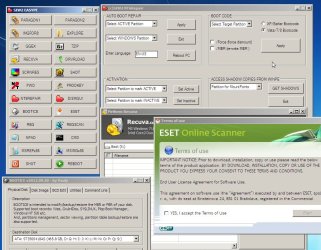
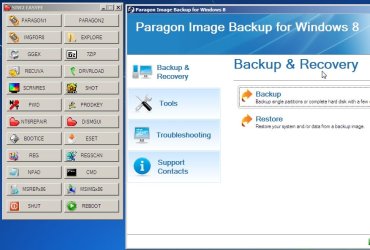
PARAGONISO5.jpg

PARAGONISO2.jpg
 

My Computers My Computers

System One System Two

  • Computer type
    PC/Desktop
    OS
    7 X64
    CPU
    i5 8400
    Motherboard
    gigabyte b365m ds3h
    Memory
    2x8gb 3200mhz
    Hard Drives
    various
    PSU
    pure power 11 400w cm
    Case
    Coolermaster
    Cooling
    cryorig m9i
  • Computer type
    PC/Desktop
    OS
    7x64
    CPU
    g5400
    Motherboard
    ga b365m ds3h
    Memory
    8gb ddr4 2400
    PSU
    xfx pro 450w
Awesome, Sy!
 

My Computer My Computer

Computer type
Laptop
Computer Manufacturer/Model Number
Sony Vaio VPCEB47GM Laptop
OS
Win 7 Pro 64-bit
CPU
Intel i5 2.4 Ghz
Memory
8GB DDR3
Graphics Card(s)
Intel HD 3000
Sound Card
IDT High Definition
Monitor(s) Displays
15.6 WGXA Anti-Glare LED
Screen Resolution
1280x800
Hard Drives
640Gb 7200rpm
Antivirus
MSE
Browser
Opera (primary) with IE9 backup
You tried it already?

That was quick.
 

My Computers My Computers

System One System Two

  • Computer type
    PC/Desktop
    OS
    7 X64
    CPU
    i5 8400
    Motherboard
    gigabyte b365m ds3h
    Memory
    2x8gb 3200mhz
    Hard Drives
    various
    PSU
    pure power 11 400w cm
    Case
    Coolermaster
    Cooling
    cryorig m9i
  • Computer type
    PC/Desktop
    OS
    7x64
    CPU
    g5400
    Motherboard
    ga b365m ds3h
    Memory
    8gb ddr4 2400
    PSU
    xfx pro 450w
here.

rt click the downloaded zip, properties>unblock>apply>ok

extract it onto the root of the drive, so you have C:\PARAGONPE

In there , rt click and run as admin on PARAGON-RunMeAsAdmin.cmd


Hello SIW2 :)

Thank you for the reply and help!!!

So I'll extract onto C:\ -- and just run it as admin and it's finished. How will I burn to cd? Anyway, I am downloading now and will try this one when I get home(in the office right now).

Will report back here again. Is there anything that I need to know or check additionally?

This is very very useful and helpful for those who are using Paragon apps :)

Regards,

:)
 
Last edited by a moderator:

My Computer My Computer

Computer type
PC/Desktop
OS
Windows 7 Ultimate x32
Hard Drives
WD 320gb/500gb/1TB
Seagate 500gb/1TB
Originally Posted by marsmimar
I haven't heard of any issues of losing partitions using Macrium. (I think the company's reputation would be in the toilet rather quickly if that was a widespread problem.) Not to say it couldn't happen but if it did, I think it would be an isolated case due to perhaps user error.

Yeah probably a user error of some sort. I too cannot understand why she lost other partitions since the app will only lock/install onto the selected partition and not the others. Thanks :)
 

My Computer My Computer

Computer type
PC/Desktop
OS
Windows 7 Ultimate x32
Hard Drives
WD 320gb/500gb/1TB
Seagate 500gb/1TB

Originally Posted by marsmimar
I haven't heard of any issues of losing partitions using Macrium. (I think the company's reputation would be in the toilet rather quickly if that was a widespread problem.) Not to say it couldn't happen but if it did, I think it would be an isolated case due to perhaps user error.

Yeah probably a user error of some sort. I too cannot understand why she lost other partitions since the app will only lock/install onto the selected partition and not the others. Thanks :)
 

My Computer My Computer

Computer type
PC/Desktop
OS
Windows 7 Ultimate x32
Hard Drives
WD 320gb/500gb/1TB
Seagate 500gb/1TB

Hello SIW2,

I just ran the PARAGONPE.zip earlier and went as far as the created,

C:\ISO\sources\BOOTx86.WIM

Then I do not know how to create an iso file from it. Sorry for the very newbie questions as I am not well versed with these kind of endeavor. Most of what I understand I learn from gurus like you and from this forum who have been very very helpful to me.

Kindly see the attached images for you to see if what went through was right.

Suppose I will add drivers for USB3.0, (have no need for it yet but may probably soon), where can I get drivers for USB3.0?

Will await reply :)

Thanks!:)
 
Last edited by a moderator:

My Computer My Computer

Computer type
PC/Desktop
OS
Windows 7 Ultimate x32
Hard Drives
WD 320gb/500gb/1TB
Seagate 500gb/1TB
That looks right so far.

Why did you stop there?

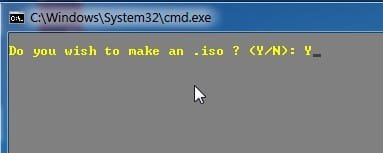
Then next question it asks is would you like to create an iso

Type Y and press enter - it will make an iso in few seconds.

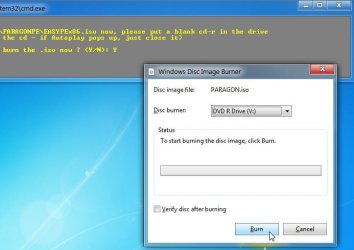
Next it asks if you want to burn the iso. Type Y and press enter, then isoburn.exe pops up asking if you want to burn it.

MAKE-ISO1.jpg

MAKE-ISO3.jpg

Suppose I will add drivers for USB3.0, (have no need for it yet but may probably soon), where can I get drivers for USB3.0?

Depends what usb drivers you need. You will find them at various driver sites.

Some of the common RAID and USB drivers are in here: View attachment Driversx86.zip
 

My Computers My Computers

System One System Two

  • Computer type
    PC/Desktop
    OS
    7 X64
    CPU
    i5 8400
    Motherboard
    gigabyte b365m ds3h
    Memory
    2x8gb 3200mhz
    Hard Drives
    various
    PSU
    pure power 11 400w cm
    Case
    Coolermaster
    Cooling
    cryorig m9i
  • Computer type
    PC/Desktop
    OS
    7x64
    CPU
    g5400
    Motherboard
    ga b365m ds3h
    Memory
    8gb ddr4 2400
    PSU
    xfx pro 450w
I'm having a few problems with this. I go through all the steps, but the finished product doesn't seem to be a PE - it boots to the windows Setup screen and insists that it can't load any drivers.

Also, adding drivers is tedious - is there any way to multi-select drivers to be added, instead of doing each one individually?
 

My Computer My Computer

OS
Windows 7 Professional x64
Hmmmm....it did not ask me to make an iso. It stopped when it asked if I was to "add another PBR or HDM or XX"...I typed "n" as I only had PBR installed. That was it.

I repeated the procedure this time I used the ver2 (deleted the elements of the previous ver1)now there is a C: PARAGONPEver2. But the thing is it did not ask again to make an iso...anyway, I was also able to make an iso from the,

C:\PARAGONPEv2\ISO\sources\BOOTx86.WIM

using 'Deployment Tools Commad Prompt' of my installed WAIK. See image attached.


I was able to burn it with Imageburn. But when I booted to cd there was an error "CANNOT BOOTMGR". I rebooted again to be sure but the error was the same. Kindly see the contents of the cd/iso file.


The Oscdimg string is:

oscdimg -n -bc:\PARAGONPEv2\ISO\BOOT\ETFSBOOT.com C:\PARAGONPEv2\ISO\BOOT C:\PARAGONPEv2\ISO\sources\BOOTx86.iso

Is there something wrong I am doing here...? I Hmm is the string correct?

In addition I was lucky to make an iso of the BOOTx86.WIM because I chanced upon I had WAIK installed, how can I make the BOOTx86.WIM to an iso file if I had not used WAIK? That "asking me to make an iso file" is great but sadly it did not push through...

Can I repeat all of that by just deleting the whole C:\PARAGONPEv2 and start over again?

I'd like to see that "ask me to make an iso file" function because that's a nifty addition there. Very nice!

Incidentally during my search for how to make an iso file from the .wim, I formerly opened cmd.exe and pasted the string there but i said,

"...'oscdimg' is not recognized as an internal or external command, operable program or batch file."

Thanks and will wait for your reply :)
 
Last edited:

My Computer My Computer

Computer type
PC/Desktop
OS
Windows 7 Ultimate x32
Hard Drives
WD 320gb/500gb/1TB
Seagate 500gb/1TB
You won't have oscdimg in the normal cmd path. You will have it if you open waik tools cmd.

If you just want a simple iso with bios boot support, the command should be

oscdimg -n -o -m -b"C:\PARAGONPEv2\ISO\BOOT\ETFSBOOT.COM" "C:\PARAGONPEv2\ISO" "C:\PARAGON.iso"
 

My Computers My Computers

System One System Two

  • Computer type
    PC/Desktop
    OS
    7 X64
    CPU
    i5 8400
    Motherboard
    gigabyte b365m ds3h
    Memory
    2x8gb 3200mhz
    Hard Drives
    various
    PSU
    pure power 11 400w cm
    Case
    Coolermaster
    Cooling
    cryorig m9i
  • Computer type
    PC/Desktop
    OS
    7x64
    CPU
    g5400
    Motherboard
    ga b365m ds3h
    Memory
    8gb ddr4 2400
    PSU
    xfx pro 450w
It is pe - with the standard win7 drivers.

Your difficulty seems to be you need specific drivers for your machine.

I'm having a few problems with this. I go through all the steps, but the finished product doesn't seem to be a PE - it boots to the windows Setup screen and insists that it can't load any drivers.

Might have a look at putting that in as an option when I get the time.

Also, adding drivers is tedious - is there any way to multi-select drivers to be added, instead of doing each one individually?
 

My Computers My Computers

System One System Two

  • Computer type
    PC/Desktop
    OS
    7 X64
    CPU
    i5 8400
    Motherboard
    gigabyte b365m ds3h
    Memory
    2x8gb 3200mhz
    Hard Drives
    various
    PSU
    pure power 11 400w cm
    Case
    Coolermaster
    Cooling
    cryorig m9i
  • Computer type
    PC/Desktop
    OS
    7x64
    CPU
    g5400
    Motherboard
    ga b365m ds3h
    Memory
    8gb ddr4 2400
    PSU
    xfx pro 450w
Back
Top