Help to make a Windows PE disc

Great - thanks for testing and for the feedback.

( If you have Server version - I can't recall exactly with 2010 version - but bootcorrect.exe, bootcorrect.lib, p2padjust,exe and p2padjust.lib might not be in the installed version. They will on the paragon winpe cd - the one you could d/l form your paragon account. )

If that is the case, you can include them here.

To do that, copy them from the paragon cd - ( open the wim on the cd you got from paragon with 7zip and copy them out ) into the installed paragon "program" folder.

Then run my pe maker - that should work.

Funnily enough , there is a nice looking Paragon giveaway today - it should work fine with that too.

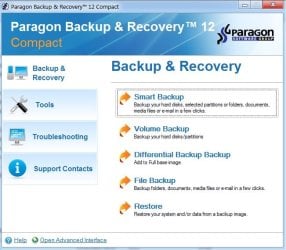
Giveaway of the Day - free licensed software daily. Paragon Backup and Recovery 12 Compact (English Version) - Paragon Backup and Recovery 12 Compact is a simple and powerful backup and recovery solution to secure stand-alone Windows desktops and lap
 

My Computers My Computers

System One System Two

  • Computer type
    PC/Desktop
    OS
    7 X64
    CPU
    i5 8400
    Motherboard
    gigabyte b365m ds3h
    Memory
    2x8gb 3200mhz
    Hard Drives
    various
    PSU
    pure power 11 400w cm
    Case
    Coolermaster
    Cooling
    cryorig m9i
  • Computer type
    PC/Desktop
    OS
    7x64
    CPU
    g5400
    Motherboard
    ga b365m ds3h
    Memory
    8gb ddr4 2400
    PSU
    xfx pro 450w
Hello SIW2,

Back here to report again. I used PPEv4 with the PBR10 Twitter edition with the "program2>launcher.exe" but it still was not included. The rest of the Paragon products which was Partition Manager 11 and Image Backup for Windows 8 were included just fine.

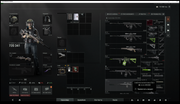
I saw your post about the GAOD offer for PBR12 Compact! I downloaded that and installed it immediately. Used the ParagonPEv4 and all was a success! Please see image attached of the PE disc created from PPEver4.


I chanced upon the explorer and I tried Faststone Image Capture if it will work. It did so the image I am posting now is more vivid. I did not know that you can launch a program from the attached Explorer++ you included there. And the new way to add drivers was great! Very nice!

Thanks very much for the tip/share on PBR 12 Compact edition. The reason why I am bent on using the PBR10 Twitter edition is that it has file and folder backup/email. While PBR12 does not have the P2V, boot corrector etc. This will do for now :)

If by chance there will be a need to add Paragon Virtualization Manager 12 Compact( got that also from a promo) might there be a way using the same PE version you created?

Can I use PPEv4 on my 64bit laptop?

Thank you eternally for sharing the very sincere effort to help me here. You rock man! Awesome!

As I'll be tinkering with the pe disc with the days to come, might you share some info of the apps you added there..? Is it okay to post questions about the ParagonPEv4 here in "Backup and Restore" via new topic?

Congratulations on this awesome tool you created SIW2! :thumbsup::thumbsup::thumbsup:You rock man!

:)
 

My Computer My Computer

Computer type
PC/Desktop
OS
Windows 7 Ultimate x32
Hard Drives
WD 320gb/500gb/1TB
Seagate 500gb/1TB
Not sure why BR10SE isn't going in - I don't think I still have a copy of that.

Bootcorrect.exe is in BR12Compact - you just need to add it to the menu.

Might knock one up if I have the time .

If by chance there will be a need to add Paragon Virtualization Manager 12 Compact( got that also from a promo) might there be a way using the same PE version you created?

Yes, you should just be able to select it as one of the Paragon programs to add.

I only included the option to add 3 Paragon products.

Isn't that enough.? LOL - it wouldn't be hard to include more - but most people won't have more than a couple and will end up with buttons on the menu that go nowhere.

Can I use PPEv4 on my 64bit laptop?

Yes.
 

My Computers My Computers

System One System Two

  • Computer type
    PC/Desktop
    OS
    7 X64
    CPU
    i5 8400
    Motherboard
    gigabyte b365m ds3h
    Memory
    2x8gb 3200mhz
    Hard Drives
    various
    PSU
    pure power 11 400w cm
    Case
    Coolermaster
    Cooling
    cryorig m9i
  • Computer type
    PC/Desktop
    OS
    7x64
    CPU
    g5400
    Motherboard
    ga b365m ds3h
    Memory
    8gb ddr4 2400
    PSU
    xfx pro 450w
Not sure why BR10SE isn't going in - I don't think I still have a copy of that.

Bootcorrect.exe is in BR12Compact - you just need to add it to the menu.

Might knock one up if I have the time .

If by chance there will be a need to add Paragon Virtualization Manager 12 Compact( got that also from a promo) might there be a way using the same PE version you created?
Yes, you should just be able to select it as one of the Paragon programs to add.

I only included the option to add 3 Paragon products.

Isn't that enough.? LOL - it wouldn't be hard to include more - but most people won't have more than a couple and will end up with buttons on the menu that go nowhere.

Can I use PPEv4 on my 64bit laptop?
Yes.

Hi SIW2,

I was thinking on installing PVM 12 Compact and selecting it instead of Image Backup for Windows 8 but I think it would not be added as I selected PPM 11 already with PBR12. I'll forget about PBR10 SE as your tip is the latest. I expect it also to be faster in creating backups / restoring images. Does version 12 performs faster or just the same as version 10/11..?

The bootcorrector.exe is very useful thanks for mentioning that it's included in PBR 12 Compact. I will wait for it and will definitely be on the watch after you make it. Can you kindly send me a PM if it's ready? (will really eagerly await it).

Might you share common 64bit drivers for USB/RAID as posted previously (x32)..?

Thanks again :)
 

My Computer My Computer

Computer type
PC/Desktop
OS
Windows 7 Ultimate x32
Hard Drives
WD 320gb/500gb/1TB
Seagate 500gb/1TB
Sorry,don't think I have 64 bit raid drivers lying around .

Not sure what you need them for - 32 bit pe needs 32 bit drivers.

Here: View attachment ExpLauncher.zip

BR12-COMP1.jpg

BR12-COMP2.jpg
 

My Computers My Computers

System One System Two

  • Computer type
    PC/Desktop
    OS
    7 X64
    CPU
    i5 8400
    Motherboard
    gigabyte b365m ds3h
    Memory
    2x8gb 3200mhz
    Hard Drives
    various
    PSU
    pure power 11 400w cm
    Case
    Coolermaster
    Cooling
    cryorig m9i
  • Computer type
    PC/Desktop
    OS
    7x64
    CPU
    g5400
    Motherboard
    ga b365m ds3h
    Memory
    8gb ddr4 2400
    PSU
    xfx pro 450w
Sorry,don't think I have 64 bit raid drivers lying around .

Not sure what you need them for - 32 bit pe needs 32 bit drivers.
--Oh sorry I must have confused you. It's for the laptop ;)

Thanks for the ExpLauncher.zip. Will I add it in,

C:\Program Files\Paragon Software\Backup and Recovery 12 Compact\program

I also see an Explauncher.ini there (3kb) will adding it not conflict? I am sorry I am not really a techy guy.

Will try it and report back here. Thank you again for the sincere help you share here. You are an ace in this forum :)
 

My Computer My Computer

Computer type
PC/Desktop
OS
Windows 7 Ultimate x32
Hard Drives
WD 320gb/500gb/1TB
Seagate 500gb/1TB
You are supposed to replace the original explauncher.ini with that one. You can just rename the original if you like - e.g. explauncher-orig.ini and leave it where it is , then put the new one in the paragon program folder.
 

My Computers My Computers

System One System Two

  • Computer type
    PC/Desktop
    OS
    7 X64
    CPU
    i5 8400
    Motherboard
    gigabyte b365m ds3h
    Memory
    2x8gb 3200mhz
    Hard Drives
    various
    PSU
    pure power 11 400w cm
    Case
    Coolermaster
    Cooling
    cryorig m9i
  • Computer type
    PC/Desktop
    OS
    7x64
    CPU
    g5400
    Motherboard
    ga b365m ds3h
    Memory
    8gb ddr4 2400
    PSU
    xfx pro 450w
You are supposed to replace the original explauncher.ini with that one. You can just rename the original if you like - e.g. explauncher-orig.ini and leave it where it is , then put the new one in the paragon program folder.


Back here to report again. Did just that

I replaced the Explauncher.zip to,

C:\Program Files\Paragon Software\Backup and Recovery 12 Compact\program

, ran the PPEv4 and it was all okay. Kindly see images attached.


I'd like to thank you again SIW2 and marsmiman for the help and assistance you have shared here. I also am happy that rkenimer's has been worked out :)

I will be fiddling with the winpe disc by tomorrow after work and see how does it behave. I guess this thread is solved now. Will open another thread on using it if there are any problems I encounter.

Again thank you SIW2 for the great tool :) You rock man :) :thumbsup::thumbsup::thumbsup:
 

My Computer My Computer

Computer type
PC/Desktop
OS
Windows 7 Ultimate x32
Hard Drives
WD 320gb/500gb/1TB
Seagate 500gb/1TB
here. NEW V4 updated


http://www.sevenforums.com/attachme...161-help-make-windows-pe-disc-paragonpev4.zip

rt click the downloaded zip, properties>unblock>apply>ok

extract it onto the root of the drive, so you have C:\PARAGONPE

In there , rt click and run as admin on PARAGON-RunMeAsAdmin.cmd

Hi SIW2,

I am having problem downloading paragonpev4.zip, it gets to 4.8MB out of 5MB and then the connection resets itself. Other members from Paragon forum tried to download , same problem.

Are you able to re-upload?

Thanks and Merry Xmas.

Zaxa
 

My Computer My Computer

OS
Windows 7 64 bit Pro
What again?

Strange how the file gets corrupted.

Will see if I can find the original - I may not have it with me.
 

My Computers My Computers

System One System Two

  • Computer type
    PC/Desktop
    OS
    7 X64
    CPU
    i5 8400
    Motherboard
    gigabyte b365m ds3h
    Memory
    2x8gb 3200mhz
    Hard Drives
    various
    PSU
    pure power 11 400w cm
    Case
    Coolermaster
    Cooling
    cryorig m9i
  • Computer type
    PC/Desktop
    OS
    7x64
    CPU
    g5400
    Motherboard
    ga b365m ds3h
    Memory
    8gb ddr4 2400
    PSU
    xfx pro 450w
Last edited:

My Computers My Computers

System One System Two

  • Computer type
    PC/Desktop
    OS
    7 X64
    CPU
    i5 8400
    Motherboard
    gigabyte b365m ds3h
    Memory
    2x8gb 3200mhz
    Hard Drives
    various
    PSU
    pure power 11 400w cm
    Case
    Coolermaster
    Cooling
    cryorig m9i
  • Computer type
    PC/Desktop
    OS
    7x64
    CPU
    g5400
    Motherboard
    ga b365m ds3h
    Memory
    8gb ddr4 2400
    PSU
    xfx pro 450w

My Computers My Computers

System One System Two

  • Computer type
    PC/Desktop
    OS
    7 X64
    CPU
    i5 8400
    Motherboard
    gigabyte b365m ds3h
    Memory
    2x8gb 3200mhz
    Hard Drives
    various
    PSU
    pure power 11 400w cm
    Case
    Coolermaster
    Cooling
    cryorig m9i
  • Computer type
    PC/Desktop
    OS
    7x64
    CPU
    g5400
    Motherboard
    ga b365m ds3h
    Memory
    8gb ddr4 2400
    PSU
    xfx pro 450w
@SIW2,

It's been a while but I'd just like to ask.

Was wondering how I can make this Paragon PE in a USB stick..? I mean a WinPE USB Bootable Paragon PE..?

Might come in handy.

Thanks.
 

My Computer My Computer

Computer type
PC/Desktop
OS
Windows 7 Ultimate x32
Hard Drives
WD 320gb/500gb/1TB
Seagate 500gb/1TB
Sure you can, that's how I run my pe and other stuff.
I do it by hand, but you can use any number of tools to do it for you:

Use diskmgmt , or Paragon to format the flash to either fat32 or ntfs, then use 7-zip to copy the entire contents of the iso onto the flash drive.

Tha's it.
 

My Computers My Computers

System One System Two

  • Computer type
    PC/Desktop
    OS
    7 X64
    CPU
    i5 8400
    Motherboard
    gigabyte b365m ds3h
    Memory
    2x8gb 3200mhz
    Hard Drives
    various
    PSU
    pure power 11 400w cm
    Case
    Coolermaster
    Cooling
    cryorig m9i
  • Computer type
    PC/Desktop
    OS
    7x64
    CPU
    g5400
    Motherboard
    ga b365m ds3h
    Memory
    8gb ddr4 2400
    PSU
    xfx pro 450w
Sure you can, that's how I run my pe and other stuff.
I do it by hand, but you can use any number of tools to do it for you:

Use diskmgmt , or Paragon to format the flash to either fat32 or ntfs, then use 7-zip to copy the entire contents of the iso onto the flash drive.

Tha's it.

WOW Thanks there! I will try that when I get home from work. Be back to post how it worked!

Thanks again SIW2 :)
 

My Computer My Computer

Computer type
PC/Desktop
OS
Windows 7 Ultimate x32
Hard Drives
WD 320gb/500gb/1TB
Seagate 500gb/1TB
everytime I try to download the zip it takes me to a page saying to contact the admin. Is there another way to download the zip?
 

My Computer My Computer

Computer type
Laptop
OS
Windows 7 Enterprise 64bit

My Computers My Computers

System One System Two

  • Computer type
    PC/Desktop
    OS
    7 X64
    CPU
    i5 8400
    Motherboard
    gigabyte b365m ds3h
    Memory
    2x8gb 3200mhz
    Hard Drives
    various
    PSU
    pure power 11 400w cm
    Case
    Coolermaster
    Cooling
    cryorig m9i
  • Computer type
    PC/Desktop
    OS
    7x64
    CPU
    g5400
    Motherboard
    ga b365m ds3h
    Memory
    8gb ddr4 2400
    PSU
    xfx pro 450w
Thanks

Thanks. I wasn't expecting a reply so quickly.
 

My Computer My Computer

Computer type
Laptop
OS
Windows 7 Enterprise 64bit
gives "Message
Invalid Attachment specified. If you followed a valid link, please notify the administrator" when clicking on v4 or v5.zip
 

My Computer My Computer

Computer type
PC/Desktop
Computer Manufacturer/Model Number
Dell Optiplex 7010
OS
windows 7 professional 64bit
CPU
3.4GHz
Memory
4GB
Graphics Card(s)
AMD Radeon HD 7470
Antivirus
TrendMicro
Browser
chrome
sorry, didn't see the repost you did siw2 and thanks for helping us newbies out with your work!
 

My Computer My Computer

Computer type
PC/Desktop
Computer Manufacturer/Model Number
Dell Optiplex 7010
OS
windows 7 professional 64bit
CPU
3.4GHz
Memory
4GB
Graphics Card(s)
AMD Radeon HD 7470
Antivirus
TrendMicro
Browser
chrome
Back
Top