
HELP! UEFI BIOS or OS compromised?

RPmtl

New member
Member
Local time
8:06 AM
Messages
23
Location
Montreal
I went to turn on my computer and the boot process stopped before loading Windows7 Pro(64) with a text message saying:

"The system found unauthorized changes on the firmware, operating system or UEFI drivers.
Press [N] to run next boot device, or enter directly to BIOS Setup, if there are no other boot devices installed.
Go to BIOS Setup > Advanced > Boot and change the current boot device into another secured boot devices"

The only thing I had done (afaik) since the last re-boot at the end of day the day before was install a bunch of Microsoft updates that required a reboot, and it rebooted without that message.

I went into the BIOS and changed the Secure Boot setting from "Windows UEFI mode" to "Other OS" and the system then booted without a problem.

BUT (YIKES!) - the whole thing has me worried that a security issue did occur and I've somehow been infected by something.

Is this something that others have seen before and should I be suspecting a real problem.

I did a full scan for any viruses as soon as I was back in Windows 7, but the system seems to be clean.

Any ideas??

Thanks,

Russell

Windows7Pro(64), Asus P9X79-DLX, i7-3930K, 32GB RAM, Nochua N1, Gforce GTX750Ti, Samsung850Pro 256GB SSD
 

My Computer My Computer

Computer type
PC/Desktop
Computer Manufacturer/Model Number
Custom build
OS
Win 10 Pro
CPU
Intel Core i7-6900K
Motherboard
Asus X99-DELUXE II
Memory
32GB DDR4-2133
Graphics Card(s)
Gforce GTX 750 Ti
Monitor(s) Displays
2x Dell U2413
Screen Resolution
1920 x 1200
Hard Drives
Samsung 850 Pro 256 GB SSD
WD600GLFS
WD300GLFS
PSU
Corsair AX750
Case
Lian Li PC-B10
Cooling
Nochua N1
Keyboard
Das Keyboard Pro (Cherry MX blue w/O-Ring Mod)
Mouse
Logitech MX-610 Laser w/Teflon pads
Hiyya Russell mate run this Kaspersky Rescue Disk 10 it will require you make a bootable disk or stick and set the BIOS to boot from whatever you have put the rescue disk on. I prefer a disk but the choice is yours.
It runs without involving Windows and may take some time to scan but it will scan everything.;)
 

My Computer My Computer

Computer type
PC/Desktop
Computer Manufacturer/Model Number
Own build (new) Desk1 / Asus ROG Win 7 / Desk2 1st build
OS
Desk1 7 Home Prem / Desk2 10 Pro / Main lap Asus ROG 10 Pro 2 laptop Toshiba 7 Pro Asus P2520 7 & 10
CPU
Desk1 i5 3750K / Laptop i7 GTX 860M / Desk2 i5 2500
Motherboard
Desk1 Asus P877-V / Desk2 Gigabyte H67 UD3H / Laptop ?
Memory
Desk1 8GB (1866) / Desk2 16GB (1333) / Laptop 8Gb DDR3
Graphics Card(s)
Desk 1& 2NVidia GTX 650 & Laptops on board Intel
Sound Card
Desk 1 & 2 -XONAR DG Realtek High Def audio Laptop
Monitor(s) Displays
Desk 1 Benq HD 2450 / Desk2 Philips 24" / Laptop 17.5"
Screen Resolution
1920x1080 D1 & D2 & Laptop 1
Hard Drives
Desk1 Samsung 120GB 830 SSD
Asus ROG 256GB 850 Pro SSD
Desk2 Samsung 840 256 SSD
Toshiba 120GB EVO
PSU
Desk 1 Corsair HX 1050/ Laptop ? / Desk 2 Corsair HX 650
Case
Desk 1 Cooler HAF XM ? Toshiba laptop / Desk2 Coolermaster
Cooling
Fans on all Desk1 -2 Desk2 - all Coolermasters 5 Laptop ?
Keyboard
Desk 1 MS Sidewinder X6 Desk 2 MS Sidewinder X 4
Mouse
Desk 1&2 - Gigabyte MS 900 gamer - laptop - Logitec wireless
Internet Speed
ADSL2+
Other Info
One other Desktop (tester) and spare Toshba laptop both with SSD's
Running Kaspersky 2016 ISS on all machines config'd identically
Logitec audio stereo systems on each machine (x3)
Canon MG5250MFC
Router/modem TP-Link running WPA2SK
Hiyya Russell mate run this Kaspersky Rescue Disk 10 It runs without involving Windows and may take some time to scan but it will scan everything.;)

Thanks ICIT2LOL, I'll give a try. I did do a pretty thorough scan using Malwarebytes, though that was not via a boot disk. Kaspersky's not been on my favourite AV programs for the past few years. But it'll be interesting to see what it reports.
 

My Computer My Computer

Computer type
PC/Desktop
Computer Manufacturer/Model Number
Custom build
OS
Win 10 Pro
CPU
Intel Core i7-6900K
Motherboard
Asus X99-DELUXE II
Memory
32GB DDR4-2133
Graphics Card(s)
Gforce GTX 750 Ti
Monitor(s) Displays
2x Dell U2413
Screen Resolution
1920 x 1200
Hard Drives
Samsung 850 Pro 256 GB SSD
WD600GLFS
WD300GLFS
PSU
Corsair AX750
Case
Lian Li PC-B10
Cooling
Nochua N1
Keyboard
Das Keyboard Pro (Cherry MX blue w/O-Ring Mod)
Mouse
Logitech MX-610 Laser w/Teflon pads
Sorry late rpely mate broadband playing up No need to worry about it being Kaspersky as I said it runs in a non Windows system a bit like a Linux OS.

Personally I have used Kapsersky for the last six years on all my machines and have had no issues though I do run MBAM and SuperAntiSpyware and ADWCleaner if necessary the latter being the last to use and form y links you can see Kaspersky can at time snot like it so I disable that while I am using it.
SUPERAntiSpyware | Remove Malware | Remove Spyware - AntiMalware, AntiSpyware, AntiAdware!
Malwarebytes | Malwarebytes Anti-Malware Premium
AdwCleaner Download
delete any rubbish found with the malware scans
(NB If one is running Kaspersky security it may rant about ADW - just ignore it or disable Kaspersky while the ADW is being used)
 

My Computer My Computer

Computer type
PC/Desktop
Computer Manufacturer/Model Number
Own build (new) Desk1 / Asus ROG Win 7 / Desk2 1st build
OS
Desk1 7 Home Prem / Desk2 10 Pro / Main lap Asus ROG 10 Pro 2 laptop Toshiba 7 Pro Asus P2520 7 & 10
CPU
Desk1 i5 3750K / Laptop i7 GTX 860M / Desk2 i5 2500
Motherboard
Desk1 Asus P877-V / Desk2 Gigabyte H67 UD3H / Laptop ?
Memory
Desk1 8GB (1866) / Desk2 16GB (1333) / Laptop 8Gb DDR3
Graphics Card(s)
Desk 1& 2NVidia GTX 650 & Laptops on board Intel
Sound Card
Desk 1 & 2 -XONAR DG Realtek High Def audio Laptop
Monitor(s) Displays
Desk 1 Benq HD 2450 / Desk2 Philips 24" / Laptop 17.5"
Screen Resolution
1920x1080 D1 & D2 & Laptop 1
Hard Drives
Desk1 Samsung 120GB 830 SSD
Asus ROG 256GB 850 Pro SSD
Desk2 Samsung 840 256 SSD
Toshiba 120GB EVO
PSU
Desk 1 Corsair HX 1050/ Laptop ? / Desk 2 Corsair HX 650
Case
Desk 1 Cooler HAF XM ? Toshiba laptop / Desk2 Coolermaster
Cooling
Fans on all Desk1 -2 Desk2 - all Coolermasters 5 Laptop ?
Keyboard
Desk 1 MS Sidewinder X6 Desk 2 MS Sidewinder X 4
Mouse
Desk 1&2 - Gigabyte MS 900 gamer - laptop - Logitec wireless
Internet Speed
ADSL2+
Other Info
One other Desktop (tester) and spare Toshba laptop both with SSD's
Running Kaspersky 2016 ISS on all machines config'd identically
Logitec audio stereo systems on each machine (x3)
Canon MG5250MFC
Router/modem TP-Link running WPA2SK
Hi ICIT2LOL,

I ran Kaspersky from the Boot CD and it came up clean after running all the various scan options (startup, root, efi, whole C drive). Though I worry about new infections that AV software knows nothing about yet.

This is not a public computer, I'm the only person who uses it, and I'm *very careful* about what I do with it. I was really surprised by that login screen message.

Could something in one of Microsoft's own own updates have trigger such a warning at the UEFI level?

Might something have just messed up on the MB BIOS (static charge..)?

Disabling the UEFI 'Secure Boot' feature is a workaround. But I just hate these kind of strange unexplained errors.

I have a 3 month old backup of my main system drive (OS and apps only) that I'll restore to see if it resolves the issue. If so I'll just proceed to do whatever installs, updates and changes are needed to being things up to date.

Thanks for your help and suggestions :-)

Russell
 

My Computer My Computer

Computer type
PC/Desktop
Computer Manufacturer/Model Number
Custom build
OS
Win 10 Pro
CPU
Intel Core i7-6900K
Motherboard
Asus X99-DELUXE II
Memory
32GB DDR4-2133
Graphics Card(s)
Gforce GTX 750 Ti
Monitor(s) Displays
2x Dell U2413
Screen Resolution
1920 x 1200
Hard Drives
Samsung 850 Pro 256 GB SSD
WD600GLFS
WD300GLFS
PSU
Corsair AX750
Case
Lian Li PC-B10
Cooling
Nochua N1
Keyboard
Das Keyboard Pro (Cherry MX blue w/O-Ring Mod)
Mouse
Logitech MX-610 Laser w/Teflon pads
Hey Russell yes mate I am not fond of those untied ends either but sometimes glitches for want of a better term happen.
There is so much nonsense (in my own mind) going on with Windows updates and the fact that Microsoft want us all to use 10 come hell or high water I would not be surprised if it was caused by an update/s??

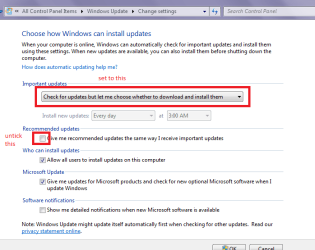
Now if you are not wanting to upgrade - again a nonsense to me - to 10 then you need to watch for the updates that are put out that do not necessarily state they are 10 related, and to that end I always set updates to let me know about them and let me decide whether or not to download or install them.

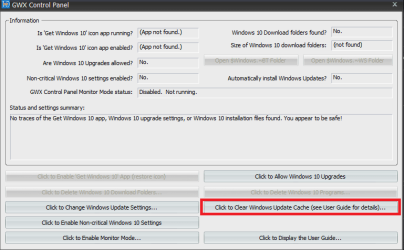
Personally I am using the batch file from this Upgrade to Windows 10 Update - Enable or Disable in Windows 7 or 8.1 - Windows 10 Forums to disable that upgrade and the GWX Control Panel from here Ultimate Outsider - Software Downloads < (use only the GWX app) to watch out for updates or files that creep through with updates that are 10 related on all of my machines.
 

Attachments

  • GWX CONTROL.PNG
    GWX CONTROL.PNG
    14.8 KB · Views: 5
  • UPDATE SETTINGS.PNG
    UPDATE SETTINGS.PNG
    19 KB · Views: 57

My Computer My Computer

Computer type
PC/Desktop
Computer Manufacturer/Model Number
Own build (new) Desk1 / Asus ROG Win 7 / Desk2 1st build
OS
Desk1 7 Home Prem / Desk2 10 Pro / Main lap Asus ROG 10 Pro 2 laptop Toshiba 7 Pro Asus P2520 7 & 10
CPU
Desk1 i5 3750K / Laptop i7 GTX 860M / Desk2 i5 2500
Motherboard
Desk1 Asus P877-V / Desk2 Gigabyte H67 UD3H / Laptop ?
Memory
Desk1 8GB (1866) / Desk2 16GB (1333) / Laptop 8Gb DDR3
Graphics Card(s)
Desk 1& 2NVidia GTX 650 & Laptops on board Intel
Sound Card
Desk 1 & 2 -XONAR DG Realtek High Def audio Laptop
Monitor(s) Displays
Desk 1 Benq HD 2450 / Desk2 Philips 24" / Laptop 17.5"
Screen Resolution
1920x1080 D1 & D2 & Laptop 1
Hard Drives
Desk1 Samsung 120GB 830 SSD
Asus ROG 256GB 850 Pro SSD
Desk2 Samsung 840 256 SSD
Toshiba 120GB EVO
PSU
Desk 1 Corsair HX 1050/ Laptop ? / Desk 2 Corsair HX 650
Case
Desk 1 Cooler HAF XM ? Toshiba laptop / Desk2 Coolermaster
Cooling
Fans on all Desk1 -2 Desk2 - all Coolermasters 5 Laptop ?
Keyboard
Desk 1 MS Sidewinder X6 Desk 2 MS Sidewinder X 4
Mouse
Desk 1&2 - Gigabyte MS 900 gamer - laptop - Logitec wireless
Internet Speed
ADSL2+
Other Info
One other Desktop (tester) and spare Toshba laptop both with SSD's
Running Kaspersky 2016 ISS on all machines config'd identically
Logitec audio stereo systems on each machine (x3)
Canon MG5250MFC
Router/modem TP-Link running WPA2SK
Hi Russell,

I had the same problem. Same message before booting Windows 7.
After turning off Secure Boot in the BIOS, I could boot Windows 7 again.

Windows 7 does not officially support Secure Boot, but in the past 23 months, Windows 7 happily booted with Secure Boot activated.

I don't know exactly what happened, but here is some info that might help to identify the real problem ..

My PC has an Asus Z87-Pro Motherboard.
I am using UEFI mode, not legacy BIOS mode, so that the disks are partitioned in GPT mode, not (legacy) MBR mode.

Windows 7 (64 bit) is installed on the first disk (Samsung SSD on first SATA port).
Windows 8.1 (64 bit) is installed on the second disk (Western Digital HDD on second SATA port).

Both Windows versions were installed independently from each other by physically disconnecting the other disk during installation.
So I am not using the standard dual boot options of Windows, where the first (older) Windows version appears as additional boot option in the Windows Boot Manager menu of the second (newer) Windows version. To select the Windows version to boot, I use the the Asus BIOS boot menu instead.

I was able to boot both Windows 7 and 8.1 with Secure Boot enabled in the past 23 months.
After installing some Microsoft update in Windows 8.1, I could not boot Windows 7 anymore with Secure Boot activated, so I had to turn Secure Boot off.

On March 21st, 2016, I installed the following optional 22 Microsoft updates for Windows 8.1 (64 bit):

KB3139923: MSI repair doesn't work when MSI source is installed on an HTTP share in Windows
KB3109976: Texas Instruments xHCI USB controllers may encounter a hardware issue on large data transfers in Windows 8.1
KB3140234: "0x0000009F" Stop error when a Windows VPN client computer is shutdown with an active L2TP VPN connection
KB3136019: Explorer.exe may crash when you play back an MPEG-4 file in Windows 8.1 or Windows RT 8.1
KB3105115: Can't connect to the desktop of Windows 8.1 or Windows Server 2012 R2 from a remote desktop at low screen resolution
KB3137728: VSS restore fails when you use ResyncLuns VSS API in Windows Server 2012 R2-based failover cluster
KB3133681: Virtual machines don't respond to your operation in SCVMM in Windows Server 2012 R2
KB3134785: Memory leak in RPCSS and DcomLaunch services in Windows 8.1 or Windows Serer 2012 R2
KB3140219: "0x00000133" Stop error after you install hotfix 3061460 in Windows Server 2012 R2
KB3138602: "File contents" option is always selectable, Start screen becomes blank, or computer freezes when startup in Windows 8.1
KB3140222: Conflicting files in Internet Explorer favorites when Work Folders is installed in Windows 8.1
KB3137061: Windows Azure VMs don't recover from a network outage and data corruption issues occur
KB3133690: Update to add Discrete Device Assignment support for Azure that runs on Windows Server 2012 R2-based guest VMs
KB3137725: Get-StorageReliabilityCounter doesn't report correct values of temperature in Windows Server 2012 R2
KB3100473: DNS records get deleted when you delete the scope on a Windows Server 2012 R2-based DHCP server
KB3140786: Windows Server backup fails despite sufficient free space on target volume in Windows Server 2012 R2
KB3103709: (no official MS docs ... check google yourself ...)
KB3139219: 0x1E Stop error when you restart or shut down a computer running Windows 8.1 or Windows Server 2012 R2
KB3115224: Reliability improvements for VMs that are running on a Windows Server 2012 R2 or Windows Server 2012 host
KB3139165: High CPU load on a Windows Server 2012 R2-based server because NAT keep-alive timer isn't cleaned up
KB3141074: "0x00000001" Stop error when a shared VHDX file is accessed in Windows Server 2012 R2-based Hyper-V guest
KB3140250: MinDiffAreaFileSize doesn't work on Windows Server 2012 R2

Right after these updates, the UEFI BIOS refused to boot Windows 7.

The other (important and recommended) updates for Windows 8.1 for March 2016 were already installed on March 9th. After those updates, Windows 7 still booted with Secure Boot.

Windows 7 updates also were installed on March 9th.

In other words, I have to suspect, that one of those 22 optional 8.1 updates messed something up ..

I have not tried to fix the issue by uninstalling these 22 updates.

Does someone know more or can explain what is going on ?
 

My Computer My Computer

Computer type
PC/Desktop
Computer Manufacturer/Model Number
custom build
OS
W7 Ultimate SP1 x64 + W8.1 Enterprise x64
CPU
Intel i7-4771
Motherboard
Asus Z79-Pro
Memory
32 GB
Graphics Card(s)
none (iGPU)
Hi MillKaDe,

Our systems are quite similar as I'm running Win7-64 on an Asus P9X79-DLX w/ a Samsung 850Pro SSD. I'm not dual booting with 8.1. I too GPT formatted my SSD and that's why Secure Boot was enabled with the UEFI BIOS.

I'm restoring my 4-month old backup this weekend on a second SSD and see what happens. If Secure Boot does not complain then I'll know it's something that happened after that point in time. I'll then add the MS updates and see if that breaks it. No big deal if it does as I'll just disable the Secure Boot feature knowing that the issue was caused by a MS update and not by some virus from outer space.

I run 5 computers of various vintages and have upgraded all the others to Win10 (all clean installs). But this is my main work system and it's working fine. So I'm in no rush to upgrade it. I have a running list of all the Win10 nagware KB updates to avoid - a bit like playing whack-a-mole. All the Win10 systems use Startisback to restore a 'Win7' environment and Spybot Anti-Beacon works great to turn off all the MS spyware.

I'll post my findings later this weekend re: what MS update(s) might have caused my Secure Boot option to start complaining.
 

My Computer My Computer

Computer type
PC/Desktop
Computer Manufacturer/Model Number
Custom build
OS
Win 10 Pro
CPU
Intel Core i7-6900K
Motherboard
Asus X99-DELUXE II
Memory
32GB DDR4-2133
Graphics Card(s)
Gforce GTX 750 Ti
Monitor(s) Displays
2x Dell U2413
Screen Resolution
1920 x 1200
Hard Drives
Samsung 850 Pro 256 GB SSD
WD600GLFS
WD300GLFS
PSU
Corsair AX750
Case
Lian Li PC-B10
Cooling
Nochua N1
Keyboard
Das Keyboard Pro (Cherry MX blue w/O-Ring Mod)
Mouse
Logitech MX-610 Laser w/Teflon pads
Hi Russell,

here is some more information about how Secure Boot works: https://technet.microsoft.com/en-us/library/hh824987.aspx

As far as i understand, the UEFI BIOS stores the required keys and signatures in NVRAM. The ASUS BIOS allows to backup the keys and signatures to a FAT formatted USB memory stick as files named 'PK', 'KEK', 'db' and 'dbx'.

Some other links which seems to describe the same problem:

a): windows 7 - System found unauthorized changes on the firmware - Super User

b): https://hardforum.com/threads/secure-boot-suddenly-stopped-working-with-windows-7.1894722/

In the second link, KB3133977 ( https://support.microsoft.com/en-us/kb/3133977 ) is mentioned. It seems to contain some UEFI related files: Bootmgfw.efi, Bootmgr.efi.
I think these are stored in one of the hidden partitions.

Maybe it is enough to uninstall KB 3133977 and maybe restore the hidden partition containing the EFI files. Of course you want to make a complete backup before trying my wild guesses ..

And about getting rid of Windows 10 update nagware: https://support.microsoft.com/en-us/kb/3080351
If you add the two registry keys explained in that KB, you wont get molested about Windows 10 anymore.
 

My Computer My Computer

Computer type
PC/Desktop
Computer Manufacturer/Model Number
custom build
OS
W7 Ultimate SP1 x64 + W8.1 Enterprise x64
CPU
Intel i7-4771
Motherboard
Asus Z79-Pro
Memory
32 GB
Graphics Card(s)
none (iGPU)
Yes Millka it goes on and on and as I hinted at earlier I do not download updates per se' unless I know they are free of crap, because I feel that M$ are not really that interested in keeping 7 as good as it needs to be.

Plus as long as that batch file is installed and I use the GWX Control Panel (usually daily) I am happy as things are as I think that Microsoft are intent on everyone using 10 and no matter how benign updates look if I don't download them then the rubbish cannot creep in.

Having said that is what I do - the GWX panel does still pick up stuff!
 

My Computer My Computer

Computer type
PC/Desktop
Computer Manufacturer/Model Number
Own build (new) Desk1 / Asus ROG Win 7 / Desk2 1st build
OS
Desk1 7 Home Prem / Desk2 10 Pro / Main lap Asus ROG 10 Pro 2 laptop Toshiba 7 Pro Asus P2520 7 & 10
CPU
Desk1 i5 3750K / Laptop i7 GTX 860M / Desk2 i5 2500
Motherboard
Desk1 Asus P877-V / Desk2 Gigabyte H67 UD3H / Laptop ?
Memory
Desk1 8GB (1866) / Desk2 16GB (1333) / Laptop 8Gb DDR3
Graphics Card(s)
Desk 1& 2NVidia GTX 650 & Laptops on board Intel
Sound Card
Desk 1 & 2 -XONAR DG Realtek High Def audio Laptop
Monitor(s) Displays
Desk 1 Benq HD 2450 / Desk2 Philips 24" / Laptop 17.5"
Screen Resolution
1920x1080 D1 & D2 & Laptop 1
Hard Drives
Desk1 Samsung 120GB 830 SSD
Asus ROG 256GB 850 Pro SSD
Desk2 Samsung 840 256 SSD
Toshiba 120GB EVO
PSU
Desk 1 Corsair HX 1050/ Laptop ? / Desk 2 Corsair HX 650
Case
Desk 1 Cooler HAF XM ? Toshiba laptop / Desk2 Coolermaster
Cooling
Fans on all Desk1 -2 Desk2 - all Coolermasters 5 Laptop ?
Keyboard
Desk 1 MS Sidewinder X6 Desk 2 MS Sidewinder X 4
Mouse
Desk 1&2 - Gigabyte MS 900 gamer - laptop - Logitec wireless
Internet Speed
ADSL2+
Other Info
One other Desktop (tester) and spare Toshba laptop both with SSD's
Running Kaspersky 2016 ISS on all machines config'd identically
Logitec audio stereo systems on each machine (x3)
Canon MG5250MFC
Router/modem TP-Link running WPA2SK
Maybe it is enough to uninstall KB 3133977 and maybe restore the hidden partition containing the EFI files. Of course you want to make a complete backup before trying my wild guesses ..

Hi MillKaDe,

Success!! That is EXACTLY what causes the issue :-)
I'm happy just to know that my computer has not been infested by extraterrestrials <g>

I restored my older backup and did all the updates (50+) except for the Win10 stuff and the four optional "Updates to Microsoft Windows" updates that were installed just before the problem popped up. To that point everything was booting fine using Secure Boot and UEFI. I then proceeded to apply them one at a time and KB3133977 was the first. BINGO - up popped that black screen with the dire message.

I then tried uninstalling it but the problem remains. So it seems whatever it does cannot be reversed.

Thanks to you and ICIT2LOL for your help :-))

Russell
 

My Computer My Computer

Computer type
PC/Desktop
Computer Manufacturer/Model Number
Custom build
OS
Win 10 Pro
CPU
Intel Core i7-6900K
Motherboard
Asus X99-DELUXE II
Memory
32GB DDR4-2133
Graphics Card(s)
Gforce GTX 750 Ti
Monitor(s) Displays
2x Dell U2413
Screen Resolution
1920 x 1200
Hard Drives
Samsung 850 Pro 256 GB SSD
WD600GLFS
WD300GLFS
PSU
Corsair AX750
Case
Lian Li PC-B10
Cooling
Nochua N1
Keyboard
Das Keyboard Pro (Cherry MX blue w/O-Ring Mod)
Mouse
Logitech MX-610 Laser w/Teflon pads
I didn't think secure boot was supported on Windows 7 64 bit.
 

My Computer My Computer

Computer type
PC/Desktop
Computer Manufacturer/Model Number
Dell All in one Inspiron 2020
OS
W10 32 bit, XUbuntu 18.xx 64 bit
CPU
Intel(R) Celeron(R) CPU G1620T @ 2.40GHz, 2400 Mhz
Motherboard
Dell
Memory
4GB
Graphics Card(s)
Intel HD graphics
Sound Card
High Definition Audio Device
Monitor(s) Displays
20 inch Screen
Screen Resolution
W7=1280 x 720 & Linux Mint Xfce=1360 x 768
Hard Drives
500 GB hard drive
Keyboard
Usb
Mouse
Usb
Internet Speed
High-Speed
Antivirus
MSE
Browser
Main Browser Firefox
Other Info
I have done a clean install of Windows 7 using Dell re-installation disk (Dell sent me one). I also use Free Macrium reflect backup and restore.
If the system reserved partition is formatted or shows as efi instead of ntfs which I've seen a few posts like that I guess that causes the issue with the update in question.
That and people installing Optional/ Recommended updates :p
 

My Computer My Computer

Computer type
PC/Desktop
Computer Manufacturer/Model Number
Custom assembled by me :}
OS
Win-7-Pro64bit 7-H-Prem-64bit
CPU
i7-5930K 2nd i9-9940x both water blocked VRM's too
Motherboard
ASUS SABERTOOTH X99 2nd ASUS x299 Apex
Memory
Trident-z 3200C14 2nd Trident-z 3600C16
Graphics Card(s)
EVGA 1080ti ftw3 2nd Titan Xp both water blocked
Sound Card
Built-in Realtek
Monitor(s) Displays
1-AOC G2460PG 24"G-Sync 144Hz/ 2nd 1-ASUS VG248QE 24" 144Hz
Screen Resolution
1920 x 1080 144Hz
Hard Drives
2-Samsung M.2 Evo & Evo Plus
2-Samsung 850 EVO 500GB SSD's/ 3-2.5 W.D. Black 1tb-&3-1tb/3-3.5 WD Black 1tb hdd's
PSU
EVGA SuperNOVA 1000-P2 2nd 1200-P2
Case
2-Corsair Obsidian Series 450D Black ATX Mid Tower
Cooling
Custom water loops
Keyboard
Logitech G710+/ 2nd Logitech G910
Mouse
2-RedDragon M901 Perdition 16400 dpi Gaming mouse = wired
Internet Speed
Comcast Ping 19ms 89.31mbps download speed 6.12mbps upload
Antivirus
Malwarebytes Pro/ Superantispyware Pro
Browser
FireFox & Pale moon
Other Info
2nd ASUS X299 Apex/Intel i9-9940x with Custom water loop/7H-Prem-x64/Corsair 450D case/Ram Trident-z 3600C16 4x8gb / Samsung970Evo plus 500gb SSD/Dual ssd EZ swap evo/PSU EVGA SuperNova 1200w-P2 80+Platinum/GPU Titan Xp /8-ML-140 on push-pull on 2-280GTX rads
Seems the only systems being reported as affected are those using an ASUS motherboard (various models) and that it's due to an error in the Secure Boot implementation by ASUS and not something that Microsoft screwed up. But you would think these things would be tested on various systems by MS before sending it out the door and ASUS is a very common brand. I appreciate that some folks pick and choose the updates they apply. But most just update everything assuming that what's being offered serves a useful purpose.

https://social.technet.microsoft.co...b7ab808c1a/patch-3152016?forum=w7itprogeneral

I'm sure we'll be hearing more on this issue as more 'regular folk' apply that KB3133977 update.

Russell
 

My Computer My Computer

Computer type
PC/Desktop
Computer Manufacturer/Model Number
Custom build
OS
Win 10 Pro
CPU
Intel Core i7-6900K
Motherboard
Asus X99-DELUXE II
Memory
32GB DDR4-2133
Graphics Card(s)
Gforce GTX 750 Ti
Monitor(s) Displays
2x Dell U2413
Screen Resolution
1920 x 1200
Hard Drives
Samsung 850 Pro 256 GB SSD
WD600GLFS
WD300GLFS
PSU
Corsair AX750
Case
Lian Li PC-B10
Cooling
Nochua N1
Keyboard
Das Keyboard Pro (Cherry MX blue w/O-Ring Mod)
Mouse
Logitech MX-610 Laser w/Teflon pads
Yep this update is causing a few headaches too
KB3139398
 

My Computer My Computer

Computer type
PC/Desktop
Computer Manufacturer/Model Number
Custom assembled by me :}
OS
Win-7-Pro64bit 7-H-Prem-64bit
CPU
i7-5930K 2nd i9-9940x both water blocked VRM's too
Motherboard
ASUS SABERTOOTH X99 2nd ASUS x299 Apex
Memory
Trident-z 3200C14 2nd Trident-z 3600C16
Graphics Card(s)
EVGA 1080ti ftw3 2nd Titan Xp both water blocked
Sound Card
Built-in Realtek
Monitor(s) Displays
1-AOC G2460PG 24"G-Sync 144Hz/ 2nd 1-ASUS VG248QE 24" 144Hz
Screen Resolution
1920 x 1080 144Hz
Hard Drives
2-Samsung M.2 Evo & Evo Plus
2-Samsung 850 EVO 500GB SSD's/ 3-2.5 W.D. Black 1tb-&3-1tb/3-3.5 WD Black 1tb hdd's
PSU
EVGA SuperNOVA 1000-P2 2nd 1200-P2
Case
2-Corsair Obsidian Series 450D Black ATX Mid Tower
Cooling
Custom water loops
Keyboard
Logitech G710+/ 2nd Logitech G910
Mouse
2-RedDragon M901 Perdition 16400 dpi Gaming mouse = wired
Internet Speed
Comcast Ping 19ms 89.31mbps download speed 6.12mbps upload
Antivirus
Malwarebytes Pro/ Superantispyware Pro
Browser
FireFox & Pale moon
Other Info
2nd ASUS X299 Apex/Intel i9-9940x with Custom water loop/7H-Prem-x64/Corsair 450D case/Ram Trident-z 3600C16 4x8gb / Samsung970Evo plus 500gb SSD/Dual ssd EZ swap evo/PSU EVGA SuperNova 1200w-P2 80+Platinum/GPU Titan Xp /8-ML-140 on push-pull on 2-280GTX rads
windows update?

windows failed to boot on Asus H97-PRO board.i have a samsung Solid State for 'C' drive tried to reinstall windows. This is what i get "Cannot install to this disk GPT partion Style'. 'The partion is an EFI system Partion (ESP). I belive all this was caused by a windows update but i am about to throw the whole lot out the window. any ideas would be truly welcome.:(
 

My Computer My Computer

Computer type
PC/Desktop
Computer Manufacturer/Model Number
Asus
OS
windows 7 64 pro
CPU
intel
Motherboard
asus H97-PRO
Memory
16mb 1333
Hard Drives
samsund 128 Solid State
Antivirus
Kaspersky
Browser
mozila

My Computer My Computer

Computer type
PC/Desktop
Computer Manufacturer/Model Number
Custom assembled by me :}
OS
Win-7-Pro64bit 7-H-Prem-64bit
CPU
i7-5930K 2nd i9-9940x both water blocked VRM's too
Motherboard
ASUS SABERTOOTH X99 2nd ASUS x299 Apex
Memory
Trident-z 3200C14 2nd Trident-z 3600C16
Graphics Card(s)
EVGA 1080ti ftw3 2nd Titan Xp both water blocked
Sound Card
Built-in Realtek
Monitor(s) Displays
1-AOC G2460PG 24"G-Sync 144Hz/ 2nd 1-ASUS VG248QE 24" 144Hz
Screen Resolution
1920 x 1080 144Hz
Hard Drives
2-Samsung M.2 Evo & Evo Plus
2-Samsung 850 EVO 500GB SSD's/ 3-2.5 W.D. Black 1tb-&3-1tb/3-3.5 WD Black 1tb hdd's
PSU
EVGA SuperNOVA 1000-P2 2nd 1200-P2
Case
2-Corsair Obsidian Series 450D Black ATX Mid Tower
Cooling
Custom water loops
Keyboard
Logitech G710+/ 2nd Logitech G910
Mouse
2-RedDragon M901 Perdition 16400 dpi Gaming mouse = wired
Internet Speed
Comcast Ping 19ms 89.31mbps download speed 6.12mbps upload
Antivirus
Malwarebytes Pro/ Superantispyware Pro
Browser
FireFox & Pale moon
Other Info
2nd ASUS X299 Apex/Intel i9-9940x with Custom water loop/7H-Prem-x64/Corsair 450D case/Ram Trident-z 3600C16 4x8gb / Samsung970Evo plus 500gb SSD/Dual ssd EZ swap evo/PSU EVGA SuperNova 1200w-P2 80+Platinum/GPU Titan Xp /8-ML-140 on push-pull on 2-280GTX rads
Back
Top