Help upgrading to 7 from Vista

joshdw

New member
Member
Local time
7:52 PM
Messages
35
Location
Spain
Hello,
I'm getting a new computer tomorrow, finally a windows 7
smile.gif

I'm currently using a Windows Vista Home Basic computer, which is really outdated now for what I'm doing.
I would like to know if there is a way to like transfer all installed applications (and their settings), and files, to the new computer.
Any ideas?
Thanks for your time, Josh
 

My Computer

Computer type
PC/Desktop
OS
Windows 7 Ultimate 64-bit SP1
CPU
Intel Core i5 4670K @ 3.40GHz
Motherboard
MSI Z87-G45 GAMING (MS-7821)
Memory
16.0GB Dual-Channel DDR3 @ 666MHz (9-9-9-24)
Graphics Card(s)
2047MB NVIDIA GeForce GTX 760 (MSI)
Monitor(s) Displays
Acer H236HL
Screen Resolution
1920x1080@60Hz
Hard Drives
111GB KINGSTON SV300S37A120G ATA Device (SSD)
2794GB Seagate ST3000DM001-9YN166 ATA Device (SATA)
465GB Seagate ST3500320NS ATA Device (SATA)
931GB Seagate ST1000DM003-1CH162 ATA Device (SATA)
3726GB Hitachi HGST HDS 5C4040ALE630 USB Device (USB
PSU
LEPA G 650W 80 PLUS Gold
Case
Fractal Design Define R4 (Arctic White)
Cooling
Corsair H60 74.4 CFM Liquid CPU Cooler
Antivirus
Common sense
Browser
Firefox

My Computer

Computer type
PC/Desktop
Computer Manufacturer/Model Number
Dell XPS 420
OS
Windows 10, Home Clean Install
CPU
Intel Core2 processsor Q8200(2.33Ghz 1333FSB) Quad Core Tech
Motherboard
Dell
Memory
6 gb
Graphics Card(s)
ATI Radeon 256MB HD3650
Sound Card
Intergrated 7.1 Channel Audio
Monitor(s) Displays
Dell SP2009W 20"
Hard Drives
640 GB Serial ATA Hard drive
Cooling
Fan
Keyboard
Dell USB Keyboard
Mouse
Dell Premium Optical USB
Internet Speed
DSL 2.85
I know many people suggest the Easy Transfer Wizard, and if you want to try it, go for it, but I always prefer doing the data backup manually. You are the user of your computer, so you'll know what is important and where it is, such as e-mail, pictures, etc. I wouldn't and don't trust a software app to know what I feel is important. You can use a flash drive, external drive, blank DVD, online storage area...doesn't matter.
 

My Computer

OS
Windows 7 Ultimate x64 SP1
CPU
Intel Core i7-2600
Motherboard
Gigabyte GA-P67A-UD3P-B3
Memory
12 GB Patriot Extreme DDR3-1333
Graphics Card(s)
Nvidia GTX 470
Monitor(s) Displays
Dell UltraSharp 2209WA
Hard Drives
OCZ Agility3 240 GB, WD5001AALS, WD7501AALS
PSU
OCZ ModStream 700W
Case
CoolerMaster HAF 912 Advanced
Cooling
CoolerMaster Hyper 212 Plus
Easy Transfer will get things that a novice user won't know to get, such as settings for various programs, including your emails (if you use a mail program). Much more experienced users may be able to do the job manually.
 

My Computer

Computer Manufacturer/Model Number
Custom
OS
Windows 7 Ultimate RTM (Technet)
CPU
3.00 gigahertz Intel Core2 Duo E8400
Motherboard
ASUSTeK Computer INC. P5K/EPU Rev 1.xx
Memory
4GB
Graphics Card(s)
ATI Radeon X1950 Pro
Sound Card
Built in HD Audio
Monitor(s) Displays
22" Gateway LCD
Screen Resolution
1920 x 1200
Hard Drives
ST3160023A [Hard drive] (160.04 GB) -- drive 0, rev 8.01, ST3500630AS [Hard drive] (500.11 GB) -- drive 2, rev 3.AAK
ST3500630AS [Hard drive] (500.11 GB) -- drive 1, rev 3.AAK
Keyboard
Logitech G11
Mouse
Microsoft Wireless Laser Mouse 5000
Internet Speed
13.44 Mbps
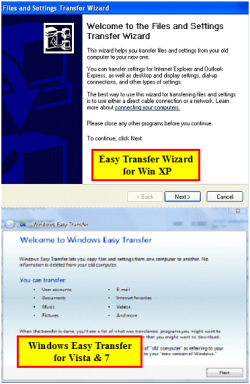
Easy Transfer Wizard will not work on Vista or Windows 7 as it is a Win XP app.
You need to use Windows Easy Transfer.

Capturewet.PNG
 
Last edited:

My Computer

OS
ME/XP/Vista/Win7
I used easy trasfer from vista to vista, as a test, then vista to 7; it could not have gone better
 

My Computer

Computer type
PC/Desktop
Computer Manufacturer/Model Number
Dell XPS 420
OS
Windows 10, Home Clean Install
CPU
Intel Core2 processsor Q8200(2.33Ghz 1333FSB) Quad Core Tech
Motherboard
Dell
Memory
6 gb
Graphics Card(s)
ATI Radeon 256MB HD3650
Sound Card
Intergrated 7.1 Channel Audio
Monitor(s) Displays
Dell SP2009W 20"
Hard Drives
640 GB Serial ATA Hard drive
Cooling
Fan
Keyboard
Dell USB Keyboard
Mouse
Dell Premium Optical USB
Internet Speed
DSL 2.85
I vote for manual data transfer of active User folders.

WET imports settings which are a corruption path that helps defeat the purpose of a clean install.

Go totally clean with fresh settings all around.
 
Back
Top