Help USBport.sys Latency Issue Major Problem

Dissolution

New member
Local time
2:09 PM
Messages
6
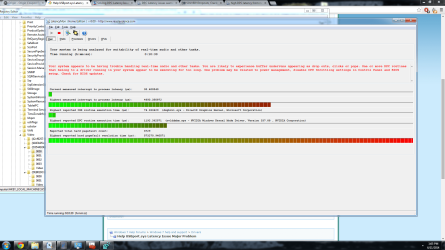
I have been having this strange memory leak for the past few weeks where my system will all of a sudden be incredibly bogged down, and the audio will start to crack and break as I am watching something or gaming. I thought it was a compatibility issue with my onboard sound, but I turned that off and the problem still persists. Today I was reading and I thought I would test my latency, and I found out that the USBport.sys is causing major latency issues in my system. The problem is that no matter where I look nobody has a real solution. Some have said that Windows released a patch for it, but when I tried to install the patch it told me that I already had it on my system..... Additionally, when I restart my computer it is generally fine for a day or two, but then it begins the cycle all over with latency problems.

I could really use some help to figure out why this is happening... I am open to any suggestions from anyone out there who might have some knowledge on this subject. I will try my best to provide any additional information that people may need to help me diagnose this issue completely. I should note that I have done a full virus/malware scan and found no issues. I have also updated all of the drivers on my board to see if that will fix the issue.

Thank you in advance.
 

My Computer

Computer type
PC/Desktop
Computer Manufacturer/Model Number
Custom Build
OS
Windows 7 64 bit
CPU
Intel i7 3770k
Motherboard
Sabertooth Z77
Memory
16 gig Corsair Vengeance
Graphics Card(s)
Asus Nvidia GTX 680
Hard Drives
Seagate 1tb
I should also point out that I am using LatencyMon to monitor the latency in real time, and I literally just restarted and I am already getting issues with my audio. Something is definitely wrong, but I want to avoid formatting at all costs.....
 

Attachments

  • latmonpic.png
    latmonpic.png
    113 KB · Views: 11
Last edited:

My Computer

Computer type
PC/Desktop
Computer Manufacturer/Model Number
Custom Build
OS
Windows 7 64 bit
CPU
Intel i7 3770k
Motherboard
Sabertooth Z77
Memory
16 gig Corsair Vengeance
Graphics Card(s)
Asus Nvidia GTX 680
Hard Drives
Seagate 1tb
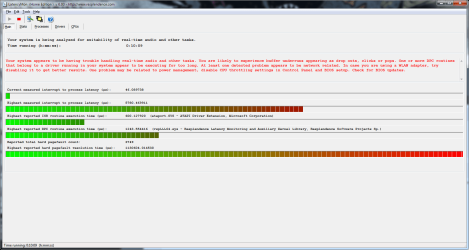
Now I am getting this...
 

Attachments

  • latmonpic2.png
    latmonpic2.png
    49.7 KB · Views: 3

My Computer

Computer type
PC/Desktop
Computer Manufacturer/Model Number
Custom Build
OS
Windows 7 64 bit
CPU
Intel i7 3770k
Motherboard
Sabertooth Z77
Memory
16 gig Corsair Vengeance
Graphics Card(s)
Asus Nvidia GTX 680
Hard Drives
Seagate 1tb
Open an elevated command prompt, type in sfc/scannow and hit enter. USBport.sys is a USB 1.1 and 2.0 port driver (Link) handled by Windows Updates so if there's a problem with the sfc/scannow may rectify it.

Report back with the results.
 

My Computer

Computer type
PC/Desktop
Computer Manufacturer/Model Number
Custom Build
OS
W7 Pro x64 SP1 | W10 Pro IP x64 | W8.1 Pro x64 VM | Linux Mint VM
CPU
i7-4790k @ 4GHz (4.4GHz Boost)
Motherboard
ASUS Sabertooth Z87 (BIOS Rev 2004)
Memory
16GB DDR3 Kingston HyperX Fury @ 1600MHz CL 9-9-9-27
Graphics Card(s)
EVGA GTX 980 Classified
Sound Card
Realtek Onboard
Monitor(s) Displays
Samsung S27D390
Screen Resolution
1920 x 1080
Hard Drives
240GB Intel 520 Series SSD |
Samsung 850 EVO 120GB SSD |
2TB WD Caviar Black |
2TB WD Caviar Green
PSU
Corsair HX850-80 Gold Modular
Case
Cooler Master Silencio 650
Cooling
Corsair H80i w/2 x Corsair SP120 | 2 x 120mm Noctua NF-S12B
Keyboard
Microsoft Sidewinder X4
Mouse
Gigabyte M6900 optical
Internet Speed
152mb
Antivirus
F-Secure
Browser
Firefox 38.0
Other Info
Backup Rig: Win 7 Pro 64-bit | AMD A10-5800k | ASUS F2A85-V Pro | 8GB Samsung DDR3 @1600MHz | 120GB Toshiba SDD | 2TB Seagate HDD | Cooler Master Silencio 550
Thank you. I am running the scan now...
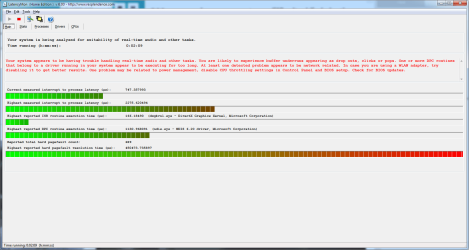
In the meantime.... this is what Latencymon is showing...
 

Attachments

  • latmonpic3.png
    latmonpic3.png
    43.6 KB · Views: 3

My Computer

Computer type
PC/Desktop
Computer Manufacturer/Model Number
Custom Build
OS
Windows 7 64 bit
CPU
Intel i7 3770k
Motherboard
Sabertooth Z77
Memory
16 gig Corsair Vengeance
Graphics Card(s)
Asus Nvidia GTX 680
Hard Drives
Seagate 1tb
Windows Resource Protection did not find any integrity violations... Sigh
 

My Computer

Computer type
PC/Desktop
Computer Manufacturer/Model Number
Custom Build
OS
Windows 7 64 bit
CPU
Intel i7 3770k
Motherboard
Sabertooth Z77
Memory
16 gig Corsair Vengeance
Graphics Card(s)
Asus Nvidia GTX 680
Hard Drives
Seagate 1tb

My Computer

Computer type
PC/Desktop
Computer Manufacturer/Model Number
Custom Built
OS
Windows 10 Pro
CPU
AMD Ryzen 5 2400G Processor with Radeon RX Vega 11 Graphics
Motherboard
ASRock X470 Master SLI/AC AM4 AMD Promontory X470 SATA 6Gb/s
Memory
G.SKILL Ripjaws V Series 16GB (2 x 8GB) 288-Pin DDR4 SDRAM D
Graphics Card(s)
2047MB NVIDIA GeForce GTX 1060 6GB (EVGA)
Sound Card
Motherboard Built in
Monitor(s) Displays
Acer R240HY bidx 23.8-Inch IPS HDMI DVI VGA (1920 x 1080) Wi
Screen Resolution
1920 x 1080
Hard Drives
1TB Sandisk SSD PLUS (Main drive)
500 GB Seagate 7200 RPM (Games)
500 GB Western Digital 7200 RPM (Virtual Machines)
PSU
CORSAIR TX Series TX650M 650W 80+ Gold Modular Power Supply
Case
CORSAIR CARBIDE SPEC-02 Mid-Tower Gaming Case, Red LED Fan
Cooling
220mm, two 120mm, and four 60mm fans
Keyboard
Wired Dell keyboard
Mouse
Wireless Logitech mouse
Internet Speed
250mb down, 30mb up
Antivirus
Panda Cloud Antivirus
Browser
Chrome-ish x64
Other Info
Your awesome for reading this.
I decided to update my system to Windows 8.1, but the problem seemed to persist through a complete wipe of my entire system. After updating every single driver I think I might have fixed it.... I still have a few errors that I am not sure of such as 1002 and 7000. The 1002 only happened once while I was playing Sleeping Dogs, and the 7000 error has only happened a few times. I am pretty sure the latency is gone though, but I am not sure how to check. I was told that LatencyMon is a bs program and not to use it. I haven't really noticed any drop outs since all the drivers have been updated..... how should I test it?

Any suggestions?
 

My Computer

Computer type
PC/Desktop
Computer Manufacturer/Model Number
Custom Build
OS
Windows 7 64 bit
CPU
Intel i7 3770k
Motherboard
Sabertooth Z77
Memory
16 gig Corsair Vengeance
Graphics Card(s)
Asus Nvidia GTX 680
Hard Drives
Seagate 1tb
Back
Top