HELP !!! Windows Major Crash re-upgrade from Vista

ikwi

New member
Local time
11:33 PM
Messages
5
I have brought a second hand Compaq Presario which was upgraded from Vista to Windows 7. The computer still has the original Vista serial number on it
The computer has crashed completely and I am unable to boot it. I don't have repair disk or the Win & installation disk and the computer is outside warranty period.

What I want is can I go back to Microsoft and use the original Vista product code to reload a Win 7 O/S?
 

My Computer My Computer

At a glance

7 Home
Computer type
Laptop
Computer Manufacturer/Model Number
Compaq Presario
OS
7 Home
Browser
Firefox
Hi ikwi,
Yes, if Vista on your machine was 64 bit and the Win7 you have now is upgrade.
Does your win7 product key match the Vista sticker product key?
(25 character key 5 sets of 5 alpha-numeric) not product ID
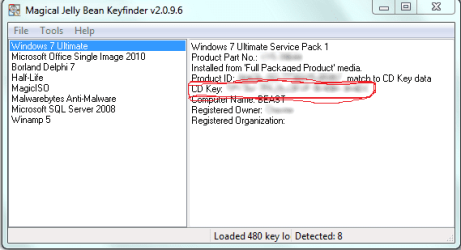
magic jellybean will find your product key on your machine.
Repair Install
Ultimate iso available.
TechBench
All editions ( pro, home premium, etc ) can be made available from any windows 7 iso - either by removing the ei.cfg file from the sources folder, or by using
eicfg_removal_utility.zip
Repair Install Video
eicfc utility video
 

My Computer My Computer

At a glance

Win 10 x64, Linux Lite, Win 7 x64, BlackArch,...
Computer type
PC/Desktop
Computer Manufacturer/Model Number
HP Desktop & Compaq Laptop
OS
Win 10 x64, Linux Lite, Win 7 x64, BlackArch, & Kali
Hard Drives
Samsung 850 Pro 256Gb,
Hitachi HDD 1Tb,
Crucial MX SSD 250Gb
Segate 3Tb USB 3.0 Ext. Backup HDD
Internet Speed
150Mbps dn, 20Mbps up
Antivirus
Avast Free, Malwarebytes Anti-Exploit & Anti-Ransomware
Browser
Firefox, Chrome, Opera, & VPN
It's a 32 bit system.
The computer was upgraded by the store I bought it from so I don't have the WIn 7 product key but I do have the Vista product key
 

My Computer My Computer

At a glance

7 Home
Computer type
Laptop
Computer Manufacturer/Model Number
Compaq Presario
OS
7 Home
Browser
Firefox
magic jellybean will find your Windows 7 product key on your machine.
Windows stores your product key as hexi-decimal, i.e. base 16.
MagicJellybean, Belarc Advisor and other programs will convert Base 16/hex to alpha-neumeric/base 10.
Your Vista x32 product key will not work on your Win7 x64 machine!
Therefore, you will have to obtain the product key, not product ID via MagicJellybean.

Capture.PNG
 

My Computer My Computer

At a glance

Win 10 x64, Linux Lite, Win 7 x64, BlackArch,...
Computer type
PC/Desktop
Computer Manufacturer/Model Number
HP Desktop & Compaq Laptop
OS
Win 10 x64, Linux Lite, Win 7 x64, BlackArch, & Kali
Hard Drives
Samsung 850 Pro 256Gb,
Hitachi HDD 1Tb,
Crucial MX SSD 250Gb
Segate 3Tb USB 3.0 Ext. Backup HDD
Internet Speed
150Mbps dn, 20Mbps up
Antivirus
Avast Free, Malwarebytes Anti-Exploit & Anti-Ransomware
Browser
Firefox, Chrome, Opera, & VPN
The computer I have is Win 7 32 bit, the Vista is 32 bit.
I cannot boot up that computer as it will not progress past the BIOS.
I was hoping to use my other computer (XP) to access Microsoft and use the Vista product code to download Win 7 (which I believe the store has already done.)
 

My Computer My Computer

At a glance

7 Home
Computer type
Laptop
Computer Manufacturer/Model Number
Compaq Presario
OS
7 Home
Browser
Firefox
You're sure it's windows 7 32 bit?
If you have an OEM version of Vista upgraded to Windows 7, accessing Microsoft for
an ISO download will be fruitless.

Do you know how to download an ISO image and burn it to disk?
The TechBench link I provided in post will permit you to download Win7 x32 ISO image without need of product key.
Burning ISO images with ImgBurn
If you make a Win7 DVD you can use it to repair windows startup. I'd shy away from repair install, being that you're not sue that the Win7 was an upgrade from Vista. If, by chance, it wasn't done via upgrade, your product keys may differ. It's important for Microsoft verification of Genuine Windows
 

My Computer My Computer

At a glance

Win 10 x64, Linux Lite, Win 7 x64, BlackArch,...
Computer type
PC/Desktop
Computer Manufacturer/Model Number
HP Desktop & Compaq Laptop
OS
Win 10 x64, Linux Lite, Win 7 x64, BlackArch, & Kali
Hard Drives
Samsung 850 Pro 256Gb,
Hitachi HDD 1Tb,
Crucial MX SSD 250Gb
Segate 3Tb USB 3.0 Ext. Backup HDD
Internet Speed
150Mbps dn, 20Mbps up
Antivirus
Avast Free, Malwarebytes Anti-Exploit & Anti-Ransomware
Browser
Firefox, Chrome, Opera, & VPN
Great thank you for the links. Although the little message at the bottom right of my screen and the pop ups are somewhat disconcerting. (Just call me Kim DotCom):D
Now just one more question; I use my XP computer to run my railway, with all the associated bits and pieces by which I mean track plans, DCC and a Java based program.
Is it possible to network the WIN 7 with the XP to run these programs or do I have to download them again on to WIN 7.
I have already set up a homegroup network which enables me to transfer files but I need the programs to open them.
 

My Computer My Computer

At a glance

7 Home
Computer type
Laptop
Computer Manufacturer/Model Number
Compaq Presario
OS
7 Home
Browser
Firefox
..

I know that maybe this would sound stupid, but try installing vista with your OEM key and download ISO file of Win7 and do the upgade.
 

My Computer My Computer

At a glance

Windows 7 Home Premium 64-bitAMD A4 6210 Quad-Core 1.8ghz4GB DDR3Integrated AMD Radeon R3 6210
Computer type
Laptop
Computer Manufacturer/Model Number
Acer
OS
Windows 7 Home Premium 64-bit
CPU
AMD A4 6210 Quad-Core 1.8ghz
Motherboard
Larne
Memory
4GB DDR3
Graphics Card(s)
Integrated AMD Radeon R3 6210
Hard Drives
500GB WD Blue
Antivirus
/
Browser
Chrome, Firefox
I don't have the original Vista but the product key is on the back.
Are you saying I should download Vista using this product key then using this as a stepping stone to upgrade to Win 7.
 

My Computer My Computer

At a glance

7 Home
Computer type
Laptop
Computer Manufacturer/Model Number
Compaq Presario
OS
7 Home
Browser
Firefox
Back
Top