

Specs:
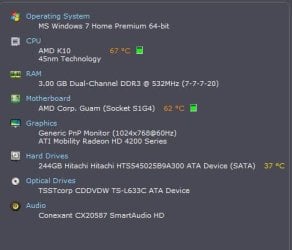
I'm working on the heat issue, she has no canned air, nor a vaccuum with a hose attachment. She is not exactly computer savvy, and lives 2500 miles away, so most of the suggestions I will try through teamviewer, unless I can text her simple directions.
The main problem is that windows tend to spazz out, like, the tabs go away in chrome, or the menu bar will dissappear. I have a hunch it's malware or a virus, but I was hoping for a direction to go in.
Steps taken:
I have installed MSE and removed Norton NIS 2011, AVG 2011, and McCrapfree which were all previously installed by other "helpers." She torrents a LOT of stuff, which I tried to discourage, but she will have none of it because several other bone heads have told her it's the "safest way" to get stuff. I have tried to inform her that this is incorrect, but it's not getting through. UAC is enabled, ran a full scan with MSE and Malwarebytes, and the issue went away for a couple days.
The issue also tends to go away with pressing the control or shift button, or a combination of the two. But, that issue was persistent until the malwarebytes scan. I doubt she will be all for a reinstall, and I doubt she has the media. I am currently uninstalling toshiba's OEM crapware, along with countless toolbars and the like, as well, and have disabled all but about 10 startup processes.
I'm working on the heat issue, she has no canned air, nor a vaccuum with a hose attachment. She is not exactly computer savvy, and lives 2500 miles away, so most of the suggestions I will try through teamviewer, unless I can text her simple directions.
The main problem is that windows tend to spazz out, like, the tabs go away in chrome, or the menu bar will dissappear. I have a hunch it's malware or a virus, but I was hoping for a direction to go in.
Steps taken:
I have installed MSE and removed Norton NIS 2011, AVG 2011, and McCrapfree which were all previously installed by other "helpers." She torrents a LOT of stuff, which I tried to discourage, but she will have none of it because several other bone heads have told her it's the "safest way" to get stuff. I have tried to inform her that this is incorrect, but it's not getting through. UAC is enabled, ran a full scan with MSE and Malwarebytes, and the issue went away for a couple days.
The issue also tends to go away with pressing the control or shift button, or a combination of the two. But, that issue was persistent until the malwarebytes scan. I doubt she will be all for a reinstall, and I doubt she has the media. I am currently uninstalling toshiba's OEM crapware, along with countless toolbars and the like, as well, and have disabled all but about 10 startup processes.
My Computer
At a glance
W7 Professional x64AMD Athlon II X3 445 Rana 3.10 GHzPNY XLR DDR3 1600 4x2GBNVIDIA GeForce GTS 450 (fermi) 1GB GDDR5
- Computer Manufacturer/Model Number
- Pugh Technologies
- OS
- W7 Professional x64
- CPU
- AMD Athlon II X3 445 Rana 3.10 GHz
- Motherboard
- MSI 870A-G54
- Memory
- PNY XLR DDR3 1600 4x2GB
- Graphics Card(s)
- NVIDIA GeForce GTS 450 (fermi) 1GB GDDR5
- Sound Card
- Realtek ALC892 onboard
- Monitor(s) Displays
- ASUS VE205t, Viewsonic VX2035WM
- Screen Resolution
- 1600x900, 1600x1050
- Hard Drives
- 977GB Hitachi Hitachi HDS721010CLA332
244GB Western Digital WDC WD2500AAJS-65B4A0
488GB Western Digital WDC WD5000AAJS-00A8B0
488GB Western Digital WDC WD5000AAKS-00UU3A0
- PSU
- Antec EarthWatts EA650 650W
- Case
- ThermalTake Armor A90 Mid Tower
- Cooling
- 3x 120mm in, 1x 120mm & 200mm out, self built hydro-cooler
- Keyboard
- Logitec 55
- Mouse
- Razer Deathadder
- Internet Speed
- 20 Mbps D/L, 9 Mbps U/L

