Help with a Pioneer DVR-KD08 DVD Rom Drive and Windows 7

Briank0411

New member
Local time
6:07 PM
Messages
6
Good eveingin all. I recently purchased this pc, a Acer Extensa 5620z, from ebay. The seller updated the os from vista to windows 7 ultimate. When he told me that the DVD Rom did not spin, he assumed that it was broken. I have purchased another drive, same type and model number, and still have the same problem. The drive will not open and when I try to eject it from my computer icon, it says there is an error in the DVD Drive. I have uninstalled and reinstalled the drive as well as trying to update the drivers. Nothing has worked.

I AM GOING CRAZY! HELP.
 

My Computer My Computer

At a glance

Windows 7 Ultimate 64Inel (R) Core (TM) Dou CPU2 GB
Computer Manufacturer/Model Number
Acer Extensa 5620Z
OS
Windows 7 Ultimate 64
CPU
Inel (R) Core (TM) Dou CPU
Memory
2 GB

My Computer My Computer

At a glance

Originally Win 7 Hm Prem x64 Ver 6.1.7600 Bui...Intel i3 530 2.93GHz, 2933MHz 2 Cores 4 Logic...6GB of 1,333MHz DDR3 SDRAM32MB Intel Graphics Media Accelerator HD IGChip
Computer type
PC/Desktop
Computer Manufacturer/Model Number
Gateway DX4831-01e (Mid-Tower Desktop)
OS
Originally Win 7 Hm Prem x64 Ver 6.1.7600 Build 7601-SP1 | Upgraded to Windows 10 December 14, 2019
CPU
Intel i3 530 2.93GHz, 2933MHz 2 Cores 4 Logical Processors
Motherboard
Gateway H57M01 133 megahertz
Memory
6GB of 1,333MHz DDR3 SDRAM
Graphics Card(s)
32MB Intel Graphics Media Accelerator HD IGChip
Sound Card
Realtek High Definition Audio
Monitor(s) Displays
Gateway HX2000 20inch TFT active matrix TN
Screen Resolution
1600 x 900 x 59 hertz
Hard Drives
WDC WD10EADS-00M2B0 [HDD] (1000.20 GB) -- drive 0,
HL-DT-ST DVDRAM GH41N [CD-ROM dr]
Four card readers, and Four USB 2.0
PSU
300watts.
Case
Mid-Tower Desktop
Cooling
Stock from Gateway
Keyboard
Natural Ergonomic Keyboard 4000, see Other Info
Mouse
Orig. Gateway wore out now using Insignia USB wired optical
Internet Speed
Vz FIOS 10ms png 57.64Mbps down 65.53Mbps up Speedtest.org
Antivirus
Zamana Anti-logger with Anti-malware, MSE, Windows Firewall,
Browser
IE11.0.9600.19399-Upd ver11.0.135, Firefox 68.0.1 x64
Other Info
System Specs by Belarc.

BIOS: American Megatrends Inc. P01-A0 11/17/2009

Replaced the MS 'Natural' Standard PS/2 Enhanced 101-102 Keyboard with a new Natural Ergonomic Keyboard 4000 on August 1st 2014.

Canon Pixma MG3222 Printer.

Updated to IE11 on 12102015 | Fios Quantum Router g1100

Additional AV: SpywareBlaster, manual Mbam, SAS
Thanks

I tried that and it still doesnt let me use the drive. I can see it. It says that all the drivers are up to date. Yet the drive doesnt open.
 

My Computer My Computer

At a glance

Windows 7 Ultimate 64Inel (R) Core (TM) Dou CPU2 GB
Computer Manufacturer/Model Number
Acer Extensa 5620Z
OS
Windows 7 Ultimate 64
CPU
Inel (R) Core (TM) Dou CPU
Memory
2 GB
You could try this reg. file go here and follow the instructions:
http://www.sevenforums.com/drivers/86056-cd-dvd-drive-missing.html#post748547

There may be three solutions here:
Windows 7 DVD Drive Not Working Problem Missing Disappeared Error Gone Not Found Not Recognized in x64 and x86 | Capitalhead.com
Post back if you need help with the registry mods. The reg file in my first post might be a batch file that does what solution #2 does in my second link.

This sounds like the seller corrupted the registry or used unsigned drivers when he upgraded from Vista to 7

Do me a favor please? Just to rule these out.
Go to Control Panel\All Control Panel Items\System and at the bottom left do you see "Windows is activated"?
Then at the bottom right corner, does it show a rectangular blue sticker saying "Ask for Genuine Windows software"?

Run any Commands at the CMD prompt as elevated (Administrator).
http://www.sevenforums.com/tutorials/783-elevated-command-prompt.html
 

My Computer My Computer

At a glance

Originally Win 7 Hm Prem x64 Ver 6.1.7600 Bui...Intel i3 530 2.93GHz, 2933MHz 2 Cores 4 Logic...6GB of 1,333MHz DDR3 SDRAM32MB Intel Graphics Media Accelerator HD IGChip
Computer type
PC/Desktop
Computer Manufacturer/Model Number
Gateway DX4831-01e (Mid-Tower Desktop)
OS
Originally Win 7 Hm Prem x64 Ver 6.1.7600 Build 7601-SP1 | Upgraded to Windows 10 December 14, 2019
CPU
Intel i3 530 2.93GHz, 2933MHz 2 Cores 4 Logical Processors
Motherboard
Gateway H57M01 133 megahertz
Memory
6GB of 1,333MHz DDR3 SDRAM
Graphics Card(s)
32MB Intel Graphics Media Accelerator HD IGChip
Sound Card
Realtek High Definition Audio
Monitor(s) Displays
Gateway HX2000 20inch TFT active matrix TN
Screen Resolution
1600 x 900 x 59 hertz
Hard Drives
WDC WD10EADS-00M2B0 [HDD] (1000.20 GB) -- drive 0,
HL-DT-ST DVDRAM GH41N [CD-ROM dr]
Four card readers, and Four USB 2.0
PSU
300watts.
Case
Mid-Tower Desktop
Cooling
Stock from Gateway
Keyboard
Natural Ergonomic Keyboard 4000, see Other Info
Mouse
Orig. Gateway wore out now using Insignia USB wired optical
Internet Speed
Vz FIOS 10ms png 57.64Mbps down 65.53Mbps up Speedtest.org
Antivirus
Zamana Anti-logger with Anti-malware, MSE, Windows Firewall,
Browser
IE11.0.9600.19399-Upd ver11.0.135, Firefox 68.0.1 x64
Other Info
System Specs by Belarc.

BIOS: American Megatrends Inc. P01-A0 11/17/2009

Replaced the MS 'Natural' Standard PS/2 Enhanced 101-102 Keyboard with a new Natural Ergonomic Keyboard 4000 on August 1st 2014.

Canon Pixma MG3222 Printer.

Updated to IE11 on 12102015 | Fios Quantum Router g1100

Additional AV: SpywareBlaster, manual Mbam, SAS
I tried to do what you asked. I do not have upper and lower filters and for some reason, I only have an F2 when I reboot. No F8. I also can not access the administrator comand prompt. When I do it it still comes up as C:\User\Owner> though the top of the window does say Administratr Comand Prompt.

What the hell did I buy???? Last time I get something for a cheap price, I will make sure everything works.
 

My Computer My Computer

At a glance

Windows 7 Ultimate 64Inel (R) Core (TM) Dou CPU2 GB
Computer Manufacturer/Model Number
Acer Extensa 5620Z
OS
Windows 7 Ultimate 64
CPU
Inel (R) Core (TM) Dou CPU
Memory
2 GB
Now, now, Brian no need to swear. It will just take some time and patience to figure this out.

Your description of the CMD prompts sounds convoluted. Here are the two prompts, and what they should look like. Clicking on the pix will enlarge it.
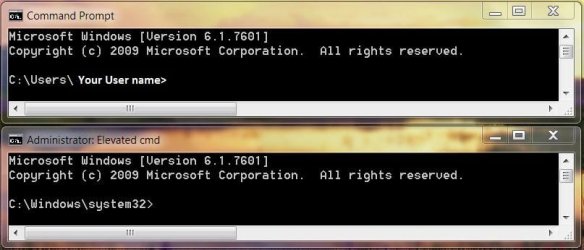
CMDPrompts.JPG
The top prompt is a regular prompt it will only say CMD Prompt in the title bar, and the input line starts with C:\User\ and then your user name>.

The Administrator Prompt has Administrator: Elevated Command in the title bar, and the input line starts with C:\Windows\system32>.

Can you explain what I underlined here?
The drive will not open and when I try to eject it from my computer icon, it says there is an error in the DVD Drive.
Can you tell me. Does the DVD drive make any spinning/whirring noises, any lights blinking?

And can you check this for me please?
Do me a favor please? Just to rule these out.
Go to Control Panel\All Control Panel Items\System and at the bottom left do you see "Windows is activated"?
Then at the bottom right corner, does it show a rectangular blue sticker saying "Ask for Genuine Windows software"?
Do you notice any :warn: in Device Manager? Go down all the triangles and open them to make sure there are none hiding, especially where it says >DVD/CD-ROM Drives.

You can open Device Manager quickly by typing devmgmt.msc into RUN or SEARCH and pressing ENTER.
If you use search pick the first listing under Programs

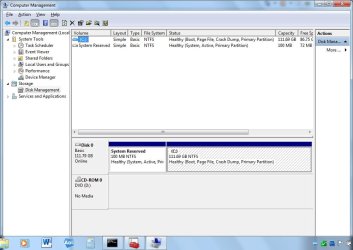
I would also like you to go into Computer Management, and post a screen shot of your drives.
http://www.sevenforums.com/tutorials/9733-screenshots-files-upload-post-seven-forums.html

You can open Computer Management quickly by typing Computer Management into SEARCH and pressing ENTER.
When you use search pick the first listing under Programs

In the left column, go down to the triangle beside Storage, and click on it, you will see a sub-category called Disk Management. Give it a short time to build a report, and show it.

The sides are drag-able so you can enlarge the center section or you could just click on maximize in the upper right corner of the title bar.

Using the Snipping Tool, it is only necessary to show this much. I will use my management area to show you what we need.
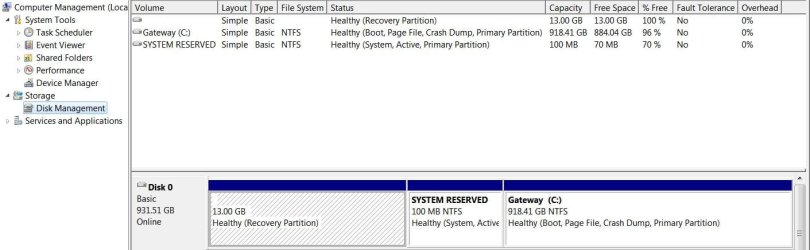
DiskManagement.JPG

I did find an interesting site for your Acer, I do not know if you have been there yet:
Acer Extensa 5220 5620 5620Z


One last question for now, did you recieve any disks when you purchased your machine?

 

My Computer My Computer

At a glance

Originally Win 7 Hm Prem x64 Ver 6.1.7600 Bui...Intel i3 530 2.93GHz, 2933MHz 2 Cores 4 Logic...6GB of 1,333MHz DDR3 SDRAM32MB Intel Graphics Media Accelerator HD IGChip
Computer type
PC/Desktop
Computer Manufacturer/Model Number
Gateway DX4831-01e (Mid-Tower Desktop)
OS
Originally Win 7 Hm Prem x64 Ver 6.1.7600 Build 7601-SP1 | Upgraded to Windows 10 December 14, 2019
CPU
Intel i3 530 2.93GHz, 2933MHz 2 Cores 4 Logical Processors
Motherboard
Gateway H57M01 133 megahertz
Memory
6GB of 1,333MHz DDR3 SDRAM
Graphics Card(s)
32MB Intel Graphics Media Accelerator HD IGChip
Sound Card
Realtek High Definition Audio
Monitor(s) Displays
Gateway HX2000 20inch TFT active matrix TN
Screen Resolution
1600 x 900 x 59 hertz
Hard Drives
WDC WD10EADS-00M2B0 [HDD] (1000.20 GB) -- drive 0,
HL-DT-ST DVDRAM GH41N [CD-ROM dr]
Four card readers, and Four USB 2.0
PSU
300watts.
Case
Mid-Tower Desktop
Cooling
Stock from Gateway
Keyboard
Natural Ergonomic Keyboard 4000, see Other Info
Mouse
Orig. Gateway wore out now using Insignia USB wired optical
Internet Speed
Vz FIOS 10ms png 57.64Mbps down 65.53Mbps up Speedtest.org
Antivirus
Zamana Anti-logger with Anti-malware, MSE, Windows Firewall,
Browser
IE11.0.9600.19399-Upd ver11.0.135, Firefox 68.0.1 x64
Other Info
System Specs by Belarc.

BIOS: American Megatrends Inc. P01-A0 11/17/2009

Replaced the MS 'Natural' Standard PS/2 Enhanced 101-102 Keyboard with a new Natural Ergonomic Keyboard 4000 on August 1st 2014.

Canon Pixma MG3222 Printer.

Updated to IE11 on 12102015 | Fios Quantum Router g1100

Additional AV: SpywareBlaster, manual Mbam, SAS
Thanks for the help in advance.

First thing is when I ask to run as an administrator, it only comes up with the first prompt you have in your example. I can not access the Admin command prompt.

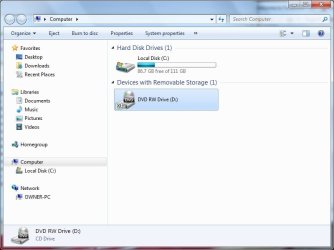
When I go to the Computer icon in the start menu, the two things that are shown are my Toshiba Hard Drive and my DVD Drive. I then right click and tell the drive to eject. This causes the yellow light to come on and after a few seconds, the error message "An error message occurred while ejecting the DVD RW Drive."

The drive does not spin nor make any noise and the only time the light comes on is when I ask the pc to eject the disc for me. When I push the button, nothing happens.

My windows is active and I do have a blue sticker saying "ask for genuine windows software."

I opened up all the devises in my device manager and did not find any
warnsmall.png
next to them.

Drives.jpg

computer drives.jpg

The only discs I got were the restore disc for vista. He said he lost the windows disc when he moved.

Hope this helps and again thanks for all your help.
 

My Computer My Computer

At a glance

Windows 7 Ultimate 64Inel (R) Core (TM) Dou CPU2 GB
Computer Manufacturer/Model Number
Acer Extensa 5620Z
OS
Windows 7 Ultimate 64
CPU
Inel (R) Core (TM) Dou CPU
Memory
2 GB
Did you try this reg. file?
Cd\dvd drive missing!

If that does not help try:
Go to device manager and uninstall the CD/DVD drive
Press Win+R and type regedit
Navigate to HKEY_LOCAL_MACHINE\SYSTEM\CurrentControlSet\Control\Class
Locate the entry {4D36E965-E325-11CE-BFC1-08002BE10318}
On the right side, locate the entry UpperFilters and delete it
locate the entry LowerFilters and delete that as well
Close regedit
Restart

Upon restart, windows will automatically install the driver for your CD/DVD ROM device. Verify results of the operation in device manager.

Note: If you find multiple entries of {4D36E965-E325-11CE-BFC1-08002BE10318}, you might want to go through each and every one to make sure that the upper and lower filter entries are removed. You must make sure that you are in the appropriate registry subkey before deleting the UpperFilters and the LowerFilters values. To verify this, make sure that the Default data value is DVD/CD-ROM and the Class data value is CDROM.

Important: if you've installed any 3rd party burning software like Nero, PowerISO, etc. they would need to be re-installed after these steps.
Source: http://www.sevenforums.com/drivers/...ive-not-useable-new-w7-install.html#post40127
Even if there is only one or the other, high or low delete the entry.


The image of your Disk Management does not look good, There is no Recovery partition listed.


He said he lost the windows disc when he moved.
That is a poor excuse!

Is there any time limit on if you can get your money back?


There is one other way to see if you have a valid copy of Windows.

Go here download and install Microsoft Security Essentials (MSE).

Before it installs it will check to see if you have a valid/genuine copy of Windows. if you do not it will not install.
 

My Computer My Computer

At a glance

Originally Win 7 Hm Prem x64 Ver 6.1.7600 Bui...Intel i3 530 2.93GHz, 2933MHz 2 Cores 4 Logic...6GB of 1,333MHz DDR3 SDRAM32MB Intel Graphics Media Accelerator HD IGChip
Computer type
PC/Desktop
Computer Manufacturer/Model Number
Gateway DX4831-01e (Mid-Tower Desktop)
OS
Originally Win 7 Hm Prem x64 Ver 6.1.7600 Build 7601-SP1 | Upgraded to Windows 10 December 14, 2019
CPU
Intel i3 530 2.93GHz, 2933MHz 2 Cores 4 Logical Processors
Motherboard
Gateway H57M01 133 megahertz
Memory
6GB of 1,333MHz DDR3 SDRAM
Graphics Card(s)
32MB Intel Graphics Media Accelerator HD IGChip
Sound Card
Realtek High Definition Audio
Monitor(s) Displays
Gateway HX2000 20inch TFT active matrix TN
Screen Resolution
1600 x 900 x 59 hertz
Hard Drives
WDC WD10EADS-00M2B0 [HDD] (1000.20 GB) -- drive 0,
HL-DT-ST DVDRAM GH41N [CD-ROM dr]
Four card readers, and Four USB 2.0
PSU
300watts.
Case
Mid-Tower Desktop
Cooling
Stock from Gateway
Keyboard
Natural Ergonomic Keyboard 4000, see Other Info
Mouse
Orig. Gateway wore out now using Insignia USB wired optical
Internet Speed
Vz FIOS 10ms png 57.64Mbps down 65.53Mbps up Speedtest.org
Antivirus
Zamana Anti-logger with Anti-malware, MSE, Windows Firewall,
Browser
IE11.0.9600.19399-Upd ver11.0.135, Firefox 68.0.1 x64
Other Info
System Specs by Belarc.

BIOS: American Megatrends Inc. P01-A0 11/17/2009

Replaced the MS 'Natural' Standard PS/2 Enhanced 101-102 Keyboard with a new Natural Ergonomic Keyboard 4000 on August 1st 2014.

Canon Pixma MG3222 Printer.

Updated to IE11 on 12102015 | Fios Quantum Router g1100

Additional AV: SpywareBlaster, manual Mbam, SAS
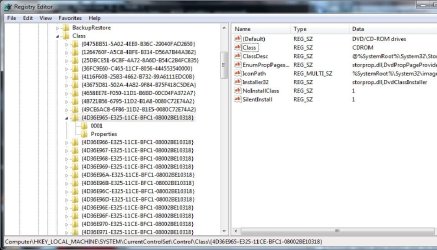
I wish I could get my money back. However it was an as is auction. This is the values that I have in my editor. There are no upper or lower filters.

registry editor.jpg

I am starting to think that the dvd rom drive is not compatible with windows 7. Could this be an issue?
 

My Computer My Computer

At a glance

Windows 7 Ultimate 64Inel (R) Core (TM) Dou CPU2 GB
Computer Manufacturer/Model Number
Acer Extensa 5620Z
OS
Windows 7 Ultimate 64
CPU
Inel (R) Core (TM) Dou CPU
Memory
2 GB
See if you have any upper or lower filters here:

[HKEY_LOCAL_MACHINE\SYSTEM\CurrentControlSet\Control\Class\{71A27CDD-812A-11DO-BEC7-08802BE2092F}]

If you do, make sure you have un-installed the previous driver for the dvd.
Go to Device Manager, and un-install it from there.

I had upper and lower in the right view pane, just right click on the entry, and delete.

Close regedit >Restart
Upon restart, windows should automatically install the driver for your CD/DVD ROM device. Verify results of the operation in device manager.


I changed my mind about the above instructions, it is for Storage Devices, and that would include your HDD.

Are you sure you went into Device Manager and un-installed the drivers for the DVD listed?
You have to do that before you check for the filters, and since you do not have any, the drivers need un-installed, then do a restart, and see if the OS can re-install.

If the OS can't load the drivers, and since you don't have a working player you will have to find the vista drivers, load them onto a USB Stick, and when the OS asks for them you can direct it to the USB drive were the drivers are located.

Or, you could try to load the drivers in my third link down, then you could download them from the site, and point the OS to them.

Do you have access to another machine? that way you could load the Vista CD, get the drivers, and put them on a stick.

Or, even network yours with another machine, and get the drivers from a shared folder.

In any event it sounds like you will have to load the drivers in Vista compatibility mode.

I am starting to think that the dvd rom drive is not compatible with windows 7. Could this be an issue?
You could run this Upgrade Advisor:
Windows 7 Upgrade Advisor - Download - Microsoft Windows

This link will confirm your Firmware level and other information will probably save to a text file, use the downloaded file numbers to locate later.
Click on firmware when you get there:DVR-KD08 - Slim-line Internal DVD/CD Writer for notebooks | Pioneer Electronics USA

I have found this with a link, it explains what's up:
Pioneer DVR-KD08 issues on Windows 7 - Microsoft Answers

This offers more troubleshooting tips:
pioneer dvd-rw dvrkd08 ata device - Microsoft Answers
 
Last edited:

My Computer My Computer

At a glance

Originally Win 7 Hm Prem x64 Ver 6.1.7600 Bui...Intel i3 530 2.93GHz, 2933MHz 2 Cores 4 Logic...6GB of 1,333MHz DDR3 SDRAM32MB Intel Graphics Media Accelerator HD IGChip
Computer type
PC/Desktop
Computer Manufacturer/Model Number
Gateway DX4831-01e (Mid-Tower Desktop)
OS
Originally Win 7 Hm Prem x64 Ver 6.1.7600 Build 7601-SP1 | Upgraded to Windows 10 December 14, 2019
CPU
Intel i3 530 2.93GHz, 2933MHz 2 Cores 4 Logical Processors
Motherboard
Gateway H57M01 133 megahertz
Memory
6GB of 1,333MHz DDR3 SDRAM
Graphics Card(s)
32MB Intel Graphics Media Accelerator HD IGChip
Sound Card
Realtek High Definition Audio
Monitor(s) Displays
Gateway HX2000 20inch TFT active matrix TN
Screen Resolution
1600 x 900 x 59 hertz
Hard Drives
WDC WD10EADS-00M2B0 [HDD] (1000.20 GB) -- drive 0,
HL-DT-ST DVDRAM GH41N [CD-ROM dr]
Four card readers, and Four USB 2.0
PSU
300watts.
Case
Mid-Tower Desktop
Cooling
Stock from Gateway
Keyboard
Natural Ergonomic Keyboard 4000, see Other Info
Mouse
Orig. Gateway wore out now using Insignia USB wired optical
Internet Speed
Vz FIOS 10ms png 57.64Mbps down 65.53Mbps up Speedtest.org
Antivirus
Zamana Anti-logger with Anti-malware, MSE, Windows Firewall,
Browser
IE11.0.9600.19399-Upd ver11.0.135, Firefox 68.0.1 x64
Other Info
System Specs by Belarc.

BIOS: American Megatrends Inc. P01-A0 11/17/2009

Replaced the MS 'Natural' Standard PS/2 Enhanced 101-102 Keyboard with a new Natural Ergonomic Keyboard 4000 on August 1st 2014.

Canon Pixma MG3222 Printer.

Updated to IE11 on 12102015 | Fios Quantum Router g1100

Additional AV: SpywareBlaster, manual Mbam, SAS
Back
Top