Before I did my clean install I was able to to this drive on or off and Windows would see it. Now in order for Windows to see the drive I have to turn the drive on and then do a full restart. It then will see the drive even if I shut it off. Then if I want to restart I have to hit the restart button or the PC will not re boot. It is seen in the Bios. So if someone can tell me how to Fix this I will appreciate it. If not I can make it into a USB drive but it will be slower.
Gary have you done all the WS updates also is your mobo's bios updated? Also does the external drive require drivers?
My Computer
At a glance
Windows 7 Ultimate 64i7 3770k OC'd 4.6 @ 1.17v, also FX 8120 & i5 ...32 gb G.Skill Sniper DDR3 10-12-12-31 @ 2133XFX Radeon 7870 2GB DDR5
Computer type
PC/Desktop
Computer Manufacturer/Model Number
A blend of brains, brawn and dumb luck.
OS
Windows 7 Ultimate 64
CPU
i7 3770k OC'd 4.6 @ 1.17v, also FX 8120 & i5 miniITX
Motherboard
MSI P67A-GD80 b3
Memory
32 gb G.Skill Sniper DDR3 10-12-12-31 @ 2133
Graphics Card(s)
XFX Radeon 7870 2GB DDR5
Sound Card
Sound Blaster Z Series Card
Monitor(s) Displays
(2) LG LED 23" 1920 x 1080 2ms Monitors via mini d-port
Screen Resolution
1680 X 1050 p
Hard Drives
Samsung 256 gb 830 SSD sata III
(1) 1 tb WD Black
(2) 1 tb Hitachi deskmates/sata II
(2) 1 tb WD green/sata II
(2) 3 tb Seagate Barracuda
(1) 120 gb OCZ Vertex SS
(1) Drobo 5N w/5 Seagate 3tb
PSU
EVGA modular 1000G2 80% gold rating & APC 1200 RS
Case
CoolerMaster Storm Styker
Cooling
7 case fans 140mm & 120mm, NZXT Kraken X60
Keyboard
(2) Logitech Illuminated Keyboards (1) usb (1) wireless
Mouse
Logitech G700 & T-BC21 - nano nx for the laptop
Internet Speed
Basic 120mbps down
Antivirus
Trend Micro Titanium Max Security & Malwarebytes Premium
Browser
Chrome and IE 10
Other Info
5 Noctua case fans + 3 Noctua in p/p on NZXT cooler
Integrated hot swap drive bays for 2.5" Drives
(2) Lite-on dvd/cd/Blu Ray optical 22X
Integrated fan controller and led on/off
HP Officejet Pro 8630 all-n-one
Hot-swappable 3.5" hard drive bay
Netgear Nighthawk router
Asus USB 3 & sata 6 PCIe card
Vantec IDE to sata adptr./Ultra sata adptr
Lenovo L420 i5 lappy with m sata
Drobo 5N advanced NAS
Gary, you may have missed " Rapid Storage Technology" software install.
Look on your M/B disk or download from support site.
This term is Intel, it maybe called something else with other brands.
Good luck
My Computer
At a glance
Windows 7 Ultimate x64 SP1 OEMIntel i7 3930KKingston Genesis KHX2133C11D3K4/32GAsus RTX 2070 Ti Turbo fan series
Computer type
PC/Desktop
Computer Manufacturer/Model Number
Owner Builder
OS
Windows 7 Ultimate x64 SP1 OEM
CPU
Intel i7 3930K
Motherboard
Asus X79 Deluxe
Memory
Kingston Genesis KHX2133C11D3K4/32G
Graphics Card(s)
Asus RTX 2070 Ti Turbo fan series
Sound Card
Creative Sound Blaster ZXR
Monitor(s) Displays
Samsung U32J39 UHD
Screen Resolution
3840 x 2160
Hard Drives
Samsung 860 Pro 256 GB
OCZ Vertex 4 512GB
Western Digital Black 4TB
PSU
Corsair AX850
Case
Gigabyte
Cooling
Push - Pull 120 mm Noctua PWM, Scythe Big Shuriken 2 Rev. B
Keyboard
Logitech K800 Backlit
Mouse
Logitech MX2 Master
Internet Speed
NBN 25 Mbps
Antivirus
Kaspersky Internet Security
Browser
Mozilla FireFox
Other Info
TP-Link Archer VR600v
Sennheiser TR220 WiFi Head Phones.
Gary I don't have e-sata so I can't do a lot of trial and error but I do have a suggestion.
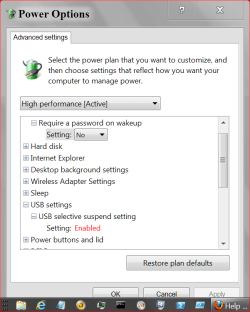
Look in power options and see if by chance their is something in there that can help.
When you go Star Orb and then hover over Computer does your drive show up when installed?
If it shows up can you go to Properties and see anything?
When installed do you see it in Disk Management and does it have a drive letter. Is it labeled NTSF, FAT or RAW.
My Computer
At a glance
Windows 10 Pro. 64/ version 1709 Windows 7 Pr...Intel i7-6800K @ 4.3Corsair Platinum 16 gig @2400EVGA GTX 1070 OC
Computer type
PC/Desktop
Computer Manufacturer/Model Number
Home made Desktop
OS
Windows 10 Pro. 64/ version 1709 Windows 7 Pro/64
CPU
Intel i7-6800K @ 4.3
Motherboard
ASUS X-99 Deluxe II
Memory
Corsair Platinum 16 gig @2400
Graphics Card(s)
EVGA GTX 1070 OC
Monitor(s) Displays
Asus 27" LED LCD/VE278Q
Screen Resolution
1920-1080 or 1280-720 HDMI
Hard Drives
INTEL SSD 730-240 Gb Sata 3.0/
PSU
EVGA Platium 1200W
Case
Phanteks Luxe Tempered Glass 8 fans/ one radiator
Cooling
XSPC/ Water Cooled CPU
Keyboard
Das 4 Professional
Mouse
Logitech M705/MX Anywhere 2-S
Internet Speed
100 mbits
Antivirus
Microsoft Security Essentials/ Malwarebytes Premium 3.0/ SAS
Browser
I.E. 11 default/Firefox/ ISP Time Warner Cable/Spectrum
Other Info
LG BluRay Burner/
Sound system-KLipsch-THX/
Icy Dock ssd Hot Swap bays.
I did about all I can do. I switched the connection to a USB port so at least it works. I only use it for backups so it won't be that much of a hassle. Through using Google , I have found that there are many users with the same problem. Yes it did show up and I could use it if I started the PC with it turned on. I used to be able to just turn it on and use it. I remember downloading some form of Chipset drivers on MajorGeeks but I don't remember what they were. I will get by.
More suggestions.
Device Manger.
Scan for new hardware.
Find your e-sata and update driver.
Reboot. Check for driver again. (Brows my computer for driver software) Tick on it, You should get (Let me pick from a list) pick one. Windows should of picked it up.
My Computer
At a glance
Windows 10 Pro. 64/ version 1709 Windows 7 Pr...Intel i7-6800K @ 4.3Corsair Platinum 16 gig @2400EVGA GTX 1070 OC
Computer type
PC/Desktop
Computer Manufacturer/Model Number
Home made Desktop
OS
Windows 10 Pro. 64/ version 1709 Windows 7 Pro/64
CPU
Intel i7-6800K @ 4.3
Motherboard
ASUS X-99 Deluxe II
Memory
Corsair Platinum 16 gig @2400
Graphics Card(s)
EVGA GTX 1070 OC
Monitor(s) Displays
Asus 27" LED LCD/VE278Q
Screen Resolution
1920-1080 or 1280-720 HDMI
Hard Drives
INTEL SSD 730-240 Gb Sata 3.0/
PSU
EVGA Platium 1200W
Case
Phanteks Luxe Tempered Glass 8 fans/ one radiator
Cooling
XSPC/ Water Cooled CPU
Keyboard
Das 4 Professional
Mouse
Logitech M705/MX Anywhere 2-S
Internet Speed
100 mbits
Antivirus
Microsoft Security Essentials/ Malwarebytes Premium 3.0/ SAS
Browser
I.E. 11 default/Firefox/ ISP Time Warner Cable/Spectrum
Other Info
LG BluRay Burner/
Sound system-KLipsch-THX/
Icy Dock ssd Hot Swap bays.
Windows 7 Ultimate 64i7 3770k OC'd 4.6 @ 1.17v, also FX 8120 & i5 ...32 gb G.Skill Sniper DDR3 10-12-12-31 @ 2133XFX Radeon 7870 2GB DDR5
Computer type
PC/Desktop
Computer Manufacturer/Model Number
A blend of brains, brawn and dumb luck.
OS
Windows 7 Ultimate 64
CPU
i7 3770k OC'd 4.6 @ 1.17v, also FX 8120 & i5 miniITX
Motherboard
MSI P67A-GD80 b3
Memory
32 gb G.Skill Sniper DDR3 10-12-12-31 @ 2133
Graphics Card(s)
XFX Radeon 7870 2GB DDR5
Sound Card
Sound Blaster Z Series Card
Monitor(s) Displays
(2) LG LED 23" 1920 x 1080 2ms Monitors via mini d-port
Screen Resolution
1680 X 1050 p
Hard Drives
Samsung 256 gb 830 SSD sata III
(1) 1 tb WD Black
(2) 1 tb Hitachi deskmates/sata II
(2) 1 tb WD green/sata II
(2) 3 tb Seagate Barracuda
(1) 120 gb OCZ Vertex SS
(1) Drobo 5N w/5 Seagate 3tb
PSU
EVGA modular 1000G2 80% gold rating & APC 1200 RS
Case
CoolerMaster Storm Styker
Cooling
7 case fans 140mm & 120mm, NZXT Kraken X60
Keyboard
(2) Logitech Illuminated Keyboards (1) usb (1) wireless
Mouse
Logitech G700 & T-BC21 - nano nx for the laptop
Internet Speed
Basic 120mbps down
Antivirus
Trend Micro Titanium Max Security & Malwarebytes Premium
Browser
Chrome and IE 10
Other Info
5 Noctua case fans + 3 Noctua in p/p on NZXT cooler
Integrated hot swap drive bays for 2.5" Drives
(2) Lite-on dvd/cd/Blu Ray optical 22X
Integrated fan controller and led on/off
HP Officejet Pro 8630 all-n-one
Hot-swappable 3.5" hard drive bay
Netgear Nighthawk router
Asus USB 3 & sata 6 PCIe card
Vantec IDE to sata adptr./Ultra sata adptr
Lenovo L420 i5 lappy with m sata
Drobo 5N advanced NAS
I had two WD 2TB My books running esata, when one of my mobo upgrades made then un-see able I had to choose an alternate method. When calling WD they said that it happens as no one manufacturer can predict and test for all other components and sometimes conflicts will arise. Later building to a new platform and mobo and the WD's are seen now.
My Computer
At a glance
Windows 7 Ultimate 64i7 3770k OC'd 4.6 @ 1.17v, also FX 8120 & i5 ...32 gb G.Skill Sniper DDR3 10-12-12-31 @ 2133XFX Radeon 7870 2GB DDR5
Computer type
PC/Desktop
Computer Manufacturer/Model Number
A blend of brains, brawn and dumb luck.
OS
Windows 7 Ultimate 64
CPU
i7 3770k OC'd 4.6 @ 1.17v, also FX 8120 & i5 miniITX
Motherboard
MSI P67A-GD80 b3
Memory
32 gb G.Skill Sniper DDR3 10-12-12-31 @ 2133
Graphics Card(s)
XFX Radeon 7870 2GB DDR5
Sound Card
Sound Blaster Z Series Card
Monitor(s) Displays
(2) LG LED 23" 1920 x 1080 2ms Monitors via mini d-port
Screen Resolution
1680 X 1050 p
Hard Drives
Samsung 256 gb 830 SSD sata III
(1) 1 tb WD Black
(2) 1 tb Hitachi deskmates/sata II
(2) 1 tb WD green/sata II
(2) 3 tb Seagate Barracuda
(1) 120 gb OCZ Vertex SS
(1) Drobo 5N w/5 Seagate 3tb
PSU
EVGA modular 1000G2 80% gold rating & APC 1200 RS
Case
CoolerMaster Storm Styker
Cooling
7 case fans 140mm & 120mm, NZXT Kraken X60
Keyboard
(2) Logitech Illuminated Keyboards (1) usb (1) wireless
Mouse
Logitech G700 & T-BC21 - nano nx for the laptop
Internet Speed
Basic 120mbps down
Antivirus
Trend Micro Titanium Max Security & Malwarebytes Premium
Browser
Chrome and IE 10
Other Info
5 Noctua case fans + 3 Noctua in p/p on NZXT cooler
Integrated hot swap drive bays for 2.5" Drives
(2) Lite-on dvd/cd/Blu Ray optical 22X
Integrated fan controller and led on/off
HP Officejet Pro 8630 all-n-one
Hot-swappable 3.5" hard drive bay
Netgear Nighthawk router
Asus USB 3 & sata 6 PCIe card
Vantec IDE to sata adptr./Ultra sata adptr
Lenovo L420 i5 lappy with m sata
Drobo 5N advanced NAS
No I ran MSI Live Update many times and it never said that needed to be updated. My PC is ~3 years old so maybe Live update only works on new machines,