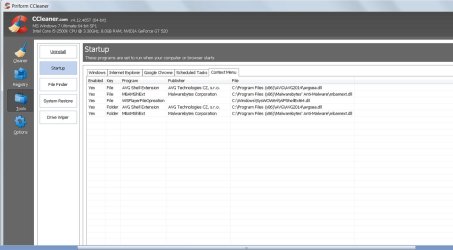
Not sure if this belongs here, but what the heck. I downloaded the program 'Wondershare,' I needed to convert some videos to disk so I could play them on my home dvd player.
I decided I didn't like the program so I deleted it through the Programs and Features in the Control Panel. However, it still left the remnants of what you see in this screen shot. Any ideas on how to remove/edit/delete this text??
The text I'm referring to is:
"Play With Wondershare Player"
"Add to Wondershare Player Playlist"
I decided I didn't like the program so I deleted it through the Programs and Features in the Control Panel. However, it still left the remnants of what you see in this screen shot. Any ideas on how to remove/edit/delete this text??
The text I'm referring to is:
"Play With Wondershare Player"
"Add to Wondershare Player Playlist"
Attachments
My Computer
- Computer type
- PC/Desktop
- Computer Manufacturer/Model Number
- Custom Build
- OS
- Windows 7 Ultimate x64
- CPU
- Intel i5-2500K
- Motherboard
- Gigabyte P67A-UD3-B3
- Memory
- 16GB
- Graphics Card(s)
- NVIDIA GeForce GT 710
- Sound Card
- Microsoft HD Audio
- Monitor(s) Displays
- AOC 21"
- Screen Resolution
- 1920 x 1080 x 60 hertz
- Hard Drives
- Seagate Barracuda 1000GB
- PSU
- Antec Neo ECO 620C
- Case
- Antec
- Cooling
- 2 case fans, video card fan
- Keyboard
- Insignia wireless
- Mouse
- Insignia wireless
- Internet Speed
- COX 89Mbps v, 9Mbps ^
- Antivirus
- AVG Free
- Browser
- Chrome