Solved Help with fans.

YTBOY83

New member
Pro User
VIP
Local time
11:21 PM
Messages
615
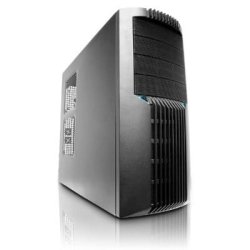
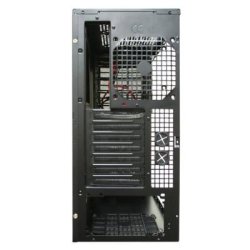
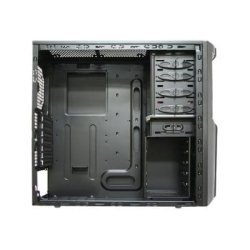
Have alook at the case pictures, can you please tell me which way i should have all the fans.???????????

A 120mm can be installed a front, 2 x 120 mm on the side and 140mm maximum on top of case.

The case is
NZXT Beta Evo


Black Metal Edition (BEVO-001BK)
 

Attachments
  • 41A6OODotpL._SS400_.jpg
    41A6OODotpL._SS400_.jpg
    14.7 KB · Views: 2
  • 41NxgTh0iZL._SS400_.jpg
    41NxgTh0iZL._SS400_.jpg
    10.4 KB · Views: 2
  • 41vvoS6zh+L._SS400_.jpg
    41vvoS6zh+L._SS400_.jpg
    12.4 KB · Views: 2
  • 51OF4QZrBiL._SS400_.jpg
    51OF4QZrBiL._SS400_.jpg
    14.9 KB · Views: 3

My Computer My Computer

At a glance

Windows 7 64Bit Ultimate Edition SP1AMD Phenom II X5 955 @ 3200 MhzG.Skill 12GB DDR3 1333MHzPalit GeForce GTX 550 Ti OC Sonic 1GB
Computer Manufacturer/Model Number
Customised
OS
Windows 7 64Bit Ultimate Edition SP1
CPU
AMD Phenom II X5 955 @ 3200 Mhz
Motherboard
Asus M5A99X EVO
Memory
G.Skill 12GB DDR3 1333MHz
Graphics Card(s)
Palit GeForce GTX 550 Ti OC Sonic 1GB
Sound Card
Onboard
Monitor(s) Displays
LG 32" HDTV
Screen Resolution
1920x1080 @ 60Hz
Hard Drives
Internal 250GB SATA 3.0 Western Digital WDC WD25 00AAKX-001CA0

Internal 500GB SATA 2.0 Seagate ST350041 3AS

Internal 500GB SATA 2.0 Western Digital WDC WD50 00AAKS-00WWP

External 1TB USB 2.0 Western Digital

External 2TB USB 2.0 Buffalo
PSU
Colors-IT 750w BLACK 12CM Silent
Case
Xigamatek CPC-T45UB-U01 Asgard Chassis
Cooling
4 120mm Fans In Total
Keyboard
ADVENT Illuminated Keyboard
Mouse
Genius
Internet Speed
30MB
Other Info
CPU Cooler - Cooler Master Hyper 212 Plus Cooler
Kind of an odd arrangement with the side fan slots.

Anyway, what you want is to have more air going in than out. That'll give you a negative pressure rig which is better for cooling than a positive or neutral pressure rig. It'll drag the air out quickly and get it out of the corners and such.

Therefore ()...

Front Fan = Input Air
Side Fans = Input Air
Back = Output Air
Top Fans = Output Air

Speeds: (N x Speed of Front Fan)

Front: 1
Side: 0.75
Back: 1.2
Top: 1

Basically you want your outgoing fans to be spinning a little faster than your incoming fans. You might be able to keep the top fan at the same speed as the front due to it being bigger. They could also work at the same speed if the CFM rating was higher on the output fans.

Here's a good explanation:
http://www.xoxide.com/computer-cooling.html
 
Last edited:

My Computer My Computer

At a glance

W7 Ult. x64 | OS XIntel Mobile Core 2 Duo 2.93Ghz [T9800 Penryn]4096MB Samsung DDR3 Dual Channel [PC3-8500F 1...NVIDIA GeForce 9600M GT 512MB [G96M Rev. C1]
Computer Manufacturer/Model Number
Apple Macbook Pro (April 2009)
OS
W7 Ult. x64 | OS X
CPU
Intel Mobile Core 2 Duo 2.93Ghz [T9800 Penryn]
Motherboard
NVIDIA nForce 730i Rev. B1 [Mac-F2268EC8 (U2E1)]
Memory
4096MB Samsung DDR3 Dual Channel [PC3-8500F 1066Mhz]
Graphics Card(s)
NVIDIA GeForce 9600M GT 512MB [G96M Rev. C1]
Sound Card
SB X-Fi Surround 5.1 USB | Onboard Realtek (Disabled)
Monitor(s) Displays
Acer x223wbd 22" | Apple Anti-Glare 17" (Disabled)
Screen Resolution
{Current} 1440x900 {Acer} 1680x1050 {Apple} 1920x1200
Hard Drives
{Internal}
Seagate Momentus 320GB 2.5" 7200RPM [ST9320421AS]

{Externals}
LaCie 320GB USB 2.0 HDD [301284UR]
LaCie 750GB USB 2.0 FW400 eSATA HDD [301314U]
LaCie 1TB USB 2.0 HDD [301304UR]
PSU
Magsafe
Case
Aluminum/Unibody (MBP52)
Cooling
2 x 6000 RPM Fans
Keyboard
Logitech G-15v2 [PN 920-000379]
Mouse
Logitech G-9 [PN 910-000338]
Internet Speed
12Mbps/2.5Mbps w/ 24Mbps Speed Boost [Comcast]
Other Info
Logitech X-540 Speakers [PN 970223-0122]
Sennheiser PC-151 Headset
Will the top side fan blowing air out not affect cpu fan?????????
 

My Computer My Computer

At a glance

Windows 7 64Bit Ultimate Edition SP1AMD Phenom II X5 955 @ 3200 MhzG.Skill 12GB DDR3 1333MHzPalit GeForce GTX 550 Ti OC Sonic 1GB
Computer Manufacturer/Model Number
Customised
OS
Windows 7 64Bit Ultimate Edition SP1
CPU
AMD Phenom II X5 955 @ 3200 Mhz
Motherboard
Asus M5A99X EVO
Memory
G.Skill 12GB DDR3 1333MHz
Graphics Card(s)
Palit GeForce GTX 550 Ti OC Sonic 1GB
Sound Card
Onboard
Monitor(s) Displays
LG 32" HDTV
Screen Resolution
1920x1080 @ 60Hz
Hard Drives
Internal 250GB SATA 3.0 Western Digital WDC WD25 00AAKX-001CA0

Internal 500GB SATA 2.0 Seagate ST350041 3AS

Internal 500GB SATA 2.0 Western Digital WDC WD50 00AAKS-00WWP

External 1TB USB 2.0 Western Digital

External 2TB USB 2.0 Buffalo
PSU
Colors-IT 750w BLACK 12CM Silent
Case
Xigamatek CPC-T45UB-U01 Asgard Chassis
Cooling
4 120mm Fans In Total
Keyboard
ADVENT Illuminated Keyboard
Mouse
Genius
Internet Speed
30MB
Other Info
CPU Cooler - Cooler Master Hyper 212 Plus Cooler
It'll pull air from the CPU faster I believe. If you're worried about that you could always go with the newer Corsair H50 water cooler for the CPU but there are much better rated products. Zalman have good fans, I saw a benchmark a while back can't remember when or where.

EDIT: Your best bet is to set up your fans so that you have air coming in from the front and leaving through the back, either at the top or both at the top and bottom.

Either way, that link explains a good way to test your setup if you can see inside the case which you can't really but maybe through a slot or something covered w/ plastic. What you'd do is set up your fans and get them running, then let a little smoke into the case, if it leaves quickly then you're good, if it stays in the case or circulates for a while then you need a different setup.
 
Last edited:

My Computer My Computer

At a glance

W7 Ult. x64 | OS XIntel Mobile Core 2 Duo 2.93Ghz [T9800 Penryn]4096MB Samsung DDR3 Dual Channel [PC3-8500F 1...NVIDIA GeForce 9600M GT 512MB [G96M Rev. C1]
Computer Manufacturer/Model Number
Apple Macbook Pro (April 2009)
OS
W7 Ult. x64 | OS X
CPU
Intel Mobile Core 2 Duo 2.93Ghz [T9800 Penryn]
Motherboard
NVIDIA nForce 730i Rev. B1 [Mac-F2268EC8 (U2E1)]
Memory
4096MB Samsung DDR3 Dual Channel [PC3-8500F 1066Mhz]
Graphics Card(s)
NVIDIA GeForce 9600M GT 512MB [G96M Rev. C1]
Sound Card
SB X-Fi Surround 5.1 USB | Onboard Realtek (Disabled)
Monitor(s) Displays
Acer x223wbd 22" | Apple Anti-Glare 17" (Disabled)
Screen Resolution
{Current} 1440x900 {Acer} 1680x1050 {Apple} 1920x1200
Hard Drives
{Internal}
Seagate Momentus 320GB 2.5" 7200RPM [ST9320421AS]

{Externals}
LaCie 320GB USB 2.0 HDD [301284UR]
LaCie 750GB USB 2.0 FW400 eSATA HDD [301314U]
LaCie 1TB USB 2.0 HDD [301304UR]
PSU
Magsafe
Case
Aluminum/Unibody (MBP52)
Cooling
2 x 6000 RPM Fans
Keyboard
Logitech G-15v2 [PN 920-000379]
Mouse
Logitech G-9 [PN 910-000338]
Internet Speed
12Mbps/2.5Mbps w/ 24Mbps Speed Boost [Comcast]
Other Info
Logitech X-540 Speakers [PN 970223-0122]
Sennheiser PC-151 Headset
What about to side intake, i back exhaust and two top exhausts, or even two top intakes. Thanks for the info.
 

My Computer My Computer

At a glance

Windows 7 64Bit Ultimate Edition SP1AMD Phenom II X5 955 @ 3200 MhzG.Skill 12GB DDR3 1333MHzPalit GeForce GTX 550 Ti OC Sonic 1GB
Computer Manufacturer/Model Number
Customised
OS
Windows 7 64Bit Ultimate Edition SP1
CPU
AMD Phenom II X5 955 @ 3200 Mhz
Motherboard
Asus M5A99X EVO
Memory
G.Skill 12GB DDR3 1333MHz
Graphics Card(s)
Palit GeForce GTX 550 Ti OC Sonic 1GB
Sound Card
Onboard
Monitor(s) Displays
LG 32" HDTV
Screen Resolution
1920x1080 @ 60Hz
Hard Drives
Internal 250GB SATA 3.0 Western Digital WDC WD25 00AAKX-001CA0

Internal 500GB SATA 2.0 Seagate ST350041 3AS

Internal 500GB SATA 2.0 Western Digital WDC WD50 00AAKS-00WWP

External 1TB USB 2.0 Western Digital

External 2TB USB 2.0 Buffalo
PSU
Colors-IT 750w BLACK 12CM Silent
Case
Xigamatek CPC-T45UB-U01 Asgard Chassis
Cooling
4 120mm Fans In Total
Keyboard
ADVENT Illuminated Keyboard
Mouse
Genius
Internet Speed
30MB
Other Info
CPU Cooler - Cooler Master Hyper 212 Plus Cooler
Ok I just looked up your case on tiger direct and this is what you've got for fans:

120mm Fan Ports: 6

140mm Fan Ports: 2

As mentioned, just look at that diagram on the link and try to set something up thats similar. You want negative pressure and you want distributed cooling. In other words, if you can have something like:

If you use all the fan ports, have 4 coming in and 4 going out. Have the top fans going out, the front fan coming in, the bottom side fan in and the top side fan in, the back fan out. Not sure where the last fan is but have that coming in I guess. Just make sure that the out fans are a bit bigger and/or spinning a bit faster. In other words you want a larger CFM (Cubic Feet /Min) for the out fans than the in fans.
 
Last edited:

My Computer My Computer

At a glance

W7 Ult. x64 | OS XIntel Mobile Core 2 Duo 2.93Ghz [T9800 Penryn]4096MB Samsung DDR3 Dual Channel [PC3-8500F 1...NVIDIA GeForce 9600M GT 512MB [G96M Rev. C1]
Computer Manufacturer/Model Number
Apple Macbook Pro (April 2009)
OS
W7 Ult. x64 | OS X
CPU
Intel Mobile Core 2 Duo 2.93Ghz [T9800 Penryn]
Motherboard
NVIDIA nForce 730i Rev. B1 [Mac-F2268EC8 (U2E1)]
Memory
4096MB Samsung DDR3 Dual Channel [PC3-8500F 1066Mhz]
Graphics Card(s)
NVIDIA GeForce 9600M GT 512MB [G96M Rev. C1]
Sound Card
SB X-Fi Surround 5.1 USB | Onboard Realtek (Disabled)
Monitor(s) Displays
Acer x223wbd 22" | Apple Anti-Glare 17" (Disabled)
Screen Resolution
{Current} 1440x900 {Acer} 1680x1050 {Apple} 1920x1200
Hard Drives
{Internal}
Seagate Momentus 320GB 2.5" 7200RPM [ST9320421AS]

{Externals}
LaCie 320GB USB 2.0 HDD [301284UR]
LaCie 750GB USB 2.0 FW400 eSATA HDD [301314U]
LaCie 1TB USB 2.0 HDD [301304UR]
PSU
Magsafe
Case
Aluminum/Unibody (MBP52)
Cooling
2 x 6000 RPM Fans
Keyboard
Logitech G-15v2 [PN 920-000379]
Mouse
Logitech G-9 [PN 910-000338]
Internet Speed
12Mbps/2.5Mbps w/ 24Mbps Speed Boost [Comcast]
Other Info
Logitech X-540 Speakers [PN 970223-0122]
Sennheiser PC-151 Headset
I have only rtoom for fans, one front, two for the side, one for the back and two top fans.
 

My Computer My Computer

At a glance

Windows 7 64Bit Ultimate Edition SP1AMD Phenom II X5 955 @ 3200 MhzG.Skill 12GB DDR3 1333MHzPalit GeForce GTX 550 Ti OC Sonic 1GB
Computer Manufacturer/Model Number
Customised
OS
Windows 7 64Bit Ultimate Edition SP1
CPU
AMD Phenom II X5 955 @ 3200 Mhz
Motherboard
Asus M5A99X EVO
Memory
G.Skill 12GB DDR3 1333MHz
Graphics Card(s)
Palit GeForce GTX 550 Ti OC Sonic 1GB
Sound Card
Onboard
Monitor(s) Displays
LG 32" HDTV
Screen Resolution
1920x1080 @ 60Hz
Hard Drives
Internal 250GB SATA 3.0 Western Digital WDC WD25 00AAKX-001CA0

Internal 500GB SATA 2.0 Seagate ST350041 3AS

Internal 500GB SATA 2.0 Western Digital WDC WD50 00AAKS-00WWP

External 1TB USB 2.0 Western Digital

External 2TB USB 2.0 Buffalo
PSU
Colors-IT 750w BLACK 12CM Silent
Case
Xigamatek CPC-T45UB-U01 Asgard Chassis
Cooling
4 120mm Fans In Total
Keyboard
ADVENT Illuminated Keyboard
Mouse
Genius
Internet Speed
30MB
Other Info
CPU Cooler - Cooler Master Hyper 212 Plus Cooler
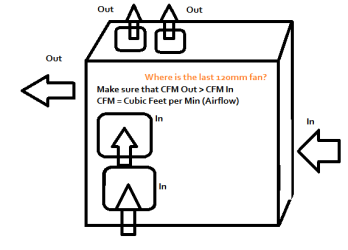
You'll be fine with the above setup as long as the CFM out is higher than in but not so high that it doubles it or anything. Like I said, don't take my word for it, test with different setups. Just take the plating off your CD/DVD areas and put plastic on there to see if you're getting good airflow.

EDIT: If you only have one front fan you can make the side fans blow in. You should still have more airflow out than in because the top fans are bigger. Just make sure to check the CFM ratings and add up the totals.
 

My Computer My Computer

At a glance

W7 Ult. x64 | OS XIntel Mobile Core 2 Duo 2.93Ghz [T9800 Penryn]4096MB Samsung DDR3 Dual Channel [PC3-8500F 1...NVIDIA GeForce 9600M GT 512MB [G96M Rev. C1]
Computer Manufacturer/Model Number
Apple Macbook Pro (April 2009)
OS
W7 Ult. x64 | OS X
CPU
Intel Mobile Core 2 Duo 2.93Ghz [T9800 Penryn]
Motherboard
NVIDIA nForce 730i Rev. B1 [Mac-F2268EC8 (U2E1)]
Memory
4096MB Samsung DDR3 Dual Channel [PC3-8500F 1066Mhz]
Graphics Card(s)
NVIDIA GeForce 9600M GT 512MB [G96M Rev. C1]
Sound Card
SB X-Fi Surround 5.1 USB | Onboard Realtek (Disabled)
Monitor(s) Displays
Acer x223wbd 22" | Apple Anti-Glare 17" (Disabled)
Screen Resolution
{Current} 1440x900 {Acer} 1680x1050 {Apple} 1920x1200
Hard Drives
{Internal}
Seagate Momentus 320GB 2.5" 7200RPM [ST9320421AS]

{Externals}
LaCie 320GB USB 2.0 HDD [301284UR]
LaCie 750GB USB 2.0 FW400 eSATA HDD [301314U]
LaCie 1TB USB 2.0 HDD [301304UR]
PSU
Magsafe
Case
Aluminum/Unibody (MBP52)
Cooling
2 x 6000 RPM Fans
Keyboard
Logitech G-15v2 [PN 920-000379]
Mouse
Logitech G-9 [PN 910-000338]
Internet Speed
12Mbps/2.5Mbps w/ 24Mbps Speed Boost [Comcast]
Other Info
Logitech X-540 Speakers [PN 970223-0122]
Sennheiser PC-151 Headset
The bottom side fan should also be drawing air into the case. The missing exhaust fan is the fan built in to the PSU itself. You should arrange for the case to be under negative air pressure with more air being exhausted than taken in. You should also have the side fans running slower than the front. The side fans are optional, but if you fit them they should be pulling air into the case. If you do fit them, you should also fit the top fans and have them exhausting air from the case.

See also this on a similar topic: http://www.sevenforums.com/549518-post14.html
 

My Computer My Computer

At a glance

Windows 8.1 Pro RTM x64Intel Core-i5-3570K 4-core @ 3.4GHz (Ivy Brid...4 x 4GB DDR3-1600 Corsair Vengeance CMZ8GX3M2...MSI GeForce GTX770 Gaming OC 2GB
Computer type
PC/Desktop
Computer Manufacturer/Model Number
Dwarf Dwf/11/2012 r09/2013
OS
Windows 8.1 Pro RTM x64
CPU
Intel Core-i5-3570K 4-core @ 3.4GHz (Ivy Bridge) (OC 4.4GHz)
Motherboard
ASRock Z77 Extreme4-M
Memory
4 x 4GB DDR3-1600 Corsair Vengeance CMZ8GX3M2A1600C9B (16GB)
Graphics Card(s)
MSI GeForce GTX770 Gaming OC 2GB
Sound Card
Realtek High Definition on board solution (ALC 898)
Monitor(s) Displays
ViewSonic VA1912w Widescreen (VGA)
Screen Resolution
1440x900
Hard Drives
OCZ Agility 3 SSD 120GB SATA III x2 (RAID 0)
Samsung HD501LJ 500GB SATA II x2
Hitachi HDS721010CLA332 1TB SATA II
Iomega 1.5TB Ext USB 2.0
WD 2.0TB Ext USB 3.0
PSU
XFX Pro Series 850W Semi-Modular
Case
Gigabyte IF233
Cooling
1 x 120mm Front Inlet 1 x 120mm Rear Exhaust
Keyboard
Microsoft Comfort Curve Keyboard 3000 (USB)
Mouse
Microsoft Comfort Mouse 3000 for Business (USB)
Internet Speed
NetGear DG834Gv3 ADSL Modem/Router (Ethernet) ~4.0 Mb/s (O2)
Antivirus
Avast! 8.0.1497
Browser
IE 11
Other Info
Optical Drive: HL-DT-ST BD-RE BH10LS30 SATA Bluray
Lexmark S305 Printer/Scanner/Copier (USB)
WEI Score: 8.1/8.1/8.5/8.5/8.25
Asus Eee PC 1011PX Netbook (Windows 7 x86 Starter)
The bottom side fan should also be drawing air into the case. The missing exhaust fan is the fan built in to the PSU itself. You should arrange for the case to be under negative air pressure with more air being exhausted than taken in. You should also have the side fans running slower than the front. The side fans are optional, but if you fit them they should be pulling air into the case. If you do fit them, you should also fit the top fans and have them exhausting air from the case.

See also this on a similar topic: http://www.sevenforums.com/549518-post14.html

What he said :)
 

Attachments

  • fans.png
    fans.png
    4.7 KB · Views: 2

My Computer My Computer

At a glance

W7 Ult. x64 | OS XIntel Mobile Core 2 Duo 2.93Ghz [T9800 Penryn]4096MB Samsung DDR3 Dual Channel [PC3-8500F 1...NVIDIA GeForce 9600M GT 512MB [G96M Rev. C1]
Computer Manufacturer/Model Number
Apple Macbook Pro (April 2009)
OS
W7 Ult. x64 | OS X
CPU
Intel Mobile Core 2 Duo 2.93Ghz [T9800 Penryn]
Motherboard
NVIDIA nForce 730i Rev. B1 [Mac-F2268EC8 (U2E1)]
Memory
4096MB Samsung DDR3 Dual Channel [PC3-8500F 1066Mhz]
Graphics Card(s)
NVIDIA GeForce 9600M GT 512MB [G96M Rev. C1]
Sound Card
SB X-Fi Surround 5.1 USB | Onboard Realtek (Disabled)
Monitor(s) Displays
Acer x223wbd 22" | Apple Anti-Glare 17" (Disabled)
Screen Resolution
{Current} 1440x900 {Acer} 1680x1050 {Apple} 1920x1200
Hard Drives
{Internal}
Seagate Momentus 320GB 2.5" 7200RPM [ST9320421AS]

{Externals}
LaCie 320GB USB 2.0 HDD [301284UR]
LaCie 750GB USB 2.0 FW400 eSATA HDD [301314U]
LaCie 1TB USB 2.0 HDD [301304UR]
PSU
Magsafe
Case
Aluminum/Unibody (MBP52)
Cooling
2 x 6000 RPM Fans
Keyboard
Logitech G-15v2 [PN 920-000379]
Mouse
Logitech G-9 [PN 910-000338]
Internet Speed
12Mbps/2.5Mbps w/ 24Mbps Speed Boost [Comcast]
Other Info
Logitech X-540 Speakers [PN 970223-0122]
Sennheiser PC-151 Headset
I totally agree with the above post, but want to add that if you don't put a fan in both of the side or top positions, you should fully cover the unused fan opening. If you don't, you risk the adjacent fan pulling or pushing the air from the closest opening causing a 'short circuit' and having no net effect on cooling.
 

My Computer My Computer

At a glance

Windows 7 ProfessionalIntel Duo 2.44 GbNvidia Quadro FX1600M
Computer Manufacturer/Model Number
Dell M6300
OS
Windows 7 Professional
CPU
Intel Duo 2.4
Motherboard
Dell
Memory
4 Gb
Graphics Card(s)
Nvidia Quadro FX1600M
Monitor(s) Displays
integrated 17 inch
Screen Resolution
1920x1200
Hard Drives
Seagate 320Gb
Mouse
Logitec VX nano
Internet Speed
DSL
The bottom side fan should also be drawing air into the case. The missing exhaust fan is the fan built in to the PSU itself. You should arrange for the case to be under negative air pressure with more air being exhausted than taken in. You should also have the side fans running slower than the front. The side fans are optional, but if you fit them they should be pulling air into the case. If you do fit them, you should also fit the top fans and have them exhausting air from the case.

See also this on a similar topic: http://www.sevenforums.com/549518-post14.html

What he said :)

Hmmmmmm, i think i have came across this setup before for this case when i having been browsing the web for data concerning my fan setup etc.

I shall give this a bash, thank you.
 

My Computer My Computer

At a glance

Windows 7 64Bit Ultimate Edition SP1AMD Phenom II X5 955 @ 3200 MhzG.Skill 12GB DDR3 1333MHzPalit GeForce GTX 550 Ti OC Sonic 1GB
Computer Manufacturer/Model Number
Customised
OS
Windows 7 64Bit Ultimate Edition SP1
CPU
AMD Phenom II X5 955 @ 3200 Mhz
Motherboard
Asus M5A99X EVO
Memory
G.Skill 12GB DDR3 1333MHz
Graphics Card(s)
Palit GeForce GTX 550 Ti OC Sonic 1GB
Sound Card
Onboard
Monitor(s) Displays
LG 32" HDTV
Screen Resolution
1920x1080 @ 60Hz
Hard Drives
Internal 250GB SATA 3.0 Western Digital WDC WD25 00AAKX-001CA0

Internal 500GB SATA 2.0 Seagate ST350041 3AS

Internal 500GB SATA 2.0 Western Digital WDC WD50 00AAKS-00WWP

External 1TB USB 2.0 Western Digital

External 2TB USB 2.0 Buffalo
PSU
Colors-IT 750w BLACK 12CM Silent
Case
Xigamatek CPC-T45UB-U01 Asgard Chassis
Cooling
4 120mm Fans In Total
Keyboard
ADVENT Illuminated Keyboard
Mouse
Genius
Internet Speed
30MB
Other Info
CPU Cooler - Cooler Master Hyper 212 Plus Cooler
Thanks everyone for all the info.
 

My Computer My Computer

At a glance

Windows 7 64Bit Ultimate Edition SP1AMD Phenom II X5 955 @ 3200 MhzG.Skill 12GB DDR3 1333MHzPalit GeForce GTX 550 Ti OC Sonic 1GB
Computer Manufacturer/Model Number
Customised
OS
Windows 7 64Bit Ultimate Edition SP1
CPU
AMD Phenom II X5 955 @ 3200 Mhz
Motherboard
Asus M5A99X EVO
Memory
G.Skill 12GB DDR3 1333MHz
Graphics Card(s)
Palit GeForce GTX 550 Ti OC Sonic 1GB
Sound Card
Onboard
Monitor(s) Displays
LG 32" HDTV
Screen Resolution
1920x1080 @ 60Hz
Hard Drives
Internal 250GB SATA 3.0 Western Digital WDC WD25 00AAKX-001CA0

Internal 500GB SATA 2.0 Seagate ST350041 3AS

Internal 500GB SATA 2.0 Western Digital WDC WD50 00AAKS-00WWP

External 1TB USB 2.0 Western Digital

External 2TB USB 2.0 Buffalo
PSU
Colors-IT 750w BLACK 12CM Silent
Case
Xigamatek CPC-T45UB-U01 Asgard Chassis
Cooling
4 120mm Fans In Total
Keyboard
ADVENT Illuminated Keyboard
Mouse
Genius
Internet Speed
30MB
Other Info
CPU Cooler - Cooler Master Hyper 212 Plus Cooler
Thanks everyone for all the info.

Just one more little hint in passing...

If you wet your palm and hold it about an inch from your mouth and suck air in as hard as you can... what do you feel? Not much, eh?

Now repeat this execpt this time blow air out as gently as you possibly can... Oh WOW did you feel that?

Well... heatsinks and components react in pretty much the same way.

When thinking about case cooling, always think about how to get the most cool air into the hottest spots and how to get the resulting hot air out of the case, in the most efficient manner possible.
 

My Computer My Computer

At a glance

XP Pro SP3 X86 / Win7 Pro X86Amd 64 x2 4200 (2.4ghz)Kingston DDR2 800 2gbNvidia GF-8400
Computer Manufacturer/Model Number
Homebrew
OS
XP Pro SP3 X86 / Win7 Pro X86
CPU
Amd 64 x2 4200 (2.4ghz)
Motherboard
Asus M2N-MX SE Plus
Memory
Kingston DDR2 800 2gb
Graphics Card(s)
Nvidia GF-8400
Sound Card
Realtek on Motherboard
Monitor(s) Displays
Acer x-193bw
Screen Resolution
1440 x 900
Hard Drives
Western Digital 500g
PSU
350watt In-Win
Case
In-Win
Cooling
Air
Keyboard
yes
Mouse
yes
Internet Speed
5mpbs
Other Info
Also ASRock ION 330 as HTPC (on XP).
Acer Aspire as GP netbook (on XP).
Back
Top