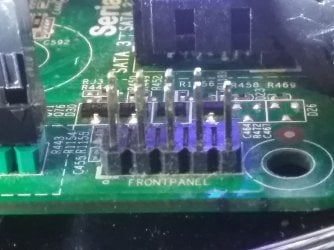
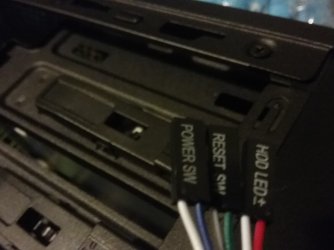
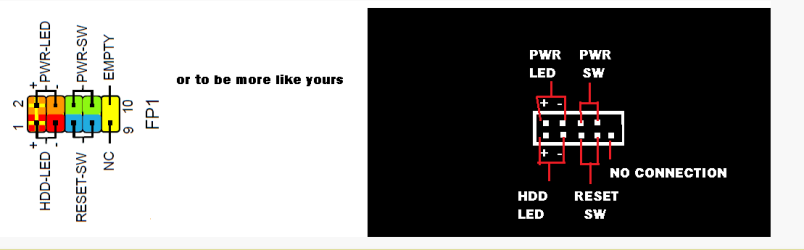
Hello! Recently, I transferred my Dell Motherboard (From an Inspiron 560) to a new Rosewill Challenger-S case. All of that went fine and dandy but now I'm facing another problem: I don't quite know where to plug up the cables from the case's front panel (power switch, reset switch, HDD LED). I found a port on my motherboard labeled "Front Panel" which matches the ports, but one is missing like normal front panel connectors, and the cables only take up 6 out of the 9 pins. So the real question is, where do you plug up the cables, or do you even put them in that spot?
Sorry if that sounded really nooby,
JaxDrumm
Sorry if that sounded really nooby,
JaxDrumm
Last edited:
My Computer
- Computer type
- PC/Desktop
- Computer Manufacturer/Model Number
- Custom
- OS
- Windows 7 Home Premium 64-bit SP1
- CPU
- Intel(R) Pentium(R) CPU G3260 @ 3.30 GHz Dual Core
- Motherboard
- Gigabyte Technology Co. Ltd. H81M-H
- Memory
- 4 GB
- Graphics Card(s)
- ZOTAC GTX 960 4GB
- Sound Card
- Realtek High Definition Audio
- Monitor(s) Displays
- E321VL (1920x1080@60Hz) HD TV
- Screen Resolution
- 1920x1080
- Hard Drives
- 298GB Seagate ST332041 8AS SCSI Disk Device (SATA)
- Case
- Rosewill Challenger S (Cool Blue Lights)
- Cooling
- Stock
- Keyboard
- Logitech Wireless
- Mouse
- Logitech Wireless
- Internet Speed
- SLOW AS ****. Satellite Internet. Seriously.
- Antivirus
- AVG
- Browser
- FireFox