help with MKV

FCVPI99

New member
Local time
4:06 PM
Messages
153
Location
Chicago area
ok so i have installed and uninstalled about 8 codec packs that CLAIM they let media player play MKV

does anyone know codec packs that will play both sound and VIDEO on media player 12
 

My Computer

Computer Manufacturer/Model Number
Custom built by myself
OS
Windows 7 Ultimate 64 bit
CPU
Intel Core 2 quad Q9550 2.83 12 MB Cache 95 Watt OC to 3.4
Motherboard
Gigabyte GA-EP45-UD3P Rev 1.6 Socket 775 Running 1600 FSB
Memory
4 GB Patriot Viper II 1066 2X2GB Memory PV224G8500ELKB
Graphics Card(s)
NVIDIA GeForce 9500 GT GV-N95TOC-1GI overclocked to 650 MHz
Sound Card
Realtec HD on board
Monitor(s) Displays
LG W2053TQ
Screen Resolution
1600X900
Hard Drives
Hatchi 160 GB SATA II System drive
Hatchi 400 GB SATA II Data
Hatchi 500 GB SATA II Data
Hitachi 2 TB SATA II Backup
PSU
Ultra LSP750 750-Watt
Case
Leadertek FX626 or Foxconn FX-626BKH
Cooling
Cool Master V-8 (its Big),1 80 MM Fan and 2 92 MM Fan
Keyboard
Dell Quietkey (POS)
Mouse
GE PS2 Optical
Internet Speed
8 down 1 up
Other Info
LS-120 Drive(IDE) - Lite-on iHOS104 Blu-ray(SATA) - HP DVD Burner with lightscribe(IDE) - media card reader
ok so i have installed and uninstalled about 8 codec packs that CLAIM they let media player play MKV

does anyone know codec packs that will play both sound and VIDEO on media player 12

Uninstall all codec packs completely. They are counterproductive on Windows 7. None were written for it. For the only native MKV support get free DivX Plus Codec Pack – DivX codecs for Windows media player | DivX.com and AC3Filter http://ac3filter.googlecode.com/files/ac3filter_1_63b.exe
 

My Computer

Computer type
Laptop
Computer Manufacturer/Model Number
Apple
OS
El Capitan / Windows 10
CPU
i7-4980HQ
Memory
16GB
Graphics Card(s)
Iris 5200
Unistall the other packs and let me recommend one that works, Shark007's windows7 codec pack. This has been put together for WIndows 7 and MKV's work for me.

NOTE: If you have the 64bit version of windows and have changed the defaults to also use the 64bit Windows Media Player. You will need to install the 64bit version of the codec pack. If you have 64bit or 32bit versions of windows 7, then windows 7 will use the 32bit windows media player by default and the 32bit pack should suffice. Personally I like to install both 32 and 64 bit codec packs and change my default to the 64bit version of windows player.

I can also recommend GOM Player, I've used in for the past 6 years and it's playback is flawless (even with MKV), it will also download the codec as needed (automatically), the latest version works a treat in windows 7.
 

My Computer

Computer Manufacturer/Model Number
Custom Hack job
OS
Windows 7 Ultimate 64 bit
CPU
Intel(R) Core(TM)2 Quad CPU Q8200 @ 2.33GHz
Motherboard
GigaByte EP45-UD3
Memory
8 GB Kingston
Graphics Card(s)
Nvidia GeForce 9600GT
Sound Card
Soundblaster Audigy
Monitor(s) Displays
AOC x2 22"
Hard Drives
2 x Samsung 500GB (RAID)
2 x Samsung 2TB
1 x WD Green 2TB
1 x Seagate 1TB
1 x Samsung 500GB
PSU
Thermaltake QFan 750W
Case
CM Scout Gaming
Cooling
Coolermaster V10
Keyboard
Microsoft Wireless Keyboard 1000
Mouse
Microsoft Wireless Optical 2000
Internet Speed
320
Other Info
Winfast PVR2000CP
LG DVD-RAM DVD/RW/DL Super Multi
Linksys WMP300Nx2 Wireless Adapter
tried both of Those DivX Suck big time crashes explore and the shark one i get sound but no picture and i want to use media player (OCD coming out)

i don't know what version im using i don't remember changing 32/64 of media player but doesn't mean anything


what if any are the benefits of 64 bit player over 32>
 

My Computer

Computer Manufacturer/Model Number
Custom built by myself
OS
Windows 7 Ultimate 64 bit
CPU
Intel Core 2 quad Q9550 2.83 12 MB Cache 95 Watt OC to 3.4
Motherboard
Gigabyte GA-EP45-UD3P Rev 1.6 Socket 775 Running 1600 FSB
Memory
4 GB Patriot Viper II 1066 2X2GB Memory PV224G8500ELKB
Graphics Card(s)
NVIDIA GeForce 9500 GT GV-N95TOC-1GI overclocked to 650 MHz
Sound Card
Realtec HD on board
Monitor(s) Displays
LG W2053TQ
Screen Resolution
1600X900
Hard Drives
Hatchi 160 GB SATA II System drive
Hatchi 400 GB SATA II Data
Hatchi 500 GB SATA II Data
Hitachi 2 TB SATA II Backup
PSU
Ultra LSP750 750-Watt
Case
Leadertek FX626 or Foxconn FX-626BKH
Cooling
Cool Master V-8 (its Big),1 80 MM Fan and 2 92 MM Fan
Keyboard
Dell Quietkey (POS)
Mouse
GE PS2 Optical
Internet Speed
8 down 1 up
Other Info
LS-120 Drive(IDE) - Lite-on iHOS104 Blu-ray(SATA) - HP DVD Burner with lightscribe(IDE) - media card reader
I personally don't like WMP and avoid any codec packs (bad experiences in the past).
If you want an easy approach to play your video files, just get another player (GOMplayer, KMplayer, VLC player, MPC-HC, etc...).
 

My Computer

OS
Windows 7 Professional x64
CPU
Core i5 520M
Graphics Card(s)
ATI HD 5650
tried both of Those DivX Suck big time crashes explore and the shark one i get sound but no picture

Hey, I think you missed a comma or something ;) , but does this mean that you tried Sharks codec pack or not?

and i want to use media player (OCD coming out)
Your rig, your choice, I use it sometimes especially for arranging my music; not so much for movies because it just uses too much resources, but still sometimes anyway.

i don't know what version im using i don't remember changing 32/64 of media player but doesn't mean anything
what if any are the benefits of 64 bit player over 32>

You can check the version on the help menu. As to the differences, the 64 bit is supposed to be faster, so it shouldn't hold up resources for as long. In my experience I honestly can't spot the difference. If you have installed windows 64bit then take a look at both of them on your rig and see for yourself (remember to install sharks 32bit codec pack as well as his 64bit codec pack, each needs their own codecs).

You can find WMP here:
32bit is here = %systemdrive%\Program Files (x86)\Windows Media Player\Program Files (x86)\Windows Media Player
64bit is here = %systemdrive%\Program Files\Windows Media Player\Program Files\Windows Media Player
 

My Computer

Computer Manufacturer/Model Number
Custom Hack job
OS
Windows 7 Ultimate 64 bit
CPU
Intel(R) Core(TM)2 Quad CPU Q8200 @ 2.33GHz
Motherboard
GigaByte EP45-UD3
Memory
8 GB Kingston
Graphics Card(s)
Nvidia GeForce 9600GT
Sound Card
Soundblaster Audigy
Monitor(s) Displays
AOC x2 22"
Hard Drives
2 x Samsung 500GB (RAID)
2 x Samsung 2TB
1 x WD Green 2TB
1 x Seagate 1TB
1 x Samsung 500GB
PSU
Thermaltake QFan 750W
Case
CM Scout Gaming
Cooling
Coolermaster V10
Keyboard
Microsoft Wireless Keyboard 1000
Mouse
Microsoft Wireless Optical 2000
Internet Speed
320
Other Info
Winfast PVR2000CP
LG DVD-RAM DVD/RW/DL Super Multi
Linksys WMP300Nx2 Wireless Adapter
yes i tried shark didnt work i tryed Windows 7 - Codec Pack also and that kinda of works i have some KVMs that will play but my stargate atlatis KVM wont i get sound but no video the video i do get is like playing music i dont know enough about KVM to find out whats wrong final media player plays it but i dont want a bunch of the same programs i just want to use one i want to use media player for the soul fact all my music is in it and all my live feeds are in it im a weather and radio scanner buff i have live meeds from NOAA weather and a bunch of towns around me for police fire scanning plus my NASA feeds so i really dont want to change
 

My Computer

Computer Manufacturer/Model Number
Custom built by myself
OS
Windows 7 Ultimate 64 bit
CPU
Intel Core 2 quad Q9550 2.83 12 MB Cache 95 Watt OC to 3.4
Motherboard
Gigabyte GA-EP45-UD3P Rev 1.6 Socket 775 Running 1600 FSB
Memory
4 GB Patriot Viper II 1066 2X2GB Memory PV224G8500ELKB
Graphics Card(s)
NVIDIA GeForce 9500 GT GV-N95TOC-1GI overclocked to 650 MHz
Sound Card
Realtec HD on board
Monitor(s) Displays
LG W2053TQ
Screen Resolution
1600X900
Hard Drives
Hatchi 160 GB SATA II System drive
Hatchi 400 GB SATA II Data
Hatchi 500 GB SATA II Data
Hitachi 2 TB SATA II Backup
PSU
Ultra LSP750 750-Watt
Case
Leadertek FX626 or Foxconn FX-626BKH
Cooling
Cool Master V-8 (its Big),1 80 MM Fan and 2 92 MM Fan
Keyboard
Dell Quietkey (POS)
Mouse
GE PS2 Optical
Internet Speed
8 down 1 up
Other Info
LS-120 Drive(IDE) - Lite-on iHOS104 Blu-ray(SATA) - HP DVD Burner with lightscribe(IDE) - media card reader
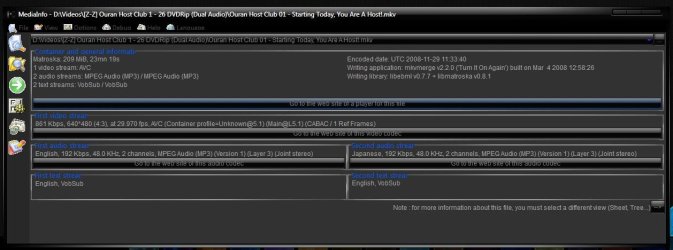
using media info i found it the video codec is AVC anyone know where to get that codec to work with media player? prefer just that codec since i already have the windows 7 codec pack installed

now im really messed up the MKV files that play are also AVC i dont know whats wrong
stargate Atlantis file is in HD

im guessing i need a V_MPEG4/ISO/AVC
 
Last edited:

My Computer

Computer Manufacturer/Model Number
Custom built by myself
OS
Windows 7 Ultimate 64 bit
CPU
Intel Core 2 quad Q9550 2.83 12 MB Cache 95 Watt OC to 3.4
Motherboard
Gigabyte GA-EP45-UD3P Rev 1.6 Socket 775 Running 1600 FSB
Memory
4 GB Patriot Viper II 1066 2X2GB Memory PV224G8500ELKB
Graphics Card(s)
NVIDIA GeForce 9500 GT GV-N95TOC-1GI overclocked to 650 MHz
Sound Card
Realtec HD on board
Monitor(s) Displays
LG W2053TQ
Screen Resolution
1600X900
Hard Drives
Hatchi 160 GB SATA II System drive
Hatchi 400 GB SATA II Data
Hatchi 500 GB SATA II Data
Hitachi 2 TB SATA II Backup
PSU
Ultra LSP750 750-Watt
Case
Leadertek FX626 or Foxconn FX-626BKH
Cooling
Cool Master V-8 (its Big),1 80 MM Fan and 2 92 MM Fan
Keyboard
Dell Quietkey (POS)
Mouse
GE PS2 Optical
Internet Speed
8 down 1 up
Other Info
LS-120 Drive(IDE) - Lite-on iHOS104 Blu-ray(SATA) - HP DVD Burner with lightscribe(IDE) - media card reader
All i use to play MKV in media player is AC3 Filter for the sound and Haali media splitter for the video.

WMP plays everything i have tried with those installed, works perfect.
 

My Computer

Computer Manufacturer/Model Number
Samsung R519 Notebook
OS
Windows 7 Home Premium with Service Pack 1
CPU
Intel Dual Core 2.2 GHZ
Memory
2 Gig
Graphics Card(s)
Intel
Sound Card
On board
Monitor(s) Displays
Built in
Screen Resolution
1366x768
Hard Drives
250 Gig Sata2
Mouse
Microsoft Arc Mouse
Internet Speed
15 meg down
yes i tried shark didnt work i tryed Windows 7 - Codec Pack also and that kinda of works i have some KVMs that will play but my stargate atlatis KVM wont i get sound but no video the video i do get is like playing music i dont know enough about KVM to find out whats wrong final media player plays it but i dont want a bunch of the same programs i just want to use one i want to use media player for the soul fact all my music is in it and all my live feeds are in it im a weather and radio scanner buff i have live meeds from NOAA weather and a bunch of towns around me for police fire scanning plus my NASA feeds so i really dont want to change

First we need to know if your using a 32bit of 64bit version of WMP, so that we can recommend a new codec for you.

Another option might be to set your KVM and MKV's to play with GOM player and everything else to play with media player. In fact if you're using the 32bit WMP and GOMplayer works for your files, it's likely that GOMplayer Media player will work too (i.e. install GOMPLAYER to download the correct codecs for you).

You may also want to use Gspot codec identifier and post up a screen print of the movie file, then I can check for those exact codecs (we need to ensure that we have both video and audio codecs for the file in which ever bit version you need).

PS: The real important thing here is to get Stargate working (Atlantis is my favorite). :D
 

My Computer

Computer Manufacturer/Model Number
Custom Hack job
OS
Windows 7 Ultimate 64 bit
CPU
Intel(R) Core(TM)2 Quad CPU Q8200 @ 2.33GHz
Motherboard
GigaByte EP45-UD3
Memory
8 GB Kingston
Graphics Card(s)
Nvidia GeForce 9600GT
Sound Card
Soundblaster Audigy
Monitor(s) Displays
AOC x2 22"
Hard Drives
2 x Samsung 500GB (RAID)
2 x Samsung 2TB
1 x WD Green 2TB
1 x Seagate 1TB
1 x Samsung 500GB
PSU
Thermaltake QFan 750W
Case
CM Scout Gaming
Cooling
Coolermaster V10
Keyboard
Microsoft Wireless Keyboard 1000
Mouse
Microsoft Wireless Optical 2000
Internet Speed
320
Other Info
Winfast PVR2000CP
LG DVD-RAM DVD/RW/DL Super Multi
Linksys WMP300Nx2 Wireless Adapter

My Computer

Computer Manufacturer/Model Number
HAL-9000
OS
Windows 7 Ultimate 64bit
CPU
Intel i7 3770K
Motherboard
Asus Sabertooth Z77
Memory
16GB DDR3 1333 Corsair XMS3
Graphics Card(s)
XFX HD6950 2GB EyeFinity
Sound Card
Logitech G35 & Sennheiser PC135 & VIA HD
Monitor(s) Displays
23" HP 2310e, 23" Samsung B2230, 21.5" Viewsonic
Screen Resolution
5760x1080
Hard Drives
16TB of Storage
128GB & 256GB Crucial M4 SSD's, 2X 1TB WD Black, 3x 2TB WD, 3x 2TB Samsung F4, 1.5TB Seagate, WD 500GB,
PSU
Antec True Power New 650watt
Case
Cooler Master HAF-932
Cooling
Corsair H60 Hydro Cooler, 3x 230mm Fans, 2x120mm Fan
Keyboard
Logitech G15 and G13
Mouse
Logitech G700 Gaming Mouse
Internet Speed
50/10 Mbit
Other Info
Speakers : Alesis M1 Active Mk2 Studio Monitors , APC RS 1200 UPS, HP 4500DN Color Laser, HP P1006 mono Laser, Kodak 8500 Dye-Sub, Epson 1280 inkjet, Epson Worforce 610 MFC
32 bit media player

im about to put a hammer to this dam thing im getting pissed FINAL MEDIA PAYER works fine but i dont like it
Windows media player will play some MKV but not all i have been looking and looking for V_MPEG4/ISO/AVC codec NOT in a pack i have installed the fallowing shark Divx CCP cole2k none of them do what they say that do which is play V_MPEG4/ISO/AVC files i installed windows 7 codec pack and that got it working to where i am now that only some MKV will play

the gspot codec program doesnt work i used a differant one (cant remeber name)and it said ether (video or audio) codec is not there when i know it plays

we can send a man to the moon yet they cant make programs do what they say they do

i wish i could upload this show but is 1.2 GB file its the first show of Stargate Atlantis in HD
 

My Computer

Computer Manufacturer/Model Number
Custom built by myself
OS
Windows 7 Ultimate 64 bit
CPU
Intel Core 2 quad Q9550 2.83 12 MB Cache 95 Watt OC to 3.4
Motherboard
Gigabyte GA-EP45-UD3P Rev 1.6 Socket 775 Running 1600 FSB
Memory
4 GB Patriot Viper II 1066 2X2GB Memory PV224G8500ELKB
Graphics Card(s)
NVIDIA GeForce 9500 GT GV-N95TOC-1GI overclocked to 650 MHz
Sound Card
Realtec HD on board
Monitor(s) Displays
LG W2053TQ
Screen Resolution
1600X900
Hard Drives
Hatchi 160 GB SATA II System drive
Hatchi 400 GB SATA II Data
Hatchi 500 GB SATA II Data
Hitachi 2 TB SATA II Backup
PSU
Ultra LSP750 750-Watt
Case
Leadertek FX626 or Foxconn FX-626BKH
Cooling
Cool Master V-8 (its Big),1 80 MM Fan and 2 92 MM Fan
Keyboard
Dell Quietkey (POS)
Mouse
GE PS2 Optical
Internet Speed
8 down 1 up
Other Info
LS-120 Drive(IDE) - Lite-on iHOS104 Blu-ray(SATA) - HP DVD Burner with lightscribe(IDE) - media card reader
All i use to play MKV in media player is AC3 Filter for the sound and Haali media splitter for the video.

WMP plays everything i have tried with those installed, works perfect.

i have both of thos with windows 7 codec pack i click on Haali media splitter but there is no settings
 

My Computer

Computer Manufacturer/Model Number
Custom built by myself
OS
Windows 7 Ultimate 64 bit
CPU
Intel Core 2 quad Q9550 2.83 12 MB Cache 95 Watt OC to 3.4
Motherboard
Gigabyte GA-EP45-UD3P Rev 1.6 Socket 775 Running 1600 FSB
Memory
4 GB Patriot Viper II 1066 2X2GB Memory PV224G8500ELKB
Graphics Card(s)
NVIDIA GeForce 9500 GT GV-N95TOC-1GI overclocked to 650 MHz
Sound Card
Realtec HD on board
Monitor(s) Displays
LG W2053TQ
Screen Resolution
1600X900
Hard Drives
Hatchi 160 GB SATA II System drive
Hatchi 400 GB SATA II Data
Hatchi 500 GB SATA II Data
Hitachi 2 TB SATA II Backup
PSU
Ultra LSP750 750-Watt
Case
Leadertek FX626 or Foxconn FX-626BKH
Cooling
Cool Master V-8 (its Big),1 80 MM Fan and 2 92 MM Fan
Keyboard
Dell Quietkey (POS)
Mouse
GE PS2 Optical
Internet Speed
8 down 1 up
Other Info
LS-120 Drive(IDE) - Lite-on iHOS104 Blu-ray(SATA) - HP DVD Burner with lightscribe(IDE) - media card reader
Un-install everything and then install this player and then install the codecs in the install center that comes up after the install,
Inmatrix.com - Zoom Player Download


does not work same as media player i get sound no picture

nice looking to i was hoping it it work i did full install of all codecs with auto config
 

My Computer

Computer Manufacturer/Model Number
Custom built by myself
OS
Windows 7 Ultimate 64 bit
CPU
Intel Core 2 quad Q9550 2.83 12 MB Cache 95 Watt OC to 3.4
Motherboard
Gigabyte GA-EP45-UD3P Rev 1.6 Socket 775 Running 1600 FSB
Memory
4 GB Patriot Viper II 1066 2X2GB Memory PV224G8500ELKB
Graphics Card(s)
NVIDIA GeForce 9500 GT GV-N95TOC-1GI overclocked to 650 MHz
Sound Card
Realtec HD on board
Monitor(s) Displays
LG W2053TQ
Screen Resolution
1600X900
Hard Drives
Hatchi 160 GB SATA II System drive
Hatchi 400 GB SATA II Data
Hatchi 500 GB SATA II Data
Hitachi 2 TB SATA II Backup
PSU
Ultra LSP750 750-Watt
Case
Leadertek FX626 or Foxconn FX-626BKH
Cooling
Cool Master V-8 (its Big),1 80 MM Fan and 2 92 MM Fan
Keyboard
Dell Quietkey (POS)
Mouse
GE PS2 Optical
Internet Speed
8 down 1 up
Other Info
LS-120 Drive(IDE) - Lite-on iHOS104 Blu-ray(SATA) - HP DVD Burner with lightscribe(IDE) - media card reader
Since all these solutions work for the posters and none work for you I suggest either your machine is borked beyond all recognition or you've got some badly corrupted MKVs. If you really want to figure this out I'd install a clean Windows 7 parallel to the potentially borked one and try DivX and AC3Filter. It it works then you've borked your Windows and if it doesn't then you've got bad MKVs.
 

My Computer

Computer type
Laptop
Computer Manufacturer/Model Number
Apple
OS
El Capitan / Windows 10
CPU
i7-4980HQ
Memory
16GB
Graphics Card(s)
Iris 5200
ok well thats not gana happen i hopeing insted of telling me about differant media players please would be telling me where to get the specific codec (V_MPEG4/ISO/AVC)

MKV files the worst thing that every happened to computers
 

My Computer

Computer Manufacturer/Model Number
Custom built by myself
OS
Windows 7 Ultimate 64 bit
CPU
Intel Core 2 quad Q9550 2.83 12 MB Cache 95 Watt OC to 3.4
Motherboard
Gigabyte GA-EP45-UD3P Rev 1.6 Socket 775 Running 1600 FSB
Memory
4 GB Patriot Viper II 1066 2X2GB Memory PV224G8500ELKB
Graphics Card(s)
NVIDIA GeForce 9500 GT GV-N95TOC-1GI overclocked to 650 MHz
Sound Card
Realtec HD on board
Monitor(s) Displays
LG W2053TQ
Screen Resolution
1600X900
Hard Drives
Hatchi 160 GB SATA II System drive
Hatchi 400 GB SATA II Data
Hatchi 500 GB SATA II Data
Hitachi 2 TB SATA II Backup
PSU
Ultra LSP750 750-Watt
Case
Leadertek FX626 or Foxconn FX-626BKH
Cooling
Cool Master V-8 (its Big),1 80 MM Fan and 2 92 MM Fan
Keyboard
Dell Quietkey (POS)
Mouse
GE PS2 Optical
Internet Speed
8 down 1 up
Other Info
LS-120 Drive(IDE) - Lite-on iHOS104 Blu-ray(SATA) - HP DVD Burner with lightscribe(IDE) - media card reader
ok well thats not gana happen i hopeing insted of telling me about differant media players please would be telling me where to get the specific codec (V_MPEG4/ISO/AVC)

MKV files the worst thing that every happened to computers
That is not a codec. That shows only that the video is encoded according to MPEG4 standard using AVC codec and wrapped in a ISO image file.

As I've suggested, messing with codec packs can nuke your system, as very often one pack hates the other. So, if you system is already a mess (which is probably the case after installing/uninstalling these packs), you are better off restoring your system to a clean state. Then, use VLC Player or MPC-HC to play your video files. If you encounter any problems, check them with MediaInfo and post the results here.
If one solution doesn't work (WMP+codecs), what's the point in sticking to it?
 

My Computer

OS
Windows 7 Professional x64
CPU
Core i5 520M
Graphics Card(s)
ATI HD 5650
well this is what media info says
Capture is one that WONT play in media player
Capture 1 is one that WILL play in media player

again both ply fine in finial media player but i hate finial
 

Attachments

  • Capture.JPG
    Capture.JPG
    57.8 KB · Views: 14
  • Capture1.JPG
    Capture1.JPG
    77.9 KB · Views: 9

My Computer

Computer Manufacturer/Model Number
Custom built by myself
OS
Windows 7 Ultimate 64 bit
CPU
Intel Core 2 quad Q9550 2.83 12 MB Cache 95 Watt OC to 3.4
Motherboard
Gigabyte GA-EP45-UD3P Rev 1.6 Socket 775 Running 1600 FSB
Memory
4 GB Patriot Viper II 1066 2X2GB Memory PV224G8500ELKB
Graphics Card(s)
NVIDIA GeForce 9500 GT GV-N95TOC-1GI overclocked to 650 MHz
Sound Card
Realtec HD on board
Monitor(s) Displays
LG W2053TQ
Screen Resolution
1600X900
Hard Drives
Hatchi 160 GB SATA II System drive
Hatchi 400 GB SATA II Data
Hatchi 500 GB SATA II Data
Hitachi 2 TB SATA II Backup
PSU
Ultra LSP750 750-Watt
Case
Leadertek FX626 or Foxconn FX-626BKH
Cooling
Cool Master V-8 (its Big),1 80 MM Fan and 2 92 MM Fan
Keyboard
Dell Quietkey (POS)
Mouse
GE PS2 Optical
Internet Speed
8 down 1 up
Other Info
LS-120 Drive(IDE) - Lite-on iHOS104 Blu-ray(SATA) - HP DVD Burner with lightscribe(IDE) - media card reader
if everyone took the stance it doesn't work il give up we wouldn't even have computers
 

My Computer

Computer Manufacturer/Model Number
Custom built by myself
OS
Windows 7 Ultimate 64 bit
CPU
Intel Core 2 quad Q9550 2.83 12 MB Cache 95 Watt OC to 3.4
Motherboard
Gigabyte GA-EP45-UD3P Rev 1.6 Socket 775 Running 1600 FSB
Memory
4 GB Patriot Viper II 1066 2X2GB Memory PV224G8500ELKB
Graphics Card(s)
NVIDIA GeForce 9500 GT GV-N95TOC-1GI overclocked to 650 MHz
Sound Card
Realtec HD on board
Monitor(s) Displays
LG W2053TQ
Screen Resolution
1600X900
Hard Drives
Hatchi 160 GB SATA II System drive
Hatchi 400 GB SATA II Data
Hatchi 500 GB SATA II Data
Hitachi 2 TB SATA II Backup
PSU
Ultra LSP750 750-Watt
Case
Leadertek FX626 or Foxconn FX-626BKH
Cooling
Cool Master V-8 (its Big),1 80 MM Fan and 2 92 MM Fan
Keyboard
Dell Quietkey (POS)
Mouse
GE PS2 Optical
Internet Speed
8 down 1 up
Other Info
LS-120 Drive(IDE) - Lite-on iHOS104 Blu-ray(SATA) - HP DVD Burner with lightscribe(IDE) - media card reader
well this is what media info says
Capture is one that WONT play in media player
Capture 1 is one that WILL play in media player

again both ply fine in finial media player but i hate finial

AC3Filter full needs to be installed.
 

My Computer

Computer type
Laptop
Computer Manufacturer/Model Number
Apple
OS
El Capitan / Windows 10
CPU
i7-4980HQ
Memory
16GB
Graphics Card(s)
Iris 5200
Back
Top