help with project

theski232

New member
Member
VIP
Local time
9:57 AM
Messages
399
Location
Massachussetts
I have to do a project for my computer literacy class, and it requires Windows XP. All that I have access to is Windows 7. Is there any way to get an interactive XP interface on my Windows 7 laptop?
 

My Computer My Computer

Computer Manufacturer/Model Number
Dell Studio 1749
OS
Windows 7 Home Premium 64 Bit
CPU
Intel i5 2.40GHz
Internet Speed
university ethernet sucks
If you have a spare copy of Windows XP and you can install virtual box and install it or upgrade to Windows 7 pro/ultimate and download the Windows XP Mode
 

My Computer My Computer

Computer type
PC/Desktop
Computer Manufacturer/Model Number
GIGABYTE Rig (Custom)
OS
Windows 7 Professional (x64/SP1) /Linux Mint 16
CPU
Intel i5-3570k 3.40 GHz @ 4.6 GHz
Motherboard
GIGABYTE Z77X-D3H
Memory
8GB (2133MHz) DDR3
Graphics Card(s)
Asus GTX560 Ti (Nvidia)
Monitor(s) Displays
HP 23", Acer 19" and a Dell 17"
Screen Resolution
1080p, 1440x900 and 1280x1024
Hard Drives
Sandisk Extreme 120GB (SSD), WD 2TB green and 4 other HDDs
PSU
Antec 620w High Current Gamer
Case
Corsair Obsidian 600D
Cooling
CPU - Antec KÜHLER H₂O 920
Keyboard
Steelseries 6Gv2
Mouse
Roccat LUA
Internet Speed
4 - 6mb/s
Antivirus
ESET NOD32
Browser
Chrome/Firefox
Other Info
Intel Gigabit CT (PCIE NIC) and Thinkpad T61p,
If you have a spare copy of Windows XP and you can install virtual box and install it or upgrade to Windows 7 pro/ultimate and download the Windows XP Mode
i dont have a copy of XP and i dont have the money to upgrade to pro or ultimate
 

My Computer My Computer

Computer Manufacturer/Model Number
Dell Studio 1749
OS
Windows 7 Home Premium 64 Bit
CPU
Intel i5 2.40GHz
Internet Speed
university ethernet sucks
If you have a spare copy of Windows XP and you can install virtual box and install it or upgrade to Windows 7 pro/ultimate and download the Windows XP Mode
i dont have a copy of XP and i dont have the money to upgrade to pro or ultimate

Well I they are the only legal options I know
 

My Computer My Computer

Computer type
PC/Desktop
Computer Manufacturer/Model Number
GIGABYTE Rig (Custom)
OS
Windows 7 Professional (x64/SP1) /Linux Mint 16
CPU
Intel i5-3570k 3.40 GHz @ 4.6 GHz
Motherboard
GIGABYTE Z77X-D3H
Memory
8GB (2133MHz) DDR3
Graphics Card(s)
Asus GTX560 Ti (Nvidia)
Monitor(s) Displays
HP 23", Acer 19" and a Dell 17"
Screen Resolution
1080p, 1440x900 and 1280x1024
Hard Drives
Sandisk Extreme 120GB (SSD), WD 2TB green and 4 other HDDs
PSU
Antec 620w High Current Gamer
Case
Corsair Obsidian 600D
Cooling
CPU - Antec KÜHLER H₂O 920
Keyboard
Steelseries 6Gv2
Mouse
Roccat LUA
Internet Speed
4 - 6mb/s
Antivirus
ESET NOD32
Browser
Chrome/Firefox
Other Info
Intel Gigabit CT (PCIE NIC) and Thinkpad T61p,

My Computer My Computer

Computer Manufacturer/Model Number
Dell Studio 1749
OS
Windows 7 Home Premium 64 Bit
CPU
Intel i5 2.40GHz
Internet Speed
university ethernet sucks
legal is the key word there
Legal is the key word here as well...forum rules.

As for the need to use XP, I'm torn on this. On one hand, if it is required, the college should have provided it to you, or made labs available during class time. On the other hand, who doesn't have XP or an older XP system sitting around, or access to an XP system? If you really don't have XP sitting around, how about friends or family? Someone has to have an XP system that you can sit in front of.
 

My Computer My Computer

OS
Windows 7 Ultimate x64 SP1
CPU
Intel Core i7-2600
Motherboard
Gigabyte GA-P67A-UD3P-B3
Memory
12 GB Patriot Extreme DDR3-1333
Graphics Card(s)
Nvidia GTX 470
Monitor(s) Displays
Dell UltraSharp 2209WA
Hard Drives
OCZ Agility3 240 GB, WD5001AALS, WD7501AALS
PSU
OCZ ModStream 700W
Case
CoolerMaster HAF 912 Advanced
Cooling
CoolerMaster Hyper 212 Plus
I have to do a project for my computer literacy class, and it requires Windows XP. All that I have access to is Windows 7. Is there any way to get an interactive XP interface on my Windows 7 laptop?

If this is part of a project... do they not provide some kind of Virtual Environment for you to use? (Something like VM Ware or the Virtual HDD from Virtual Box)

As previously mentioned, you would need a copy of XP (legitimate Version too :))

Regards,
JDobbsy1987
 

My Computer My Computer

Computer type
PC/Desktop
Computer Manufacturer/Model Number
Self Built
OS
Windows 8.1 Pro x64
CPU
Intel Core i5-2500K @ 3.30GHz - S1155
Motherboard
Asus P8P67 LE Rev3, Intel P67, S115
Memory
8GB Corsair DDR3 XMS3, PC3-12800
Graphics Card(s)
NVIDIA GeForce GTX 650
Sound Card
On-Board
Monitor(s) Displays
3 x 24" {Extended Display}
Screen Resolution
1920 x 1080
Hard Drives
300GB Seagate Barracuda 7200
PSU
550W Coolermaster GX550
Case
Silverstone Precision PS04B
Cooling
Stock
Keyboard
Logitech K120
Mouse
World of Warcraft Cataclysm MMO Gaming Mouse
Internet Speed
80 MB
Antivirus
MSE / Windows Defender
Browser
Chrome
do any of you have XP?
 

My Computer My Computer

Computer Manufacturer/Model Number
Dell Studio 1749
OS
Windows 7 Home Premium 64 Bit
CPU
Intel i5 2.40GHz
Internet Speed
university ethernet sucks
As for the need to use XP, I'm torn on this. On one hand, if it is required, the college should have provided it to you, or made labs available during class time. On the other hand, who doesn't have XP or an older XP system sitting around, or access to an XP system? If you really don't have XP sitting around, how about friends or family? Someone has to have an XP system that you can sit in front of.
To the OP, from what I can tell this is your best option. I would track down either an old machine, or use someone else's computer when doing your project. Since it requires XP, are you required to use a program that only runs on XP? Why are you required to use XP and not a later version?
 

My Computer My Computer

Computer Manufacturer/Model Number
Dell XPS 420
OS
Windows 7 Professional x64 | Ubuntu 10.04 x64
CPU
Intel Core 2 Quad 2.66 GHz
Memory
4 GB
Graphics Card(s)
ATI Radeon 3650 HD
Monitor(s) Displays
24" Dell Ultrasharp Display
Hard Drives
Seagate Barracuda 750GB - 7200 rpm | Seagate Barracuda 80 GB - 7200 rpm
As for the need to use XP, I'm torn on this. On one hand, if it is required, the college should have provided it to you, or made labs available during class time. On the other hand, who doesn't have XP or an older XP system sitting around, or access to an XP system? If you really don't have XP sitting around, how about friends or family? Someone has to have an XP system that you can sit in front of.
To the OP, from what I can tell this is your best option. I would track down either an old machine, or use someone else's computer when doing your project. Since it requires XP, are you required to use a program that only runs on XP? Why are you required to use XP and not a later version?
it is not the programs available but it is the features of the OS itself that we need to use
 

My Computer My Computer

Computer Manufacturer/Model Number
Dell Studio 1749
OS
Windows 7 Home Premium 64 Bit
CPU
Intel i5 2.40GHz
Internet Speed
university ethernet sucks
it is not the programs available but it is the features of the OS itself that we need to use
What features are you needing to use? Its possible you could produce the same results with Windows 7.
 

My Computer My Computer

Computer Manufacturer/Model Number
Dell XPS 420
OS
Windows 7 Professional x64 | Ubuntu 10.04 x64
CPU
Intel Core 2 Quad 2.66 GHz
Memory
4 GB
Graphics Card(s)
ATI Radeon 3650 HD
Monitor(s) Displays
24" Dell Ultrasharp Display
Hard Drives
Seagate Barracuda 750GB - 7200 rpm | Seagate Barracuda 80 GB - 7200 rpm
it is not the programs available but it is the features of the OS itself that we need to use
What features are you needing to use? Its possible you could produce the same results with Windows 7.
Ill post some of the questions that i was not able to answer with Windows 7
1)[FONT=&quot]What are the first 13 words of the text that appears in the popup when you hover over Control Panel in the Start menu?
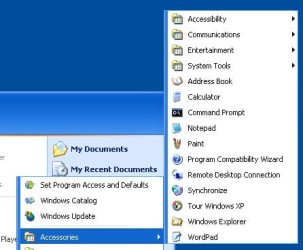
2)[/FONT][FONT=&quot][/FONT][FONT=&quot]What are two submenu categories found in the Accessories submenu
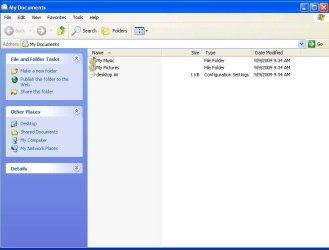
3)[/FONT]What are the three areas found on the left side of the My Document windows?
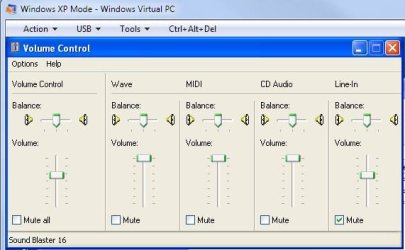
4)[FONT=&quot]What does each of the slider controls adjust the volume for? (in volume control)
[/FONT]
 

My Computer My Computer

Computer Manufacturer/Model Number
Dell Studio 1749
OS
Windows 7 Home Premium 64 Bit
CPU
Intel i5 2.40GHz
Internet Speed
university ethernet sucks
it is not the programs available but it is the features of the OS itself that we need to use
What features are you needing to use? Its possible you could produce the same results with Windows 7.
Ill post some of the questions that i was not able to answer with Windows 7
1)[FONT=&quot]What are the first 13 words of the text that appears in the popup when you hover over Control Panel in the Start menu?
2)[/FONT][FONT=&quot]What are two submenu categories found in the Accessories submenu
3)[/FONT]What are the three areas found on the left side of the My Document windows?
4)[FONT=&quot]What does each of the slider controls adjust the volume for? (in volume control)
[/FONT]
That's some strange stuff right there! ;)

A lot of those questions are dependent on the way in which the computer is setup and the type of hardware (especially audio in the case of one of the questions) contained on the system.

I can guarantee my Xp was/is setup differently than most and if one were to use my XP to answer those questions they would certainly differ from the answers at which most others would arrive.

Computer literacy class? If such questions are to be asked and there is to be some type of consistent manner in determining the validity of the answers, the instructor should be providing you with a computer lab wherein consistency for accuracy in answering the questions can be controlled.

Heck, just put down anything and tell 'em that's how your XP is configured. If you had XP you could configure it in practically any manner you care to regarding those questions.

Anyway, let's go back to the questions; all of them can be answered in Windows 7. Look a bit harder, you'll gain additional computer literacy. ;)
 

My Computer My Computer

Computer Manufacturer/Model Number
Toshiba L355D
OS
Windows 7 Ultimate x64 SP1
CPU
Core2 Duo
Motherboard
Intel
Memory
4 GB
Graphics Card(s)
GM965 on-board
Sound Card
RealTek on-board
Monitor(s) Displays
19"+17"(laptop)
Screen Resolution
1440x900 (x 2)
Hard Drives
500GB Ext. 200GB Internal
PSU
N/A
Case
N/A
Cooling
N/A
What features are you needing to use? Its possible you could produce the same results with Windows 7.
Ill post some of the questions that i was not able to answer with Windows 7
1)[FONT=&quot]What are the first 13 words of the text that appears in the popup when you hover over Control Panel in the Start menu?
2)[/FONT][FONT=&quot]What are two submenu categories found in the Accessories submenu
3)[/FONT]What are the three areas found on the left side of the My Document windows?
4)[FONT=&quot]What does each of the slider controls adjust the volume for? (in volume control)
[/FONT]
That's some strange stuff right there! ;)

A lot of those questions are dependent on the way in which the computer is setup and the type of hardware (especially audio in the case of one of the questions) contained on the system.

I can guarantee my Xp was/is setup differently than most and if one were to use my XP to answer those questions they would certainly differ from the answers most others would arrive.

Computer literacy class? If such questions are to be asked and there is to be some type of consistent manner in determining the validity of the answers, the instructor should be providing you with a computer lab wherein consistency for accuracy in answering the questions can be controlled.
there is a lab that cam be used but only certain hours and the professor says that any computer running XP will work
 

My Computer My Computer

Computer Manufacturer/Model Number
Dell Studio 1749
OS
Windows 7 Home Premium 64 Bit
CPU
Intel i5 2.40GHz
Internet Speed
university ethernet sucks
Sorry but the professor is wrong - for example I've just finished an XP install and the accessories sub menu in the start menu does not contain any sub-Menus - I deleted the folders ;) :D

If the questions were properly designed such as "what is the recommended minimum processor that you require for XP?" then you would get some consistency in answers
 

My Computers My Computers

System One System Two

  • Computer type
    PC/Desktop
    Computer Manufacturer/Model Number
    ChillBlast - Custom to my design
    OS
    Windows 11 Pro x64 [Latest Release and Release Preview]
    CPU
    Ryzen 9 5950X, 3.8 - 5.2 MHz
    Motherboard
    Asus Prime X570-Pro
    Memory
    64GB [2 x 32GB] DDR4 3200MHz
    Graphics Card(s)
    4GB NVIDIA GEFORCE GTX 1650 Ti
    Sound Card
    On-board SPDIF to 5.1 System + HDMI [5.1 system]
    Monitor(s) Displays
    32" UHD 32 Bit HDR Monitor + 43" UHD 4K 32Bit HDR TV
    Screen Resolution
    2 x 3840 x 2160 @60Hz
    Hard Drives
    1TB M2 SSD OS, 500GB Fast Access SSD, 2 x 8TB Data + Various Externals from 1TB to 4TB, 10TB NAS
    PSU
    NZXT C750 80 PLUS Gold 750W Modular PSU
    Case
    Workstation Case [Matt Black]
    Cooling
    NZXT Kraken X63 280mm CPU Cooler +2x Quiet Case fans
    Keyboard
    Logitech Wireless MX Keys & K400 + others
    Mouse
    Logitech Wireless MX Master 3S
    Internet Speed
    920 MB Down 50 MB Up
    Antivirus
    BitDefender Total Security Pro
    Browser
    Chrome (always run latest Non-Beta)
    Other Info
    Also run ...
    Laptop - Quad 8GB - Windows 10 Pro x64
    Nexus 7 Android tablet x2
    Samsung 10.2" tablet
    Blackview TAB 8 4G Android Tablet c/w Keyboard
    Wacom Intuos Pro Medium Pen Pad
    Wacom Intuos Pro Small Pen Pad
    Wacom Expresskeys Remote
    Loopdeck+ Graphics Controller
    Shuttle Pro v2 Control
  • Computer type
    Laptop
    System Manufacturer/Model Number
    Dell XPS 17 10750H
    OS
    Windows 11 Pro x64 Latest RP
    CPU
    Intel I7 10750H 5.0GHz
    Motherboard
    Dell XPS
    Memory
    32GB [2x16GB] DDR4 2933 MHz
    Graphics Card(s)
    nVidia GTX1650Ti 4 GB GDDR6
    Sound Card
    Stock [Realtek] 4 Speaker
    Monitor(s) Displays
    17" IPS UHD+ Infinity Edge Touchscreen
    Screen Resolution
    3840 x 2400
    Hard Drives
    2TB M2 NVMe, 4TB External + various 500GB & 1TB External NVMe (also have access to spinner HDD from
    PSU
    Stock
    Case
    Stock XPS Aluminium & Carbon Fibre
    Cooling
    Stock - Active Fan Control
    Keyboard
    Backlit + Various Logitech
    Mouse
    Stock Track Pad + Logitech MX Trackball
    Internet Speed
    72 MB Down 18MB Up
    Browser
    Chrome
    Other Info
    Also run ...
    Laptop - Quad 8GB - Windows 10 Pro x64
    Nexus 7 Android tablet x2
    10.2" tablet
    Sony Z3 Android Smartphone
    Wacom Intuos Pro Medium Pen Pad
    Wacom Intuos Pro Small Pen Pad
    Wacom Expresskeys Remote
    Loopdeck+ Graphics Controller
    Shuttle Pro v2 Control Pad
    10TB NAS
Why on Earth is your professor using an OS that is two times removed from current technology?

Sorry for the sarcasm. You came here seeking help. You deserve better than what I have offered heretofore. Look below.
 

My Computer My Computer

Computer Manufacturer/Model Number
Toshiba L355D
OS
Windows 7 Ultimate x64 SP1
CPU
Core2 Duo
Motherboard
Intel
Memory
4 GB
Graphics Card(s)
GM965 on-board
Sound Card
RealTek on-board
Monitor(s) Displays
19"+17"(laptop)
Screen Resolution
1440x900 (x 2)
Hard Drives
500GB Ext. 200GB Internal
PSU
N/A
Case
N/A
Cooling
N/A
1)[FONT=&quot]What are the first 13 words of the text that appears in the popup when you hover over Control Panel in the Start menu?
[/FONT]Screenshot_5.jpg
[FONT=&quot]

2)[/FONT][FONT=&quot]What are two submenu categories found in the Accessories submenu
[/FONT]Screenshot_6.jpg
[FONT=&quot]
3)[/FONT]What are the three areas found on the left side of the My Document windows?
Screenshot_7.jpg

4)[FONT=&quot]What does each of the slider controls adjust the volume for? (in volume control)
[/FONT]
Screenshot_8.jpg
 

My Computer My Computer

Computer Manufacturer/Model Number
Toshiba L355D
OS
Windows 7 Ultimate x64 SP1
CPU
Core2 Duo
Motherboard
Intel
Memory
4 GB
Graphics Card(s)
GM965 on-board
Sound Card
RealTek on-board
Monitor(s) Displays
19"+17"(laptop)
Screen Resolution
1440x900 (x 2)
Hard Drives
500GB Ext. 200GB Internal
PSU
N/A
Case
N/A
Cooling
N/A
Why on Earth is your professor using an OS that is two times removed from current technology? In which country do you reside?
it is the OS that the university uses in its computers
 

My Computer My Computer

Computer Manufacturer/Model Number
Dell Studio 1749
OS
Windows 7 Home Premium 64 Bit
CPU
Intel i5 2.40GHz
Internet Speed
university ethernet sucks

My Computer My Computer

Computer Manufacturer/Model Number
Toshiba L355D
OS
Windows 7 Ultimate x64 SP1
CPU
Core2 Duo
Motherboard
Intel
Memory
4 GB
Graphics Card(s)
GM965 on-board
Sound Card
RealTek on-board
Monitor(s) Displays
19"+17"(laptop)
Screen Resolution
1440x900 (x 2)
Hard Drives
500GB Ext. 200GB Internal
PSU
N/A
Case
N/A
Cooling
N/A

My Computer My Computer

Computer Manufacturer/Model Number
Dell Studio 1749
OS
Windows 7 Home Premium 64 Bit
CPU
Intel i5 2.40GHz
Internet Speed
university ethernet sucks
Back
Top