Solved Help with removing happili virus

weeksjr

New member
Local time
3:15 AM
Messages
26
Hi there!

Recently it seems as though my Google searches are being redirected to happili more and more often (and I think once to infomash?). Anyway, it seems as if people on here have been very helpful in helping folks remove this virus but, it also looks like the instructions vary on a system by system basis. I guess I'd like to join the queue and get some help getting this virus off of my system. I've seen requests for some files to begin the diagnosis so i've gone ahead and attached those files to save some time. Thanks for any help!
 

Attachments

My Computer My Computer

OS
Windows 7 64 bit
Hello weeksjr and welcome to Seven Forums.

I'm not a malware removal expert but while waiting for one of our experts to respond, you could try a few free on-demand scanners to see if they can remove it.

Malwarebytes | Hitman Pro | Superantispyware | Comodo Cleaning Essentials

If the scanner offers a link to update the data base, do so before running the scan. Then run a full scan rather than a quick scan. If any malware is discovered you will be given the opportunity to quarantine or remove. I'd suggest quarantine because you could reinstall if it turns out to be a false-positive and a necessary file. Please post back if this helps or not.
 

My Computer My Computer

Computer type
Laptop
Computer Manufacturer/Model Number
Sony Vaio VPCEB47GM Laptop
OS
Win 7 Pro 64-bit
CPU
Intel i5 2.4 Ghz
Memory
8GB DDR3
Graphics Card(s)
Intel HD 3000
Sound Card
IDT High Definition
Monitor(s) Displays
15.6 WGXA Anti-Glare LED
Screen Resolution
1280x800
Hard Drives
640Gb 7200rpm
Antivirus
MSE
Browser
Opera (primary) with IE9 backup
Hi there! Thanks for the advice. I'd actually already run Malwarebytes several times and it didn't come up w/ anything. I went ahead and did a scan w/ Hitman Pro and it found something that it thought was malware called neoasi.dll The only options that I had were to ignore it or delete it so, I went w/ delete. I've JUST rebooted and it doesn't look like deleting it had any bad effect on anything. As for the Happili redirect, it happened intermittently so, I can't say for sure or not if it's gone.
 

My Computer My Computer

OS
Windows 7 64 bit

My Computer My Computer

Computer type
Laptop
Computer Manufacturer/Model Number
HP pavilion DV6
OS
win7 home premium-64bit-SP1-IE10
CPU
T6600 2.2Ghz
Motherboard
HP Model 3628
Memory
4 Gb
Graphics Card(s)
ATI Mobility Radeon HD 4530
Sound Card
IDT High Definition
Screen Resolution
1366x768 @ 60Hz
Hard Drives
500Gb Western Digital
Antivirus
MSE
Other Info
Malwarebytes Antimalware + Spybot-Search&Destroy
Hi! Yeah, I saw that other post and saw that the fix worked but, and of course now i can't remember where, I read somewhere that not everyone should run combofix b/c it could actually do more harm than good. That's what led me to posting my own post.... thought?
 

My Computer My Computer

OS
Windows 7 64 bit
I just got redirected to Happili again so it looks like the malware I removed this AM did not do the trick....will following the instructions in the post from Hanna 1 work for my system or should I wait and get help? Thanks so much for any info!
 

My Computer My Computer

OS
Windows 7 64 bit
Hi,

You are better off waiting for some help - I emailed Jacee and asked her to visit this thread. Look out for her replies.

Regards,
Golden
 

My Computer My Computer

Computer type
PC/Desktop
Computer Manufacturer/Model Number
Golden Mk. I.4
OS
Windows 10 Pro x64 ; Xubuntu x64
CPU
Intel i7 860 @ 2.80 GHz O/C'ed to 4.0GHz
Motherboard
Gigabyte P55A-UD3R Rev.1. Award BIOS F13
Memory
16GB Corsair Vengance DDR3 @ 661 MHz Dual Channel (9-9-9-24)
Graphics Card(s)
EVGA NVidia GTX 560 1024MB
Sound Card
Realtek Integrated
Monitor(s) Displays
Dual Samsung SyncMaster 2494HS
Screen Resolution
1920*1080 and 1920*1080
Hard Drives
1*Samsung 840 EVO 120GB SSD;
1*OCZ Vertex 2 60GB SSD;
2*Samsung F3 SpinPoint 1TB in RAID0;
1*Samsung F1 SpinPoint 1TB;
2*Western Digital 1TB External USB 3.0
1*Western Digital 500GB External USB 3.0
1*Seagate 500GB External USB 2.0
PSU
Thermaltake ToughPower QFan 750W
Case
Thermaltake Element S VK60001W2Z
Cooling
Corsair H60 Water Cooling, 2*230mm and 2*80mm case fans
Keyboard
Logitech G110
Mouse
Logitech MX518
Standing by and thanks for all the help!!!
 

My Computer My Computer

OS
Windows 7 64 bit
In case Jacee is otherwise engaged, I'll also ask Corinne to have a look at this for you.

Both Jacee and Corinne are professionally trained, and Microsoft recognised, malware removalists.
 

My Computer My Computer

Computer type
PC/Desktop
Computer Manufacturer/Model Number
Golden Mk. I.4
OS
Windows 10 Pro x64 ; Xubuntu x64
CPU
Intel i7 860 @ 2.80 GHz O/C'ed to 4.0GHz
Motherboard
Gigabyte P55A-UD3R Rev.1. Award BIOS F13
Memory
16GB Corsair Vengance DDR3 @ 661 MHz Dual Channel (9-9-9-24)
Graphics Card(s)
EVGA NVidia GTX 560 1024MB
Sound Card
Realtek Integrated
Monitor(s) Displays
Dual Samsung SyncMaster 2494HS
Screen Resolution
1920*1080 and 1920*1080
Hard Drives
1*Samsung 840 EVO 120GB SSD;
1*OCZ Vertex 2 60GB SSD;
2*Samsung F3 SpinPoint 1TB in RAID0;
1*Samsung F1 SpinPoint 1TB;
2*Western Digital 1TB External USB 3.0
1*Western Digital 500GB External USB 3.0
1*Seagate 500GB External USB 2.0
PSU
Thermaltake ToughPower QFan 750W
Case
Thermaltake Element S VK60001W2Z
Cooling
Corsair H60 Water Cooling, 2*230mm and 2*80mm case fans
Keyboard
Logitech G110
Mouse
Logitech MX518
Download Combofix from any of the links below, and save it to your desktop.<--Important
Link 1
Link 2
Link 3

Click on this link Here to see a list of programs that should be disabled.
The list is not all inclusive. If yours is not listed and you don't know how to disable it, please ask.
If your anti-virus or firewall complains, please allow this script to run as it is not malicious.
Next: Disconnect from the internet. If you are on Cable or DSL, unplug your computer from the modem.
Next: Please disable all onboard security programs (all running with back ground protection) as it may hinder the scanner from working.
This includes Antivirus, Firewall, and any Spyware scanners that run in the background.
  • Double click combofix.exe and follow the prompts.
  • When finished, it will produce a log for you.
Note: Do not mouseclick combofix's window while its running. That may cause it to stall
Please be patient while the scan runs, at times it may appear to stall.
When finished and after reboot (in case it asks to reboot), it should open a log, combofix.txt.
Post this log in your next reply
After rebooting ensure your Security applications have been re-enabled.

In your next reply post:
ComboFix.txt
***A guide and tutorial on "How to use Combofix" can be found here:
A guide and tutorial on using ComboFix

IF CF won't run:
During the download, rename Combofix.exe to sVchost.exe
 

My Computer My Computer

Computer type
PC/Desktop
Computer Manufacturer/Model Number
Bruce ... somewhere in his 40's
OS
Windows 7 Ultimate 32bit SP1
CPU
Intel(R) Core(TM)2 Quad CPU @ 2.40GHz, 2400 MHz
Motherboard
INTEL/D975XBX2
Memory
4 GB
Graphics Card(s)
ATI Radeon HD 2600 Pro
Monitor(s) Displays
Samsung SyncMaster 914v
Screen Resolution
1280 x 1024
Hard Drives
2/500GB each ... ST3500630AS ATA Device.
One is not connected
PSU
Rocketfish 700 W
Case
G.Skill Gigabyte Chassis
Keyboard
Standard PS/2 Keyboard
Mouse
Microsoft PS/2 Mouse
Internet Speed
DSL
Antivirus
Avira Internet Security
Browser
IE 11
Other Info
ATI HDMI Audio
Hi Jacee!

Thanks for the post! I've followed the instructions you posted and here's the log file you requested. Please advise as to what you'd like me to do next.

Cheers!
 

Attachments

My Computer My Computer

OS
Windows 7 64 bit
Next, flush the dirty DNS cache, and restore MS's Hosts file:
Copy and paste these lines in Note pad.

@Echo on
pushd\windows\system32\drivers\etc
attrib -h -s -r hosts
echo 127.0.0.1 localhost>HOSTS
attrib +r +h +s hosts
popd
ipconfig /release
ipconfig /renew
ipconfig /flushdns
netsh winsock reset all
netsh int ip reset all
shutdown -r -t 1
del %0


Save as flush.bat to your desktop.
Double click on the flush.bat file to run it.Vista and Windows 7... right click the .bat file and choose to run as Administrator. Your computer will reboot itself.

After your computer reboots, I'd like you to scan your machine with ESET OnlineScan
  1. Hold down Control and click on the following link to open ESET OnlineScan in a new window.
    ESET OnlineScan
  2. Click the
    esetOnline.png
    button.
  3. For alternate browsers only: (Microsoft Internet Explorer users can skip these steps)
    1. Click on
      esetSmartInstall.png
      to download the ESET Smart Installer. Save it to your desktop.
    2. Double click on the
      esetSmartInstallDesktopIcon.png
      icon on your desktop.
  4. Check
    esetAcceptTerms.png
  5. Click the
    esetStart.png
    button.
  6. Accept any security warnings from your browser.
  7. Check
    esetScanArchives.png
  8. Push the Start button.
  9. ESET will then download updates for itself, install itself, and begin scanning your computer. Please be patient as this can take some time.
  10. When the scan completes, push
    esetListThreats.png
  11. Push
    esetExport.png
    , and save the file to your desktop using a unique name, such as ESETScan. Include the contents of this report in your next reply.
  12. Push the
    esetBack.png
    button.
  13. Push
    esetFinish.png
 

My Computer My Computer

Computer type
PC/Desktop
Computer Manufacturer/Model Number
Bruce ... somewhere in his 40's
OS
Windows 7 Ultimate 32bit SP1
CPU
Intel(R) Core(TM)2 Quad CPU @ 2.40GHz, 2400 MHz
Motherboard
INTEL/D975XBX2
Memory
4 GB
Graphics Card(s)
ATI Radeon HD 2600 Pro
Monitor(s) Displays
Samsung SyncMaster 914v
Screen Resolution
1280 x 1024
Hard Drives
2/500GB each ... ST3500630AS ATA Device.
One is not connected
PSU
Rocketfish 700 W
Case
G.Skill Gigabyte Chassis
Keyboard
Standard PS/2 Keyboard
Mouse
Microsoft PS/2 Mouse
Internet Speed
DSL
Antivirus
Avira Internet Security
Browser
IE 11
Other Info
ATI HDMI Audio
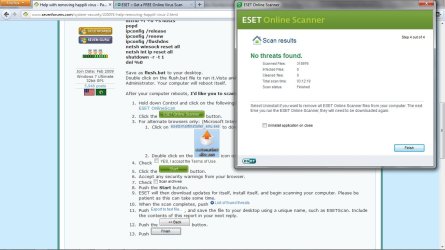
Wow... that took a while! Anyway, the scan just finished and there were no threats found. Since that's the case, I couldn't do the last few steps (exporting the file) so I just grabbed a screenshot to show you. Anything else to be done? Thanks again so much for the help!
 

Attachments

  • ESETresults.jpg
    ESETresults.jpg
    108.3 KB · Views: 43

My Computer My Computer

OS
Windows 7 64 bit
Please download TFC by Old Timer TFC - Temp File Cleaner by OldTimer - Geeks to Go Forums and save it to your desktop.
Save any unsaved work. TFC will close ALL open programs including your browser!
Double-click on TFC.exe to run it. If you are using Vista/Windows 7 right-click on the file and choose Run As Administrator.
Click the Start button to begin the cleaning process and let it run uninterrupted to completion.
Important! If TFC prompts you to reboot, please do so immediately. If not prompted, manually reboot the machine anyway to ensure a complete clean.

***TFC (Temp File Cleaner) will clear out all temp folders for all user accounts (temp, IE temp, java, FF, Opera, Chrome, Safari), including Administrator, All Users, LocalService, NetworkService, and any other accounts in the user folder. It also cleans out the %systemroot%\temp folder and checks for .tmp files in the %systemdrive% root folder, %systemroot%, and the system32 folder (both 32bit and 64bit on 64bit OSs). It shows the amount removed for each location found (in bytes) and the total removed (in MB). Before running, it will stop Explorer and all other running apps. When finished, if a reboot is required the user must reboot to finish clearing any in-use temp files.

Now let me know if you are still being redirected while searching in both FF and IE.
 

My Computer My Computer

Computer type
PC/Desktop
Computer Manufacturer/Model Number
Bruce ... somewhere in his 40's
OS
Windows 7 Ultimate 32bit SP1
CPU
Intel(R) Core(TM)2 Quad CPU @ 2.40GHz, 2400 MHz
Motherboard
INTEL/D975XBX2
Memory
4 GB
Graphics Card(s)
ATI Radeon HD 2600 Pro
Monitor(s) Displays
Samsung SyncMaster 914v
Screen Resolution
1280 x 1024
Hard Drives
2/500GB each ... ST3500630AS ATA Device.
One is not connected
PSU
Rocketfish 700 W
Case
G.Skill Gigabyte Chassis
Keyboard
Standard PS/2 Keyboard
Mouse
Microsoft PS/2 Mouse
Internet Speed
DSL
Antivirus
Avira Internet Security
Browser
IE 11
Other Info
ATI HDMI Audio
Ok, I went ahead and cleared all of the temp files. I was only getting redirected every now and again so, it will take a little while to confirm that it's worked but, so far so good! I'll post again when I know for sure. Thanks again so much for your help!
 

My Computer My Computer

OS
Windows 7 64 bit
Hmmm... unfortunately, it doesn't look like I'm fixed entirely. In the 10 minutes of surfing I've done this AM, I've already had one redirection to a page that didn't actually load (the URL was totally wrong so, when I backed up and clicked the link again, it actually went to the right page) and then just got redirected to something called beesq. Help?
 

My Computer My Computer

OS
Windows 7 64 bit
Which browser (IE or FF) redirected you?


Download TDSSKiller and save it to your Desktop.
  • Extract the file and run it.
  • Once completed it will create a log in the root directory (usually C:\).
  • Please post the contents of that log in your next reply.
 

My Computer My Computer

Computer type
PC/Desktop
Computer Manufacturer/Model Number
Bruce ... somewhere in his 40's
OS
Windows 7 Ultimate 32bit SP1
CPU
Intel(R) Core(TM)2 Quad CPU @ 2.40GHz, 2400 MHz
Motherboard
INTEL/D975XBX2
Memory
4 GB
Graphics Card(s)
ATI Radeon HD 2600 Pro
Monitor(s) Displays
Samsung SyncMaster 914v
Screen Resolution
1280 x 1024
Hard Drives
2/500GB each ... ST3500630AS ATA Device.
One is not connected
PSU
Rocketfish 700 W
Case
G.Skill Gigabyte Chassis
Keyboard
Standard PS/2 Keyboard
Mouse
Microsoft PS/2 Mouse
Internet Speed
DSL
Antivirus
Avira Internet Security
Browser
IE 11
Other Info
ATI HDMI Audio
Log looks okay! You didn't tell me which browser redirected you.

Did you set this "Manual Proxy Configuration" and enter "localhost" as the server and 8000 as the port in Firefox?
FF - prefs.js: browser.startup.homepage - hxxp://www.southpole.usap.gov/
FF - prefs.js: network.proxy.socks - 10.0.2.1
FF - prefs.js: network.proxy.socks_port - 8000

Download Security Check by screen317 from here http://screen317.spywareinfoforum.org/SecurityCheck.exe or here http://screen317.changelog.fr/SecurityCheck.exe
Save it to your Desktop.
Double click SecurityCheck.exe and follow the onscreen instructions inside of the black box.
A Notepad document should open automatically called checkup.txt.
Please post the contents of that document.
 

My Computer My Computer

Computer type
PC/Desktop
Computer Manufacturer/Model Number
Bruce ... somewhere in his 40's
OS
Windows 7 Ultimate 32bit SP1
CPU
Intel(R) Core(TM)2 Quad CPU @ 2.40GHz, 2400 MHz
Motherboard
INTEL/D975XBX2
Memory
4 GB
Graphics Card(s)
ATI Radeon HD 2600 Pro
Monitor(s) Displays
Samsung SyncMaster 914v
Screen Resolution
1280 x 1024
Hard Drives
2/500GB each ... ST3500630AS ATA Device.
One is not connected
PSU
Rocketfish 700 W
Case
G.Skill Gigabyte Chassis
Keyboard
Standard PS/2 Keyboard
Mouse
Microsoft PS/2 Mouse
Internet Speed
DSL
Antivirus
Avira Internet Security
Browser
IE 11
Other Info
ATI HDMI Audio
Sorry. I just came back to the computer b/c I realized that I forgot to tell you that I'm using FF. I definitely set the homepage but the other things I didn't do myself. I had an IT person look at my PC and I *THINK* that's what he set a while ago. Should I remove them?

Anyway, I've run the next program and attached the file... no more re directions have happened recently but, I also haven't been on the computer much....
 

Attachments

My Computer My Computer

OS
Windows 7 64 bit
Back
Top