Help with 'TAKEOWN' command

The registry does change. It simply does not work the the files I am trying to modify, while it works fine with other files and program files..
 

My Computer My Computer

At a glance

Windows 7
OS
Windows 7
OK, you may have an illegal or hacked copy, and that could be why the registry change doesn't work.

We cannot help with anything but legal software, sorry.
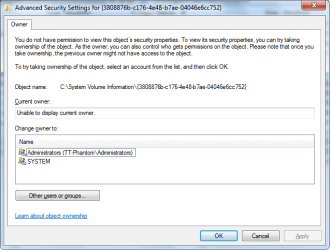
It isn't any explanation.There are many objects in system there even unable to display owner of object mostly these kind of objects are in C:\Windows or in System Volume Information.Example:

per.png

And this is normal.In each Vista & 7 this is.For few 3p programs you can also see similar things.You have to realize theory of changing permissions and practice of changing permissions are different things.Not all will work according with theory.Administrator is not absolute ruler in own system!Sometimes unable change permission due to processes programs in use,incorrect object name,corrupted objects or really sometimes difficult to explain.

@Tygerr
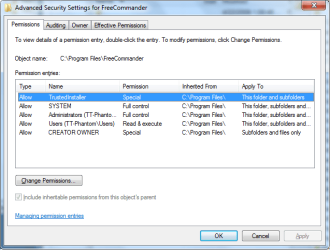
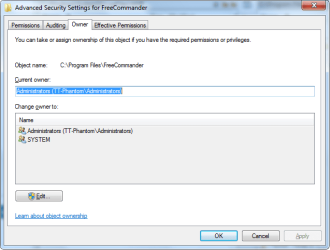
If you absolutely sure you everything correct do try these commands in "safe mode with commands prompt" (not in classic safe mode http://www.sevenforums.com/tutorials/666-advanced-boot-options.html).If it don't help too,show screen from advanced security properties to this object,show also Owner tab - I mean these equivalents
PER2.pngPER3.png
 

My Computer My Computer

At a glance

Windows 7 Professional x64 PLAMD Athlon 4450eGoodRam DDR2 2x2048MB (FSB 800MHz)nVidia GeForce 9600GT (G94-300) 1024 MB
Computer Manufacturer/Model Number
Custom made
OS
Windows 7 Professional x64 PL
CPU
AMD Athlon 4450e
Motherboard
Giga-Byte GA-MA69G-S3H
Memory
GoodRam DDR2 2x2048MB (FSB 800MHz)
Graphics Card(s)
nVidia GeForce 9600GT (G94-300) 1024 MB
Monitor(s) Displays
SAMSUNG SyncMaster HS2P301688
Hard Drives
Seagate ST3750330AS 750GB
PSU
Corsair 550W
Cooling
AeroCool ExtremeEngine 3T
"Because it's my computer." There is no better reason than that.
Actually no it not. That is the mind set that gets us into trouble, that is the mind set that makes us call tech support in the wee hours interrupting my precious sleep.
 

My Computer My Computer

At a glance

Windows 10 Pro (x64)Intel Core i7-3930K (3.2GHz - 4.5GHz)4x Samsung 4GB PC3-12800 DDR3 (16GB 1600MHz)Nvidia Geforce GTX 690
Computer type
PC/Desktop
Computer Manufacturer/Model Number
Alienware Aurora ALX R4
OS
Windows 10 Pro (x64)
CPU
Intel Core i7-3930K (3.2GHz - 4.5GHz)
Motherboard
Alienware Aurora-R4 x79
Memory
4x Samsung 4GB PC3-12800 DDR3 (16GB 1600MHz)
Graphics Card(s)
Nvidia Geforce GTX 690
Sound Card
SteelSeries Siberia Elite
Monitor(s) Displays
Dell UltraSharp U3011
Screen Resolution
2560x1600
Hard Drives
Samsung 850 Pro 256 GB, Seagate 1TB Desktop Hybrid HDD, 2x Western Digital 4TB Green HDD
PSU
875W Some Dell PSU <.<
Case
Alienware Aurora ALX
Cooling
Custom Liquid Cooling (EK CPU & GPU blocks) dual EK 480RAD
Keyboard
Logitech G710+ Mechanical
Mouse
Logitech G700s
Internet Speed
Verizon Fios (50 mbps average)
Other Info
Server: Intel NUC D54250WYK: i5-4250U, 16GB, 256 GB mSATA, Windows Server 2012 R2
Actually no it not. That is the mind set that gets us into trouble, that is the mind set that makes us call tech support in the wee hours interrupting my precious sleep.

You're joking, perhaps?

I didn't realize Google.com slept.
 

My Computer My Computer

At a glance

Windows 7 Pro x643.00 GHz Intel Core2 Quad Q96504 GBATI Radeon HD 3400 Series
Computer Manufacturer/Model Number
Dell Vostro 420
OS
Windows 7 Pro x64
CPU
3.00 GHz Intel Core2 Quad Q9650
Memory
4 GB
Graphics Card(s)
ATI Radeon HD 3400 Series
Monitor(s) Displays
DELL 2405FPW
Screen Resolution
1920x1200
Hard Drives
System: 80GB WDC WD800JD-22MSA1
Data: 500GB Hitachi HDP725050GLA360
Internet Speed
Verizon FiOS 20/5 mbps
Other Info
Computing is primarily business use with off-time troubleshooting practice: Remote desktop, scanning and producing invoices, some minor graphics work.

My Computer My Computer

At a glance

Windows 10 Pro (x64)Intel Core i7-3930K (3.2GHz - 4.5GHz)4x Samsung 4GB PC3-12800 DDR3 (16GB 1600MHz)Nvidia Geforce GTX 690
Computer type
PC/Desktop
Computer Manufacturer/Model Number
Alienware Aurora ALX R4
OS
Windows 10 Pro (x64)
CPU
Intel Core i7-3930K (3.2GHz - 4.5GHz)
Motherboard
Alienware Aurora-R4 x79
Memory
4x Samsung 4GB PC3-12800 DDR3 (16GB 1600MHz)
Graphics Card(s)
Nvidia Geforce GTX 690
Sound Card
SteelSeries Siberia Elite
Monitor(s) Displays
Dell UltraSharp U3011
Screen Resolution
2560x1600
Hard Drives
Samsung 850 Pro 256 GB, Seagate 1TB Desktop Hybrid HDD, 2x Western Digital 4TB Green HDD
PSU
875W Some Dell PSU <.<
Case
Alienware Aurora ALX
Cooling
Custom Liquid Cooling (EK CPU & GPU blocks) dual EK 480RAD
Keyboard
Logitech G710+ Mechanical
Mouse
Logitech G700s
Internet Speed
Verizon Fios (50 mbps average)
Other Info
Server: Intel NUC D54250WYK: i5-4250U, 16GB, 256 GB mSATA, Windows Server 2012 R2

My Computer My Computer

At a glance

Windows 7 Pro x643.00 GHz Intel Core2 Quad Q96504 GBATI Radeon HD 3400 Series
Computer Manufacturer/Model Number
Dell Vostro 420
OS
Windows 7 Pro x64
CPU
3.00 GHz Intel Core2 Quad Q9650
Memory
4 GB
Graphics Card(s)
ATI Radeon HD 3400 Series
Monitor(s) Displays
DELL 2405FPW
Screen Resolution
1920x1200
Hard Drives
System: 80GB WDC WD800JD-22MSA1
Data: 500GB Hitachi HDP725050GLA360
Internet Speed
Verizon FiOS 20/5 mbps
Other Info
Computing is primarily business use with off-time troubleshooting practice: Remote desktop, scanning and producing invoices, some minor graphics work.
Put the entire path in quotes - the space in "Program Files" has caused more headaches than any other single character, anywhere, ever.

From your example: TAKEOWN /F "C:\Program Files\xxx\xxx\xxx"

I did this code exactly and it says the system cannot find the path specified
Help? email me
[email protected]
 

My Computer My Computer

At a glance

Windows 7 Home Premium 32bit
OS
Windows 7 Home Premium 32bit
TAKEOWN /F "C:\windows"
CACLS C:\windows /e /p UserName:F
 

My Computer My Computer

At a glance

Windows 7 Profesional 32bit
OS
Windows 7 Profesional 32bit
Back
Top