
Help with User Profiles in Windows Server 2008

@ rvcjew

Any chance at some step by step instructions if you have time? Again, i have a student account for users that is a roaming profile stored server side. The client machines are running window 7. P.S. do i have to use active directory with gpo?(Sorry that was a bit of a dumb question since gpo is connected to active directory.) I am just wondering if you could give me some instructions though. Like how to add a certain user to the policies i create etc.

I'm working on a tutorial video but its going slow as I always forget steps lol so i'm making it as idiot proof as possible, if you already have the organizational unit in place ect. then skip that part, but on the server i'm making it with (my fathers work unit) I don't want to mess with their own setup so i'm remaking users to show my point. If i get time I will make VM of just server 2008 r2 and show it that way.

EDIT: will update a quick way to do it if you just want to make it so they cant move their desktop stuff.
 

My Computer My Computer

Computer type
PC/Desktop
Computer Manufacturer/Model Number
Custom
OS
10 Pro x64
CPU
Ryzen 9 3900X
Motherboard
Asrock x370 Tachi
Memory
64GB(4x16GB) DDR4
Graphics Card(s)
EVGA 1080ti FTW3
Sound Card
ASUS Xonar Essence STX (V4 Bursons), ODAC rev B, NFB-11, O2
Monitor(s) Displays
3xASUS PB278Q/R, Optoma HD142X
Screen Resolution
3x1440p, 1080p
Hard Drives
512GB 850 EVO(OS, Programs)
4TB (Movies)
3TB (Downloads)
3TB (Programs)
1TB HDD (Games)
2x6TB R1 (videos)
PSU
AX760
Case
Fractal Define R5
Cooling
NH-D15S
Keyboard
Massdrop Ctrl with Box Navy's
Mouse
G903, Alioth XXL Mat
Internet Speed
280/40
Antivirus
MBAM, ESET
Browser
Canary 64 Bit
Other Info
I also own a Thinkpad P50 Xeon 4K, X220T, X1C5
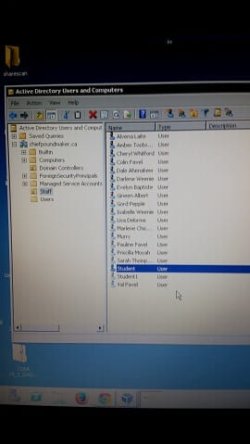
OK thanks and ill get a speccy screenshot for you asap. Also heres some screenshots of how i currently have the users setup in active directory on the domain:

As you can see in the first picture, i have all user accounts in active directory in an oranizational unit under the folder name Staff. The account i want to put restrictions on the "Student" account.
gpo1.jpg

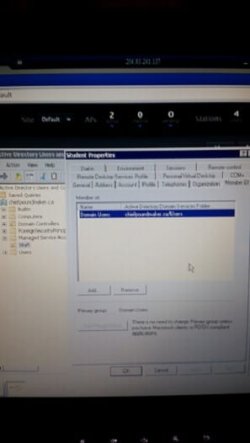
In this picture you can see they are a member of the domain chiefpoundmaker.ca/users under domain users. Will it still be easy to create group policy settings for the Student account even though they are already in the "Staff" Organizational Unit?
gpo2.jpg
 

My Computer My Computer

Computer type
PC/Desktop
OS
Windows 7 Pro 64 bit
You should move them into their own unit and not under the staff unit. You should never have staff and students together IMO. If you want to do things Like restrict their wallpaper and set up how their icons should be then you need to make a hidden share with that content on the server so their profile can access it to pull what you set up from the group policy. I was trying to make a tutorial with that server I was talking about but found i cant even attempt it without making shares and I don't want to risk missing theirs up atm. I will when I get a chance make a VM of 2012 (what i have on hand) and show the basic steps to set one up. Are your users accounts storing anything back to the server atm and if so how (are you using the profile directory path in the user properties window)?.
 

My Computer My Computer

Computer type
PC/Desktop
Computer Manufacturer/Model Number
Custom
OS
10 Pro x64
CPU
Ryzen 9 3900X
Motherboard
Asrock x370 Tachi
Memory
64GB(4x16GB) DDR4
Graphics Card(s)
EVGA 1080ti FTW3
Sound Card
ASUS Xonar Essence STX (V4 Bursons), ODAC rev B, NFB-11, O2
Monitor(s) Displays
3xASUS PB278Q/R, Optoma HD142X
Screen Resolution
3x1440p, 1080p
Hard Drives
512GB 850 EVO(OS, Programs)
4TB (Movies)
3TB (Downloads)
3TB (Programs)
1TB HDD (Games)
2x6TB R1 (videos)
PSU
AX760
Case
Fractal Define R5
Cooling
NH-D15S
Keyboard
Massdrop Ctrl with Box Navy's
Mouse
G903, Alioth XXL Mat
Internet Speed
280/40
Antivirus
MBAM, ESET
Browser
Canary 64 Bit
Other Info
I also own a Thinkpad P50 Xeon 4K, X220T, X1C5
yes they have a home folder they can save their stuff to. I did it exactly how windows server 2008 guide suggests. I will get a screenshot of that too. They dont have anything stored yet though. So i am free to gut that account or start fresh if needed. And yes i am doing it via the user properties so each account can store whatever they like on the server

And thanks on the info about creating a separate organizational unit for students. Thats an easy fix. The students havent saved anything etc. so it is not an issue to create a brand new Student account and then just gut or delete the old one in the future if needed.
 
Last edited:

My Computer My Computer

Computer type
PC/Desktop
OS
Windows 7 Pro 64 bit
Any update? All help is greatly appreciated !
 

My Computer My Computer

Computer type
PC/Desktop
OS
Windows 7 Pro 64 bit
Been so busy haven't had time to make a tutorial for this kind of thing( time to setup vm to film it) . Will try to find you some tutorials to try out for yourself when I get time.
 

My Computer My Computer

Computer type
PC/Desktop
Computer Manufacturer/Model Number
Custom
OS
10 Pro x64
CPU
Ryzen 9 3900X
Motherboard
Asrock x370 Tachi
Memory
64GB(4x16GB) DDR4
Graphics Card(s)
EVGA 1080ti FTW3
Sound Card
ASUS Xonar Essence STX (V4 Bursons), ODAC rev B, NFB-11, O2
Monitor(s) Displays
3xASUS PB278Q/R, Optoma HD142X
Screen Resolution
3x1440p, 1080p
Hard Drives
512GB 850 EVO(OS, Programs)
4TB (Movies)
3TB (Downloads)
3TB (Programs)
1TB HDD (Games)
2x6TB R1 (videos)
PSU
AX760
Case
Fractal Define R5
Cooling
NH-D15S
Keyboard
Massdrop Ctrl with Box Navy's
Mouse
G903, Alioth XXL Mat
Internet Speed
280/40
Antivirus
MBAM, ESET
Browser
Canary 64 Bit
Other Info
I also own a Thinkpad P50 Xeon 4K, X220T, X1C5
thanks! yah i tried to look online myself for something specific to my situation to no avail
 

My Computer My Computer

Computer type
PC/Desktop
OS
Windows 7 Pro 64 bit
Any updates rvcjew or anyone else? I would be very grateful to have your assistance! Thank you :)
 

My Computer My Computer

Computer type
PC/Desktop
OS
Windows 7 Pro 64 bit
unfortunately I have found that what you want I may not know how to explain very well. That being said this tutorial seems to help a lot in explaining the fundamentals, its for a VDI situation but will work for a normal redirection setup as well. Desktop restrictions with Group Policy Objects Let me know how that goes for you.
 

My Computer My Computer

Computer type
PC/Desktop
Computer Manufacturer/Model Number
Custom
OS
10 Pro x64
CPU
Ryzen 9 3900X
Motherboard
Asrock x370 Tachi
Memory
64GB(4x16GB) DDR4
Graphics Card(s)
EVGA 1080ti FTW3
Sound Card
ASUS Xonar Essence STX (V4 Bursons), ODAC rev B, NFB-11, O2
Monitor(s) Displays
3xASUS PB278Q/R, Optoma HD142X
Screen Resolution
3x1440p, 1080p
Hard Drives
512GB 850 EVO(OS, Programs)
4TB (Movies)
3TB (Downloads)
3TB (Programs)
1TB HDD (Games)
2x6TB R1 (videos)
PSU
AX760
Case
Fractal Define R5
Cooling
NH-D15S
Keyboard
Massdrop Ctrl with Box Navy's
Mouse
G903, Alioth XXL Mat
Internet Speed
280/40
Antivirus
MBAM, ESET
Browser
Canary 64 Bit
Other Info
I also own a Thinkpad P50 Xeon 4K, X220T, X1C5
Ok thanks. I guess an easier way of explaining what i am hoping to do is this: is there a way to set up some type of policy that for example; Student logs into a lab computer. He makes a bunch of browser shortcuts all over the desktop. User logs out. The next time user logs in, any changes the user made to desktop are gone( in other words, the desktop always reverts back to the original desktop and forgets any changes the user made from the last session. I have heard of this being a doable thing but im struggling to find a solution. The former IT guy before me seemed to have had success since any alterations made to the desktop seem to revert back as soon as the user logs out and back in. Just trying to figure out how he did it.... See, i do want there to be changes allowed on the desktop, for example, a student wants to install a new program and asks me if i can install it. So i install it, put in my admin pass when asked, and boom new icon is created on desktop etc. What i dont want user to be able to do is create shortcuts of any kind on desktop or at least if they try it asks for admin pass. Currently if the user is lets say on firefox. They are on a website and bookmark the page and drag the url link to the desktop. The link stays on desktop and over time creates a massive pile of icon links etc all over the desktop. Currently if the user tries to install a new program they are asked for admin pass so they cant and thats great and what i want. However they do have access to create any shortcuts etc. on the desktop which is a giant mess.

I keep hearing about this user.dat file that can be changed to user.man, that supposedly solves this issue. But within the domain, no matter where i search (with hidden files set to not be hidden of course) i cannot find this file. I have searched on the physical server student profile path for this file and on the client machines and cannot seem to find this user.dat file. just trying to see what i am missing here :(

If you have a chance rvcjew feel free to also ask some people you may know about my issue as well since im desperate and i assume you probably know a lot more IT techie guys than me since you seem to be very active on these forums. I will be truly indebted to you for any additional help you can give and if you need me to go more indepth to explain my exact issue, i am happy to give a step by step list of my issue and where i am encountering problems. Thanks!!!
 

My Computer My Computer

Computer type
PC/Desktop
OS
Windows 7 Pro 64 bit
So your saying some users this already works for or it no longer works for them now too? If it still works answer may lie in a script somewhere that is ran for them. You could write a script that would in theory when they logg out run and revert there desktop to a folder you have assigned, that is a dirty way to do it IMO and some of the places I have seen do this it seems 50/50 if it works.
 

My Computer My Computer

Computer type
PC/Desktop
Computer Manufacturer/Model Number
Custom
OS
10 Pro x64
CPU
Ryzen 9 3900X
Motherboard
Asrock x370 Tachi
Memory
64GB(4x16GB) DDR4
Graphics Card(s)
EVGA 1080ti FTW3
Sound Card
ASUS Xonar Essence STX (V4 Bursons), ODAC rev B, NFB-11, O2
Monitor(s) Displays
3xASUS PB278Q/R, Optoma HD142X
Screen Resolution
3x1440p, 1080p
Hard Drives
512GB 850 EVO(OS, Programs)
4TB (Movies)
3TB (Downloads)
3TB (Programs)
1TB HDD (Games)
2x6TB R1 (videos)
PSU
AX760
Case
Fractal Define R5
Cooling
NH-D15S
Keyboard
Massdrop Ctrl with Box Navy's
Mouse
G903, Alioth XXL Mat
Internet Speed
280/40
Antivirus
MBAM, ESET
Browser
Canary 64 Bit
Other Info
I also own a Thinkpad P50 Xeon 4K, X220T, X1C5
Well i heard about it from an employee but have no verification that it works. This might explain things better though.

The former IT guy that was around before me had an organizational unit like i do with all the staff accounts in it. However where we differed is he had created the Student account in the pre-made Users folder instead of where i put the Student Account which is in my newly created organizational Unit called "Staff" (see prior post page 3 where i had pics). I just found this out today as i had access to one of his old servers and viewed his setup. I am starting to think that the simple fix may just be that i should not have put the Student account in the organizational unit folder i created and instead in that User folder. I am going to test it out next week and see if the issue is resolved ! I will post the details next week.
 

My Computer My Computer

Computer type
PC/Desktop
OS
Windows 7 Pro 64 bit
Well i heard about it from an employee but have no verification that it works. This might explain things better though.

The former IT guy that was around before me had an organizational unit like i do with all the staff accounts in it. However where we differed is he had created the Student account in the pre-made Users folder instead of where i put the Student Account which is in my newly created organizational Unit called "Staff" (see prior post page 3 where i had pics). I just found this out today as i had access to one of his old servers and viewed his setup. I am starting to think that the simple fix may just be that i should not have put the Student account in the organizational unit folder i created and instead in that User folder. I am going to test it out next week and see if the issue is resolved ! I will post the details next week.
Yeah let us know how it goes.
 

My Computer My Computer

Computer type
PC/Desktop
Computer Manufacturer/Model Number
Custom
OS
10 Pro x64
CPU
Ryzen 9 3900X
Motherboard
Asrock x370 Tachi
Memory
64GB(4x16GB) DDR4
Graphics Card(s)
EVGA 1080ti FTW3
Sound Card
ASUS Xonar Essence STX (V4 Bursons), ODAC rev B, NFB-11, O2
Monitor(s) Displays
3xASUS PB278Q/R, Optoma HD142X
Screen Resolution
3x1440p, 1080p
Hard Drives
512GB 850 EVO(OS, Programs)
4TB (Movies)
3TB (Downloads)
3TB (Programs)
1TB HDD (Games)
2x6TB R1 (videos)
PSU
AX760
Case
Fractal Define R5
Cooling
NH-D15S
Keyboard
Massdrop Ctrl with Box Navy's
Mouse
G903, Alioth XXL Mat
Internet Speed
280/40
Antivirus
MBAM, ESET
Browser
Canary 64 Bit
Other Info
I also own a Thinkpad P50 Xeon 4K, X220T, X1C5
Yah i think i just solved the issue! See my main issue here was that for the Student Account, i don't care if its a roaming profile. All accounts in my "Staff" Organizational Unit are setup as roaming profiles. However, i had also put the Student Account in there. So, lets say some student throws a pile of junk on a desktop while logged in to student. Of course on another machine that junk will be on another client machine if Student logs in. I don't need the Student Accounts to sync amongst all the client machines so that may solve my issue. However, i still cant figure out why with roaming profile accounts, if you have many users logging in and out why they still can't delete anything off the Student desktop without it coming back at next login. I am wondering if this is somehow a corruption issue or if there is a lingering machine in the school still logged in to the Student account at the time i try to delete stuff off the desktop?

So i think the issue must be with creating a roaming profile where multiple users will be logged in at the same time on different machines? It has to be since all my other accounts in the Staff folder can delete off the desktop fine, however they aren't logged in to multiple machines at the same time. Maybe this is where my issue occurs. Not totally sure though. This should also solve my issue with locking down the desktop as well since if i create my new Student account in the Users folder and not as a roaming profile, i should then be able to work properly with group policy as well i suspect :)
 

My Computer My Computer

Computer type
PC/Desktop
OS
Windows 7 Pro 64 bit
The guys over at Crunchgear came up with eighteen new screenshots of Windows 7 which later turned out to be concept renderings instead of screenshots of the latest Windows 7 build. This was pointed out by a Microsoft representative after posting those images on the website. Several of the features shown on the screenshots however resemble those that we have seen from Windows 7 Milestone 1 screenshots and videos and it is very likely that they will make their way into the final product.

Full Story: Windows 7 screen grabs look better than they sound | TechCrunch

Yeah it sounds like you have someone staying logged in that keeps really caching your profile on the server syncing with it. I can't remember the command and can't look it up atm but if you can find it it will let you push all users of that account to logg out.
 

My Computer My Computer

Computer type
PC/Desktop
Computer Manufacturer/Model Number
Custom
OS
10 Pro x64
CPU
Ryzen 9 3900X
Motherboard
Asrock x370 Tachi
Memory
64GB(4x16GB) DDR4
Graphics Card(s)
EVGA 1080ti FTW3
Sound Card
ASUS Xonar Essence STX (V4 Bursons), ODAC rev B, NFB-11, O2
Monitor(s) Displays
3xASUS PB278Q/R, Optoma HD142X
Screen Resolution
3x1440p, 1080p
Hard Drives
512GB 850 EVO(OS, Programs)
4TB (Movies)
3TB (Downloads)
3TB (Programs)
1TB HDD (Games)
2x6TB R1 (videos)
PSU
AX760
Case
Fractal Define R5
Cooling
NH-D15S
Keyboard
Massdrop Ctrl with Box Navy's
Mouse
G903, Alioth XXL Mat
Internet Speed
280/40
Antivirus
MBAM, ESET
Browser
Canary 64 Bit
Other Info
I also own a Thinkpad P50 Xeon 4K, X220T, X1C5
Thanks. Yah and the Student account doesnt need to be a roaming profile anyway so i am going to create a new account and leave it local. As long as they can save documents to the server thats all they need.
 

My Computer My Computer

Computer type
PC/Desktop
OS
Windows 7 Pro 64 bit
Back
Top