
OK I know i've bombarded the forums lately with a couple threads all somewhat related.
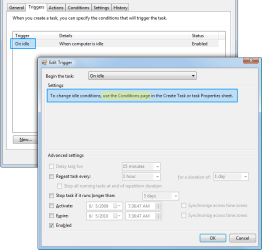
Point of this thread -- how to correctly set the idle trigger in windows task scheduler.
There is a MSFT article Task Idle Conditions (Windows) which tries to explain it, but I can't figure it out.
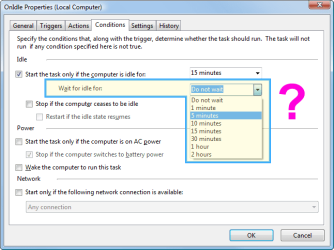
I still don't understand what the "Wait for idle for" means. Also, the article says Windows checks the system every 15 minutes, so does that mean any time less than 15 minutes would not work?
Has anyone successfully used the 'idle' as a trigger? I want to run a program (namely shutdown.exe /l) when computer is idle for 17 minutes. I want to pop up a message at 15 minutes saying it'll log you out in 2 minutes. So I want to set two tasks, both on idle triggers, two minutes apart.
I tried two ways of the trigger --
1) When computer is idle, and set conditions of idle
2) At log on, and then set conditions of idle
I've waited and waited to see if it would work and it does NOT! Any and all help appreciated.
Point of this thread -- how to correctly set the idle trigger in windows task scheduler.
There is a MSFT article Task Idle Conditions (Windows) which tries to explain it, but I can't figure it out.
I still don't understand what the "Wait for idle for" means. Also, the article says Windows checks the system every 15 minutes, so does that mean any time less than 15 minutes would not work?
Has anyone successfully used the 'idle' as a trigger? I want to run a program (namely shutdown.exe /l) when computer is idle for 17 minutes. I want to pop up a message at 15 minutes saying it'll log you out in 2 minutes. So I want to set two tasks, both on idle triggers, two minutes apart.
I tried two ways of the trigger --
1) When computer is idle, and set conditions of idle
2) At log on, and then set conditions of idle
I've waited and waited to see if it would work and it does NOT! Any and all help appreciated.
Attachments
My Computer
- Computer Manufacturer/Model Number
- Hewlett Packard dv4-1222nr
- OS
- Windows 7
- CPU
- AMD Turion X2 RM-72 2.10 GHz Dual-Core Mobile Processor
- Memory
- 4GB
- Graphics Card(s)
- ATI Radeon HD 3200 Graphics RS780M
- Monitor(s) Displays
- 14.1" LCD
- Hard Drives
- 250GB (5400RPM)
- Internet Speed
- 3.0 MBPS (down) / 1.0MBPS (up)

