Help with Wireless Ad-Hoc

LM2008

New member
Member
VIP
Local time
7:48 AM
Messages
168
I'm using Windows 7 Home Premium 64b and want to use the ad hoc feature so my brother can transfer files with me and vice versa, but his version is Windows XP. What version of Windows are compatible with this ad hoc feature?
 

My Computer My Computer

Computer type
Laptop
Computer Manufacturer/Model Number
Acer Aspire 5810T8929
OS
Windows 10 Home 64b
CPU
Intel Core Solo 1.4Ghz 800Mhz FSB
Memory
Samsung 4GB DDR3
Graphics Card(s)
Intel GMA 4500MHD
Screen Resolution
1366x768
Hard Drives
Seagate Momentus XT (Hybrid HD) 750GB
Internet Speed
40 Mbs
Antivirus
Kaspersky Free Antivirus
Browser
Chrome 60.0.3112.113 (Official Build) (64-bit)
Ad-hoc is just connecting two computers together with a crossover cable. All Windows OS's support this.
 

My Computer My Computer

Computer Manufacturer/Model Number
Dell XPS 15 L502x
OS
Windows 7 Ultimate x64 SP1
CPU
Core i7-2670QM
Memory
8GB DDR3 PC3-10600
Graphics Card(s)
Intel HD Graphics 3000 + GeForce GT 540M
Screen Resolution
1920x1080
Hard Drives
1TB 5400RPM Seagate
but i mean ad hock using wireless. We have laptops and the router is in a place where we can use cables.
 

My Computer My Computer

Computer type
Laptop
Computer Manufacturer/Model Number
Acer Aspire 5810T8929
OS
Windows 10 Home 64b
CPU
Intel Core Solo 1.4Ghz 800Mhz FSB
Memory
Samsung 4GB DDR3
Graphics Card(s)
Intel GMA 4500MHD
Screen Resolution
1366x768
Hard Drives
Seagate Momentus XT (Hybrid HD) 750GB
Internet Speed
40 Mbs
Antivirus
Kaspersky Free Antivirus
Browser
Chrome 60.0.3112.113 (Official Build) (64-bit)
Same thing. All Windows OS's support ad-hoc. There are guides available - just google it.
 

My Computer My Computer

Computer Manufacturer/Model Number
Dell XPS 15 L502x
OS
Windows 7 Ultimate x64 SP1
CPU
Core i7-2670QM
Memory
8GB DDR3 PC3-10600
Graphics Card(s)
Intel HD Graphics 3000 + GeForce GT 540M
Screen Resolution
1920x1080
Hard Drives
1TB 5400RPM Seagate

My Computer My Computer

Computer type
PC/Desktop
Computer Manufacturer/Model Number
Custom built by me.
OS
Windows 10 Pro
CPU
Intel Core i7-4770K (3.5Ghz)
Motherboard
Gigabyte G1 Sniper 5 (F10 Bios)
Memory
32 gig Corsair Dominator Platinum (4x8Gig)
Graphics Card(s)
Sapphire Tri-X R9 Fury
Sound Card
Soundblaster ZXR
Monitor(s) Displays
NEC PA242W 24" LCD Monitor
Screen Resolution
1920 x 1200
Hard Drives
Primary - Samsung 850 Pro (512gig), Samsung 840 Pro (256gig), 2TB WD Caviar Black.
PSU
EVGA Supernova 1000 G2
Case
Cooler Master HAF X
Cooling
Corsair H100i with Corsair Air Series SP120 Quiet Fans
Keyboard
Logitech Wireless Wave
Mouse
Logitech Performance MX
Internet Speed
High Speed Cable
Antivirus
Norton Security
Browser
IE11
Other Info
Memory Timings - 1866MHz @ 9-9-9-27-1T @ 1.5 volts
My bad, for not being clearer, what im asking is if a laptop with windows xp can connect to another that uses windows 7 and vice versa.
 

My Computer My Computer

Computer type
Laptop
Computer Manufacturer/Model Number
Acer Aspire 5810T8929
OS
Windows 10 Home 64b
CPU
Intel Core Solo 1.4Ghz 800Mhz FSB
Memory
Samsung 4GB DDR3
Graphics Card(s)
Intel GMA 4500MHD
Screen Resolution
1366x768
Hard Drives
Seagate Momentus XT (Hybrid HD) 750GB
Internet Speed
40 Mbs
Antivirus
Kaspersky Free Antivirus
Browser
Chrome 60.0.3112.113 (Official Build) (64-bit)
My bad, for not being clearer, what im asking is if a laptop with windows xp can connect to another that uses windows 7 and vice versa.

I'm pretty sure I answered that for you. ;)

All Windows OS's support ad-hoc.
 

My Computer My Computer

Computer Manufacturer/Model Number
Dell XPS 15 L502x
OS
Windows 7 Ultimate x64 SP1
CPU
Core i7-2670QM
Memory
8GB DDR3 PC3-10600
Graphics Card(s)
Intel HD Graphics 3000 + GeForce GT 540M
Screen Resolution
1920x1080
Hard Drives
1TB 5400RPM Seagate
My bad, for not being clearer, what im asking is if a laptop with windows xp can connect to another that uses windows 7 and vice versa.

I'm pretty sure I answered that for you. ;)

All Windows OS's support ad-hoc.

I'm sure he would have been much happier with a link ;)

See this link... http://www.sevenforums.com/network-sharing/91765-remote-dekstop-windows-7-xp.html#post794368

You might want to check out this article as well... Remote Desktop Connection 7 for Windows 7, Windows XP & Windows Vista - Remote Desktop Services (Terminal Services) Team Blog - Site Home - MSDN Blogs
 

My Computer My Computer

Computer type
PC/Desktop
Computer Manufacturer/Model Number
Custom built by me.
OS
Windows 10 Pro
CPU
Intel Core i7-4770K (3.5Ghz)
Motherboard
Gigabyte G1 Sniper 5 (F10 Bios)
Memory
32 gig Corsair Dominator Platinum (4x8Gig)
Graphics Card(s)
Sapphire Tri-X R9 Fury
Sound Card
Soundblaster ZXR
Monitor(s) Displays
NEC PA242W 24" LCD Monitor
Screen Resolution
1920 x 1200
Hard Drives
Primary - Samsung 850 Pro (512gig), Samsung 840 Pro (256gig), 2TB WD Caviar Black.
PSU
EVGA Supernova 1000 G2
Case
Cooler Master HAF X
Cooling
Corsair H100i with Corsair Air Series SP120 Quiet Fans
Keyboard
Logitech Wireless Wave
Mouse
Logitech Performance MX
Internet Speed
High Speed Cable
Antivirus
Norton Security
Browser
IE11
Other Info
Memory Timings - 1866MHz @ 9-9-9-27-1T @ 1.5 volts
My bad, for not being clearer, what im asking is if a laptop with windows xp can connect to another that uses windows 7 and vice versa.
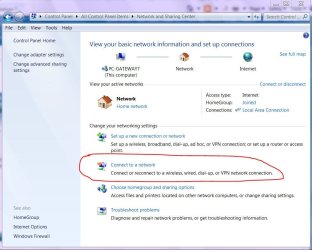
Sounds like you want a simple network. Workgroup if you perfer. Network sharing center on windows 7 :D
networking.JPG
 

My Computer My Computer

Computer Manufacturer/Model Number
Gateway GT5692
OS
Windows 7 Ulti. x64
CPU
AMD Phenom 8450 triple-core 2.10 ghz
Memory
4GB
Graphics Card(s)
ATI Radion HD 3200
Monitor(s) Displays
Gateway FPD1775W
Screen Resolution
1280x720
Hard Drives
465.6613 Gibibytes
Sounds like you want a simple network. Workgroup if you perfer. Network sharing center on windows 7 :D
View attachment 81634

Yeah, but...

what im asking is if a laptop with windows xp can connect to another that uses windows 7 and vice versa.

Remote Desktop. Just needs to get it setup. Thus the links I provided :)

Err... maybe I'm missing the point of his request :confused:

Sorry
 

My Computer My Computer

Computer type
PC/Desktop
Computer Manufacturer/Model Number
Custom built by me.
OS
Windows 10 Pro
CPU
Intel Core i7-4770K (3.5Ghz)
Motherboard
Gigabyte G1 Sniper 5 (F10 Bios)
Memory
32 gig Corsair Dominator Platinum (4x8Gig)
Graphics Card(s)
Sapphire Tri-X R9 Fury
Sound Card
Soundblaster ZXR
Monitor(s) Displays
NEC PA242W 24" LCD Monitor
Screen Resolution
1920 x 1200
Hard Drives
Primary - Samsung 850 Pro (512gig), Samsung 840 Pro (256gig), 2TB WD Caviar Black.
PSU
EVGA Supernova 1000 G2
Case
Cooler Master HAF X
Cooling
Corsair H100i with Corsair Air Series SP120 Quiet Fans
Keyboard
Logitech Wireless Wave
Mouse
Logitech Performance MX
Internet Speed
High Speed Cable
Antivirus
Norton Security
Browser
IE11
Other Info
Memory Timings - 1866MHz @ 9-9-9-27-1T @ 1.5 volts
I can understand what he means, but I am in the same situation. I bet this is what he means.. read on pls!!!

I don't need Remote Desktop as I don't want to do anything other than to setup just 1 folder on each computer (a sharing folder that has access to the other laptop) that I can copy a file to and the other computer gets and vice-versa.

I have 2 laptops side by side. One is XP the other one is Windows 7
I have ADSL and both laptops use the same internet connection via an ADSL Modem and a separate wireless rounter (pre the days when you got both of these in one). XP use the cable and Win 7 laptop use the wireless to access the internet.. All good on that front.

So my point here is I tried many ways to create a folder that each laptop can share, just for files, nothing else, but still can't get it to work.

I am getting errors like, Access deniend, not found etc etc, but I have done everything to a T as I have found on many articles and forums. Still can't get it to work, but i know it works, as I had it going briefly a while back, i was able to send some files from XP laptop to the Win 7 laptop. Then it all stopped working and for the life of me I don't know what happened. Could be something changed in some security settings, but have tried many things and still no go.

Basically, if the OP is asking if it is possible to share files (and files only) between his and his brothers computers, the answer is YES it is.

Now how to set this up, I can't answer cause this is where I am having troubles.

Can anyone help me with my dilemma. Sick of using an external thumb drive or HD to move files back and forth.

Many thanks

 

My Computer My Computer

Computer type
PC/Desktop
Computer Manufacturer/Model Number
Custom Build
OS
Windows 7 Home Premium 64bit
CPU
i7-3770
Motherboard
ASUS P8Z77-V Deluxe
Memory
G.Skill 2133MHz - 16 GB
Graphics Card(s)
ASUS GTX 670
Sound Card
motherboard
Monitor(s) Displays
AOC e2795Vh
Screen Resolution
1920 x 1808
Hard Drives
OCZ Agility 4 - 128GB
WD 1TB - Black
PSU
Corsair HX850w
Case
Fractal Design F4
Cooling
Corsair H100
Keyboard
Microsoft Desktop 600
Mouse
Microsof Desktop 600
Internet Speed
ADSL - 8MB
Antivirus
Microsoft Security essentials
Browser
Firefox

My Computer My Computer

Computer type
PC/Desktop
Computer Manufacturer/Model Number
Custom built by me.
OS
Windows 10 Pro
CPU
Intel Core i7-4770K (3.5Ghz)
Motherboard
Gigabyte G1 Sniper 5 (F10 Bios)
Memory
32 gig Corsair Dominator Platinum (4x8Gig)
Graphics Card(s)
Sapphire Tri-X R9 Fury
Sound Card
Soundblaster ZXR
Monitor(s) Displays
NEC PA242W 24" LCD Monitor
Screen Resolution
1920 x 1200
Hard Drives
Primary - Samsung 850 Pro (512gig), Samsung 840 Pro (256gig), 2TB WD Caviar Black.
PSU
EVGA Supernova 1000 G2
Case
Cooler Master HAF X
Cooling
Corsair H100i with Corsair Air Series SP120 Quiet Fans
Keyboard
Logitech Wireless Wave
Mouse
Logitech Performance MX
Internet Speed
High Speed Cable
Antivirus
Norton Security
Browser
IE11
Other Info
Memory Timings - 1866MHz @ 9-9-9-27-1T @ 1.5 volts
Thanks sygnus21, I been reading this thread now and trying a few things.

Guess its alittle more complicated than one would expect

http://www.sevenforums.com/network-...le-share-between-windows-7-windows-xp-13.html

Anyway I did manage to get this going to some extent. I can now see both computers in Networking on my Win 7 laptop, but will need to re-boot and as it keeps asking me or the User name and password before I can access my XP laptop from the Win 7 Laptop, even though I give it the correct user name and password, still doesn't like it so i am about to set it to "Allow Windows to Manage connection" option in Advanced sharing settings.

Also had to play around with both firewalls on both laptops. I think that was the major cause of the problem.

I was also able to get Win 7 laptop to access my shared folder on XP via entering the IP address at the title bar in Windows explorer on Win 7 laptop (eg. \\192.168.4.22)
 

My Computer My Computer

Computer type
PC/Desktop
Computer Manufacturer/Model Number
Custom Build
OS
Windows 7 Home Premium 64bit
CPU
i7-3770
Motherboard
ASUS P8Z77-V Deluxe
Memory
G.Skill 2133MHz - 16 GB
Graphics Card(s)
ASUS GTX 670
Sound Card
motherboard
Monitor(s) Displays
AOC e2795Vh
Screen Resolution
1920 x 1808
Hard Drives
OCZ Agility 4 - 128GB
WD 1TB - Black
PSU
Corsair HX850w
Case
Fractal Design F4
Cooling
Corsair H100
Keyboard
Microsoft Desktop 600
Mouse
Microsof Desktop 600
Internet Speed
ADSL - 8MB
Antivirus
Microsoft Security essentials
Browser
Firefox
Back
Top