Help

dmannick

New member
Local time
7:03 AM
Messages
3
My PC takes 25 minutes to finish booting. After I turn on the PC and logon on the I can't start any program, e.g skype, win explorer or microsoft office until after 25 mins. Can anyone help?
Also after I updated Intel Graphics Media Accelarator driver 8.15.2022, It asked me to restart. After restarting all I get is a black screen. Is this due to a virus???
 

My Computer

OS
windows 7 home premium 64bit
Very often this happens when the system is programmed to run an anti-virus scan at StartUp --- and therefore StartUp takes forever. You might check this, and if it's the case, reschedule your virus scans to a more convenient time.

Don't know about the black screen, but yes, it's possible that it's a virus. If you do a System Restore to a time just before you installed the update -- and there are no more black screens, then you know it was the update -- it could've been corrupted. You can try to install it again to see if you get a successful update -- or you can abandon that app. If you still get a black screen after you uninstall the update, then you have to start looking for another cause. You can do a Malwarebytes and/or TrendMicro scan to see if it's a virus/worm.
 

My Computer

Computer Manufacturer/Model Number
HP Pavillion dv5t (generation 1)
OS
Vista 64 bit and 32 bit (SP2)
CPU
Intel(R) Core(TM)2 Duo Processor T9400 (2.53 GHz
Memory
4GB DDR2 System Memory (2 Dimm)
Graphics Card(s)
512 MB NVIDIA GeForce 9600M GT
Monitor(s) Displays
15.4" diagonal WSXGA+ High-Definition HP BrightView Widescre
Screen Resolution
1680 x 1050
Hard Drives
320GB 5400RPM SATA Hard Drive with HP ProtectSmart Hard Drive Protection
Keyboard
Built-in HP
Mouse
Built in - Synaptics TouchPad V6.5 on PS/2 Port
Internet Speed
Max
Other Info
~ Intel Next-Gen Wireless-N Mini-card w/Bluetooth ~ Blu-Ray ROM DVD+/-R/RW ~ Integ. HDTV Hybrid Tuner ~ 12 Cell Battery ~ MS Office (Home Premium) 2007 ~
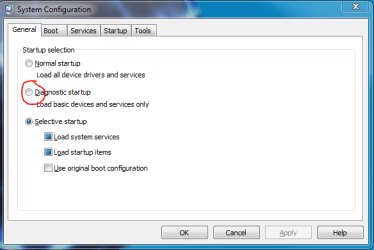
You may also benefit form trying a diagnostic startup. Open the start menu and type "msconfig" without the quotes, and select the diagnostic startup radio button. If Improvement is seen re-enable your startup programs one by one until you pinpoint the problem.
 

Attachments

  • Capture.PNG
    Capture.PNG
    12.5 KB · Views: 8

My Computer

Computer Manufacturer/Model Number
Samsung Chronos 7
OS
windows 7 Pro 64Bit
CPU
2.2 GHz Intel Core i7-2675QM
Memory
8GB
Graphics Card(s)
Intel HD Graphics 3000/Radeon HD 6490M
Sound Card
Realtek High Definition Audio
Monitor(s) Displays
Built in LCD and external Dell 22 inch LCD
Screen Resolution
1600x900
Hard Drives
1 TB HDD
Internet Speed
20 MBPS Down 1500 KBPS Up
Thanks Imperfect1,
I scanned my pc with Threadmicro and no threats were found. Sometimes I wonder if it's a good antivirus. My computer keeps installing that particular update automatically, so i have hidden it. My whole day was screwed yesterday cos i had to keep forcing my computer to shut down. I had to ran the system restore bout three times before i finally got my PC restarting properly. I hope it doesn't occur again.
What will happen if i set my antivirus to Extra Performance (Security software drivers will only load after the computer has started.....)
As for the diagnostic start up I disabled all my start up and booting programs, then I freaked out when everything on my PC was grey. Can you tell me which programs shd be set up as automatic and manual, cos I've set up all the programs to start up automatically.
 

My Computer

OS
windows 7 home premium 64bit
Win7 troubleshooting fundamentals

Are you doing a lot of tweaking beyond normal system settings, as Win7 will not tolerate these? If so, roll back to the System Restore point before you started tweaking.

If you have a factory OEM bloatware install, tips for cleaning it up: http://www.sevenforums.com/installa...p-all-four-primary-partitions.html#post952573

You shouldn't need any programs starting up with Windows except AV and gadgets if you use them.

Use a lightweight effective AV like MS Security Essentials or Avast 5 with the Win7 firewall for best performance.

Install and update Malwarebytes, run full scan from desktop: Malwarebytes
 
ok I restored the system to the point before all of this started. downloaded the malwarebytes, scanned with both mal nd trend micro nd no threats were found. but the problem still persists. I dnt know wat is going on and neither do i understand anything about pcs not to talk of softwares.
so this is wen I realised there was something wrong with the pc
1. I had this bluetooth usb chip installed nd i never took it off. Pc was working perfectly until I turned it on nd it took forever to load.
2. I took off the bluetooth and i dnt know wat happened my computer was working again but it was slow.
3. I ran a check on the pc nd it said the Pc was programmed to start up programs automatically. If i was sure i didnt need some of them i could uncheck it. Followed the instructions nd everything under services and boot seemed too many. so i disabled everything apart from trend micro and google i think.
4. I restarted and everything on my pc was either black or grey ( i now know that that's how safe mode start up appears).
5. I went back to whatever I did and checked everything to start automatically except 3 things which i thought were not necessary.
6. Pc was fine, still slow though till my trend micro expired. I ignored it for a day then decided to instal trend micro from my office.
7. It installed as trend micro office scan and said something about updating in the background. It was taking too long and i didnt see any sign of activity, turned the pc off.
8. started pc next day nd got a message that i had two antivirus installed nd they were both turned off. I turned the trend micro office on but i kept getting a message to get an antivirus online.
9. The pc installed an update nd i had to restart, that is when this whole black screen thing started.
10. When i turn it on i get starting windows, which stays there for some time, then windows 7 screen shows up, i enter my password, welcome screen shows up, cursor moves round forever, then tada screen goes black and leaves me with a cursor instead of my desktop.
11. This computer is driving me crazy, wat should i do to fix it. I typed this from safe mode with networking. I've tried all the restore points, all the scans say no threats found, I've hidden the update it was intel graphics update nd synaptic .......

 

My Computer

OS
windows 7 home premium 64bit
Edit startup items using msconfig>Startup tab only. I only allow AV and gadgets in my list. http://www.sevenforums.com/tutorials/1401-startup-programs-change.html

Uninstall Trend Micro and install Ms Security Essentials to run with the Win7 firewall alone. http://www.microsoft.com/security_essentials/ Use Malwarebytes for on-demand scanning weekly or monthly.

Run this now: http://www.sevenforums.com/tutorials/1538-sfc-scannow-command-system-file-checker.html

If these steps don't resolve the problems then as a last resort before reinstall run a http://www.sevenforums.com/tutorials/3413-repair-install.html?ltr=R

Your actions demonstrate a certain recklessness which can cause continuiing problems if you don't get a perfect clean install and then leave it alone - bring any problems here but don't just randomly turn off all services like an unguided missle.

So if the steps above don't return Win7 to its native instantaneous state, follow these steps which apply to get a purrfect reinstall, after setup save a Win7 backup image, then leave it alone. http://www.sevenforums.com/installation-setup/125874-re-install-windows-7-a.html#post1086729
 
Back
Top