Hey/Help

Shawn1995

New member
Local time
6:42 AM
Messages
8
Hey I'm new to the forums! My name is Shawn and I'm 15 years old. I joined the Windows 7 Forums because I have a huge question.

As we all know Microsoft doesn't have the brain to create a virtual pc for ALL WINDOWS 7 USERS! :mad:. I have the Home version of Windows 7 like any other ordinary person. So I recently found a VPC alt. called Oracle VM VirtualBox. I don't know how to use it well. Can anybody tell me how to install it properly so that I can have Windows XP run on it. I have a program that I want to run thats only for Windows 98/2000/Me/ and XP users.
 

My Computer My Computer

At a glance

Windows 7 Home Premium-64 Bit
OS
Windows 7 Home Premium-64 Bit

My Computer My Computer

At a glance

Windows 10 Pro x64Intel Core i5 4440 @Stock4 x 4GB HyperX Fury DDR3Gigabyte GTX 1050Ti O4G
Computer type
PC/Desktop
Computer Manufacturer/Model Number
Custom Build
OS
Windows 10 Pro x64
CPU
Intel Core i5 4440 @Stock
Motherboard
Gigabyte Z97 D3H
Memory
4 x 4GB HyperX Fury DDR3
Graphics Card(s)
Gigabyte GTX 1050Ti O4G
Sound Card
Integrated
Monitor(s) Displays
Dell P2417H
Screen Resolution
1920 x 1080
Hard Drives
Samsung EVO 850 120GB / Toshiba DT01ACA050 1TB 7200prm 32MB
PSU
Riotoro Onyx 750W
Case
NZXT H500 Black-Red
Cooling
Stock CPU + NZXT 120mm + 2x120mm red fans
Keyboard
Modecom Volcano Lanparty
Mouse
Asus ROG Gladius / DeepCool E-Pad Plus
Internet Speed
DOCSIS 50/3 Mbit
Browser
Google Chrome
Other Info
Asus K55VJ(i5 3210M, GT635M / 2GB, 8GB DDR3, 500GB HDD)
Thank You
 

My Computer My Computer

At a glance

Windows 7 Home Premium-64 Bit
OS
Windows 7 Home Premium-64 Bit
Hi Shawn, welcome to the Seven Forums.
As we all know Microsoft doesn't have the brain to create a virtual pc for ALL WINDOWS 7 USERS! :mad:. I have the Home version of Windows 7 like any other ordinary person.
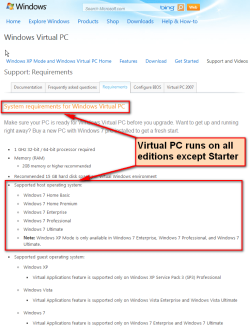
As we all know, Microsoft Virtual PC is available to every edition of Windows 7 except Starter ;)

Download_VPC_only_3.png

(extract from http://www.microsoft.com/windows/virtual-pc/support/requirements.aspx)

There's nothing that prevents you from using Microsoft Virtual PC on your Home Premium. Only the Windows XP Mode is restricted to Professional, Ultimate and Enterprise editions, being one of those extras you get when you pay a bit more.

You can download and install Virtual PC, and then install an XP virtual machine on it like this:
  • Go to Virtual PC download site
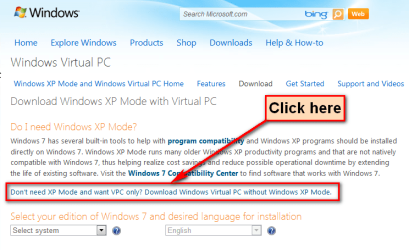
  • Click the link Don’t need XP Mode and want VPC only? Download Windows Virtual PC without Windows XP Mode
    .
    Download_VPC_only_1.png
    .
  • Because of a known bug on the download site, now you need to "lie" a bit: select Professional or better from the drop down menu, select your preferred language and click Download button
    .
    Download_VPC_only_2.png
    .
  • Install Microsoft Virtual PC
  • Install XP to Virtual PC using your own XP install media
That's it. Notice that according to Microsoft, an XP virtual machine should have SP3 to guarantee total functionality.

Kari

P.S. This method, telling the download site you have Pro or better even you only have Home Premium or less does not help you to get XP Mode. XP Mode checks the edition of your Windows 7, refusing to work if it's not Pro or better whereas Virtual PC does not check anything because it is meant to work in any edition.
 
Last edited:

My Computer My Computer

At a glance

Windows 10 Pro x64 EN-GB1.6 GHz Intel Core i7-720QM Processor6 GBATI Mobility Radeon HD 5850 Graphics
Computer type
Laptop
Computer Manufacturer/Model Number
HP ENVY 17-1150eg
OS
Windows 10 Pro x64 EN-GB
CPU
1.6 GHz Intel Core i7-720QM Processor
Memory
6 GB
Graphics Card(s)
ATI Mobility Radeon HD 5850 Graphics
Sound Card
Beats sound system with integrated subwoofer
Monitor(s) Displays
17" laptop display, 22" LED and 32" Full HD TV through HDMI
Screen Resolution
1600*900 (1), 1920*1080 (2&3)
Hard Drives
Internal: 2 x 500 GB SATA Hard Disk Drive 7200 rpm
External: 2TB for backups, 3TB USB3 network drive for media
Cooling
As Envy runs a bit warm, I have it on a Cooler Master pad
Keyboard
Logitech diNovo Media Desktop Laser (bluetooth)
Mouse
Logitech Performance Mouse MX
Internet Speed
50/10 Mbps VDSL
Antivirus
Windows Defender 4.3.9431.0
Browser
Maxthon 3.5.2., IE11
Hi Shawn, welcome to the Seven Forums.
As we all know Microsoft doesn't have the brain to create a virtual pc for ALL WINDOWS 7 USERS! :mad:. I have the Home version of Windows 7 like any other ordinary person.
As we all know, Microsoft Virtual PC is available to every edition of Windows 7 except Starter ;)

View attachment 137524

(extract from Windows Virtual PC: Requirements)

There's nothing that prevents you from using Microsoft Virtual PC on your Home Premium. Only the Windows XP Mode is restricted to Professional, Ultimate and Enterprise editions, being one of those extras you get when you pay a bit more.


You can download and install Virtual PC, and then install an XP virtual machine on it like this:
  • Go to Virtual PC download site
  • Click the link Don’t need XP Mode and want VPC only? Download Windows Virtual PC without Windows XP Mode
    .
    View attachment 137521
    .
  • Because of a known bug on the download site, now you need to "lie" a bit: select Professional or better from the drop down menu, select your preferred language and click Download button
    .
    View attachment 137522
    .
  • Install Microsoft Virtual PC
  • Install XP to Virtual PC using your own XP install media
That's it. Notice that according to Microsoft, an XP virtual machine should have SP3 to guarantee total functionality.

Kari

P.S. This method, telling the download site you have Pro or better even you only have Home Premium or less does not help you to get XP Mode. XP Mode checks the edition of your Windows 7, refusing to work if it's not Pro or better whereas Virtual PC does not check anything because it is meant to work in any edition.

So If I download virtual PC, what can I put on it? Is it possible to add Windows 98/00/Me on it?
 

My Computer My Computer

At a glance

Windows 7 Home Premium-64 Bit
OS
Windows 7 Home Premium-64 Bit
So If I download virtual PC, what can I put on it? Is it possible to add Windows 98/00/Me on it?
With all virtual machines, integration with the host and the network is important. For this purpose all major virtualization applications offer a set of tools. In Microsoft Virtual PC these tools are called Integration Components, in Oracle VirtualBox Guest Additions, and in VMware you have VMware Tools.

Microsoft Virtual PC Integration Components only work with XP, Vista and Seven, with all editions and versions of these three OS. However, if you want to use Virtual PC virtual applications, launch a program installed in a Virtual PC virtual machine directly from your host's Start Menu, this is only supported if the guest OS is XP SP3, Vista Ultimate or Enterprise and Seven Ultimate or Enterprise.

So if you have for instance an XP install media, CD/DVD or ISO, you can create a new Virtual PC virtual machine and install a guest OS from that install media. The result is a working XP virtual machine; if it is XP SP2 or less, you can use applications installed on it only by launching the vm and then launching the app from vm. If you have installed XP SP3, or you update the XP SP2 or earlier vm to SP3, and you enable integration, you can then launch apps installed on this vm from your host's (Seven) Start Menu.

VirtualBox Guest Additions work with Linux, Unix and Windows 2000 or later, VMware Tools also offer support for older Windows versions, Windows 95 or later, as well as for Linux and Unix vm's.

I use Virtual PC for my XP, Vista and Seven virtual machines, VirtualBox for Linux and Unix vm's, and VMware Player for pre-XP Windows vm's. Please notice this is my personal opinion, based on my own experience. Other members might recommend something else :)


Kari
 

My Computer My Computer

At a glance

Windows 10 Pro x64 EN-GB1.6 GHz Intel Core i7-720QM Processor6 GBATI Mobility Radeon HD 5850 Graphics
Computer type
Laptop
Computer Manufacturer/Model Number
HP ENVY 17-1150eg
OS
Windows 10 Pro x64 EN-GB
CPU
1.6 GHz Intel Core i7-720QM Processor
Memory
6 GB
Graphics Card(s)
ATI Mobility Radeon HD 5850 Graphics
Sound Card
Beats sound system with integrated subwoofer
Monitor(s) Displays
17" laptop display, 22" LED and 32" Full HD TV through HDMI
Screen Resolution
1600*900 (1), 1920*1080 (2&3)
Hard Drives
Internal: 2 x 500 GB SATA Hard Disk Drive 7200 rpm
External: 2TB for backups, 3TB USB3 network drive for media
Cooling
As Envy runs a bit warm, I have it on a Cooler Master pad
Keyboard
Logitech diNovo Media Desktop Laser (bluetooth)
Mouse
Logitech Performance Mouse MX
Internet Speed
50/10 Mbps VDSL
Antivirus
Windows Defender 4.3.9431.0
Browser
Maxthon 3.5.2., IE11
Hey! Sorry again, but I just downloaded Windows 98 onto VPC 2007 and I works fine, except everytime I start it up it says that the BIOS are disabled. I Have an HP desktop and I did all the steps to get to he BIOS menue but nothing works! Help me.
 
Last edited:

My Computer My Computer

At a glance

Windows 7 Home Premium-64 Bit
OS
Windows 7 Home Premium-64 Bit
....
 

My Computer My Computer

At a glance

Windows 7 Home Premium-64 Bit
OS
Windows 7 Home Premium-64 Bit
I have no idea what you mean. Virtual machine BIOS is disabled? Please take a screenshot of that message and post it here.

Kari
 

My Computer My Computer

At a glance

Windows 10 Pro x64 EN-GB1.6 GHz Intel Core i7-720QM Processor6 GBATI Mobility Radeon HD 5850 Graphics
Computer type
Laptop
Computer Manufacturer/Model Number
HP ENVY 17-1150eg
OS
Windows 10 Pro x64 EN-GB
CPU
1.6 GHz Intel Core i7-720QM Processor
Memory
6 GB
Graphics Card(s)
ATI Mobility Radeon HD 5850 Graphics
Sound Card
Beats sound system with integrated subwoofer
Monitor(s) Displays
17" laptop display, 22" LED and 32" Full HD TV through HDMI
Screen Resolution
1600*900 (1), 1920*1080 (2&3)
Hard Drives
Internal: 2 x 500 GB SATA Hard Disk Drive 7200 rpm
External: 2TB for backups, 3TB USB3 network drive for media
Cooling
As Envy runs a bit warm, I have it on a Cooler Master pad
Keyboard
Logitech diNovo Media Desktop Laser (bluetooth)
Mouse
Logitech Performance Mouse MX
Internet Speed
50/10 Mbps VDSL
Antivirus
Windows Defender 4.3.9431.0
Browser
Maxthon 3.5.2., IE11
Hey! Sorry again, but I just downloaded Windows 98 onto VPC 2007 and I works fine, except everytime I start it up it says that the BIOS are disabled. I Have an HP desktop and I did all the steps to get to he BIOS menue but nothing works! Help me.

I might be mistaken but you mention that you have a HP desktop and you have taken steps to access your BIOS menu. You don't need to access BIOS on your local computer when using a Virtual PC. I have used VPC many times and have never needed to access VPC BIOS.

To access VPC BIOS, just press DEL on boot.
 

My Computer My Computer

At a glance

Windows 7, Ubuntu 9.10, Vista2.4Ghz4GB512MB NVIDIA GeForce 9500M
Computer Manufacturer/Model Number
Acer Aspire 6920g
OS
Windows 7, Ubuntu 9.10, Vista
CPU
2.4Ghz
Motherboard
Acer Aspire 6920g
Memory
4GB
Graphics Card(s)
512MB NVIDIA GeForce 9500M
Sound Card
Integrated with Virtual Surround Sound & Dolby Home Theater
Hard Drives
320GB
That is so completely different thing than what you mentioned earlier!

You have to enable Hardware Assisted Virtualization (HAV). Check this: Windows Virtual PC: Configure BIOS

Kari
 

My Computer My Computer

At a glance

Windows 10 Pro x64 EN-GB1.6 GHz Intel Core i7-720QM Processor6 GBATI Mobility Radeon HD 5850 Graphics
Computer type
Laptop
Computer Manufacturer/Model Number
HP ENVY 17-1150eg
OS
Windows 10 Pro x64 EN-GB
CPU
1.6 GHz Intel Core i7-720QM Processor
Memory
6 GB
Graphics Card(s)
ATI Mobility Radeon HD 5850 Graphics
Sound Card
Beats sound system with integrated subwoofer
Monitor(s) Displays
17" laptop display, 22" LED and 32" Full HD TV through HDMI
Screen Resolution
1600*900 (1), 1920*1080 (2&3)
Hard Drives
Internal: 2 x 500 GB SATA Hard Disk Drive 7200 rpm
External: 2TB for backups, 3TB USB3 network drive for media
Cooling
As Envy runs a bit warm, I have it on a Cooler Master pad
Keyboard
Logitech diNovo Media Desktop Laser (bluetooth)
Mouse
Logitech Performance Mouse MX
Internet Speed
50/10 Mbps VDSL
Antivirus
Windows Defender 4.3.9431.0
Browser
Maxthon 3.5.2., IE11
I tried but those instructions dont work 4 me
 

My Computer My Computer

At a glance

Windows 7 Home Premium-64 Bit
OS
Windows 7 Home Premium-64 Bit
I can get to the boot menu and there to locations to go to. Ether one you click start the computer. Virtual PC is no hope for me :cry:
 

My Computer My Computer

At a glance

Windows 7 Home Premium-64 Bit
OS
Windows 7 Home Premium-64 Bit
In that case, I would suggest visiting your computer manufacturer's website and looking up the model of your PC to see how Hardware Assisted Virtualization can be enabled on your specific model of computer or provide us with the make and model of computer that you have so we can see if and how it can be done as sometimes, manufacturers are known to disable certain options from being configured despite being available with your motherboard and CPU configuration.
 

My Computer My Computer

At a glance

Windows 7 Ultimate x64 SP1Intel Core i3 530 2.93 Ghz Clarkdale4 GB OCZ DDR3 1600 (PC12800) Low Voltage Desk...Nvidia GeForce GTX 550 Ti with 1 GB of RAM
OS
Windows 7 Ultimate x64 SP1
CPU
Intel Core i3 530 2.93 Ghz Clarkdale
Motherboard
ASRock P55 PRO/USB3 LGA 1156
Memory
4 GB OCZ DDR3 1600 (PC12800) Low Voltage Desktop Memory
Graphics Card(s)
Nvidia GeForce GTX 550 Ti with 1 GB of RAM
Sound Card
Realtek HD ALC892
Monitor(s) Displays
20'' eMachines E202HDbmd Glare Panel Widescreen
Screen Resolution
1600 x 900
Hard Drives
Western Digital 1 TB Caviar Black Edition (7200 RPM) SATA
Hitachi Deskstar 500 GB (7200 RPM) SATA
Samsung SpinPoint 400 GB (7200 RPM) SATA
PSU
Rosewill Xtreme Series RX750-D-B ATX12V v2.2 & EPS12V (750W)
Case
Cooler Master Centurion 534 RC-534-KKN2-GP Mid-Tower
Cooling
Standard Case Fans and Stock CPU Heatsink
Keyboard
Microsoft Wireless Optical Desktop Elite
Mouse
Microsoft Wireless Optical Desktop Elite
Internet Speed
7.1 Mbps Verizon DSL
Correct me if I'm wrong but isn't Windows Virtual PC different to Microsoft Virtual PC? Google Microsoft Virtual PC and download it.

Also, you need to be more specific and accurate about error messages. This will help volunteers provide a quicker solution.

00J
 

My Computer My Computer

At a glance

Windows 7, Ubuntu 9.10, Vista2.4Ghz4GB512MB NVIDIA GeForce 9500M
Computer Manufacturer/Model Number
Acer Aspire 6920g
OS
Windows 7, Ubuntu 9.10, Vista
CPU
2.4Ghz
Motherboard
Acer Aspire 6920g
Memory
4GB
Graphics Card(s)
512MB NVIDIA GeForce 9500M
Sound Card
Integrated with Virtual Surround Sound & Dolby Home Theater
Hard Drives
320GB
Just to clarify this:

Virtual PC has currently two versions available, the one called Windows Virtual PC is the current, latest version, but also the previous version Microsoft Virtual PC 2007 is still available.

Virtual PC 2007 can be run on XP and all editions of Vista and Seven except Starter, whereas the current version Windows Virtual PC runs only on Seven (all editions except Starter).

Windows XP Mode is a free, fully working virtual machine with XP professional Service Pack 3. It needs the current version of Windows Virtual PC and only runs on Seven Professional, Ultimate or Enterprise. Windows XP Mode does not work on Virtual PC 2007.

Kari
 
Last edited:

My Computer My Computer

At a glance

Windows 10 Pro x64 EN-GB1.6 GHz Intel Core i7-720QM Processor6 GBATI Mobility Radeon HD 5850 Graphics
Computer type
Laptop
Computer Manufacturer/Model Number
HP ENVY 17-1150eg
OS
Windows 10 Pro x64 EN-GB
CPU
1.6 GHz Intel Core i7-720QM Processor
Memory
6 GB
Graphics Card(s)
ATI Mobility Radeon HD 5850 Graphics
Sound Card
Beats sound system with integrated subwoofer
Monitor(s) Displays
17" laptop display, 22" LED and 32" Full HD TV through HDMI
Screen Resolution
1600*900 (1), 1920*1080 (2&3)
Hard Drives
Internal: 2 x 500 GB SATA Hard Disk Drive 7200 rpm
External: 2TB for backups, 3TB USB3 network drive for media
Cooling
As Envy runs a bit warm, I have it on a Cooler Master pad
Keyboard
Logitech diNovo Media Desktop Laser (bluetooth)
Mouse
Logitech Performance Mouse MX
Internet Speed
50/10 Mbps VDSL
Antivirus
Windows Defender 4.3.9431.0
Browser
Maxthon 3.5.2., IE11
Actually, the current version for Windows 7 only is called Windows Virtual PC. Microsoft Virtual PC 2007 is the older version as you stated though.
 

My Computer My Computer

At a glance

Windows 7 Ultimate x64 SP1Intel Core i3 530 2.93 Ghz Clarkdale4 GB OCZ DDR3 1600 (PC12800) Low Voltage Desk...Nvidia GeForce GTX 550 Ti with 1 GB of RAM
OS
Windows 7 Ultimate x64 SP1
CPU
Intel Core i3 530 2.93 Ghz Clarkdale
Motherboard
ASRock P55 PRO/USB3 LGA 1156
Memory
4 GB OCZ DDR3 1600 (PC12800) Low Voltage Desktop Memory
Graphics Card(s)
Nvidia GeForce GTX 550 Ti with 1 GB of RAM
Sound Card
Realtek HD ALC892
Monitor(s) Displays
20'' eMachines E202HDbmd Glare Panel Widescreen
Screen Resolution
1600 x 900
Hard Drives
Western Digital 1 TB Caviar Black Edition (7200 RPM) SATA
Hitachi Deskstar 500 GB (7200 RPM) SATA
Samsung SpinPoint 400 GB (7200 RPM) SATA
PSU
Rosewill Xtreme Series RX750-D-B ATX12V v2.2 & EPS12V (750W)
Case
Cooler Master Centurion 534 RC-534-KKN2-GP Mid-Tower
Cooling
Standard Case Fans and Stock CPU Heatsink
Keyboard
Microsoft Wireless Optical Desktop Elite
Mouse
Microsoft Wireless Optical Desktop Elite
Internet Speed
7.1 Mbps Verizon DSL
Darician, you are of course right. I have edited my post.

Kari
 

My Computer My Computer

At a glance

Windows 10 Pro x64 EN-GB1.6 GHz Intel Core i7-720QM Processor6 GBATI Mobility Radeon HD 5850 Graphics
Computer type
Laptop
Computer Manufacturer/Model Number
HP ENVY 17-1150eg
OS
Windows 10 Pro x64 EN-GB
CPU
1.6 GHz Intel Core i7-720QM Processor
Memory
6 GB
Graphics Card(s)
ATI Mobility Radeon HD 5850 Graphics
Sound Card
Beats sound system with integrated subwoofer
Monitor(s) Displays
17" laptop display, 22" LED and 32" Full HD TV through HDMI
Screen Resolution
1600*900 (1), 1920*1080 (2&3)
Hard Drives
Internal: 2 x 500 GB SATA Hard Disk Drive 7200 rpm
External: 2TB for backups, 3TB USB3 network drive for media
Cooling
As Envy runs a bit warm, I have it on a Cooler Master pad
Keyboard
Logitech diNovo Media Desktop Laser (bluetooth)
Mouse
Logitech Performance Mouse MX
Internet Speed
50/10 Mbps VDSL
Antivirus
Windows Defender 4.3.9431.0
Browser
Maxthon 3.5.2., IE11
Keeps running Update Standalone Installer

Help! When I tried to download Windows Virtual PC, it gives the Standalone Installer instead. What's going on and any solutions?:mad::mad::mad::mad::mad::cry: getting frustrated!!
 

My Computer My Computer

At a glance

Windows 7 Home Premium x644GB
Computer Manufacturer/Model Number
Acer Aspire Z5771
OS
Windows 7 Home Premium x64
Memory
4GB
Back
Top