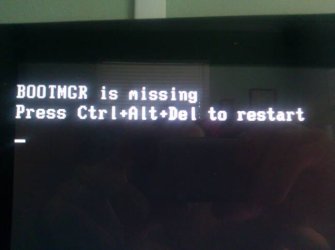
Hi guys. OS is not booting up

JoSantos

New member
Local time
12:31 PM
Messages
7
Location
Naples
I have been using Win 7 home premium for a long time now, but two days ago when I was starting the machine, a black screen came up saying that Boot file or something wasn't found, so I couldn't use the system.

I installed a fresh system already, but, how can I make windows to repair the damaged file? I have an original Windows 7 dvd. I tried, but it didn't give me any options related to repair.

Thanks in advance everyone. It is just for prevention in a future.
 

My Computer My Computer

At a glance

windows 7 home premium 64 bit, and Windows 7 ...
OS
windows 7 home premium 64 bit, and Windows 7 Ultimate 64 bit
Hey buddy, thanks for the promt reply. Regarding the message. Well, unfortunately I don't remember, but I'm sure it was a very short one. For example, once, my big PC used to show me a message saying

"FATAL ERROR: Failed to locate neccessary tablet (s) to make adjustments. Press any key for booting.

Ok, it isn't the same case, but I put an example of this, because I took a picture :D
And my solution was to reinstall the OS. Also, this same system had a problem that everytime I played a game it stoped working and the audio keep playing, but no video at all. I don't if it was the system, or the video card. I reinstalled the system, but never found out what was the problem, because I bought a new card.

Now, regarding the main topic here. As I said, I failed to gat the details. I was looking online to see if I could provide you a visual idea of what I'm talking about, but I didn't find a thing.
I can describe what happened. A day before It was working fine, but I have being having problems with a HD. I got two HD, both Western Digital which I believe are the best in reliability. But I couldn't tell what I downloaded, or what I could have done, but my second hard drive did appeared on my BIOS, but not in the system. I went to Computer, Manage, and the HD was there, but as Unallocated device. I tried to inialize it but I got an error saying that "the was a problem with the I/O" something like that.
After I did the reinstallation, I got it back operational, but after I finished installing the drivers yesterday, it went off again. I don't know man. What do you think it might be? I remember installing drivers that had to do wih the hard drive, but I simply don't know what is going on. I downloaded the drivers from dell.com (I got an Alienware 17r2) and no warranty haha nice ha?

Appreciate your help and time buddy. Thanks in advance to anyone who could give me some advises.

 

My Computer My Computer

At a glance

windows 7 home premium 64 bit, and Windows 7 ...
OS
windows 7 home premium 64 bit, and Windows 7 Ultimate 64 bit
I suggest you read the steps in the Clean Reinstall tutorial so you now what methods work best. I would also always unplug all other HD's and peripherals during reinstall.

I asked you if your Win7 HD is set first to boot in BIOS setup. You never replied to that.
 
I'm sorry buddy, I missed that one. I will have to get into the BIOS to see what it says. What is your recommendation on it?
I gonna read that article about the clean install. It sounds good, and will be a great if I could follow those instructions for a better system.

Thanks for your time Gregrocker.
 

My Computer My Computer

At a glance

windows 7 home premium 64 bit, and Windows 7 ...
OS
windows 7 home premium 64 bit, and Windows 7 Ultimate 64 bit
The Win7 HD needs to remain set as first HD to boot or it will error with Bootmanager is missing. I thought that might be the error to which you were referring as it is common and you confirmed you were messing with two HD's.

Let us know if you have any questions or need any further help. Remember to unplug all but the Win7 target HD and plug it into first SATA port before reinstall.
 
Thank you very much. I have planned to do it tomorrow, so I will let you know how it went :D

This information you are giving us, is just amazing. I really appreciate your help.

Once again, thanks.
 

My Computer My Computer

At a glance

windows 7 home premium 64 bit, and Windows 7 ...
OS
windows 7 home premium 64 bit, and Windows 7 Ultimate 64 bit
Hi greg. Well here I send you an image, so you know what is happening. I was installing some windows updates, and the machine asked me for restart. Ok, I did it and here I am. The same problem. Thanks god I followed your instructions and made a recovery image. I'm working on it right now, but it is really pissing me off man. What is going on here?
 

My Computer My Computer

At a glance

windows 7 home premium 64 bit, and Windows 7 ...
OS
windows 7 home premium 64 bit, and Windows 7 Ultimate 64 bit
Here is the image
 

Attachments

  • uploadfromtaptalk1336946419518.jpg
    uploadfromtaptalk1336946419518.jpg
    17.5 KB · Views: 5

My Computer My Computer

At a glance

windows 7 home premium 64 bit, and Windows 7 ...
OS
windows 7 home premium 64 bit, and Windows 7 Ultimate 64 bit
Hey Gregrocker. I have found a solution to avoid the problem. And yes, those are the updates, who are messing the system up. I tried all those ipdates the system gave me to download first, and the problem ocurred, so I was able to take the shot in the morning. I used the repair disk, and I got the system back to brand new. Then I tried again, but this time just the essential, or critical updates. Once it finished downloading everything, as you know, it restarted, but this time it was fine, without problem, the HDs were OK. So I realize that was the problem, since the bigining.

I always wanted to know how to create a backup image, and thnaks to you, I do now.
Thank you very much for your great help.

Problem is solved... for me.
 

My Computer My Computer

At a glance

windows 7 home premium 64 bit, and Windows 7 ...
OS
windows 7 home premium 64 bit, and Windows 7 Ultimate 64 bit
You can install the other updates singly with a Restore Point to find out which is a problem, then if it causes a problem boot Repair Disk to System Restore, post the Update up in our Updates forum and even open a Support case with MS Updates website to get it installed.
 
Back
Top