Hibernation removal?

Beemer2

New member
Member
Local time
1:58 AM
Messages
47
How do I stop xp mode hibernating? Every time I start xp mode from my Windows 7 Pro 64-bit it says that it is opening it from hibernation.

I do not use hibernation for any Windows mode.

regards,

Beemer
 

My Computer

OS
Windows 7 Pro 64bit
CPU
Intel core 2 Duo E8400
Motherboard
Gigabyte GA-EP45-DS3
Memory
Corsair Dominator DDR2 8500 1066MHz 8GB
Graphics Card(s)
Sapphire Radeon HD 4850
Sound Card
Echo Mia Midi
Monitor(s) Displays
Samsung SyncMaster 172x and Hitachi CM752ET (CRT)
PSU
450W
Cooling
120mm and 75mm fans

My Computer

Computer type
PC/Desktop
Computer Manufacturer/Model Number
Self built custom
OS
64-bit Windows 11 Pro for Workstations
CPU
Intel i7-8700K OC'd to 5 GHz
Motherboard
ASUS ROG Maximus XI Formula Z390
Memory
64 GB (4x16GB) G.SKILL TridentZ RGB DDR4 3600 MHz
Graphics Card(s)
ASUS ROG-STRIX-GTX1080TI-O11G-GAMING
Sound Card
Integrated
Monitor(s) Displays
2 x Samsung Odyssey G7 27"
Screen Resolution
2560x1440
Hard Drives
1TB Samsung 990 PRO M.2,
4TB Samsung 990 PRO PRO M.2,
TerraMaster F8 SSD Plus NAS
PSU
Seasonic Prime Titanium 850W
Case
Thermaltake Core P3
Cooling
Corsair Hydro H115i
Keyboard
Logitech wireless K800
Mouse
Logitech MX Master 4
Internet Speed
2 Gb/s Download and 100 Mb/s Upload
Antivirus
Malwarebyte Anti-Malware Premium
Browser
Google Chrome
Other Info
Logitech Z625 speaker system,
Logitech BRIO 4K Pro webcam,
HP Color LaserJet Pro MFP M477fdn,
APC SMART-UPS RT 1000 XL - SURT1000XLI,
Galaxy S23 Plus phone
Shawn,

When I checked, Shut Down and not Hibernate was selected in both Windows XP Mode.vmcx ands XP Virtual machine.vmcx.

Something must be invoking hibernate as a separate task

regards,

Beemer
 

My Computer

OS
Windows 7 Pro 64bit
CPU
Intel core 2 Duo E8400
Motherboard
Gigabyte GA-EP45-DS3
Memory
Corsair Dominator DDR2 8500 1066MHz 8GB
Graphics Card(s)
Sapphire Radeon HD 4850
Sound Card
Echo Mia Midi
Monitor(s) Displays
Samsung SyncMaster 172x and Hitachi CM752ET (CRT)
PSU
450W
Cooling
120mm and 75mm fans
Beemer, here's how to manually delete XP Mode hibernation data and force XP Mode to reboot next time it's launched: http://www.sevenforums.com/virtuali...loading-your-settings-screen.html#post1143958

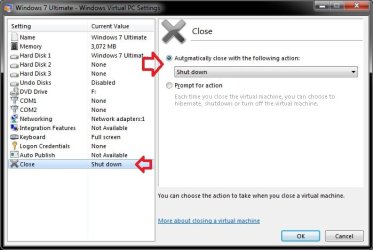
Also, change the Close action (screenshot in Brink's post above) to Prompt for action. This causes XP Mode to ask you every time it's closed if you want to hibernate or shut down.

Kari

EDIT: About that file XP Virtual Machine.vcmx you mentioned: it's totally unknown to me, does not belong to XP Mode. Check the other thread of yours regarding this unknown file.
 
Last edited:

My Computer

Computer type
Laptop
Computer Manufacturer/Model Number
HP ENVY 17-1150eg
OS
Windows 10 Pro x64 EN-GB
CPU
1.6 GHz Intel Core i7-720QM Processor
Memory
6 GB
Graphics Card(s)
ATI Mobility Radeon HD 5850 Graphics
Sound Card
Beats sound system with integrated subwoofer
Monitor(s) Displays
17" laptop display, 22" LED and 32" Full HD TV through HDMI
Screen Resolution
1600*900 (1), 1920*1080 (2&3)
Hard Drives
Internal: 2 x 500 GB SATA Hard Disk Drive 7200 rpm
External: 2TB for backups, 3TB USB3 network drive for media
Cooling
As Envy runs a bit warm, I have it on a Cooler Master pad
Keyboard
Logitech diNovo Media Desktop Laser (bluetooth)
Mouse
Logitech Performance Mouse MX
Internet Speed
50/10 Mbps VDSL
Antivirus
Windows Defender 4.3.9431.0
Browser
Maxthon 3.5.2., IE11
Back
Top