Hidden Virus File

mervyn100

New member
Local time
4:36 AM
Messages
7
I recently developed a virus on my computer. I did a MSCONFIG and found the malicious file in the start-up and ‘Disabled’ it so it did not run when I started my computer. Next, I wanted to delete this file so found its location in C:\Users\Appdata\...etc. However, when I got to the final folder there was no file visible? I have turned on all hidden files in explorer but still nothing there? Do I need to ‘Enable’ this file to start-up before it appears? Any help would be very much appreciated.

I have a Dell PC with Windows 7 running.
 

My Computer

Computer type
PC/Desktop
Computer Manufacturer/Model Number
Dell
OS
Windows 7
I recently developed a virus on my computer. I did a MSCONFIG and found the malicious file in the start-up and ‘Disabled’ it so it did not run when I started my computer. Next, I wanted to delete this file so found its location in C:\Users\Appdata\...etc. However, when I got to the final folder there was no file visible? I have turned on all hidden files in explorer but still nothing there? Do I need to ‘Enable’ this file to start-up before it appears? Any help would be very much appreciated.

I have a Dell PC with Windows 7 running.

Hi mervyn100,

Welcome to Seven forums.

Please check these links below for removing various infections on the system:

http://www.sevenforums.com/security...uide-2011-how-get-rid-all-latest-malware.html

http://www.sevenforums.com/security...-pc-clean-remove-malware-four-easy-steps.html

Kindly update your system specs here by following this.


Keep us posted with the results so we can advise you further.
 

My Computer

Computer type
PC/Desktop
OS
Winndows 7 32 bit
Let's see if we can actually find the malicious file, and know what it is we are working with...

:info: Please use the Farbar Recovery Scan Tool
Download: http://www.bleepingcomputer.com/download/farbar-recovery-scan-tool/
Select the version that applies to your system.
Save it to your Desktop.

Double-click the downloaded file to run it.
When the tool opens click Yes to the disclaimer.

Press the Scan button.

The tool makes a log (FRST.txt) in the same directory from which the tool is run (Desktop).
:ar: Please provide the FRST.txt in your reply.

The first time the tool is run, it also makes another log: Addition.txt
:ar: Also post the Addition.txt in your reply.
 

My Computer

Computer type
PC/Desktop
Computer Manufacturer/Model Number
An ol' eMachines
OS
Windows 7 Home Premium
Internet Speed
Fine for me...I'm retired!
Thanks for the replies.

Sanddeepp I have tried both them specs but unfortunately none have removed the infected file.

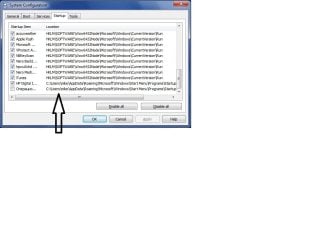
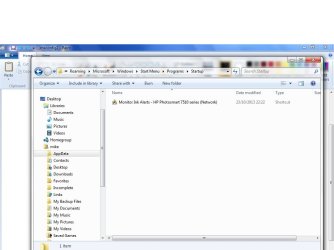
Cottonball I have located the file but it does not appear in location specified in MSCONFIG for me to delete it.

I have attached some pics to try and explain.

The first is showing the name of the file that I have disabled

The second show the path to its location.

The third shows the location folder but no file in there.

Hope this explains a bit further.

Thanks in advance.
 

Attachments

  • msconfig.jpg
    msconfig.jpg
    33.3 KB · Views: 10
  • msconfig2.jpg
    msconfig2.jpg
    56.4 KB · Views: 3
  • msconfig3.jpg
    msconfig3.jpg
    51.5 KB · Views: 1

My Computer

Computer type
PC/Desktop
Computer Manufacturer/Model Number
Dell
OS
Windows 7
Please press on with Post #3.

The tool may shed some light as to where that file is.

It looks to be written in a foreign language, maybe Russian, but not sure.
 

My Computer

Computer type
PC/Desktop
Computer Manufacturer/Model Number
An ol' eMachines
OS
Windows 7 Home Premium
Internet Speed
Fine for me...I'm retired!
You could use ccleaner to completely delete the entry, but depending on the nature of the threat, it could possibly just add itself there again.
 

My Computer

Computer type
PC/Desktop
Computer Manufacturer/Model Number
Custom Built
OS
Windows 10 Pro
CPU
AMD Ryzen 5 2400G Processor with Radeon RX Vega 11 Graphics
Motherboard
ASRock X470 Master SLI/AC AM4 AMD Promontory X470 SATA 6Gb/s
Memory
G.SKILL Ripjaws V Series 16GB (2 x 8GB) 288-Pin DDR4 SDRAM D
Graphics Card(s)
2047MB NVIDIA GeForce GTX 1060 6GB (EVGA)
Sound Card
Motherboard Built in
Monitor(s) Displays
Acer R240HY bidx 23.8-Inch IPS HDMI DVI VGA (1920 x 1080) Wi
Screen Resolution
1920 x 1080
Hard Drives
1TB Sandisk SSD PLUS (Main drive)
500 GB Seagate 7200 RPM (Games)
500 GB Western Digital 7200 RPM (Virtual Machines)
PSU
CORSAIR TX Series TX650M 650W 80+ Gold Modular Power Supply
Case
CORSAIR CARBIDE SPEC-02 Mid-Tower Gaming Case, Red LED Fan
Cooling
220mm, two 120mm, and four 60mm fans
Keyboard
Wired Dell keyboard
Mouse
Wireless Logitech mouse
Internet Speed
250mb down, 30mb up
Antivirus
Panda Cloud Antivirus
Browser
Chrome-ish x64
Other Info
Your awesome for reading this.
Hi mervyn100,

It might not show when you browse to the folder location. Have you checked progam files to check if any similar software is installed. If yes then use cc cleaner to remove those software and left over files.

You can also try this free antivirus which I normally used to get rid of many virus on my personal system:

Free Antivirus | Download Free Virus Protection Software | AVG

Use the free version. Keep us posted with the results so we can advise you further.
 

My Computer

Computer type
PC/Desktop
OS
Winndows 7 32 bit
Back
Top