Hidden volumes empty or not?

jifjaf

New member
Local time
10:39 PM
Messages
4
Hi all, new forum member here :) (I’m currently training as a technician so advance apologies for any daft questions or omissions!)

.............................................................................

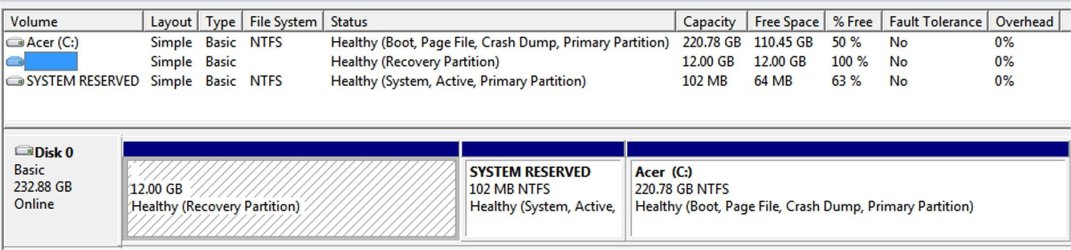
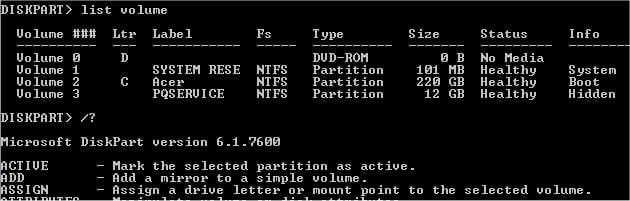
Disk management/diskpart show that I've got 3 volumes - see attached screenshots.

My machine didn't come with any disks so I think the 12GB 'nameless'/recovery partition contains all the system files I'd need to do a fresh reinstall of the OS, but it's shown as having 100% free i.e. empty. But when, in command line, i assign it a letter (diskpart > list volume > select volume 3 > assign letter....) then when it appears in 'computer' it shows as only having 1.97 of 12GB free.... i.e not empty

  • Does anyone know why...what's going on there?

  • Also, what's the 102MB 'system reserved' volume for?

  • Are they both for recovery i.e. the recovery partition is split in two?

  • if so why & what's the difference between the two?

  • & if not what's the difference between the two?
Also, I think I read somewhere that the recovery partitions are created by/for the h.ware manufacturer - in that case I guess the contents as a whole won't be much use for another machine....?


TIA


p.s. I've removed all assigned letters from hidden volumes to avoid the BIOS not being able to boot the recovery partition, if I ever need to.
 

Attachments
  • cmd diskpart.jpg
    cmd diskpart.jpg
    21.1 KB · Views: 34
  • GUI disk management screenshot.jpg
    GUI disk management screenshot.jpg
    102.5 KB · Views: 40

My Computer

OS
Win 7 home premium 64-bit (main computer)
System reserved contains the boot files necessary for your current installation of Windows. Without it, you won't boot. If you were to do a clean install using diskpart, you could omit that partition and force the boot files to be on C instead. But as it is, you need to keep that system reserved partition.

The recovery partition is something else entirely and is used to restore the PC to factory specs.

It's normal for the recovery partition to appear empty, but as you discovered, it really isn't.
 

My Computer

Computer type
PC/Desktop
Computer Manufacturer/Model Number
Ignatz Special; 4 speed manual gearbox; factory air conditioning; one of one
OS
Windows 7 Home Premium SP1, 64-bit
CPU
Intel Skylake i5-6600K, not overclocked
Motherboard
AsRock Z170M Extreme 4, micro ATX
Memory
8 GB HyperX DDR4-2666 (2 x 4 GB)
Graphics Card(s)
none; graphics are integrated on CPU
Sound Card
onboard: Realtek ALC1150; external: USB Behringer UF0-202
Monitor(s) Displays
Dell S2340M 23 inch IPS
Screen Resolution
1600 x 900
Hard Drives
System: Crucial MX100 series SSD, 128 GB;
Data: Samsung Spinpoint 103SJ, 1 TB;
Backup: WD Caviar Green WD30EZRX-00D8PB0, 3 TB
PSU
Rosewill SilentNight 500 watt fanless, semi-modular
Case
Antec Solo II
Cooling
Noctua NH-U12S; Noctua F12 intake, Noctua S12A exhaust
Keyboard
Microsoft 200 6JH-00001 USB
Mouse
Dell or Microsoft optical wired; USB
Antivirus
Microsoft Security Essentials and Malwarebytes Premium
Browser
Pale Moon
Other Info
All fans PWM; speeds at idle: CPU circa 500 rpm; intake circa 600 rpm; exhaust circa 600 rpm; CPU temps 27 idle and 47 C load in a warm room (27 C/81 F) when running Intel Extreme Tuning Utility stress test.
Thanks...

ignatzatsonic wrote "It's normal for the recovery partition to appear empty, but as you discovered, it really isn't."

Is there a particular reason for that?
 

My Computer

OS
Win 7 home premium 64-bit (main computer)
The two hidden partitions 102MB and 12GB partitions are made on purpose without drive letters. 102MB partition is used for booting the system. 12GB partition contains the setup files for returning the system as it came from factory.

When these two partitions are without drive letters, they appear to be empty. But once drive letters are assigned to them they show the contents and also indicate space occupied and free space. You should not assign any drive letters to these two partitions for normal usage.
 

My Computer

Computer Manufacturer/Model Number
Toshiba Satellite P775-S7232
OS
MS Windows 7 Ultimate 64-bit SP1
CPU
i5-2410M 2.3GHz (2.9GHz Turbo-Boost) Sandy Bridge 32nm
Motherboard
Toshiba PHRAA ver. PSBY1U-00F003
Memory
4GB+4GB Samsung DDR3 PC3-10700 (1333 MHz)
Graphics Card(s)
Video Intel(R) HD Graphics Family, 1696MB available memory
Sound Card
Realtek High Definition Audio version=6.0.1.6323
Monitor(s) Displays
17.3 " Trubrite TFT LCD, LED Backlit
Screen Resolution
1600x900 32 bit, Native support for 720P content
Hard Drives
TOSHIBA MK6476GSXN
580.614 [GB] partitioned C: 80GB and D: 500GB with hidden recovery partitons.

Spare bay for 2nd HDD but no SATA connector :-(
PSU
Toshiba AC/DC Adapter
Case
Notebook
Cooling
Built-in Fan
Keyboard
Premium Raised Tile keyboard
Mouse
Logitech M215 wireless mouse
Internet Speed
Not fast enough
Other Info
Built-in Harman Kardon speakers with Dolby Advanced Audio, Waves MaxxAudio® 3. HDMI, 1xUSB3+3xUSB2 ports, WebCam, Battery life 4hrs 11mins, 4GB Readyboost SDHC card, WD My Book Essential Ext HDDs 2 TB, 2x1TB, My Passport SE 1TB and WDTV 1st Gen for Multimedia playing on a Sony Wega 32" LCD.
Recent addition to my toys are Asus Transformer Pad TF300T with 32GB onboard sd card + 32GB microsd card.
You should not assign any drive letters to these two partitions for normal usage.

That's why I removed any assigned letters from the hidden volumes, as I mentioned in my initial post - so as to avoid the BIOS not being able to boot the recovery partition, if I ever need to use it.

Are there any other potential risks from assigning letters to hidden volumes?

Thanks
 

My Computer

OS
Win 7 home premium 64-bit (main computer)
(I’m currently training as a technician so advance apologies for any daft questions or omissions!)

Using your wording :D;)

Some daft people add or delete DATA to/from the partitions, making them unusable.
 

My Computer

OS
ME/XP/Vista/Win7
yeh, I do know enough not to do that!! :D

Thanks
 

My Computer

OS
Win 7 home premium 64-bit (main computer)
Back
Top