Hiding Windows 7 disk from XP

DarkStar GT

New member
Power User
Local time
5:13 AM
Messages
257
Location
Surrey, UK
I have a dual-boot Windows 7 and XP PC and wanted to stop XP deleting Windows 7's System Restore Points.

I followed this tutorial: System Restore Points - Stop XP Dual Boot Delete - Vista Forums using Option 2: The Manual Way and rebooted XP.

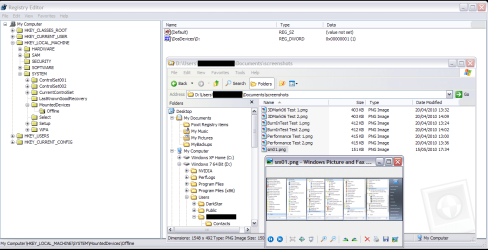
But I can still see the Windows 7 disk (D: ) and access the files on it. Attached is a screenshot taken in XP. What have I missed?
 

Attachments
  • DS_HideW7_disk.PNG
    DS_HideW7_disk.PNG
    66.8 KB · Views: 11
Last edited:

My Computer

Computer type
PC/Desktop
Computer Manufacturer/Model Number
Scan 3XS P55 liteDAW
OS
Windows Home Premium (64)
CPU
Intel Core i7 860
Motherboard
Gigabyte GA-P55A-UD4
Memory
8GB (4x2GB) Corsair TwinX XMS3
Graphics Card(s)
1GB Gainward 9500 GT
Sound Card
M-Audio Delta 66
Monitor(s) Displays
Acer v223wBBd
Screen Resolution
1680 x 1050
Hard Drives
1 x 500 GB WD Barracuda (OS+Docs)
2 x 1TB Samsung Spinpoint F3 (Data)
PSU
Enermax EMD625AWT II - 625W Enermax Modu82+ II
Case
Fractal Design Define R2 Black
Cooling
Prolima Megahalems Super 6 Heatpipe Tower Cooler
Keyboard
Microsoft Digital Media Pro
Mouse
Belkin Optical Ergo
Internet Speed
8 Mbps nominal (14.9 achieved !)
Other Info
Digital Audio Workstation
It is never a good idea to mess with the registry. I hope you set a restore point so you can get back.

The best way to achieve what you want is to install the OS's on separate HD's and have a BIOS managed Dual Boot, not a Windows-managed Dual boot.

Each HD has its own System MBR and boots via BIOS boot order or one-time Boot Menu. Set the preferred HD as first to boot in BIOS setup, or if you want the other HD to boot then tap the Fkey given on first bootup menu for one-time Boot Menu to trigger it instead.

If you already have the OS's on separate HD's and want to extricate them from WIndows-managed Dual Boot, post back a screenshot of your full DIsk Mgmt drive map and listings, using Snipping Tool in Start Menu, atttaching file using Paper Cilp in Reply Box.
 
Thank you for your reply. Yes, I did set a System Restore Point (and an Acronis True Image backup).

XP and Windows 7 are in two partitions on the same disk. The installations were done by my supplier. Reinstalling Windows 7 onto a separate disk is not something that I wish to undertake.

I will double-check the tutorial, but I cannot see why it did not work.
 

My Computer

Computer type
PC/Desktop
Computer Manufacturer/Model Number
Scan 3XS P55 liteDAW
OS
Windows Home Premium (64)
CPU
Intel Core i7 860
Motherboard
Gigabyte GA-P55A-UD4
Memory
8GB (4x2GB) Corsair TwinX XMS3
Graphics Card(s)
1GB Gainward 9500 GT
Sound Card
M-Audio Delta 66
Monitor(s) Displays
Acer v223wBBd
Screen Resolution
1680 x 1050
Hard Drives
1 x 500 GB WD Barracuda (OS+Docs)
2 x 1TB Samsung Spinpoint F3 (Data)
PSU
Enermax EMD625AWT II - 625W Enermax Modu82+ II
Case
Fractal Design Define R2 Black
Cooling
Prolima Megahalems Super 6 Heatpipe Tower Cooler
Keyboard
Microsoft Digital Media Pro
Mouse
Belkin Optical Ergo
Internet Speed
8 Mbps nominal (14.9 achieved !)
Other Info
Digital Audio Workstation
what i do with my dual boot is;
@XP
right click on my computer - click manage - disk management
right click at partition you wanna hide - click change drive letter option - remove the drive letter
 

My Computer

Computer Manufacturer/Model Number
Alienware m11x
OS
XP Pro SP2 x86 & Seven x64 Enterprise
CPU
Intel Core i5 520UM
Memory
4 GiGs PC3-8500 Dual-Channel DDR3
Graphics Card(s)
Nvidia GeForce GT 335M Discrete Graphics (1GB GDDR3)
Monitor(s) Displays
Flat & Flip 11.6" WXGA WideHD 1366x768 LED Backlit
Hard Drives
Western Digital 250GB SATAII
Internet Speed
!!!deadly slow!!!
I've not heard about REMOVING drive letters - it sounds risky to me. How does the BIOS/ boot-up respond? Any other issues?

I've double-checked and the Windows 7 disk is still accessible from XP. Any ideas why the tutorial is not working for me?
 

My Computer

Computer type
PC/Desktop
Computer Manufacturer/Model Number
Scan 3XS P55 liteDAW
OS
Windows Home Premium (64)
CPU
Intel Core i7 860
Motherboard
Gigabyte GA-P55A-UD4
Memory
8GB (4x2GB) Corsair TwinX XMS3
Graphics Card(s)
1GB Gainward 9500 GT
Sound Card
M-Audio Delta 66
Monitor(s) Displays
Acer v223wBBd
Screen Resolution
1680 x 1050
Hard Drives
1 x 500 GB WD Barracuda (OS+Docs)
2 x 1TB Samsung Spinpoint F3 (Data)
PSU
Enermax EMD625AWT II - 625W Enermax Modu82+ II
Case
Fractal Design Define R2 Black
Cooling
Prolima Megahalems Super 6 Heatpipe Tower Cooler
Keyboard
Microsoft Digital Media Pro
Mouse
Belkin Optical Ergo
Internet Speed
8 Mbps nominal (14.9 achieved !)
Other Info
Digital Audio Workstation
removing drive letter from other OS in Disk Management is done to hide its' files from OS you are in.

I'm not sure it comes to bear on Restore points issue with XP dual boot which was supposed to be fixed in RTM.

What build Win7 are you using?
 
Last edited:
Its Windows 7 Home Premium 64-bit. But you'll have to help me out here: where do I find the Build details?

As I understand it, Windows XP Home that does not recognise the Windows 7 System Restore files on the Windows 7 disk and promptly deletes them. So next time in Windows 7, there are no System Restore points.
 
Last edited:

My Computer

Computer type
PC/Desktop
Computer Manufacturer/Model Number
Scan 3XS P55 liteDAW
OS
Windows Home Premium (64)
CPU
Intel Core i7 860
Motherboard
Gigabyte GA-P55A-UD4
Memory
8GB (4x2GB) Corsair TwinX XMS3
Graphics Card(s)
1GB Gainward 9500 GT
Sound Card
M-Audio Delta 66
Monitor(s) Displays
Acer v223wBBd
Screen Resolution
1680 x 1050
Hard Drives
1 x 500 GB WD Barracuda (OS+Docs)
2 x 1TB Samsung Spinpoint F3 (Data)
PSU
Enermax EMD625AWT II - 625W Enermax Modu82+ II
Case
Fractal Design Define R2 Black
Cooling
Prolima Megahalems Super 6 Heatpipe Tower Cooler
Keyboard
Microsoft Digital Media Pro
Mouse
Belkin Optical Ergo
Internet Speed
8 Mbps nominal (14.9 achieved !)
Other Info
Digital Audio Workstation
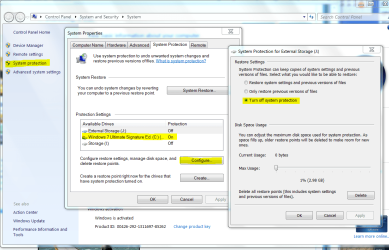
Have you tried turning off Sys REstore for Win7 in XP System Protection, then turning it off for XP in Win7 System Protection?

Capture.PNG
 
No I haven't. System Restore was initially disabled for both OS. First, in XP, I enabled it for C:\ only (strictly I enabled it for all disks, then disabled it for all but the C: disk). I then followed the tutorial, editing the Registry and rebooted XP. The D:\ disk (Widows Seven) was still visible and its files were accessible.

At the moment, System Restore is enabled only for the system disks on both OS.
In Windows XP:
-- On for C:
-- Off for D: (the Windows Seven disk)
In Windows Seven:
-- On for C:
-- Off for D: (the Windows XP disk)
 

My Computer

Computer type
PC/Desktop
Computer Manufacturer/Model Number
Scan 3XS P55 liteDAW
OS
Windows Home Premium (64)
CPU
Intel Core i7 860
Motherboard
Gigabyte GA-P55A-UD4
Memory
8GB (4x2GB) Corsair TwinX XMS3
Graphics Card(s)
1GB Gainward 9500 GT
Sound Card
M-Audio Delta 66
Monitor(s) Displays
Acer v223wBBd
Screen Resolution
1680 x 1050
Hard Drives
1 x 500 GB WD Barracuda (OS+Docs)
2 x 1TB Samsung Spinpoint F3 (Data)
PSU
Enermax EMD625AWT II - 625W Enermax Modu82+ II
Case
Fractal Design Define R2 Black
Cooling
Prolima Megahalems Super 6 Heatpipe Tower Cooler
Keyboard
Microsoft Digital Media Pro
Mouse
Belkin Optical Ergo
Internet Speed
8 Mbps nominal (14.9 achieved !)
Other Info
Digital Audio Workstation
Back
Top