High CPU after start-up.

chrismid259

New member
Local time
10:45 PM
Messages
8
Location
Liverpool, England
Hi all,
I've noticed that my computer seems to be running at high CPU just after start-up. This is before I have opened anything.

Processes after start-up
sidebar.exe
explorer.exe
dwm.exe
setpoint.exe
khalmnpr.exe
ituneshelper.exe
rthdvcpl.exe
lxdeamon.exe
nvvsvc.exe
avp.exe
taskhost.exe
winlogon.exe
csrss.exe
cmurcete.exe

60 - 70%

Usually at start-up after everything has loaded the CPU usage would read between 5 - 10%.

I have scanned my computer using Kaspersky Internet Security 2010 and Spybot S&D and they have both found nothing.

Any suggestion as to why this is?
 

My Computer

Computer Manufacturer/Model Number
Medion 8800
OS
Windows 7: Home Premium
Memory
3GB
Graphics Card(s)
nVidia GeForce 7300
Hard Drives
250/160GB external
116GB internal
You can go into Task Manager, Click on the Processes tab, then click on CPU to sort and see which process is taking up most of the CPU.
 

My Computer

Computer Manufacturer/Model Number
Dell XPS
OS
Windows 7 Pro 64bit
CPU
Intel Core 2 Quad Q6600
Motherboard
Dell Inc 0PP150 (Socket 775)
Memory
4GB
Graphics Card(s)
1024MB GeForce GTS 250 (PNY)
Monitor(s) Displays
Dell 22in
Screen Resolution
1680x1050
Hard Drives
313GB Seagate ST332062 0AS SCSI Disk Device (SCSI)
733GB Western Digital WDC WD75 00AACS-00D6B SCSI Disk Device (SCSI)
Keyboard
Logitech G11
Mouse
Logitech G5
Internet Speed
3Mb/s
Other Info
And Acer Aspire One
Hi all,
I've noticed that my computer seems to be running at high CPU just after start-up. This is before I have opened anything.

Processes after start-up
sidebar.exe
explorer.exe
dwm.exe
setpoint.exe
khalmnpr.exe
ituneshelper.exe
rthdvcpl.exe
lxdeamon.exe
nvvsvc.exe
avp.exe
taskhost.exe
winlogon.exe
csrss.exe
cmurcete.exe

60 - 70%

Usually at start-up after everything has loaded the CPU usage would read between 5 - 10%.

I have scanned my computer using Kaspersky Internet Security 2010 and Spybot S&D and they have both found nothing.

Any suggestion as to why this is?

Just a thought, have you installed any updates? There is an update (cant remember which one off the top of my head, I believe it is MS NET framework) that maxes out a core for about 10 minutes, then goes to sleep and you never see it again, (until its updated again) I had this myself last week, I checked what was using all the CPU cycles and googled it and found the info. (to see all your processes you will need to click "Show Processes for all users" under Task Manager)

Assuming that you have dual core, this would probably explain it, as the other 20% (the update will be using 50%) will be your AV checking it to see if its doing anything naughty.
 

My Computer

Computer type
PC/Desktop
Computer Manufacturer/Model Number
Medion Erazer (note to self: insert model number) - with custom additions
OS
Windows 10 Pro x64
CPU
Intel Core i5 7400 @ 3.00GHz
Motherboard
OEM supllied with PC
Memory
8GB 2133Mhz DDR4 (OEM supplied)
Graphics Card(s)
Gygabyte Windforce GTX 1050Ti (Factory Overclocked)
Sound Card
Realtek
Monitor(s) Displays
Acer Al1980 + HKC
Screen Resolution
1360*768(HKC) / 1280*1024(Acer)
Hard Drives
1TB Toshiba
1TB WD Caviar Green
120GB Samsung Evo 840
PSU
OEM supplied (no power rating on case)
Case
OEM Supplied
Cooling
Stock
Keyboard
Logitech Wireless
Mouse
Logitect Wireless
Internet Speed
40Mb/s Down 10Mb/s Up
Antivirus
Defender
Browser
Firefox
You can go into Task Manager, Click on the Processes tab, then click on CPU to sort and see which process is taking up most of the CPU.
explorer.exe (24,000 K) and sidebar.exe (16,500 K) are using the most.
 

My Computer

Computer Manufacturer/Model Number
Medion 8800
OS
Windows 7: Home Premium
Memory
3GB
Graphics Card(s)
nVidia GeForce 7300
Hard Drives
250/160GB external
116GB internal
You can go into Task Manager, Click on the Processes tab, then click on CPU to sort and see which process is taking up most of the CPU.
explorer.exe (24,000 K) and sidebar.exe (16,500 K) are using the most.

Did you show all processes for all users? also can you please upload a screenshot when the problem is occuring? Use Snipping Tool for this (in your start menu)
 

My Computer

Computer type
PC/Desktop
Computer Manufacturer/Model Number
Medion Erazer (note to self: insert model number) - with custom additions
OS
Windows 10 Pro x64
CPU
Intel Core i5 7400 @ 3.00GHz
Motherboard
OEM supllied with PC
Memory
8GB 2133Mhz DDR4 (OEM supplied)
Graphics Card(s)
Gygabyte Windforce GTX 1050Ti (Factory Overclocked)
Sound Card
Realtek
Monitor(s) Displays
Acer Al1980 + HKC
Screen Resolution
1360*768(HKC) / 1280*1024(Acer)
Hard Drives
1TB Toshiba
1TB WD Caviar Green
120GB Samsung Evo 840
PSU
OEM supplied (no power rating on case)
Case
OEM Supplied
Cooling
Stock
Keyboard
Logitech Wireless
Mouse
Logitect Wireless
Internet Speed
40Mb/s Down 10Mb/s Up
Antivirus
Defender
Browser
Firefox
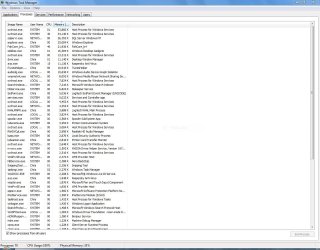
Here is a screenshot of task manager showing processes from all users.
 

Attachments

  • Capture.JPG
    Capture.JPG
    146.4 KB · Views: 168

My Computer

Computer Manufacturer/Model Number
Medion 8800
OS
Windows 7: Home Premium
Memory
3GB
Graphics Card(s)
nVidia GeForce 7300
Hard Drives
250/160GB external
116GB internal

My Computer

Computer type
PC/Desktop
Computer Manufacturer/Model Number
Medion Erazer (note to self: insert model number) - with custom additions
OS
Windows 10 Pro x64
CPU
Intel Core i5 7400 @ 3.00GHz
Motherboard
OEM supllied with PC
Memory
8GB 2133Mhz DDR4 (OEM supplied)
Graphics Card(s)
Gygabyte Windforce GTX 1050Ti (Factory Overclocked)
Sound Card
Realtek
Monitor(s) Displays
Acer Al1980 + HKC
Screen Resolution
1360*768(HKC) / 1280*1024(Acer)
Hard Drives
1TB Toshiba
1TB WD Caviar Green
120GB Samsung Evo 840
PSU
OEM supplied (no power rating on case)
Case
OEM Supplied
Cooling
Stock
Keyboard
Logitech Wireless
Mouse
Logitect Wireless
Internet Speed
40Mb/s Down 10Mb/s Up
Antivirus
Defender
Browser
Firefox

My Computer

Computer Manufacturer/Model Number
Medion 8800
OS
Windows 7: Home Premium
Memory
3GB
Graphics Card(s)
nVidia GeForce 7300
Hard Drives
250/160GB external
116GB internal
Have you downloaded BOINC? (SETI uses it among other things) or any thing that uses your CPU cycles in the background? alot of them use F@H as a base.
AFAIK this is nothing to do with the PS3
 

My Computer

Computer type
PC/Desktop
Computer Manufacturer/Model Number
Medion Erazer (note to self: insert model number) - with custom additions
OS
Windows 10 Pro x64
CPU
Intel Core i5 7400 @ 3.00GHz
Motherboard
OEM supllied with PC
Memory
8GB 2133Mhz DDR4 (OEM supplied)
Graphics Card(s)
Gygabyte Windforce GTX 1050Ti (Factory Overclocked)
Sound Card
Realtek
Monitor(s) Displays
Acer Al1980 + HKC
Screen Resolution
1360*768(HKC) / 1280*1024(Acer)
Hard Drives
1TB Toshiba
1TB WD Caviar Green
120GB Samsung Evo 840
PSU
OEM supplied (no power rating on case)
Case
OEM Supplied
Cooling
Stock
Keyboard
Logitech Wireless
Mouse
Logitect Wireless
Internet Speed
40Mb/s Down 10Mb/s Up
Antivirus
Defender
Browser
Firefox
Folding @ Home is similar but does not use the BOINC infrastructure.

chrismid259 said:
high CPU just after start-up
What do you mean by "just after"? That suggests to me it settles down shortly after. How long after?

I note that many things happen during the boot process that have nothing to do with you opening anything. For example, CCleaner, a very popular crud cleaner, is not able to delete everything when Windows is running so it tags those files for deletion during the next boot. This can significantly increase boot times and resource utilization, but settles down when complete. Many programs immediatly go out and check for updates upon boot - these might include Windows itself, anti-malware programs, Adobe Flash and Reader, etc.
 

My Computer

Computer Manufacturer/Model Number
BrightWorks Systems B4
OS
Windows 7 Profession 64-bit
CPU
Intel Core i7-860 Quad
Motherboard
Gigabyte P55-UD4P
Memory
Mushkin 4x2Gb PC12800
Graphics Card(s)
Gigabyte GTX260 896Mb
Sound Card
Integrated 7.1 HD Dolby
Monitor(s) Displays
2 Samsung 2220wm-HAS 22"
Screen Resolution
1680 x 1050 | 1680 x 1050
Hard Drives
WD HE 1Tb
PSU
Corsair TX-750W
Case
Ultra M998
Cooling
OEM
Keyboard
MS Wireless Comfort 5000
Mouse
MS Wireless 5000
Internet Speed
Cable and pretty darn fast
this is an excellent program to find out the real probs >
Process Explorer v12.04
By Mark Russinovich

Process Explorer
:thumbsup:
 

My Computer

Computer Manufacturer/Model Number
packard bell IXTREME M5722
OS
Operating System : Windows 7 Home Premium Edition 6.01.7600 SP1 (x64)
CPU
Processor : Intel Core 2 Quad Q8300 @ 2500 MHz
Motherboard
Mainboard : Packard Bell (Acer EG43M )
Memory
Physical Memory :8GB Corsair4x 2GB 800MHz C5 DDR2
Graphics Card(s)
Video Card : XFX 6700 AMD
Monitor(s) Displays
Maestro 234DL - BenQ V2220 - BenQ VW2420H
Screen Resolution
Current Display :1920x1080p pixels at 60 Hz in HD LED
Hard Drives
Hard Disks : WDC (1000 GB)
Drive C: (Hard Disk) : 428 GB available on 491 GB
Drive D: (Hard Disk) : 426 GB available on 492 GB
SAMSUNG spinpoint HD103SJ 1000.2 GB
(X 2) KINGSTON SSD NOW V 30GB
PSU
XFX ProSeries 550W PSU
Case
PACKARD BELL IXTREME
Cooling
System Blower Current: 150mA Air Flow16CFM ;Akasa 90mm rear
Keyboard
Gigabyte Aivia K8100
Mouse
TRUST-Wireless Laser Mouse - Carbon edition MI-7770C
Internet Speed
TP-LINK > TL-WN951N / AV500 Gigabit Powerline Adapters
Browser
chrome dev
Other Info
EXTRA COOLING>(FAN CONTROLLER) PC Bay Cooler 3 x 40mm fans; Akasa AK-HD-BL Blue hard drive cooler 2 x 40 mm fan 4500 rpm 29.7 dBA
Bios> American Megatrends Inc.
Version : P01-A1
Date : 08/31/2009
Actually Folding@ Home is related to the PS3. The way it works is they offer you a cool program in order to use your Cpu to process protein folding calculations. I don't think PS3 is the only place that advertises it but I just wanted let you all know.
 

My Computer

Computer Manufacturer/Model Number
Home made
OS
Windows 7 Pro 64
CPU
Phenom II X4 955 Black Ed 3.2 GHz
Motherboard
Biostar DDR3 890FX Micro ATX AMD Motherboard TA890FXE
Memory
4x Corsair XMS3 4GB PC DDR3 1333MHz =16GB
Graphics Card(s)
2x NVIDIA GeForce 9800 GT 512
Sound Card
Realtek Onboard
Monitor(s) Displays
DCLcd 20in 1680x1050 / LG 20in 1600x900
Hard Drives
Seagate 1.5 TB
Seagate 2.0 TB
PSU
Diablotek Da Series 550w ATX Power Supply
Case
IKONIK Taran A10 10-Bay ATX Mid Tower
Cooling
Corsair Hydro H50 CPU Liquid Cooler
Keyboard
Microsoft Wireless Keyboard 6000 v.3
Mouse
Microsoft Wireless Laser Mouse 7000
Internet Speed
8meg cable modem
I bet my finger he actually forgot to remove the mark when some software was installed.
Can't remember for sure is it connected with uninstaller 1.8.8,Daemon Tools,or some other software but he should try to remember when his problem started,and then check what software he installed in that time.
Uninstall of that software should solve the problem,or if there were no major changes beside that,even System Restore would solve the problem.
It is nothing weird,"they" are advertising that,let's call it-add on,as a your help which you are providing to SETI(or Hubble or something like that,I'm not sure) in anlysing of enormous data amount,with your CPU power when it is idle.
I think even some ATI software have it as an option.
That remembered me,have you installed any new ATI software recently,or installing new ATI card?

But Folding@Home is suposed to use your CPU power when it is idle,right?
 

My Computer

Computer type
PC/Desktop
Computer Manufacturer/Model Number
intel x58 selfmade
OS
Windows 7 Ultimate x64
CPU
[email protected] (non overclocked)
Motherboard
x58
Memory
8gb DDR3
Graphics Card(s)
Asus 6850
Monitor(s) Displays
lg 22"
Hard Drives
1TB
PSU
Corsair 650w
Case
Gigabyte
Cooling
Scytech
Keyboard
noname
Mouse
Logitech wireless xy
Internet Speed
70GB
Antivirus
Windows Defender
Browser
Chrome (default)
Folding@ Home

Actually the way I understand it is that they use what ever is left over. which meant to me my processor would never get any rest. That's why I didn't sign up for the PS3 program.
 

My Computer

Computer Manufacturer/Model Number
Home made
OS
Windows 7 Pro 64
CPU
Phenom II X4 955 Black Ed 3.2 GHz
Motherboard
Biostar DDR3 890FX Micro ATX AMD Motherboard TA890FXE
Memory
4x Corsair XMS3 4GB PC DDR3 1333MHz =16GB
Graphics Card(s)
2x NVIDIA GeForce 9800 GT 512
Sound Card
Realtek Onboard
Monitor(s) Displays
DCLcd 20in 1680x1050 / LG 20in 1600x900
Hard Drives
Seagate 1.5 TB
Seagate 2.0 TB
PSU
Diablotek Da Series 550w ATX Power Supply
Case
IKONIK Taran A10 10-Bay ATX Mid Tower
Cooling
Corsair Hydro H50 CPU Liquid Cooler
Keyboard
Microsoft Wireless Keyboard 6000 v.3
Mouse
Microsoft Wireless Laser Mouse 7000
Internet Speed
8meg cable modem
Between FAH and Kaspersky the OP is using 61% CPU cycles, is Kaspersky working overtime monitoring the FAH I/O?

Ap
 

My Computer

Computer Manufacturer/Model Number
Assembled in my workshop
OS
Windows 7 Home Premium
CPU
Intel Core 2 Duo @ 3.00gHz
Motherboard
Gigabyte GA-P35-S3G
Memory
4 GB
Graphics Card(s)
ATI Radeon HD 2600 XT
Sound Card
RME 24/96 Card, Realtek Internal Audio PreSonus FireStudio
Monitor(s) Displays
Acer 1917 (x2)
Screen Resolution
1280 x 1024 on both monitors
Hard Drives
Three 250GB Seagate SATA Barracuda 7200rpm
PSU
Rosewill 500-watt
Case
Rosewill mid-tower
Cooling
Noctua NH-U9B (CPU), PwrSupply fan + single large case Fan
Keyboard
Macally w/2/USB ports.
Mouse
Trackman Wheel
Other Info
Event 20/20 bas studio monitors, Yamaha sub.
Rackmount Korg/Roland/Yamaha synthesizers,
Cubase MIDI/audio recording. Sony Soundforge audio/mastering software. CD Architect Mastering. RME & Presonus audio interfaces.
Actually the way I understand it is that they use what ever is left over. which meant to me my processor would never get any rest.
CPUs don't get tired - therefore they don't need "rest". All they need is a cool, clean environment to run in. The only thing F@H and the like really do that has a negative impact is run up your power bill. It also may put a little more wear and tear on your hard drives.
 

My Computer

Computer Manufacturer/Model Number
BrightWorks Systems B4
OS
Windows 7 Profession 64-bit
CPU
Intel Core i7-860 Quad
Motherboard
Gigabyte P55-UD4P
Memory
Mushkin 4x2Gb PC12800
Graphics Card(s)
Gigabyte GTX260 896Mb
Sound Card
Integrated 7.1 HD Dolby
Monitor(s) Displays
2 Samsung 2220wm-HAS 22"
Screen Resolution
1680 x 1050 | 1680 x 1050
Hard Drives
WD HE 1Tb
PSU
Corsair TX-750W
Case
Ultra M998
Cooling
OEM
Keyboard
MS Wireless Comfort 5000
Mouse
MS Wireless 5000
Internet Speed
Cable and pretty darn fast
msconfig and check start up programs. Many things can get in there without you knowing it.
 

My Computer

Computer type
PC/Desktop
Computer Manufacturer/Model Number
Home made Desktop
OS
Windows 10 Pro. 64/ version 1709 Windows 7 Pro/64
CPU
Intel i7-6800K @ 4.3
Motherboard
ASUS X-99 Deluxe II
Memory
Corsair Platinum 16 gig @2400
Graphics Card(s)
EVGA GTX 1070 OC
Monitor(s) Displays
Asus 27" LED LCD/VE278Q
Screen Resolution
1920-1080 or 1280-720 HDMI
Hard Drives
INTEL SSD 730-240 Gb Sata 3.0/
PSU
EVGA Platium 1200W
Case
Phanteks Luxe Tempered Glass 8 fans/ one radiator
Cooling
XSPC/ Water Cooled CPU
Keyboard
Das 4 Professional
Mouse
Logitech M705/MX Anywhere 2-S
Internet Speed
100 mbits
Antivirus
Microsoft Security Essentials/ Malwarebytes Premium 3.0/ SAS
Browser
I.E. 11 default/Firefox/ ISP Time Warner Cable/Spectrum
Other Info
LG BluRay Burner/
Sound system-KLipsch-THX/
Icy Dock ssd Hot Swap bays.
Back
Top