Solved High CPU Usage for unknow reason

Raeldri

New member
Local time
10:46 PM
Messages
3
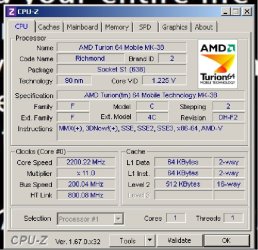
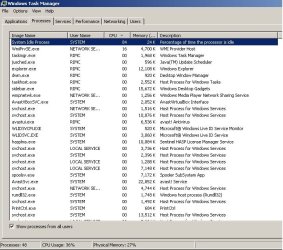
A couple weeks ago my laptop start to getting a high cpu usage from the moment I turn it on, after a couple of days trying to know the reason that cause it and running scans for virus and malwares it normalized, but then after few days it happened again but this time it didnt fix, I try the same run some scans, update programs and drivers, uninstalling my antivirus and intalling a new one, checking task manager but nothing, at first after looking task manager i saw that svchost was using almost 100% so I try to stop some services thinking that some of them was the problem but nothing, and now it went down again by itself but this time it stays at 30 -50% and I dont know what to do :cry: , I start my laptop in safe mode and the cpu usage remained the same... please someone could help me, my laptop is an ACER Aspire 4520 (i know its old but it didnt give me any problem before)
 

Attachments

  • CPUZ1.jpg
    CPUZ1.jpg
    78.1 KB · Views: 24
  • TskM.jpg
    TskM.jpg
    79.2 KB · Views: 1

My Computer

Computer type
Laptop
Computer Manufacturer/Model Number
Acer
OS
Nuevo León
CPU
AMD Turion 64 Mobile MK-38
Motherboard
Mono Acer Inc.
Memory
DDR2 4 GBytes
Graphics Card(s)
NVIDIA GeForce 7000M / nForce 610M
Antivirus
Avast
Browser
Chrome
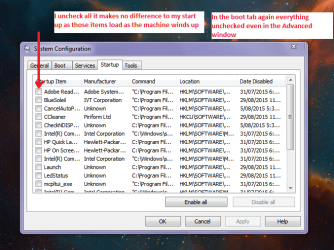
Hello and welcome Raeldri first can you please check what is being loaded at power up so Start > type msconfig > right click on the blueish box and click run as admin > a small window as in my pic will open > go to the startup tab > click it an let us know what is ticked to be loaded at start up - you may be loading far too many things then at power up.

We may need to look at what else is going on too.
Just out of interest what malware scans did you run?
 

Attachments

  • MSCONFIG.PNG
    MSCONFIG.PNG
    55.3 KB · Views: 22

My Computer

Computer type
PC/Desktop
Computer Manufacturer/Model Number
Own build (new) Desk1 / Asus ROG Win 7 / Desk2 1st build
OS
Desk1 7 Home Prem / Desk2 10 Pro / Main lap Asus ROG 10 Pro 2 laptop Toshiba 7 Pro Asus P2520 7 & 10
CPU
Desk1 i5 3750K / Laptop i7 GTX 860M / Desk2 i5 2500
Motherboard
Desk1 Asus P877-V / Desk2 Gigabyte H67 UD3H / Laptop ?
Memory
Desk1 8GB (1866) / Desk2 16GB (1333) / Laptop 8Gb DDR3
Graphics Card(s)
Desk 1& 2NVidia GTX 650 & Laptops on board Intel
Sound Card
Desk 1 & 2 -XONAR DG Realtek High Def audio Laptop
Monitor(s) Displays
Desk 1 Benq HD 2450 / Desk2 Philips 24" / Laptop 17.5"
Screen Resolution
1920x1080 D1 & D2 & Laptop 1
Hard Drives
Desk1 Samsung 120GB 830 SSD
Asus ROG 256GB 850 Pro SSD
Desk2 Samsung 840 256 SSD
Toshiba 120GB EVO
PSU
Desk 1 Corsair HX 1050/ Laptop ? / Desk 2 Corsair HX 650
Case
Desk 1 Cooler HAF XM ? Toshiba laptop / Desk2 Coolermaster
Cooling
Fans on all Desk1 -2 Desk2 - all Coolermasters 5 Laptop ?
Keyboard
Desk 1 MS Sidewinder X6 Desk 2 MS Sidewinder X 4
Mouse
Desk 1&2 - Gigabyte MS 900 gamer - laptop - Logitec wireless
Internet Speed
ADSL2+
Other Info
One other Desktop (tester) and spare Toshba laptop both with SSD's
Running Kaspersky 2016 ISS on all machines config'd identically
Logitec audio stereo systems on each machine (x3)
Canon MG5250MFC
Router/modem TP-Link running WPA2SK
Hello ICIT
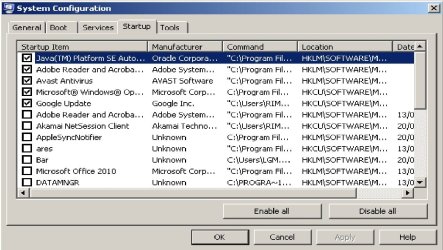
The malware scans I ran were Malwerbytes Anti malware and Avast, also I attach a pic of the window
 

Attachments

  • msconfig.jpg
    msconfig.jpg
    112.7 KB · Views: 0

My Computer

Computer type
Laptop
Computer Manufacturer/Model Number
Acer
OS
Nuevo León
CPU
AMD Turion 64 Mobile MK-38
Motherboard
Mono Acer Inc.
Memory
DDR2 4 GBytes
Graphics Card(s)
NVIDIA GeForce 7000M / nForce 610M
Antivirus
Avast
Browser
Chrome
Ok I am assuming the scans came up with nothing and for the Start up tab you could untick all of those if you like the only one to leave if it makes you feel safer is the operating system one but really it isn't needed.

Now back to those Processes in task manager can you go through them again and see which ones are eating up the CPU use please. It might be an idea to see which are using up a lot of RAM too.

By the by have you got lot of programs installed that you do not need or really use a lot?

Plus it might be good to give these a run too - will not take long and will rule out or show up any issues in the machine.


http://www.sevenforums.com/tutorials/1538-sfc-scannow-command-system-file-checker.html

http://www.sevenforums.com/tutorials/433-disk-check.html< if necessary include the /f and /r in the command line as per Option2 >in safe mode if need be

the these

https://www.malwarebytes.org/mwb-download/index.html

http://www.superantispyware.com/

http://www.bleepingcomputer.com/download/adwcleaner/

ADW download from bleepingcomputer delete any rubbish found with the malware scans

NB If anyone is runningKaspersky security it may rant about ADW - just ignore it or disable it for awhile
 

My Computer

Computer type
PC/Desktop
Computer Manufacturer/Model Number
Own build (new) Desk1 / Asus ROG Win 7 / Desk2 1st build
OS
Desk1 7 Home Prem / Desk2 10 Pro / Main lap Asus ROG 10 Pro 2 laptop Toshiba 7 Pro Asus P2520 7 & 10
CPU
Desk1 i5 3750K / Laptop i7 GTX 860M / Desk2 i5 2500
Motherboard
Desk1 Asus P877-V / Desk2 Gigabyte H67 UD3H / Laptop ?
Memory
Desk1 8GB (1866) / Desk2 16GB (1333) / Laptop 8Gb DDR3
Graphics Card(s)
Desk 1& 2NVidia GTX 650 & Laptops on board Intel
Sound Card
Desk 1 & 2 -XONAR DG Realtek High Def audio Laptop
Monitor(s) Displays
Desk 1 Benq HD 2450 / Desk2 Philips 24" / Laptop 17.5"
Screen Resolution
1920x1080 D1 & D2 & Laptop 1
Hard Drives
Desk1 Samsung 120GB 830 SSD
Asus ROG 256GB 850 Pro SSD
Desk2 Samsung 840 256 SSD
Toshiba 120GB EVO
PSU
Desk 1 Corsair HX 1050/ Laptop ? / Desk 2 Corsair HX 650
Case
Desk 1 Cooler HAF XM ? Toshiba laptop / Desk2 Coolermaster
Cooling
Fans on all Desk1 -2 Desk2 - all Coolermasters 5 Laptop ?
Keyboard
Desk 1 MS Sidewinder X6 Desk 2 MS Sidewinder X 4
Mouse
Desk 1&2 - Gigabyte MS 900 gamer - laptop - Logitec wireless
Internet Speed
ADSL2+
Other Info
One other Desktop (tester) and spare Toshba laptop both with SSD's
Running Kaspersky 2016 ISS on all machines config'd identically
Logitec audio stereo systems on each machine (x3)
Canon MG5250MFC
Router/modem TP-Link running WPA2SK
Hello ICIT

I ran the disk check and nothing was found and the problem persisted, but again it fixed itself, thanks for the help and the tips and if the problem returns I hope you can give me a hand again
 

My Computer

Computer type
Laptop
Computer Manufacturer/Model Number
Acer
OS
Nuevo León
CPU
AMD Turion 64 Mobile MK-38
Motherboard
Mono Acer Inc.
Memory
DDR2 4 GBytes
Graphics Card(s)
NVIDIA GeForce 7000M / nForce 610M
Antivirus
Avast
Browser
Chrome
Ok mate well that is good tp hear and just going back to your Start up tab in msconfig if I were you I would untick all of those you have there - you could leave the Avast if it makes you feel safer but truly I don't get my Kaspersky to fire up then I untick everything. The Java definitely and it leaves me wondering if you use that for as it is considered by many to be a source of problems;)
 

My Computer

Computer type
PC/Desktop
Computer Manufacturer/Model Number
Own build (new) Desk1 / Asus ROG Win 7 / Desk2 1st build
OS
Desk1 7 Home Prem / Desk2 10 Pro / Main lap Asus ROG 10 Pro 2 laptop Toshiba 7 Pro Asus P2520 7 & 10
CPU
Desk1 i5 3750K / Laptop i7 GTX 860M / Desk2 i5 2500
Motherboard
Desk1 Asus P877-V / Desk2 Gigabyte H67 UD3H / Laptop ?
Memory
Desk1 8GB (1866) / Desk2 16GB (1333) / Laptop 8Gb DDR3
Graphics Card(s)
Desk 1& 2NVidia GTX 650 & Laptops on board Intel
Sound Card
Desk 1 & 2 -XONAR DG Realtek High Def audio Laptop
Monitor(s) Displays
Desk 1 Benq HD 2450 / Desk2 Philips 24" / Laptop 17.5"
Screen Resolution
1920x1080 D1 & D2 & Laptop 1
Hard Drives
Desk1 Samsung 120GB 830 SSD
Asus ROG 256GB 850 Pro SSD
Desk2 Samsung 840 256 SSD
Toshiba 120GB EVO
PSU
Desk 1 Corsair HX 1050/ Laptop ? / Desk 2 Corsair HX 650
Case
Desk 1 Cooler HAF XM ? Toshiba laptop / Desk2 Coolermaster
Cooling
Fans on all Desk1 -2 Desk2 - all Coolermasters 5 Laptop ?
Keyboard
Desk 1 MS Sidewinder X6 Desk 2 MS Sidewinder X 4
Mouse
Desk 1&2 - Gigabyte MS 900 gamer - laptop - Logitec wireless
Internet Speed
ADSL2+
Other Info
One other Desktop (tester) and spare Toshba laptop both with SSD's
Running Kaspersky 2016 ISS on all machines config'd identically
Logitec audio stereo systems on each machine (x3)
Canon MG5250MFC
Router/modem TP-Link running WPA2SK
Back
Top