
High CPU Usage Normal or Not?

feetand nches

New member
Power User
VIP
Local time
10:55 AM
Messages
555
Hey guys, having this issue with a little pc that I fixed to sell and keep from going to the recycle bin. I put about as much money into it that I'll get from it. It's a low powered Windows 7 machine and a bit slow. So I want to make sure there is no garbage programs phoning home and taking up precious resources. I think all is normal but this is an OEM Install with all the junk on it.

It's seems to be doing something with the CPU up and down as you can see in the attachment. I think it is okay because it all seems to stop when I start using the laptop, but not sure. And my desktop don't do this? I meant to boot another laptop before this post to see if it was similar but forgot.

Here are a few things I've done, though just now realized that my notes are on the pc in question. This is a Clean install with SP1 and all the updates done. I'll include a MiniToolBox output I ran today.

HP Pavilion dv6-3010us

1. I removed HP Support assistant.

2. Removed unnecessary Startups.

3. Removed some junk programs that shouldn't be phoning home anyhow but were old and useless as I researched them.

4. Looked in Applications and Processes but don't see anything to much there?

Would someone please tell me what they think, thanks Nasty7
 

Attachments
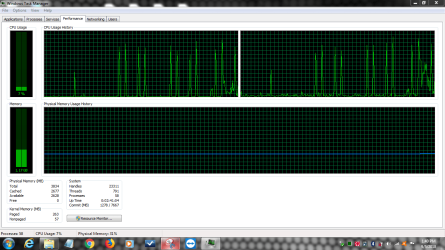
  • CPU USAGE TASK MANAGER.PNG
    CPU USAGE TASK MANAGER.PNG
    175.2 KB · Views: 1
  • MTB.txt
    MTB.txt
    19.8 KB · Views: 4

My Computer

Computer type
Laptop
Computer Manufacturer/Model Number
HP Pavilion dv7-6c23cl
OS
Windows 7 Home Premium 64bit
CPU
AMD A8-3520M
Motherboard
Hewlett-Packard 180B (Socket FS1)
Memory
6.00GB DDR3 @ 674MHz (9-9-9-24)
Graphics Card(s)
512MB ATI AMD Radeon HD 6620G
Sound Card
IDT High Definition Audio CODEC
Monitor(s) Displays
Generic PnP Monitor
Screen Resolution
(1600x900@60Hz)
Hard Drives
Samsung 850 EVO 250GB SSD
Mouse
Logitec M525
Internet Speed
30-75Mbps
Antivirus
Avast Free, Unfortunately
Browser
Google Chrome, Firefox, IE
You have all kinds of errors which leads me to believe you have a bad HDD or it's a corrupt Windows install.

You can try the following programs:

HDTune. HD Tune website

HDD Sentinel Hard Disk Sentinel - HDD health and temperature monitoring

H2testw Download H2testw 1.4


Or it's bad RAM. Memtest 86 + will help you with that.

To see what crap is auto starting try Autoruns. Autoruns for Windows - Windows Sysinternals | Microsoft Docs

Check out PCdecrapifier. The PC Decrapifier

I can't vouch for it since I go through my computer's manually and get rid of stuff.

If you look at Task Manager, and press the CPU tab to organize processes from highest CPU load to lowest, what processes are constantly being used? Processhacker is also a great tool to use. Overview - Process Hacker
 

My Computer

Computer type
PC/Desktop
OS
Windows 7 Ultimate x64
That was an excellent post F22 Simpilot!!!

All HP OEM Onboard tests have been done, so for now will look at removing some of that junk. I just looked at those errors that you pointed out and was able to see that they are major junk Programs, and some could even be a security risk. I'll get rid of them and see how it looks then.

I almost downloaded PCdecrapifier the other day, but didn't really have the need at the time. I give that a try, looks good and is downloadable by other reputable sites!

I may have forgot to reseat the RAM, which I like to do on older computers, I'll do that also.

CPU Processes look normal to me, mostly Chrome at the top. I'll look at process hacker and post a pic of the Task Manager!

I do have an old Windows 7 Retail Image that I was thinking to install, but not sure what the best way is? Keep the OEM with the Recovery Partition, or the Retail way. The Recover Partition is a real pain as it doesn't have SP1. Ahh, maybe I'll just work on what I have now to learn a little with your above instructions!

Thanks for the help!
 

My Computer

Computer type
Laptop
Computer Manufacturer/Model Number
HP Pavilion dv7-6c23cl
OS
Windows 7 Home Premium 64bit
CPU
AMD A8-3520M
Motherboard
Hewlett-Packard 180B (Socket FS1)
Memory
6.00GB DDR3 @ 674MHz (9-9-9-24)
Graphics Card(s)
512MB ATI AMD Radeon HD 6620G
Sound Card
IDT High Definition Audio CODEC
Monitor(s) Displays
Generic PnP Monitor
Screen Resolution
(1600x900@60Hz)
Hard Drives
Samsung 850 EVO 250GB SSD
Mouse
Logitec M525
Internet Speed
30-75Mbps
Antivirus
Avast Free, Unfortunately
Browser
Google Chrome, Firefox, IE
I now see what you were saying about the HDD maybe being an issue.
"Description: The driver detected a controller error on \Device\Harddisk1\DR1."

Don't know where to go from here, and not even sure if what I'm seeing is normal for this little laptop? There is so much HP Junkware on this thing it is dizzying LOL.

I tried Autoruns and disabled a few things after researching them but still these spikes in the CPU Usage. I looked on my other laptop of similar type and it isn't doing all this, though there is some usage most of it is lower.

Now not sure if I should do a Clean Install with a Retail iso or not? I'm afraid I'll run into the same thing and waste even more time?

I have done so much don't want to post all the data here, but there are still a few things that were producing Errors that I cannot trace down.

I guess I'll just Install with the Retail Image I have and see if there is any difference?
 

My Computer

Computer type
Laptop
Computer Manufacturer/Model Number
HP Pavilion dv7-6c23cl
OS
Windows 7 Home Premium 64bit
CPU
AMD A8-3520M
Motherboard
Hewlett-Packard 180B (Socket FS1)
Memory
6.00GB DDR3 @ 674MHz (9-9-9-24)
Graphics Card(s)
512MB ATI AMD Radeon HD 6620G
Sound Card
IDT High Definition Audio CODEC
Monitor(s) Displays
Generic PnP Monitor
Screen Resolution
(1600x900@60Hz)
Hard Drives
Samsung 850 EVO 250GB SSD
Mouse
Logitec M525
Internet Speed
30-75Mbps
Antivirus
Avast Free, Unfortunately
Browser
Google Chrome, Firefox, IE
Try to remove Chrome and set Win update to never check.
Chrome loads on win start and spy everything you do.
Win update can be with one of may issues.

Best way to install windows on old laptop is with a M$ disk.
Doesn't the laptop has a COA sticker with a Key? Look under or inside the battery case.
 

My Computers

System One System Two

  • Computer type
    PC/Desktop
    Computer Manufacturer/Model Number
    custom build
    OS
    Windows 7 HP 64
    CPU
    i5 6600K - 800MHz to 4200MHz
    Motherboard
    GA-Z170-HD3P
    Memory
    4+4G GSkill DDR4 3000
    Graphics Card(s)
    IG - Intel 530
    Monitor(s) Displays
    Samsung 226BW
    Screen Resolution
    1680x1050
    Hard Drives
    (1) -1 SM951 – 128GB M.2 AHCI PCIe SSD drive for Windows 7 and Lubuntu
    (2) -1 WD SATA 3 - 1T for Data
    (3) -1 WD SATA 3 - 1T for backup
    PSU
    Thermaltake 450W TR2 gold
    Keyboard
    Old and good Chicony mechanical keyboard
    Mouse
    Logitech mX performance - 9 buttons (had to disable some)
    Internet Speed
    500Mb/s
    Browser
    Firefox 64
    Other Info
    TinyWall firewall
  • Computer type
    Laptop
    System Manufacturer/Model Number
    Asus Q550LF
    OS
    Windows 7 Pro
    CPU
    i7-4500U 800MHz to 3.0GHz
    Motherboard
    Asus Q550LF
    Memory
    (4+4)G DDR3 1600
    Graphics Card(s)
    IG intel 4400 + NVIDIA GeForce GT 745M
    Sound Card
    Realtek
    Monitor(s) Displays
    LG Display LP156WF4-SPH1
    Screen Resolution
    1920 x 1080
    Hard Drives
    BX500 120G SSD for Windows and programs +
    1T HDD for data
    Internet Speed
    500 Mb/s
    Browser
    Firefox
    Other Info
    TinyWall firewall
I guess I'll just Install with the Retail Image I have and see if there is any difference?
[MENTION=497334]Megahertz07[/MENTION], Thanks...but this is what I'm going to do I think. I don't know how to track down what is causing those spikes, and don't even know if they are Abnormal or not. I have ideas but don't know how much more time I want to spend looking for that little gremlin. So now that I've spent so much time trying to disable and Uninstall so many things, it may be time to move on. I love Chrome, though it does run lot's of processes and uses lots of energy I'll keep it on there.

I should have mentioned that I did Turn Off Updates. There were so many things I did that it would have been hard to post them all. I guess the most important question was if those Spikes were normal or not. Considering the weak processor, perhaps that is normal, and on a better CPU there would be less of a spike?

I uninstalled "HP Solution Center", but I think there is some remanence of that causing one of those errors, at least that's what my research leads me to believe. "HP Update" and other unnecessary software were uninstalled also.

And don't know if this is a bogus Error or not ("Description: The driver detected a controller error on \Device\Harddisk1\DR1."
), as I already tested the HDD with the built in Tools, maybe that was a mistake, should try one of the tools F22 Simpilot suggested. I already spent some money fixing this machine because it looks good and shows little wear, but if I have to buy a HDD it's just not worth it at this point.

At least once I get a Clean Retail Image Install done I will know for sure if this is normal behavior. This as you know is an old Windows 7 machine, with a Clean OEM Install that needed SP1 Installed after. So maybe partly, this is all due to all that old OEM Junk on there.

Thanks guys!
 

My Computer

Computer type
Laptop
Computer Manufacturer/Model Number
HP Pavilion dv7-6c23cl
OS
Windows 7 Home Premium 64bit
CPU
AMD A8-3520M
Motherboard
Hewlett-Packard 180B (Socket FS1)
Memory
6.00GB DDR3 @ 674MHz (9-9-9-24)
Graphics Card(s)
512MB ATI AMD Radeon HD 6620G
Sound Card
IDT High Definition Audio CODEC
Monitor(s) Displays
Generic PnP Monitor
Screen Resolution
(1600x900@60Hz)
Hard Drives
Samsung 850 EVO 250GB SSD
Mouse
Logitec M525
Internet Speed
30-75Mbps
Antivirus
Avast Free, Unfortunately
Browser
Google Chrome, Firefox, IE
There are many services running on the background that can cause the spikes. Chrome is one, defrag is another. Hard to tell.
 

My Computers

System One System Two

  • Computer type
    PC/Desktop
    Computer Manufacturer/Model Number
    custom build
    OS
    Windows 7 HP 64
    CPU
    i5 6600K - 800MHz to 4200MHz
    Motherboard
    GA-Z170-HD3P
    Memory
    4+4G GSkill DDR4 3000
    Graphics Card(s)
    IG - Intel 530
    Monitor(s) Displays
    Samsung 226BW
    Screen Resolution
    1680x1050
    Hard Drives
    (1) -1 SM951 – 128GB M.2 AHCI PCIe SSD drive for Windows 7 and Lubuntu
    (2) -1 WD SATA 3 - 1T for Data
    (3) -1 WD SATA 3 - 1T for backup
    PSU
    Thermaltake 450W TR2 gold
    Keyboard
    Old and good Chicony mechanical keyboard
    Mouse
    Logitech mX performance - 9 buttons (had to disable some)
    Internet Speed
    500Mb/s
    Browser
    Firefox 64
    Other Info
    TinyWall firewall
  • Computer type
    Laptop
    System Manufacturer/Model Number
    Asus Q550LF
    OS
    Windows 7 Pro
    CPU
    i7-4500U 800MHz to 3.0GHz
    Motherboard
    Asus Q550LF
    Memory
    (4+4)G DDR3 1600
    Graphics Card(s)
    IG intel 4400 + NVIDIA GeForce GT 745M
    Sound Card
    Realtek
    Monitor(s) Displays
    LG Display LP156WF4-SPH1
    Screen Resolution
    1920 x 1080
    Hard Drives
    BX500 120G SSD for Windows and programs +
    1T HDD for data
    Internet Speed
    500 Mb/s
    Browser
    Firefox
    Other Info
    TinyWall firewall
Being as you are prepping this laptop for resale, I would not worry about the system performance, and would not in any way use a good Retail copy to improve it, you could sell the laptop and the good Retail licence separately and may well get more for the retail copy of the OS than for the Laptop ;)

I would just use the recovery partition to completely reset the laptop to factory and then sell it as a "cheap Laptop, Refurbished Windows 7, to factory condition, Ideal for Web surfing and basic tasks" In a a sale it's more important how the buyer sees the product than how the seller does ;)
 

My Computers

System One System Two

  • Computer type
    PC/Desktop
    Computer Manufacturer/Model Number
    ChillBlast - Custom to my design
    OS
    Windows 11 Pro x64 [Latest Release and Release Preview]
    CPU
    Ryzen 9 5950X, 3.8 - 5.2 MHz
    Motherboard
    Asus Prime X570-Pro
    Memory
    64GB [2 x 32GB] DDR4 3200MHz
    Graphics Card(s)
    4GB NVIDIA GEFORCE GTX 1650 Ti
    Sound Card
    On-board SPDIF to 5.1 System + HDMI [5.1 system]
    Monitor(s) Displays
    32" UHD 32 Bit HDR Monitor + 43" UHD 4K 32Bit HDR TV
    Screen Resolution
    2 x 3840 x 2160 @60Hz
    Hard Drives
    1TB M2 SSD OS, 500GB Fast Access SSD, 2 x 8TB Data + Various Externals from 1TB to 4TB, 10TB NAS
    PSU
    NZXT C750 80 PLUS Gold 750W Modular PSU
    Case
    Workstation Case [Matt Black]
    Cooling
    NZXT Kraken X63 280mm CPU Cooler +2x Quiet Case fans
    Keyboard
    Logitech Wireless MX Keys & K400 + others
    Mouse
    Logitech Wireless MX Master 3S
    Internet Speed
    920 MB Down 50 MB Up
    Antivirus
    BitDefender Total Security Pro
    Browser
    Chrome (always run latest Non-Beta)
    Other Info
    Also run ...
    Laptop - Quad 8GB - Windows 10 Pro x64
    Nexus 7 Android tablet x2
    Samsung 10.2" tablet
    Blackview TAB 8 4G Android Tablet c/w Keyboard
    Wacom Intuos Pro Medium Pen Pad
    Wacom Intuos Pro Small Pen Pad
    Wacom Expresskeys Remote
    Loopdeck+ Graphics Controller
    Shuttle Pro v2 Control
  • Computer type
    Laptop
    System Manufacturer/Model Number
    Dell XPS 17 10750H
    OS
    Windows 11 Pro x64 Latest RP
    CPU
    Intel I7 10750H 5.0GHz
    Motherboard
    Dell XPS
    Memory
    32GB [2x16GB] DDR4 2933 MHz
    Graphics Card(s)
    nVidia GTX1650Ti 4 GB GDDR6
    Sound Card
    Stock [Realtek] 4 Speaker
    Monitor(s) Displays
    17" IPS UHD+ Infinity Edge Touchscreen
    Screen Resolution
    3840 x 2400
    Hard Drives
    2TB M2 NVMe, 4TB External + various 500GB & 1TB External NVMe (also have access to spinner HDD from
    PSU
    Stock
    Case
    Stock XPS Aluminium & Carbon Fibre
    Cooling
    Stock - Active Fan Control
    Keyboard
    Backlit + Various Logitech
    Mouse
    Stock Track Pad + Logitech MX Trackball
    Internet Speed
    72 MB Down 18MB Up
    Browser
    Chrome
    Other Info
    Also run ...
    Laptop - Quad 8GB - Windows 10 Pro x64
    Nexus 7 Android tablet x2
    10.2" tablet
    Sony Z3 Android Smartphone
    Wacom Intuos Pro Medium Pen Pad
    Wacom Intuos Pro Small Pen Pad
    Wacom Expresskeys Remote
    Loopdeck+ Graphics Controller
    Shuttle Pro v2 Control Pad
    10TB NAS
Hi Nasty7,

I would just use the recovery partition to completely reset the laptop to factory and then sell it as a "cheap Laptop, Refurbished Windows 7, to factory condition, Ideal for Web surfing and basic tasks" In a sale it's more important how the buyer sees the product than how the seller does. ;)

I totally agree with Barman58.

IMPORTANT: Make sure that you backup ALL your essential files before you do the factory reset. This is because during the factory reset process, ALL your Documents, Pictures, Music, Videos and Data Files will be erased and become irretrievable.

I hope this helps!
 

My Computer

Computer type
Laptop
Computer Manufacturer/Model Number
Fujitsu LIFEBOOK
OS
Win 7 HP SP1 64-bit Vista HB SP2 32-bit Linux Mint 18.3
CPU
Intel(R) Pentium(R) CPU P6200 @ 2.13GHz
Motherboard
FUJITSU FJNBB06
Memory
4.00 GB
Graphics Card(s)
Intel(R) Graphics Media Accelerator HD
Sound Card
[1] Realtek High Definition Audio [2] Intel(R) Display Audio
Screen Resolution
1366 x 768 x 32 bits (4294967296 colors) @ 59 Hz
Hard Drives
TOSHIBA MK5076GSX
Antivirus
AVG FREE
Guys, it was already recovered from factory condition. And, you can use a Retail Image with the same Product Key on the pc, you don't need a seperate one.

This is a Clean install with SP1 and all the updates done.
 

My Computer

Computer type
Laptop
Computer Manufacturer/Model Number
HP Pavilion dv7-6c23cl
OS
Windows 7 Home Premium 64bit
CPU
AMD A8-3520M
Motherboard
Hewlett-Packard 180B (Socket FS1)
Memory
6.00GB DDR3 @ 674MHz (9-9-9-24)
Graphics Card(s)
512MB ATI AMD Radeon HD 6620G
Sound Card
IDT High Definition Audio CODEC
Monitor(s) Displays
Generic PnP Monitor
Screen Resolution
(1600x900@60Hz)
Hard Drives
Samsung 850 EVO 250GB SSD
Mouse
Logitec M525
Internet Speed
30-75Mbps
Antivirus
Avast Free, Unfortunately
Browser
Google Chrome, Firefox, IE
There are many services running on the background that can cause the spikes. Chrome is one, defrag is another. Hard to tell.

Yep, I think it is normal, but have not seen it look quite like that before. I think I'm good at this point and may or may not reinstall just to see if there is any difference. I really like the Retail Image with nothing installed but what needs to be.

The only thing I'm a little concerned about is the Hard Drive Errors, I'll look into that today.
 

My Computer

Computer type
Laptop
Computer Manufacturer/Model Number
HP Pavilion dv7-6c23cl
OS
Windows 7 Home Premium 64bit
CPU
AMD A8-3520M
Motherboard
Hewlett-Packard 180B (Socket FS1)
Memory
6.00GB DDR3 @ 674MHz (9-9-9-24)
Graphics Card(s)
512MB ATI AMD Radeon HD 6620G
Sound Card
IDT High Definition Audio CODEC
Monitor(s) Displays
Generic PnP Monitor
Screen Resolution
(1600x900@60Hz)
Hard Drives
Samsung 850 EVO 250GB SSD
Mouse
Logitec M525
Internet Speed
30-75Mbps
Antivirus
Avast Free, Unfortunately
Browser
Google Chrome, Firefox, IE

My Computers

System One System Two

  • Computer type
    PC/Desktop
    Computer Manufacturer/Model Number
    custom build
    OS
    Windows 7 HP 64
    CPU
    i5 6600K - 800MHz to 4200MHz
    Motherboard
    GA-Z170-HD3P
    Memory
    4+4G GSkill DDR4 3000
    Graphics Card(s)
    IG - Intel 530
    Monitor(s) Displays
    Samsung 226BW
    Screen Resolution
    1680x1050
    Hard Drives
    (1) -1 SM951 – 128GB M.2 AHCI PCIe SSD drive for Windows 7 and Lubuntu
    (2) -1 WD SATA 3 - 1T for Data
    (3) -1 WD SATA 3 - 1T for backup
    PSU
    Thermaltake 450W TR2 gold
    Keyboard
    Old and good Chicony mechanical keyboard
    Mouse
    Logitech mX performance - 9 buttons (had to disable some)
    Internet Speed
    500Mb/s
    Browser
    Firefox 64
    Other Info
    TinyWall firewall
  • Computer type
    Laptop
    System Manufacturer/Model Number
    Asus Q550LF
    OS
    Windows 7 Pro
    CPU
    i7-4500U 800MHz to 3.0GHz
    Motherboard
    Asus Q550LF
    Memory
    (4+4)G DDR3 1600
    Graphics Card(s)
    IG intel 4400 + NVIDIA GeForce GT 745M
    Sound Card
    Realtek
    Monitor(s) Displays
    LG Display LP156WF4-SPH1
    Screen Resolution
    1920 x 1080
    Hard Drives
    BX500 120G SSD for Windows and programs +
    1T HDD for data
    Internet Speed
    500 Mb/s
    Browser
    Firefox
    Other Info
    TinyWall firewall
On this one I used the built in HP Diagnostics as I was under the impression this was very similar software. DST Short and Long both Passed. Is there a reason to run a different Tool? I always look at S.M.A.R.T. in something like Crystal Disk Info...yes...done.

Of course I'm mostly curious, and as stated before, just want to make sure this is not something to do with all that HP Junk, I detest that stuff LOL. And need to learn how to read MiniToolBox stuff. Even with those Errors the pc seems to run fine, so don't know how much those Errors mean?

I have a Retail sysprep Image I may drop on there just to see if I get those same exact 80% CPU Spikes. Then Run MiniToolBox again. And maybe it would be worth running the OEM HDD Tool also.

Thanks guys for all the advice.
 

My Computer

Computer type
Laptop
Computer Manufacturer/Model Number
HP Pavilion dv7-6c23cl
OS
Windows 7 Home Premium 64bit
CPU
AMD A8-3520M
Motherboard
Hewlett-Packard 180B (Socket FS1)
Memory
6.00GB DDR3 @ 674MHz (9-9-9-24)
Graphics Card(s)
512MB ATI AMD Radeon HD 6620G
Sound Card
IDT High Definition Audio CODEC
Monitor(s) Displays
Generic PnP Monitor
Screen Resolution
(1600x900@60Hz)
Hard Drives
Samsung 850 EVO 250GB SSD
Mouse
Logitec M525
Internet Speed
30-75Mbps
Antivirus
Avast Free, Unfortunately
Browser
Google Chrome, Firefox, IE
In my first post I gave you links to test the HDD. Use them.

If the HDD is bad then you have no choice but to get a new HDD. No amount of junkware removal, etc will fix this.

Worst case the motherboard controller or HDD port is shot.
 

My Computer

Computer type
PC/Desktop
OS
Windows 7 Ultimate x64
Back
Top