Hello,
i have a toshiba satellite L505D-S5983 laptop with windows 7 home premium 32bit. everything on the computer worked fine until...
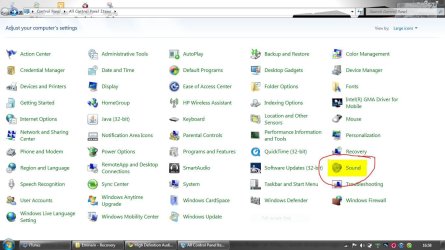
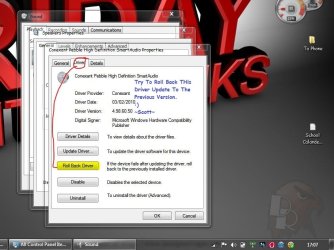
Recently I had a windows 7 update. After one of the many updates, my screen went blank and I could not open windows without going into safe mode. Well, i decided to go back to previous recovery point and then went into msconfig to deselect some of the start menu items and then I was able to open windows regularly with no problem. EXCEPT!, now I have no audio. I have the red X over my speaker icon on the desktop. I checked the device manager and there is the yellow yeid sign next to "high definition Audio Controller". I tried to uninstall the driver and restart and it did find the driver, installs it, but then it says the driver was not installed properly. Also it says "windows may have detected a hardware change." i also went to realtek and downloaded the driver and installed it but that made zero progress. please, please help me. i need help getting my audio back. fixes?
Romn
i have a toshiba satellite L505D-S5983 laptop with windows 7 home premium 32bit. everything on the computer worked fine until...
Recently I had a windows 7 update. After one of the many updates, my screen went blank and I could not open windows without going into safe mode. Well, i decided to go back to previous recovery point and then went into msconfig to deselect some of the start menu items and then I was able to open windows regularly with no problem. EXCEPT!, now I have no audio. I have the red X over my speaker icon on the desktop. I checked the device manager and there is the yellow yeid sign next to "high definition Audio Controller". I tried to uninstall the driver and restart and it did find the driver, installs it, but then it says the driver was not installed properly. Also it says "windows may have detected a hardware change." i also went to realtek and downloaded the driver and installed it but that made zero progress. please, please help me. i need help getting my audio back. fixes?
Romn
My Computer
- Computer Manufacturer/Model Number
- Toshiba Laptop/Satellite L505D-S5983
- OS
- Windows 7 Home Premium 32bit
- Hard Drives
- 320GB