High disk use reduces CPU usage

ConcorD

New member
Local time
2:38 AM
Messages
14
Hello,
This is my first topic here and I hope I find a solution for my problem.
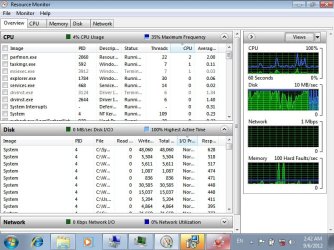
I face a problem with Disk usage when I open any application it rise to be 100%
and it prevent CPU from working well , so when i try to install any program it take long time.

Code:
Time of this report: 9/6/2012, 05:17:28
       Machine name: CONCORD-PC
   Operating System: Windows 7 Ultimate 64-bit (6.1, Build 7600) (7600.win7_rtm.090713-1255)
           Language: English (Regional Setting: English)
System Manufacturer: Hewlett-Packard
       System Model: HP Pavilion g6 Notebook PC      
               BIOS: InsydeH2O Version 03.61.01F.63
          Processor: Intel(R) Core(TM) i5-2450M CPU @ 2.50GHz (4 CPUs), ~2.5GHz
             Memory: 6144MB RAM
Available OS Memory: 6092MB RAM
          Page File: 1821MB used, 10360MB available
        Windows Dir: C:\Windows
    DirectX Version: DirectX 11
DX Setup Parameters: Not found
   User DPI Setting: Using System DPI
 System DPI Setting: 96 DPI (100 percent)
    DWM DPI Scaling: Disabled
     DxDiag Version: 6.01.7600.16385 32bit Unicode
so I hope if any one can help :)
 

Attachments

  • 2.png
    2.png
    148.6 KB · Views: 46
  • Untitled.jpg
    Untitled.jpg
    91.4 KB · Views: 56

My Computer

OS
Windows 7 Ultimate 64bit
That's normal in my opinion. Spinning platters are slow at accessing multiple reads and writes concurrently. This is where SSD's greatest advantage is truly demonstrated. It happens to my laptop too like when I am decompressing very large .rar, .iso .arc etc. files, My whole system slows down to a crawl. I mean opening a new tab in a browser takes more than 3 seconds instead of being instantaneos. The reason you feel that the CPU is not working well is because the hard disk does not have enough data to feed the CPU. In other words. the hard drive is bottlenecking your CPU and RAM.
 

My Computer

Computer type
Laptop
Computer Manufacturer/Model Number
Dell Optiplex SX270, Lenovo Z470
OS
Windows 7 Professional x64 SP1
CPU
Intel® Pentium® 4 @ 2.26 GHz, Intel Core i7-2670QM @ 2.20 GH
Motherboard
Dell, Lenovo
Memory
512MB Dual channel DDR SDRAM @ 400MHz 2.5-3-3-7, 8 GB DDR3
Graphics Card(s)
Intel 82865G, Nvidia GeForce 520M Graphics
Sound Card
SoundMax Integrated Audio, Integrated HD Audio
Monitor(s) Displays
LG W1952
Screen Resolution
1440x900, 1366 x 768
Hard Drives
40 GB 2.5" IDE 4200 RPM HDD, 500 GB 5400 RPM Sata 1.5 + 32 GB SSD
PSU
Dell 145 Watt, Lenovo 120 Watt Power Adapter
Case
Optiplex SX270 Small Form Factor, Laptop
Cooling
Dell Proprietary Air Cooling, Stock laptop cooling
Keyboard
Dell SK-8125 USB Keyboard
Mouse
Dell PS/2 2 button ball mouse with wheel scroll
Internet Speed
300 Mbit down / 20 Mbps up Time Warner Cable
Antivirus
MSE, Malwarebytes Scanner
Browser
Internet (Aizawa) Explorer 11
Other Info
Running Windows Server 2012 Datacenter on a virtual machine to run Metro Apps.
So, there is no solution ?? :S
 

My Computer

OS
Windows 7 Ultimate 64bit
Does your computer only slows down while installing? Does it also slows when are opening an application or web browsing while an installation is in progress?
 

My Computer

Computer type
Laptop
Computer Manufacturer/Model Number
Dell Optiplex SX270, Lenovo Z470
OS
Windows 7 Professional x64 SP1
CPU
Intel® Pentium® 4 @ 2.26 GHz, Intel Core i7-2670QM @ 2.20 GH
Motherboard
Dell, Lenovo
Memory
512MB Dual channel DDR SDRAM @ 400MHz 2.5-3-3-7, 8 GB DDR3
Graphics Card(s)
Intel 82865G, Nvidia GeForce 520M Graphics
Sound Card
SoundMax Integrated Audio, Integrated HD Audio
Monitor(s) Displays
LG W1952
Screen Resolution
1440x900, 1366 x 768
Hard Drives
40 GB 2.5" IDE 4200 RPM HDD, 500 GB 5400 RPM Sata 1.5 + 32 GB SSD
PSU
Dell 145 Watt, Lenovo 120 Watt Power Adapter
Case
Optiplex SX270 Small Form Factor, Laptop
Cooling
Dell Proprietary Air Cooling, Stock laptop cooling
Keyboard
Dell SK-8125 USB Keyboard
Mouse
Dell PS/2 2 button ball mouse with wheel scroll
Internet Speed
300 Mbit down / 20 Mbps up Time Warner Cable
Antivirus
MSE, Malwarebytes Scanner
Browser
Internet (Aizawa) Explorer 11
Other Info
Running Windows Server 2012 Datacenter on a virtual machine to run Metro Apps.
If your disk is always at 100 % highest active time, it's maybe windows doing indexing or superfetch or maybe a scheduled background task is running, but those disk activities should not slow down your computer much. My computer only slows down when installing heavy applications or extracting lots of compressed files.
 

My Computer

Computer type
Laptop
Computer Manufacturer/Model Number
Dell Optiplex SX270, Lenovo Z470
OS
Windows 7 Professional x64 SP1
CPU
Intel® Pentium® 4 @ 2.26 GHz, Intel Core i7-2670QM @ 2.20 GH
Motherboard
Dell, Lenovo
Memory
512MB Dual channel DDR SDRAM @ 400MHz 2.5-3-3-7, 8 GB DDR3
Graphics Card(s)
Intel 82865G, Nvidia GeForce 520M Graphics
Sound Card
SoundMax Integrated Audio, Integrated HD Audio
Monitor(s) Displays
LG W1952
Screen Resolution
1440x900, 1366 x 768
Hard Drives
40 GB 2.5" IDE 4200 RPM HDD, 500 GB 5400 RPM Sata 1.5 + 32 GB SSD
PSU
Dell 145 Watt, Lenovo 120 Watt Power Adapter
Case
Optiplex SX270 Small Form Factor, Laptop
Cooling
Dell Proprietary Air Cooling, Stock laptop cooling
Keyboard
Dell SK-8125 USB Keyboard
Mouse
Dell PS/2 2 button ball mouse with wheel scroll
Internet Speed
300 Mbit down / 20 Mbps up Time Warner Cable
Antivirus
MSE, Malwarebytes Scanner
Browser
Internet (Aizawa) Explorer 11
Other Info
Running Windows Server 2012 Datacenter on a virtual machine to run Metro Apps.
my computer slows when i do any active i find the disk up to 100% and the CPU can't increase :S
when i try to install any program even it's small it take long time to complete installing
 

My Computer

OS
Windows 7 Ultimate 64bit
i closed index, and the problems not solved
 

My Computer

OS
Windows 7 Ultimate 64bit
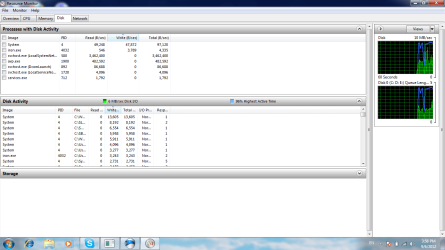
Based on your screenshots there is definitely something within the "System" process that is hogging your disk activity. Can you post a screenshot of the "Disk" tab in your Resource Monitor showing the processes that are listed on "Process with Disk Activity" and "Disk Activity" drop down menu?
 

My Computer

Computer type
Laptop
Computer Manufacturer/Model Number
Dell Optiplex SX270, Lenovo Z470
OS
Windows 7 Professional x64 SP1
CPU
Intel® Pentium® 4 @ 2.26 GHz, Intel Core i7-2670QM @ 2.20 GH
Motherboard
Dell, Lenovo
Memory
512MB Dual channel DDR SDRAM @ 400MHz 2.5-3-3-7, 8 GB DDR3
Graphics Card(s)
Intel 82865G, Nvidia GeForce 520M Graphics
Sound Card
SoundMax Integrated Audio, Integrated HD Audio
Monitor(s) Displays
LG W1952
Screen Resolution
1440x900, 1366 x 768
Hard Drives
40 GB 2.5" IDE 4200 RPM HDD, 500 GB 5400 RPM Sata 1.5 + 32 GB SSD
PSU
Dell 145 Watt, Lenovo 120 Watt Power Adapter
Case
Optiplex SX270 Small Form Factor, Laptop
Cooling
Dell Proprietary Air Cooling, Stock laptop cooling
Keyboard
Dell SK-8125 USB Keyboard
Mouse
Dell PS/2 2 button ball mouse with wheel scroll
Internet Speed
300 Mbit down / 20 Mbps up Time Warner Cable
Antivirus
MSE, Malwarebytes Scanner
Browser
Internet (Aizawa) Explorer 11
Other Info
Running Windows Server 2012 Datacenter on a virtual machine to run Metro Apps.
There is the screen
 

Attachments

  • Untitled.png
    Untitled.png
    46.1 KB · Views: 50

My Computer

OS
Windows 7 Ultimate 64bit
Sorry to invade on the thread, but have you performed an anti-virus scan, a malware program or file may be hogging your system's resources?
 

My Computer

Computer type
Laptop
The problem is found before i setup any programs
 

My Computer

OS
Windows 7 Ultimate 64bit
If you are having a high disk usage when no applications are open or data is being saved, then the problem in my opinion, seems to be pointing to a malware issue; have you got any anti-virus (AV) installed to scan your system?

Microsoft Security Essentials - Free Antivirus for Windows

MSE is a free AV program by Microsoft (if you haven't got an AV program installed)
 

My Computer

Computer type
Laptop
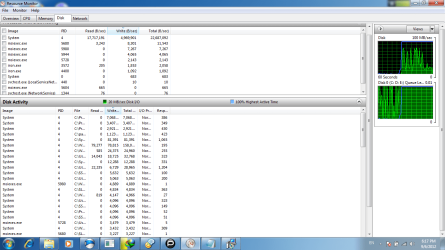
ConcorD, Can you post another screenshot of your Disk Activity tab, but with the "File" column fully expanded? "System" process basically involve many types of disk activity, but it shows which file or folder has the most read/write rates.
 

My Computer

Computer type
Laptop
Computer Manufacturer/Model Number
Dell Optiplex SX270, Lenovo Z470
OS
Windows 7 Professional x64 SP1
CPU
Intel® Pentium® 4 @ 2.26 GHz, Intel Core i7-2670QM @ 2.20 GH
Motherboard
Dell, Lenovo
Memory
512MB Dual channel DDR SDRAM @ 400MHz 2.5-3-3-7, 8 GB DDR3
Graphics Card(s)
Intel 82865G, Nvidia GeForce 520M Graphics
Sound Card
SoundMax Integrated Audio, Integrated HD Audio
Monitor(s) Displays
LG W1952
Screen Resolution
1440x900, 1366 x 768
Hard Drives
40 GB 2.5" IDE 4200 RPM HDD, 500 GB 5400 RPM Sata 1.5 + 32 GB SSD
PSU
Dell 145 Watt, Lenovo 120 Watt Power Adapter
Case
Optiplex SX270 Small Form Factor, Laptop
Cooling
Dell Proprietary Air Cooling, Stock laptop cooling
Keyboard
Dell SK-8125 USB Keyboard
Mouse
Dell PS/2 2 button ball mouse with wheel scroll
Internet Speed
300 Mbit down / 20 Mbps up Time Warner Cable
Antivirus
MSE, Malwarebytes Scanner
Browser
Internet (Aizawa) Explorer 11
Other Info
Running Windows Server 2012 Datacenter on a virtual machine to run Metro Apps.
the problem is found before i setup any thing
 

My Computer

OS
Windows 7 Ultimate 64bit
ConcorD you are not making any sense with what the problem is, have you performed a AV scan or not?

Thanks,

Harry
 

My Computer

Computer type
Laptop
yes i have kaspersky antivirus
 

My Computer

OS
Windows 7 Ultimate 64bit
another screenshot
 

Attachments

  • 3.png
    3.png
    54 KB · Views: 25

My Computer

OS
Windows 7 Ultimate 64bit
I made full scan and no threats :(
 

My Computer

OS
Windows 7 Ultimate 64bit
This may not be related to your problem, but does system create a paging file when your applications are starting to use your RAM? A paging file can use significant hard-drive resources and therefore create a high disk usage.
 

My Computer

Computer type
Laptop
Back
Top