
You are using an out of date browser. It may not display this or other websites correctly.
You should upgrade or use an alternative browser.
You should upgrade or use an alternative browser.
High disk use reduces CPU usage
- Thread starter ConcorD
- Start date
x BlueRobot
Closed by request
- Local time
- 11:21 AM
- Messages
- 6,784
To explain what a paging file is:
What is the Page File for anyway? - Ask the Performance Team - Site Home - TechNet Blogs
The paging file is usually called pagefile.sys
EDIT:
Try the methods within the article to improve hard-drive performance and then post back how the hard-drive is performing:
http://www.delete-computer-history.com/slow-hard-drive.html
CCleaner is a great utility too: http://www.piriform.com/CCLEANER
What is the Page File for anyway? - Ask the Performance Team - Site Home - TechNet Blogs
The paging file is usually called pagefile.sys
EDIT:
Try the methods within the article to improve hard-drive performance and then post back how the hard-drive is performing:
http://www.delete-computer-history.com/slow-hard-drive.html
CCleaner is a great utility too: http://www.piriform.com/CCLEANER
My Computer
- Computer type
- Laptop


The first thing I would do is look in msconfig/Start Up. Look and see how many programs are starting at boot and running in the background. I have 4 things checked only. Mouse, keyboard and active security programs. MSE and MAM. The rest work when I tick on their icon or program and tell them to.
My Computer
- Computer type
- PC/Desktop
- Computer Manufacturer/Model Number
- Home made Desktop
- OS
- Windows 10 Pro. 64/ version 1709 Windows 7 Pro/64
- CPU
- Intel i7-6800K @ 4.3
- Motherboard
- ASUS X-99 Deluxe II
- Memory
- Corsair Platinum 16 gig @2400
- Graphics Card(s)
- EVGA GTX 1070 OC
- Monitor(s) Displays
- Asus 27" LED LCD/VE278Q
- Screen Resolution
- 1920-1080 or 1280-720 HDMI
- Hard Drives
- INTEL SSD 730-240 Gb Sata 3.0/
- PSU
- EVGA Platium 1200W
- Case
- Phanteks Luxe Tempered Glass 8 fans/ one radiator
- Cooling
- XSPC/ Water Cooled CPU
- Keyboard
- Das 4 Professional
- Mouse
- Logitech M705/MX Anywhere 2-S
- Internet Speed
- 100 mbits
- Antivirus
- Microsoft Security Essentials/ Malwarebytes Premium 3.0/ SAS
- Browser
- I.E. 11 default/Firefox/ ISP Time Warner Cable/Spectrum
- Other Info
- LG BluRay Burner/
Sound system-KLipsch-THX/
Icy Dock ssd Hot Swap bays.
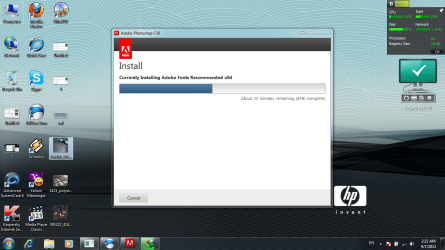
I don't know what (Tried all of that) means. Many things can cause a slow install on a program. My first though would be your choice of anti virus. MSE have been recommended in a previous post have you tried removing Kaspersky and installing MSE for a trial run? Many Adobe programs do install a little slow because in the process it is removing the old stuff not needed and checking and saving things needed. How slow is slow?
We also need you to fill out your ((My System Specs)) completely using the User CP at the top of every page. Once you complete that those will follow your every post. Tick on My System Specs in the lower left corner in this post.
We also need you to fill out your ((My System Specs)) completely using the User CP at the top of every page. Once you complete that those will follow your every post. Tick on My System Specs in the lower left corner in this post.
My Computer
- Computer type
- PC/Desktop
- Computer Manufacturer/Model Number
- Home made Desktop
- OS
- Windows 10 Pro. 64/ version 1709 Windows 7 Pro/64
- CPU
- Intel i7-6800K @ 4.3
- Motherboard
- ASUS X-99 Deluxe II
- Memory
- Corsair Platinum 16 gig @2400
- Graphics Card(s)
- EVGA GTX 1070 OC
- Monitor(s) Displays
- Asus 27" LED LCD/VE278Q
- Screen Resolution
- 1920-1080 or 1280-720 HDMI
- Hard Drives
- INTEL SSD 730-240 Gb Sata 3.0/
- PSU
- EVGA Platium 1200W
- Case
- Phanteks Luxe Tempered Glass 8 fans/ one radiator
- Cooling
- XSPC/ Water Cooled CPU
- Keyboard
- Das 4 Professional
- Mouse
- Logitech M705/MX Anywhere 2-S
- Internet Speed
- 100 mbits
- Antivirus
- Microsoft Security Essentials/ Malwarebytes Premium 3.0/ SAS
- Browser
- I.E. 11 default/Firefox/ ISP Time Warner Cable/Spectrum
- Other Info
- LG BluRay Burner/
Sound system-KLipsch-THX/
Icy Dock ssd Hot Swap bays.
sorry for my bad english
but i tried to explain many times this problem is found after i install any windows immediately
in this time i don't install any programs when i install the drivers i discover that the problem not solved
i just want you to see in the previous pic the Disk use % and the CPU use %
but i tried to explain many times this problem is found after i install any windows immediately
in this time i don't install any programs when i install the drivers i discover that the problem not solved
i just want you to see in the previous pic the Disk use % and the CPU use %
My Computer
- OS
- Windows 7 Ultimate 64bit
x BlueRobot
Closed by request
- Local time
- 11:21 AM
- Messages
- 6,784
I don't know what (Tried all of that) means.
I said to, use Disk Defragmenter, Disk Cleanup, and to use Error-Checking to check the hard-drive for any possible errors and CCleaner (clean out any temporary files); just to try and improve the hard-drive performance for them, just in case that was the problem.
Hope that gives you a idea of what they mean

My Computer
- Computer type
- Laptop
x BlueRobot
Closed by request
- Local time
- 11:21 AM
- Messages
- 6,784
Tried all of that , still slow
see this photo
You will have a high-disk usage while installing programs, as the hard-drive is writing data to your hard-drive, the CPU is not running many programs and therefore your CPU will not have to do much processing, as a result that's why you see a low CPU usage; hope this answers the question which was the title of the thread.
Hope this helps,
Harry
My Computer
- Computer type
- Laptop
Your English is fine. I have no problems with it. We just need to know what recommendations you have tried and the results.
Have you tried MSE all by itself?
Have you tried the msconfig/Start Up?
Please remember these are recommendations not demands. You get to choose.
We still need you System Specs. It will help us help you.
Have you tried MSE all by itself?
Have you tried the msconfig/Start Up?
Please remember these are recommendations not demands. You get to choose.
We still need you System Specs. It will help us help you.
My Computer
- Computer type
- PC/Desktop
- Computer Manufacturer/Model Number
- Home made Desktop
- OS
- Windows 10 Pro. 64/ version 1709 Windows 7 Pro/64
- CPU
- Intel i7-6800K @ 4.3
- Motherboard
- ASUS X-99 Deluxe II
- Memory
- Corsair Platinum 16 gig @2400
- Graphics Card(s)
- EVGA GTX 1070 OC
- Monitor(s) Displays
- Asus 27" LED LCD/VE278Q
- Screen Resolution
- 1920-1080 or 1280-720 HDMI
- Hard Drives
- INTEL SSD 730-240 Gb Sata 3.0/
- PSU
- EVGA Platium 1200W
- Case
- Phanteks Luxe Tempered Glass 8 fans/ one radiator
- Cooling
- XSPC/ Water Cooled CPU
- Keyboard
- Das 4 Professional
- Mouse
- Logitech M705/MX Anywhere 2-S
- Internet Speed
- 100 mbits
- Antivirus
- Microsoft Security Essentials/ Malwarebytes Premium 3.0/ SAS
- Browser
- I.E. 11 default/Firefox/ ISP Time Warner Cable/Spectrum
- Other Info
- LG BluRay Burner/
Sound system-KLipsch-THX/
Icy Dock ssd Hot Swap bays.
Similar threads
- Replies
- 0
- Views
- 6K
- Replies
- 13
- Views
- 8K

- Replies
- 5
- Views
- 8K
