Solved High FPS in all games but seriously bad hitching while playing

ZedDEAD

New member
Local time
3:56 AM
Messages
9
Hello and thanks for checking out my issue,

This has been a real pain to try and figure out over the past week. The hitching started when I decided to upgrade my computer. I previously used an AMD FX-6100 CPU and switched to an Intel i5-4690k. I also purchased a Crucial MX 100 SSD to use as a boot drive.
While I was installing Windows 7 I accidentally did not delete my old partition from the previous installation. Later on in the installation when I tried to change the date and time, the entire system froze for about 30 seconds (where the clock did not change at all and was 30 seconds behind when it stopped) I thought it was odd but kept going. After the installation I added the necessary drivers and a few games like Arma 3. Before the really bad hitching began the game froze once for a really long time and again the clock stopped and lost track of time. Some really bad hitching in *all* of my games began a short while later (maybe a day and a half) It was really odd so the next day I decided to take apart my computer and put it back together outside of the case as I had thought my case and large radiator was cutting off power to my CPU and possibly GPU.
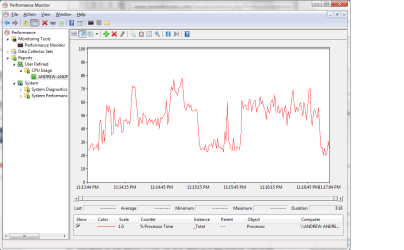
After I restarted the computer outside of the case I had no hitching in my games anymore, so I thought great I fixed it! But the very next morning it was back and even worse. Steam seems to struggle to type messages, it lags when I scroll through my games list, and even some documents on Chrome do the same thing. I ran some tests with GPU-Z and the performance monitor and attached them below. I noticed my GPU would throttle up to almost 100% usage and then down to like 5%, and it matched when the hitching would occur on screen. A high pitched noise coming from the card also matched the odd hitching. So I really am not sure what to do now. Is my card on its last legs now? Or is the small partition I left behind causing all the trouble? Any advice would really help! And thank you for taking the time to read this wall of text :D
 

Attachments

My Computer My Computer

At a glance

Windows 7 (64 bit) Home PremiumIntel i5-4690k2x Corsair Vengence 4GB at 1888HzNvdia GTX 760 by EVGA
Computer type
PC/Desktop
Computer Manufacturer/Model Number
Custom Built
OS
Windows 7 (64 bit) Home Premium
CPU
Intel i5-4690k
Motherboard
Gigabite Z97X-UD5H-BK
Memory
2x Corsair Vengence 4GB at 1888Hz
Graphics Card(s)
Nvdia GTX 760 by EVGA
Sound Card
None
Monitor(s) Displays
Asus 23in IPS LED Display
Screen Resolution
1920x1080
Hard Drives
1 Seagate Terabyte HDD
1 500 GB Western Digital Caviar Blue HDD
1 Crucial MX 100 256GB SSD
PSU
Corsair CX600M
Case
Cooler Master
Cooling
Cooler Master
Antivirus
Microsoft Security Essentials
Browser
Chrome
Did you check CPU/GPU temps? Is the motherboard still outside case? Try reseating the components and load defaults in BIOS.
 

My Computer My Computer

At a glance

Windows 7 Ultimate x64 SP1AMD Phenom 2 1090T2x8GB Kingston HyperX Fury Black 1600Mhz Unga...MSI GTX 970 Gaming 4G
Computer type
PC/Desktop
Computer Manufacturer/Model Number
Custom Build
OS
Windows 7 Ultimate x64 SP1
CPU
AMD Phenom 2 1090T
Motherboard
Gigabyte GA-890FXA-UD5
Memory
2x8GB Kingston HyperX Fury Black 1600Mhz Unganged
Graphics Card(s)
MSI GTX 970 Gaming 4G
Sound Card
Realtek On-Board HD 7.1 Audio / Logitech G35
Monitor(s) Displays
3xAcer GD245HQ
Screen Resolution
1920x1080
Hard Drives
Samsung 850 Pro 512GB SSD - OS /
WD Caviar Black SATA 3 - 1 TBx2 - Dynamic RAID 0 /
WD Caviar Green SATA 2 - 640GBx2 - Dynamic RAID 0 /
WD Caviar Green SATA 2 - 640GB - Internal Backup /
Seagate Barracude SATA 3 - 3TB - External Backup/ Sync
PSU
HighPower 1000W
Case
Cooler Master HAF 932
Cooling
Noctua NH-D14
Keyboard
Logitech G19
Mouse
Logitech G500
Internet Speed
100/4 Mbit Cable (100GB quota)
Antivirus
ZoneAlarm Extreme Security / MBAM Pro / MBAE Free / SAS Free
Browser
IE 11 - Firefox - Chrome
Other Info
Logitech F710/ G27/ G940/ Z5500 // TrackIR 5 // Nvidia 3D Surround Vision
What is HITCHING?
 

My Computer My Computer

At a glance

Windows 7 x64 Ultimate and numerous virtual m...AMD FX-8350 Vishera 32nm Technology @ 4.2 GHz...G Skill 32.0GB Dual-Channel DDR3 @ 1204MHz (1...EVGA GeForce GTX 960 4GB Super SC ACX 2.0+ wi...
Computer type
PC/Desktop
Computer Manufacturer/Model Number
Bluethunder II
OS
Windows 7 x64 Ultimate and numerous virtual machines
CPU
AMD FX-8350 Vishera 32nm Technology @ 4.2 GHz default
Motherboard
ASUSTeK COMPUTER INC. SABERTOOTH 990FX R2.0 (Socket 942)
Memory
G Skill 32.0GB Dual-Channel DDR3 @ 1204MHz (11-13-13-31)
Graphics Card(s)
EVGA GeForce GTX 960 4GB Super SC ACX 2.0+ with Back Plate
Sound Card
Creative X-Fi Titanium HD Audiophile PCIe
Monitor(s) Displays
LG L227WTG x 3
Screen Resolution
1680 x 1050 16:10
Hard Drives
238GB Samsung850 PRO SATA Disk Device (SSD)
1863GB Seagate ST2000DM 001-1CH164 (SATA)
1397GB Seagate ST1500DL 003-9VT16L(SATA)
466GB Western Digital WDC WD50 03AZEX-00K1GA0 (SATA) x 2
932GB Seagate ST310005 28AS SATA Disk Device (SATA)
PSU
Enermax Revolution87+ 1000 Watts Gold Certified Power Supply
Case
Rocketfish Full Tower
Cooling
Cooler Master Hyper 212 EVO Push Pull 120mm Fans
Keyboard
Logitech K740
Mouse
Logitech G100S Laser LED + Logitech Gamepad F310
Internet Speed
500 mbs down and 30mbs up
Antivirus
Malwarebytes Pro & Avast and MSE on certain Virtual Machines
Browser
Firefox (Main) Chrome, Internet Explorer (Back Up)
Other Info
Logitech X 230 2.1 Stereo System and 5.1 Yamaha RX V2090
B&W DM6 Monitor Speakers + Center and Surround Speakers
Using Mouse Without Borders (Google it)
I would guess it is hick-ups or extreme stutter. :)
 

My Computer My Computer

At a glance

Windows 7 Ultimate x64 SP1AMD Phenom 2 1090T2x8GB Kingston HyperX Fury Black 1600Mhz Unga...MSI GTX 970 Gaming 4G
Computer type
PC/Desktop
Computer Manufacturer/Model Number
Custom Build
OS
Windows 7 Ultimate x64 SP1
CPU
AMD Phenom 2 1090T
Motherboard
Gigabyte GA-890FXA-UD5
Memory
2x8GB Kingston HyperX Fury Black 1600Mhz Unganged
Graphics Card(s)
MSI GTX 970 Gaming 4G
Sound Card
Realtek On-Board HD 7.1 Audio / Logitech G35
Monitor(s) Displays
3xAcer GD245HQ
Screen Resolution
1920x1080
Hard Drives
Samsung 850 Pro 512GB SSD - OS /
WD Caviar Black SATA 3 - 1 TBx2 - Dynamic RAID 0 /
WD Caviar Green SATA 2 - 640GBx2 - Dynamic RAID 0 /
WD Caviar Green SATA 2 - 640GB - Internal Backup /
Seagate Barracude SATA 3 - 3TB - External Backup/ Sync
PSU
HighPower 1000W
Case
Cooler Master HAF 932
Cooling
Noctua NH-D14
Keyboard
Logitech G19
Mouse
Logitech G500
Internet Speed
100/4 Mbit Cable (100GB quota)
Antivirus
ZoneAlarm Extreme Security / MBAM Pro / MBAE Free / SAS Free
Browser
IE 11 - Firefox - Chrome
Other Info
Logitech F710/ G27/ G940/ Z5500 // TrackIR 5 // Nvidia 3D Surround Vision
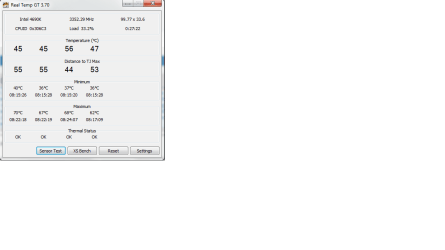
Okay so I reset everything to default, and got a program to check the temps on the CPU. In the GPU logs I attached to the original post the temps are listed there in those sensor logs. And my CPU was overclocked by 1MHz, so instead of the 3800MHz with that turbo boost, it was around 3900MHz. My RAM was also set to 1888MHz, which I manually set to because that is what the default should be, but my motherboard had it running at 1333MHz (which it currently is at right now). since setting to the base settings I am noticing a major drop in performance in games and even on the desktop. Dragging around the steam window causes some pretty bad stuttering (which yea is the hitching I was talking about, sorry for the confusing lingo. Basically it looks like this in every game I play https://www.youtube.com/watch?v=Dd9NEYOVqwM) Also yea the motherboard is still outside of the case. I have tried moving the card to different PCIE slots, but still the stuttering is the same.
 

Attachments

  • CPU Temps.png
    CPU Temps.png
    13.7 KB · Views: 2

My Computer My Computer

At a glance

Windows 7 (64 bit) Home PremiumIntel i5-4690k2x Corsair Vengence 4GB at 1888HzNvdia GTX 760 by EVGA
Computer type
PC/Desktop
Computer Manufacturer/Model Number
Custom Built
OS
Windows 7 (64 bit) Home Premium
CPU
Intel i5-4690k
Motherboard
Gigabite Z97X-UD5H-BK
Memory
2x Corsair Vengence 4GB at 1888Hz
Graphics Card(s)
Nvdia GTX 760 by EVGA
Sound Card
None
Monitor(s) Displays
Asus 23in IPS LED Display
Screen Resolution
1920x1080
Hard Drives
1 Seagate Terabyte HDD
1 500 GB Western Digital Caviar Blue HDD
1 Crucial MX 100 256GB SSD
PSU
Corsair CX600M
Case
Cooler Master
Cooling
Cooler Master
Antivirus
Microsoft Security Essentials
Browser
Chrome
So when I took my computer out of the case and reseated the components, one of my games was somehow no longer "linked" to steam, but still in the steam common apps folder. When I run the game it does not show up on Steam so it is oddly disconnected. BUT, the weird thing is the game has ZERO hitching. It runs completely fine! I am not sure why, maybe Steam is using too many resources in game but I don't think something small like that should impact my CPU. Any thoughts?
 

My Computer My Computer

At a glance

Windows 7 (64 bit) Home PremiumIntel i5-4690k2x Corsair Vengence 4GB at 1888HzNvdia GTX 760 by EVGA
Computer type
PC/Desktop
Computer Manufacturer/Model Number
Custom Built
OS
Windows 7 (64 bit) Home Premium
CPU
Intel i5-4690k
Motherboard
Gigabite Z97X-UD5H-BK
Memory
2x Corsair Vengence 4GB at 1888Hz
Graphics Card(s)
Nvdia GTX 760 by EVGA
Sound Card
None
Monitor(s) Displays
Asus 23in IPS LED Display
Screen Resolution
1920x1080
Hard Drives
1 Seagate Terabyte HDD
1 500 GB Western Digital Caviar Blue HDD
1 Crucial MX 100 256GB SSD
PSU
Corsair CX600M
Case
Cooler Master
Cooling
Cooler Master
Antivirus
Microsoft Security Essentials
Browser
Chrome
If it is an MMO it will most likely won't need Steam to run. What game is this?
Download Unigine Heaven (or Valley) and see if it runs alright without Steam, then try with it running.

Also change to High Performance power plan (Control Panel - Power Options)

Do you experience any problems on desktop (no games running) but while Steam is open?
 

My Computer My Computer

At a glance

Windows 7 Ultimate x64 SP1AMD Phenom 2 1090T2x8GB Kingston HyperX Fury Black 1600Mhz Unga...MSI GTX 970 Gaming 4G
Computer type
PC/Desktop
Computer Manufacturer/Model Number
Custom Build
OS
Windows 7 Ultimate x64 SP1
CPU
AMD Phenom 2 1090T
Motherboard
Gigabyte GA-890FXA-UD5
Memory
2x8GB Kingston HyperX Fury Black 1600Mhz Unganged
Graphics Card(s)
MSI GTX 970 Gaming 4G
Sound Card
Realtek On-Board HD 7.1 Audio / Logitech G35
Monitor(s) Displays
3xAcer GD245HQ
Screen Resolution
1920x1080
Hard Drives
Samsung 850 Pro 512GB SSD - OS /
WD Caviar Black SATA 3 - 1 TBx2 - Dynamic RAID 0 /
WD Caviar Green SATA 2 - 640GBx2 - Dynamic RAID 0 /
WD Caviar Green SATA 2 - 640GB - Internal Backup /
Seagate Barracude SATA 3 - 3TB - External Backup/ Sync
PSU
HighPower 1000W
Case
Cooler Master HAF 932
Cooling
Noctua NH-D14
Keyboard
Logitech G19
Mouse
Logitech G500
Internet Speed
100/4 Mbit Cable (100GB quota)
Antivirus
ZoneAlarm Extreme Security / MBAM Pro / MBAE Free / SAS Free
Browser
IE 11 - Firefox - Chrome
Other Info
Logitech F710/ G27/ G940/ Z5500 // TrackIR 5 // Nvidia 3D Surround Vision
It's Octodad Dadliest Catch. And it's really weird because Steam doesn't even recognize that I have it installed anymore, but I can run it from the executable in the Steam Common Apps folder. I also got Unigine Heaven and it worked like a charm. The benchmark worked completely fine, and I had no hitching! So does this mean that the problem is software related? It is really odd that only Steam is having these problems.
I set the computer to High Performance plan, and nothing seemed to change in game. And at the desktop nothing but Steam is slow. (dragging it around the desktop, typing a chat message, scrolling through the games list) Everything else done on my computer non-Steam related seems to run fine like Chrome (however large documents still struggle when I scroll through them like when they are only 40ish pages. Does this happen with your computer? Here is a link to a document to test on http://www.valvesoftware.com/company/Valve_Handbook_LowRes.pdf )
I have also attached my benchmark if that is any help. Also sorry for the long reply! College orientation has been going on and it has been pretty busy :P
 

Attachments

My Computer My Computer

At a glance

Windows 7 (64 bit) Home PremiumIntel i5-4690k2x Corsair Vengence 4GB at 1888HzNvdia GTX 760 by EVGA
Computer type
PC/Desktop
Computer Manufacturer/Model Number
Custom Built
OS
Windows 7 (64 bit) Home Premium
CPU
Intel i5-4690k
Motherboard
Gigabite Z97X-UD5H-BK
Memory
2x Corsair Vengence 4GB at 1888Hz
Graphics Card(s)
Nvdia GTX 760 by EVGA
Sound Card
None
Monitor(s) Displays
Asus 23in IPS LED Display
Screen Resolution
1920x1080
Hard Drives
1 Seagate Terabyte HDD
1 500 GB Western Digital Caviar Blue HDD
1 Crucial MX 100 256GB SSD
PSU
Corsair CX600M
Case
Cooler Master
Cooling
Cooler Master
Antivirus
Microsoft Security Essentials
Browser
Chrome
No problems with Steam here, since it is a software issue try a clean startup - http://www.sevenforums.com/tutorial...ation-conflicts-performing-clean-startup.html

This happens even without any games open, right? Just Steam open cause this? If only during gaming, try disabling Steam Overlay. If not, re-install Steam, Games will be kept.

By the way, Steam may be running minimized in notification area while you run it from exe. Is it shown in Library, does it start from there?
 

My Computer My Computer

At a glance

Windows 7 Ultimate x64 SP1AMD Phenom 2 1090T2x8GB Kingston HyperX Fury Black 1600Mhz Unga...MSI GTX 970 Gaming 4G
Computer type
PC/Desktop
Computer Manufacturer/Model Number
Custom Build
OS
Windows 7 Ultimate x64 SP1
CPU
AMD Phenom 2 1090T
Motherboard
Gigabyte GA-890FXA-UD5
Memory
2x8GB Kingston HyperX Fury Black 1600Mhz Unganged
Graphics Card(s)
MSI GTX 970 Gaming 4G
Sound Card
Realtek On-Board HD 7.1 Audio / Logitech G35
Monitor(s) Displays
3xAcer GD245HQ
Screen Resolution
1920x1080
Hard Drives
Samsung 850 Pro 512GB SSD - OS /
WD Caviar Black SATA 3 - 1 TBx2 - Dynamic RAID 0 /
WD Caviar Green SATA 2 - 640GBx2 - Dynamic RAID 0 /
WD Caviar Green SATA 2 - 640GB - Internal Backup /
Seagate Barracude SATA 3 - 3TB - External Backup/ Sync
PSU
HighPower 1000W
Case
Cooler Master HAF 932
Cooling
Noctua NH-D14
Keyboard
Logitech G19
Mouse
Logitech G500
Internet Speed
100/4 Mbit Cable (100GB quota)
Antivirus
ZoneAlarm Extreme Security / MBAM Pro / MBAE Free / SAS Free
Browser
IE 11 - Firefox - Chrome
Other Info
Logitech F710/ G27/ G940/ Z5500 // TrackIR 5 // Nvidia 3D Surround Vision
HOLY CRAP! I figured it out....

Apparently a mod on my steam workshop for Men of War Assault Squad 2 was constantly trying to update, and because of that my steam was freaking out!!! And because this was a workshop mod it never showed up as a download on the bottom unless I actually went there to check it! I feel soooooo dumb lol!

Anyways thank you guys for your help through this confusing problem!!
 

My Computer My Computer

At a glance

Windows 7 (64 bit) Home PremiumIntel i5-4690k2x Corsair Vengence 4GB at 1888HzNvdia GTX 760 by EVGA
Computer type
PC/Desktop
Computer Manufacturer/Model Number
Custom Built
OS
Windows 7 (64 bit) Home Premium
CPU
Intel i5-4690k
Motherboard
Gigabite Z97X-UD5H-BK
Memory
2x Corsair Vengence 4GB at 1888Hz
Graphics Card(s)
Nvdia GTX 760 by EVGA
Sound Card
None
Monitor(s) Displays
Asus 23in IPS LED Display
Screen Resolution
1920x1080
Hard Drives
1 Seagate Terabyte HDD
1 500 GB Western Digital Caviar Blue HDD
1 Crucial MX 100 256GB SSD
PSU
Corsair CX600M
Case
Cooler Master
Cooling
Cooler Master
Antivirus
Microsoft Security Essentials
Browser
Chrome
:)

Doesn't Steam stop Workshop downloads when a game starts?
 

My Computer My Computer

At a glance

Windows 7 Ultimate x64 SP1AMD Phenom 2 1090T2x8GB Kingston HyperX Fury Black 1600Mhz Unga...MSI GTX 970 Gaming 4G
Computer type
PC/Desktop
Computer Manufacturer/Model Number
Custom Build
OS
Windows 7 Ultimate x64 SP1
CPU
AMD Phenom 2 1090T
Motherboard
Gigabyte GA-890FXA-UD5
Memory
2x8GB Kingston HyperX Fury Black 1600Mhz Unganged
Graphics Card(s)
MSI GTX 970 Gaming 4G
Sound Card
Realtek On-Board HD 7.1 Audio / Logitech G35
Monitor(s) Displays
3xAcer GD245HQ
Screen Resolution
1920x1080
Hard Drives
Samsung 850 Pro 512GB SSD - OS /
WD Caviar Black SATA 3 - 1 TBx2 - Dynamic RAID 0 /
WD Caviar Green SATA 2 - 640GBx2 - Dynamic RAID 0 /
WD Caviar Green SATA 2 - 640GB - Internal Backup /
Seagate Barracude SATA 3 - 3TB - External Backup/ Sync
PSU
HighPower 1000W
Case
Cooler Master HAF 932
Cooling
Noctua NH-D14
Keyboard
Logitech G19
Mouse
Logitech G500
Internet Speed
100/4 Mbit Cable (100GB quota)
Antivirus
ZoneAlarm Extreme Security / MBAM Pro / MBAE Free / SAS Free
Browser
IE 11 - Firefox - Chrome
Other Info
Logitech F710/ G27/ G940/ Z5500 // TrackIR 5 // Nvidia 3D Surround Vision
I think I had background downloads enabled and maybe thats why it would keep trying. Or maybe just a really bad glitch because a few of my other friends had the problem, and never told me how they fixed it until i asked them about it lol.
 

My Computer My Computer

At a glance

Windows 7 (64 bit) Home PremiumIntel i5-4690k2x Corsair Vengence 4GB at 1888HzNvdia GTX 760 by EVGA
Computer type
PC/Desktop
Computer Manufacturer/Model Number
Custom Built
OS
Windows 7 (64 bit) Home Premium
CPU
Intel i5-4690k
Motherboard
Gigabite Z97X-UD5H-BK
Memory
2x Corsair Vengence 4GB at 1888Hz
Graphics Card(s)
Nvdia GTX 760 by EVGA
Sound Card
None
Monitor(s) Displays
Asus 23in IPS LED Display
Screen Resolution
1920x1080
Hard Drives
1 Seagate Terabyte HDD
1 500 GB Western Digital Caviar Blue HDD
1 Crucial MX 100 256GB SSD
PSU
Corsair CX600M
Case
Cooler Master
Cooling
Cooler Master
Antivirus
Microsoft Security Essentials
Browser
Chrome
Back
Top