
High idle temps

binni

New member
Local time
8:35 PM
Messages
15
The fan in my laptop has been running fast and non-stop as of recently. Even when it's idle. I had it dust-cleaned about 2 weeks ago but, if anything, it's only gotten worse since then.

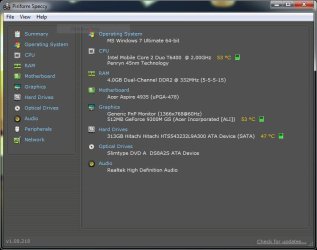
The idle temps of the CPU, GPU and HDD are all around 50°C (the GPU temp rises quickly into around 70°C if I e.g. open a semi-graphic intensive website) which seems rather high to me, but I thought someone here might be more knowledgeable in that area.

So, I guess my question is: Is it normal for a 2 year old laptop (that has been recently cleaned) to have idle temps at around 50°C with the fan running constantly on almost full power?

See attached image for more info
 

Attachments
  • temps.jpg
    temps.jpg
    50 KB · Views: 138

My Computer

Computer Manufacturer/Model Number
Acer Aspire 4935G
OS
Windows 7 Ultimate x64
CPU
Intel Mobile Core 2 Duo T6400 @ 2.00GHz
Motherboard
Acer Aspire 4935 (uPGA-478)
Memory
4.0GB Dual-Channel DDR2 @ 332MHz
Graphics Card(s)
512MB GeForce 9300M GS
Well they do make laptop cooler pads for a reason.
I did want to ask if the cpu and gpu temperature are always the same, because that just doesn't seem right?

Have you opened your task manager and checked that there isn't a process in the background that is eating up a lot of cpu time? Even for a laptop that seems a tad warm... not seriously, but enough to be looking for a reason.

Edit: you may also choose to look into one of these.
http://www.newegg.com/Product/Produ...rder=BESTMATCH&Description=laptop+cooling+pad
 

My Computer

Computer Manufacturer/Model Number
Insane hobo technologies. ;-)
OS
Windows 7 x64
CPU
Intel i7 2600k
Motherboard
Asrock z68 extreme 4 gen 3
Memory
G.skill Ripjaw 16gigs @ 1866
Graphics Card(s)
Nvidia gtx580 (evga)
Sound Card
Integrated HD audio + hdmi
Monitor(s) Displays
24" ASUS widescreen + 42" insignia
Screen Resolution
1080p (1920x1080)
Hard Drives
128 Samsung 830
256 Samsung 840
3 x 1tb storage drive (various)
1 western digital 1tb (eSATA)
1 Seagate 1tb (eSATA)
PSU
1 kilowatt SLI/Crossfire rated Silverstone modular
Case
NZXT Phantom + additional 220 fan
Cooling
Zalmann
Keyboard
Microsoft wireless 3000 (v2)
Mouse
MS - wireless 5000 (bluetrack)
Internet Speed
depends on if you ask me or my provider.
Other Info
The above information is provided as is, and the author assumes no responsibility for issues it may cause with your sanity or fanboyism.
The fan in my laptop has been running fast and non-stop as of recently. Even when it's idle. I had it dust-cleaned about 2 weeks ago but, if anything, it's only gotten worse since then.

The idle temps of the CPU, GPU and HDD are all around 50°C (the GPU temp rises quickly into around 70°C if I e.g. open a semi-graphic intensive website) which seems rather high to me, but I thought someone here might be more knowledgeable in that area.

So, I guess my question is: Is it normal for a 2 year old laptop (that has been recently cleaned) to have idle temps at around 50°C with the fan running constantly on almost full power?

See attached image for more info

Have you upgraded any components like ram, or HD?
 

My Computer

Computer Manufacturer/Model Number
HP Pavillion dv-7 1005 Tx
OS
Win 8 Release candidate 8400
CPU
[email protected]
Memory
4 gigs
Graphics Card(s)
Nvidia 9600M
Sound Card
HD built-in
Monitor(s) Displays
17" Wxga
Screen Resolution
1440x900
Cooling
none
Internet Speed
45Mb down 5Mb up
Have you upgraded any components like ram, or HD?

No, nothing had been upgraded.

I did want to ask if the cpu and gpu temperature are always the same, because that just doesn't seem right?

Have you opened your task manager and checked that there isn't a process in the background that is eating up a lot of cpu time? Even for a laptop that seems a tad warm... not seriously, but enough to be looking for a reason.

No, the CPU and GPU are not usually the same temp, just a coincidence in the screencap :).

My CPU usage is generally not more than 10-20% (usually less). The most CPU intensive program I'm running at the moment are the Task Manager and Speccy (the program that monitors the temperatures). I try to keep background processes to a minimum.

What I find odd is that up until recently this laptop has always been extremely quiet unless I was doing something intensive. It can't be normal that when just booted and idle it heats up so much that the fan has to be constantly on full blast.
 

My Computer

Computer Manufacturer/Model Number
Acer Aspire 4935G
OS
Windows 7 Ultimate x64
CPU
Intel Mobile Core 2 Duo T6400 @ 2.00GHz
Motherboard
Acer Aspire 4935 (uPGA-478)
Memory
4.0GB Dual-Channel DDR2 @ 332MHz
Graphics Card(s)
512MB GeForce 9300M GS
Did this fan noise start immediately after the service? because I'm starting to think a temp sensor is loose and the fan may not be in there properly.
 

My Computer

Computer Manufacturer/Model Number
Insane hobo technologies. ;-)
OS
Windows 7 x64
CPU
Intel i7 2600k
Motherboard
Asrock z68 extreme 4 gen 3
Memory
G.skill Ripjaw 16gigs @ 1866
Graphics Card(s)
Nvidia gtx580 (evga)
Sound Card
Integrated HD audio + hdmi
Monitor(s) Displays
24" ASUS widescreen + 42" insignia
Screen Resolution
1080p (1920x1080)
Hard Drives
128 Samsung 830
256 Samsung 840
3 x 1tb storage drive (various)
1 western digital 1tb (eSATA)
1 Seagate 1tb (eSATA)
PSU
1 kilowatt SLI/Crossfire rated Silverstone modular
Case
NZXT Phantom + additional 220 fan
Cooling
Zalmann
Keyboard
Microsoft wireless 3000 (v2)
Mouse
MS - wireless 5000 (bluetrack)
Internet Speed
depends on if you ask me or my provider.
Other Info
The above information is provided as is, and the author assumes no responsibility for issues it may cause with your sanity or fanboyism.
Did this fan noise start immediately after the service? because I'm starting to think a temp sensor is loose and the fan may not be in there properly.

No, it had started before the service. It was one of the reasons I took it in (the other being a faulty speaker, which they also failed to repair - driver problem, my ass). But, like I said, the performance did certainly not improve after it was cleaned - in my opinion it has been getting worse ever since. I actually took it back once more after the initial service and after I got it back for the second time still neither problems were fixed.

And now that you mention it, I have noticed that the laptop used to blow air out through vents on the front but doesn't seem to do so anymore. Though, I can't tell if that happened before or after "the service"

I've been thinking of testing my patience/sanity by taking it in once more but wanted to make sure if this were something abnormal that could be fixed or if this degradation in performance was normal.
 

My Computer

Computer Manufacturer/Model Number
Acer Aspire 4935G
OS
Windows 7 Ultimate x64
CPU
Intel Mobile Core 2 Duo T6400 @ 2.00GHz
Motherboard
Acer Aspire 4935 (uPGA-478)
Memory
4.0GB Dual-Channel DDR2 @ 332MHz
Graphics Card(s)
512MB GeForce 9300M GS
At this point if at all possible I would find a alternate place to have it serviced. It sounds like whoever you are going to is not doing good work.
 

My Computer

Computer Manufacturer/Model Number
Insane hobo technologies. ;-)
OS
Windows 7 x64
CPU
Intel i7 2600k
Motherboard
Asrock z68 extreme 4 gen 3
Memory
G.skill Ripjaw 16gigs @ 1866
Graphics Card(s)
Nvidia gtx580 (evga)
Sound Card
Integrated HD audio + hdmi
Monitor(s) Displays
24" ASUS widescreen + 42" insignia
Screen Resolution
1080p (1920x1080)
Hard Drives
128 Samsung 830
256 Samsung 840
3 x 1tb storage drive (various)
1 western digital 1tb (eSATA)
1 Seagate 1tb (eSATA)
PSU
1 kilowatt SLI/Crossfire rated Silverstone modular
Case
NZXT Phantom + additional 220 fan
Cooling
Zalmann
Keyboard
Microsoft wireless 3000 (v2)
Mouse
MS - wireless 5000 (bluetrack)
Internet Speed
depends on if you ask me or my provider.
Other Info
The above information is provided as is, and the author assumes no responsibility for issues it may cause with your sanity or fanboyism.
Since you used to notice air being blown out through the front vents (which isn't happening now) and both the CPU and GPU temps are higher than normal it's pretty safe to assume that the ventilation in the laptop has changed.

Just a guess but I'd say it's most likely a temp sensor problem followed closely by the possibility that the fan(s) are not working correctly anymore. Theres still a small possibility too that something is wrong with part of the internal power supply (i.e. - voltage converters or regulators)

If I were you, I would take the laptop somewhere else and explain all the symptoms. I wouldn't run it for too long at an abnormally high temperature. Could shorten some component life.
 

My Computer

Computer Manufacturer/Model Number
Alienware Aurora
OS
Win 7 Ultimate x64
CPU
Core I7 980X O.C. to 4.0 Ghz
Motherboard
Custom Intel mATX (Bios ver A10)
Memory
12GB 1600 mhz triple channel DDR3 - Kingston
Graphics Card(s)
ATI Radeon HD 5970 2GB Video Card
Sound Card
Creative Labs Titanium sound blaster
Monitor(s) Displays
30" Dell LCD
Screen Resolution
2560 x 1600
Hard Drives
240 GB OCZ Vertex 2 SSD
256 GB Samsung V2 SSD
2TB WD Black Caviar 7200 rpm SATA3
600GB WD Velociraptor 10,000 rpm SATA3
3TB WD MyBook Essential USB 3.0 7200 rpm External
PSU
850 Watt
Case
Alienware Aurora
Cooling
Water
Keyboard
Logitech G15 (original version)
Mouse
Logitech MX1000 Laser - Wireless
Internet Speed
Cable 22 Mb/sec download
Other Info
USB 3.0,
Blue Ray DVD Read/Writer
Bose Companion 3 Speakers
WRT54G Wireless Router
Thanks for your help! :)

I'd love to take it somewhere else, but since it's still under warranty I'm gonna try taking it back to the same place once more before trying other means of getting it fixed.
 

My Computer

Computer Manufacturer/Model Number
Acer Aspire 4935G
OS
Windows 7 Ultimate x64
CPU
Intel Mobile Core 2 Duo T6400 @ 2.00GHz
Motherboard
Acer Aspire 4935 (uPGA-478)
Memory
4.0GB Dual-Channel DDR2 @ 332MHz
Graphics Card(s)
512MB GeForce 9300M GS
Back
Top