High memory usage from boot.

DonkrDjay

New member
Local time
3:02 PM
Messages
10
I have a dualcore 3.00ghz CPU and 4gigs of ram running Win7 64bit.
I run Norton antivirus 2011

Lately ive been getting warnings every now and then from Norton of high cpu usage from different programs. Chrome is one of the programs i get high CPU usage warnings of.

I did som checking, and found that my system is using 2gig of ram from right after boot. It also uses 1,5gig for buffering leaving me 0,5gig free. (Numbers from task manager)

AFAIK i have no programs to start on boot other than spotify. (And obv beforementioned Spotify).

FWIW i just ran CCleaner and defraggler on my system, but the problems was there before i ran this.

So: Am i in need of new comp/upgrade or is there something wrong/i can do?
If any further info is needed id be happy to provide.
 

My Computer

OS
Windows 7 Home Premium (x64) Service Pack 1 (build 7601)
Motherboard
ASUSTeK Computer INC. P5Q-PRO Rev 1.xx
Memory
2x2gig
Graphics Card(s)
NVIDIA GeForce 8800 GT (Microsoft Corporation - WDDM v1.1) [
Sound Card
High definition audio unit.
Monitor(s) Displays
2x24"
Hard Drives
Corsair Performance3 SSD [Hard drive] (128,04 GB) -- drive 0, s/n 111181000100034104E6, rev 1.0, SMART Status: Healthy
Can you post an image of your Processes Tab using the snipping tool. Make sure you sort by Memory, clicking the memory tab wil sort it by highest / lowest used, Like the one below:
 

Attachments

  • Processes.jpg
    Processes.jpg
    194.5 KB · Views: 39

My Computer

Computer type
PC/Desktop
Computer Manufacturer/Model Number
Self Build
OS
MS Windows 7 Professional 64-bit SP1
CPU
AMD FX(tm)-6100 Six-Core Processor Socket AM3+ (942)
Motherboard
ASUSTeK COMPUTER INC. SABERTOOTH 990FX (AM3r2)
Memory
8.00 GB Dual-Channel DDR3 @ 802MHz (11-11-11-36) 1.5Volts
Graphics Card(s)
NVIDIA GeForce GTX 560 Ti
Sound Card
Onboard Realtek HD
Monitor(s) Displays
shimian (1920x1080@60Hz)
Screen Resolution
1920*1080
Hard Drives
OCZ-AGIL ITY3 SATA Disk Device 120GB
PSU
Corsair TX 750
Case
Corsair
Cooling
WaterCooled
Keyboard
Microsoft Wired
Mouse
Logitech USB Optical TiltWheel Mouse
Internet Speed
Realtek PCIe GBE Family Controller 20MB*1MB
Antivirus
Avast
Browser
Firefox
Other Info
150GB Internal Hard Drive for Backing Up Important Files -
Hauppauge Nova-DT Dual DVB-T Tuner Device (+IR) -
USB PC Camera with Mic (SN9C105)
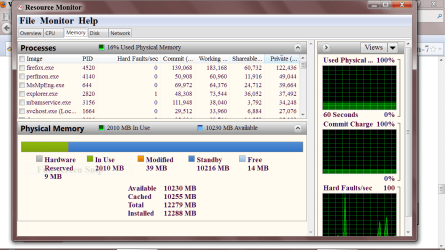
Here is the picture of the memory usage. Win is un Norwegien, let me know if any transelation needed.

List was long, so 4 listings didnt make the screen, but they use very little memory.

picture.php
 

My Computer

OS
Windows 7 Home Premium (x64) Service Pack 1 (build 7601)
Motherboard
ASUSTeK Computer INC. P5Q-PRO Rev 1.xx
Memory
2x2gig
Graphics Card(s)
NVIDIA GeForce 8800 GT (Microsoft Corporation - WDDM v1.1) [
Sound Card
High definition audio unit.
Monitor(s) Displays
2x24"
Hard Drives
Corsair Performance3 SSD [Hard drive] (128,04 GB) -- drive 0, s/n 111181000100034104E6, rev 1.0, SMART Status: Healthy
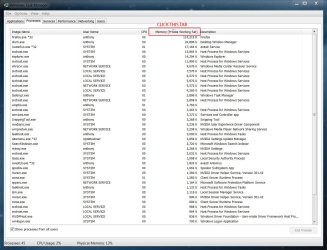
Go to Start Orb and type resmon and tick memory at the top and you should get your version of this.
Capture.PN MEMORY SNIPPET.PNG
I think you will get a better understanding of ram useage.
 

My Computer

Computer type
PC/Desktop
Computer Manufacturer/Model Number
Home made Desktop
OS
Windows 10 Pro. 64/ version 1709 Windows 7 Pro/64
CPU
Intel i7-6800K @ 4.3
Motherboard
ASUS X-99 Deluxe II
Memory
Corsair Platinum 16 gig @2400
Graphics Card(s)
EVGA GTX 1070 OC
Monitor(s) Displays
Asus 27" LED LCD/VE278Q
Screen Resolution
1920-1080 or 1280-720 HDMI
Hard Drives
INTEL SSD 730-240 Gb Sata 3.0/
PSU
EVGA Platium 1200W
Case
Phanteks Luxe Tempered Glass 8 fans/ one radiator
Cooling
XSPC/ Water Cooled CPU
Keyboard
Das 4 Professional
Mouse
Logitech M705/MX Anywhere 2-S
Internet Speed
100 mbits
Antivirus
Microsoft Security Essentials/ Malwarebytes Premium 3.0/ SAS
Browser
I.E. 11 default/Firefox/ ISP Time Warner Cable/Spectrum
Other Info
LG BluRay Burner/
Sound system-KLipsch-THX/
Icy Dock ssd Hot Swap bays.
Some programs are RAM hogs, don't have them in startup, they are there still when you need them.
Don't use Defraggler, it was fine for XP but screws up files order for w7. The built in Windows Defragger work very well or use Puran free.
 

My Computer

Computer type
PC/Desktop
Computer Manufacturer/Model Number
Home Built Desktop By DataTech
OS
Windows 7 Ultimate X64 SP1
CPU
Intel i5-2550K, Differing ~4.4-4.8GHz No built in GPU
Motherboard
ASUS P8Z68-V PRO/GEN3
Memory
16GB G.Skill Sniper 1866MHz @ 2133MHz 2x8GB
Graphics Card(s)
ASUS GTX650TIB-DC2OC-2GD5, (650TI Boost)
Sound Card
Onboard Realtek 5-1
Monitor(s) Displays
Samsung P2570HD
Screen Resolution
1920x1080
Hard Drives
Samsung 840 Pro 256GB SSD for OS, 500GB Seagate Constellation (Enterprise drive) for Data
PSU
Corsair HX650W
Case
Inwin Dragon Rider
Cooling
Hyper 212 EVO w/two Noctua fans, push-pull, @1300 RPM
Keyboard
E-Z Eyes, bright yellow keys with large characters
Mouse
steelseries SENSEI Laser Pro Gaming
Internet Speed
48-51Mbs Mbs down, 11 Mbs up Xfinity Cable
Antivirus
Norton Internet Security 2013
Browser
IE 10, Opera, Pale Moon if needed
Other Info
4 case fans, LG BluRay-RE, ASUS DVD-RW, Mr. Fusion power supply, 1.21 gigawatts.
Back
Top