High Physical Memory Usage

nipunmehra

New member
Local time
5:19 AM
Messages
2
Ive recently bought a HP probook 4530s.
Its has Windows 7 Home Premium.
Processor - Intel(R) Core(TM) i3-2310 CPU @ 2.10GHz
Installed Memory (RAM): 4.00 GB
System type: 64-bit Operating System.

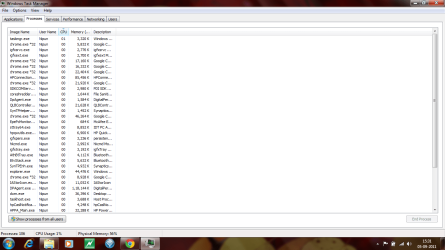
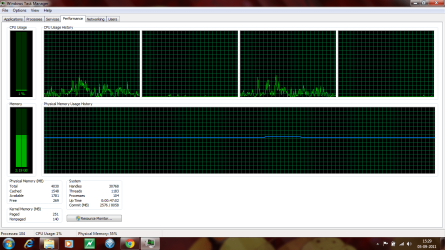
My Laptop is running slow even when there are no applications running. I am not a pro in computers so I asked one of my friend and he said that the physical memory usage is very high and there are many processes (around 105) running. So I am a little worried about this thing. :cry: Is everything alright with my laptop? if not what necessary steps I will have to take for the same.
Please Guide me through the whole thing.
Thanking in Advance :D

Screen Shots are attached.
 

Attachments
  • PIC 1.png
    PIC 1.png
    40.4 KB · Views: 532
  • PIc 2.png
    PIc 2.png
    50.6 KB · Views: 865

My Computer

OS
Windows 7 Home Premium 64 bit
HP machines are known to be shipped with a lot of stuff you don't need.

105 processes is quite high---I nearly always have less than half that many running.

Go to the start button search box and type in "system configuration".

Poke "system configuration" from the list that appears.

Look at the startup tab. Anything that is checked is going to be running every time you start up.

Uncheck all of them except anti-virus and see if your performance improves.

I'd also look into uninstalling much of the stuff that HP loaded onto the machine at the factory. You may not need most of it and there are likely other free products that perform as well or better.
 

My Computer

Computer type
PC/Desktop
Computer Manufacturer/Model Number
Ignatz Special; 4 speed manual gearbox; factory air conditioning; one of one
OS
Windows 7 Home Premium SP1, 64-bit
CPU
Intel Skylake i5-6600K, not overclocked
Motherboard
AsRock Z170M Extreme 4, micro ATX
Memory
8 GB HyperX DDR4-2666 (2 x 4 GB)
Graphics Card(s)
none; graphics are integrated on CPU
Sound Card
onboard: Realtek ALC1150; external: USB Behringer UF0-202
Monitor(s) Displays
Dell S2340M 23 inch IPS
Screen Resolution
1600 x 900
Hard Drives
System: Crucial MX100 series SSD, 128 GB;
Data: Samsung Spinpoint 103SJ, 1 TB;
Backup: WD Caviar Green WD30EZRX-00D8PB0, 3 TB
PSU
Rosewill SilentNight 500 watt fanless, semi-modular
Case
Antec Solo II
Cooling
Noctua NH-U12S; Noctua F12 intake, Noctua S12A exhaust
Keyboard
Microsoft 200 6JH-00001 USB
Mouse
Dell or Microsoft optical wired; USB
Antivirus
Microsoft Security Essentials and Malwarebytes Premium
Browser
Pale Moon
Other Info
All fans PWM; speeds at idle: CPU circa 500 rpm; intake circa 600 rpm; exhaust circa 600 rpm; CPU temps 27 idle and 47 C load in a warm room (27 C/81 F) when running Intel Extreme Tuning Utility stress test.
@paulpicks21 : Thankyou for replying. Yes even ive noticed the same but i am still doubtful what to do with dpagent.exe as i couldnt find it in services and hence couldnt disable it.

@ignatzatsonic : Thanks a lot... I did exactly what u asked me to and now its running 75 processes and using much less memory. Dunno about the rest unnecessary processes and application. Not so good at computers. :(
Still some improvement. :) I appreciate your reply
 

My Computer

OS
Windows 7 Home Premium 64 bit
Have a look at your installed program list under Programs in Control Panel.

HP is notorious for shipping with loads of stuff you don't need - be brutal and uninstall anything you don't need or use.
 

My Computer

Computer Manufacturer/Model Number
HP Pavilion Elite 495UK
OS
Windows 7 Ultimate SP1 64-Bit
CPU
Intel Core i7 870 @ 2.93GHz
Motherboard
MSI 2A9C (CPU1)
Memory
8Gb Dual-Channel DDR3 @ 664MHz
Graphics Card(s)
nVidia GeForce GTX 460 1024MB dedicated RAM
Sound Card
Realtek HD Audio
Monitor(s) Displays
HP2310i
Screen Resolution
1920 x 1080
Hard Drives
1x1954GB Hitachi HDS22020ALA 330 (RAID), 1x1954GB Hitachi External for backup and storage
PSU
460W
Case
HP Elite
Cooling
Air cooled
Keyboard
Logitech K750 solar-powered keyboard
Mouse
Logitech Wireless M180 mouse
Internet Speed
2Mb
Other Info
Pure Avanti Flow Internet Radio with iPod Dock, 64Gb iPod, HP USB Speakers, Sony MDR-V500 Headphones, Sony Vaio F-Series Laptop
Back
Top