High Ram Usage

lypire

New member
Local time
5:12 AM
Messages
4
Hi, I would like to check whether my computer is experiencing any problems as the ram usage seems to be quite high and the CPU usage is considerably low. When I start up my computer, the usage is around 30-40%, and can go up to 80% with just some programs switch on. I just recently changed to a new graphics card as the old one spoiled and my computer did not seem to be any better. In fact when playing the same game, the game became comparably more laggy than before. Any ideas how to diagnose and fix this issue?
 

My Computer

Computer Manufacturer/Model Number
Acer Aspire M5800
OS
Windows 7 Home Premium 64bit
CPU
Processor Intel(R) Core(TM)2 Quad CPU Q9400 @ 2.66GHz, 2
Memory
Installed Physical Memory (RAM) 4.00 GB
Graphics Card(s)
Nvidia Geforce 210 1GB DDR3
Sound Card
NVIDIA High Definition Audio, Realtek High Definition Audio
Screen Resolution
1440 x 900 x 59 hertz
Hard Drives
Acer 458.21 GB
(D:) 458.21 GB
Hello Lypire,

Firstly Could you post Screenshots of the Task managers Running Processes and Performance Pages Please? (Or Resource Manager If you Know how to get there)

Second You could Try a Program Called Memtest86, http://www.geekstogo.com/forum/topic/246994-guide-to-using-memtest86/ (Provided by Richc46)


AS to your gaming, Can your Computer Handle the games? Cpu Speed and Correct Amount Of Ram? A good way to Find out is to Use http://www.systemrequirementslab.com/cyri/, It does have some Bugs But it is a Good starting Point.

Have you updated all the Drivers For The Video Card you are using? Ati/Nvidia?

Let Us Know :D
 

My Computer

Computer type
PC/Desktop
Computer Manufacturer/Model Number
Custom Build
OS
Windows 8.1
CPU
Intel i5 3750k OC'd 4.0Ghz
Motherboard
P8Z77-V LX3
Memory
16GB Vengence Corsair
Graphics Card(s)
GTX 770 OC 2GB Windforce
Sound Card
C-Media 7.1 Surround Card
Monitor(s) Displays
Asus 3D 23" & BenQ 24" & LG 19"
Screen Resolution
1920*1080, 1920*1080, 1440*900
Hard Drives
Crucial 512GB SSD
WD 1.5 TB
WD 500Gb
PSU
850MW Silverstone
Case
inWin DragonRider
Cooling
4 * 140mm LED Akasa, One 140mm Fan Akasa
Keyboard
Corsair k95
Mouse
R.A.T 7 Contagion
Internet Speed
152 Mb Fiber Optic
Antivirus
ESET Nod32
Browser
Waterfox x64 / Chrome x64
Other Info
Freenas / Plex Media server
Q6600
6Gb DDR3
6TB ZFS Raid
500W PSu
2 x Intel NIC's
Also keep in mind that if you have Super Fetch enabled, then Windows is constantly loading your frequently used programs into RAM so that when you launch them it is "faster" than it would normally be if Super Fetch were not running.
 

My Computer

Computer Manufacturer/Model Number
Acer Aspire TimelineX AS4820T-6645
OS
Windows 7 Home Premium 64bit
CPU
Intel Core i3 380M(2.53GHz)
Memory
4GB DDR3 1066
Graphics Card(s)
Intel HD Graphics 128MB VRAM
Screen Resolution
1366x768
Hard Drives
640GB 5400RPM SATA
Also keep in mind that if you have Super Fetch enabled, then Windows is constantly loading your frequently used programs into RAM so that when you launch them it is "faster" than it would normally be if Super Fetch were not running.

I thought Super Fetch Was Diasbled By Default?
 

My Computer

Computer type
PC/Desktop
Computer Manufacturer/Model Number
Custom Build
OS
Windows 8.1
CPU
Intel i5 3750k OC'd 4.0Ghz
Motherboard
P8Z77-V LX3
Memory
16GB Vengence Corsair
Graphics Card(s)
GTX 770 OC 2GB Windforce
Sound Card
C-Media 7.1 Surround Card
Monitor(s) Displays
Asus 3D 23" & BenQ 24" & LG 19"
Screen Resolution
1920*1080, 1920*1080, 1440*900
Hard Drives
Crucial 512GB SSD
WD 1.5 TB
WD 500Gb
PSU
850MW Silverstone
Case
inWin DragonRider
Cooling
4 * 140mm LED Akasa, One 140mm Fan Akasa
Keyboard
Corsair k95
Mouse
R.A.T 7 Contagion
Internet Speed
152 Mb Fiber Optic
Antivirus
ESET Nod32
Browser
Waterfox x64 / Chrome x64
Other Info
Freenas / Plex Media server
Q6600
6Gb DDR3
6TB ZFS Raid
500W PSu
2 x Intel NIC's

My Computer

Computer type
PC/Desktop
Computer Manufacturer/Model Number
Custom Build
OS
Windows 10 Pro x64
CPU
Intel Core i5 4440 @Stock
Motherboard
Gigabyte Z97 D3H
Memory
4 x 4GB HyperX Fury DDR3
Graphics Card(s)
Gigabyte GTX 1050Ti O4G
Sound Card
Integrated
Monitor(s) Displays
Dell P2417H
Screen Resolution
1920 x 1080
Hard Drives
Samsung EVO 850 120GB / Toshiba DT01ACA050 1TB 7200prm 32MB
PSU
Riotoro Onyx 750W
Case
NZXT H500 Black-Red
Cooling
Stock CPU + NZXT 120mm + 2x120mm red fans
Keyboard
Modecom Volcano Lanparty
Mouse
Asus ROG Gladius / DeepCool E-Pad Plus
Internet Speed
DOCSIS 50/3 Mbit
Browser
Google Chrome
Other Info
Asus K55VJ(i5 3210M, GT635M / 2GB, 8GB DDR3, 500GB HDD)
Also keep in mind that if you have Super Fetch enabled, then Windows is constantly loading your frequently used programs into RAM so that when you launch them it is "faster" than it would normally be if Super Fetch were not running.

I thought Super Fetch Was Diasbled By Default?

No, Super Fetch is enabled by default across every version of Windows 7.
Black Viper’s Windows 7 Service Pack 1 Service Configurations | Black Viper's Website | www.blackviper.com
 

My Computer

Computer Manufacturer/Model Number
Acer Aspire TimelineX AS4820T-6645
OS
Windows 7 Home Premium 64bit
CPU
Intel Core i3 380M(2.53GHz)
Memory
4GB DDR3 1066
Graphics Card(s)
Intel HD Graphics 128MB VRAM
Screen Resolution
1366x768
Hard Drives
640GB 5400RPM SATA
Also keep in mind that if you have Super Fetch enabled, then Windows is constantly loading your frequently used programs into RAM so that when you launch them it is "faster" than it would normally be if Super Fetch were not running.

I thought Super Fetch Was Diasbled By Default?

No, Super Fetch is enabled by default across every version of Windows 7.
Black Viper’s Windows 7 Service Pack 1 Service Configurations | Black Viper's Website | www.blackviper.com


Ahh Thanks, I never Really noticed a difference with it And mine is Disabled? Must have Tweaked it last year Good Call tho.
 

My Computer

Computer type
PC/Desktop
Computer Manufacturer/Model Number
Custom Build
OS
Windows 8.1
CPU
Intel i5 3750k OC'd 4.0Ghz
Motherboard
P8Z77-V LX3
Memory
16GB Vengence Corsair
Graphics Card(s)
GTX 770 OC 2GB Windforce
Sound Card
C-Media 7.1 Surround Card
Monitor(s) Displays
Asus 3D 23" & BenQ 24" & LG 19"
Screen Resolution
1920*1080, 1920*1080, 1440*900
Hard Drives
Crucial 512GB SSD
WD 1.5 TB
WD 500Gb
PSU
850MW Silverstone
Case
inWin DragonRider
Cooling
4 * 140mm LED Akasa, One 140mm Fan Akasa
Keyboard
Corsair k95
Mouse
R.A.T 7 Contagion
Internet Speed
152 Mb Fiber Optic
Antivirus
ESET Nod32
Browser
Waterfox x64 / Chrome x64
Other Info
Freenas / Plex Media server
Q6600
6Gb DDR3
6TB ZFS Raid
500W PSu
2 x Intel NIC's
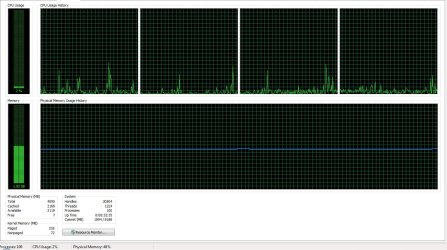
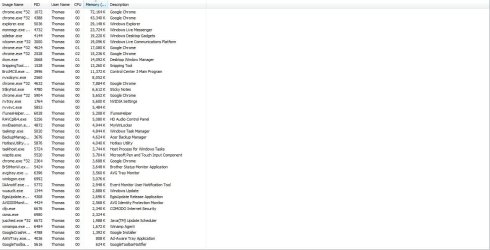
Here are the screen shots. My driver should be updated, since I installed it using the driver downloaded from the website itself. All the games should be able to work on my computer, since the tests turned out fine. I also unchecked everything that I do not need on start up, but isn't 30-40% ram usage on startup too high? I checked with my friends and theirs are running at 20% and below
 

Attachments

  • ss1.jpg
    ss1.jpg
    208.1 KB · Views: 55
  • ss2.JPG
    ss2.JPG
    99.7 KB · Views: 33

My Computer

Computer Manufacturer/Model Number
Acer Aspire M5800
OS
Windows 7 Home Premium 64bit
CPU
Processor Intel(R) Core(TM)2 Quad CPU Q9400 @ 2.66GHz, 2
Memory
Installed Physical Memory (RAM) 4.00 GB
Graphics Card(s)
Nvidia Geforce 210 1GB DDR3
Sound Card
NVIDIA High Definition Audio, Realtek High Definition Audio
Screen Resolution
1440 x 900 x 59 hertz
Hard Drives
Acer 458.21 GB
(D:) 458.21 GB
Well yes. 40 % at startup is high a bit. Mine system is starting up with 25-30% with 2GB Ram.
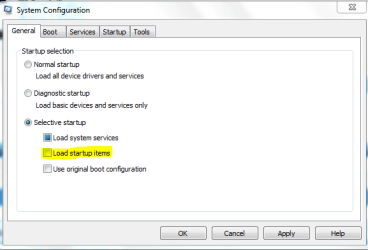
Also I can see a lot of proesses.Try this. Start->Run->msconfig.
There is Services tab click Hide All Microsoft Services,and then click Disable All.
From General tab uncheck Load Startup Items.
Capture.PNG
After that click Apply and Ok. And reboot the pc to see the ram usage.
 

My Computer

Computer type
PC/Desktop
Computer Manufacturer/Model Number
Custom Build
OS
Windows 10 Pro x64
CPU
Intel Core i5 4440 @Stock
Motherboard
Gigabyte Z97 D3H
Memory
4 x 4GB HyperX Fury DDR3
Graphics Card(s)
Gigabyte GTX 1050Ti O4G
Sound Card
Integrated
Monitor(s) Displays
Dell P2417H
Screen Resolution
1920 x 1080
Hard Drives
Samsung EVO 850 120GB / Toshiba DT01ACA050 1TB 7200prm 32MB
PSU
Riotoro Onyx 750W
Case
NZXT H500 Black-Red
Cooling
Stock CPU + NZXT 120mm + 2x120mm red fans
Keyboard
Modecom Volcano Lanparty
Mouse
Asus ROG Gladius / DeepCool E-Pad Plus
Internet Speed
DOCSIS 50/3 Mbit
Browser
Google Chrome
Other Info
Asus K55VJ(i5 3210M, GT635M / 2GB, 8GB DDR3, 500GB HDD)
I tried as you advised me to, but the ram usage is still varying between 30% to 40%
 

My Computer

Computer Manufacturer/Model Number
Acer Aspire M5800
OS
Windows 7 Home Premium 64bit
CPU
Processor Intel(R) Core(TM)2 Quad CPU Q9400 @ 2.66GHz, 2
Memory
Installed Physical Memory (RAM) 4.00 GB
Graphics Card(s)
Nvidia Geforce 210 1GB DDR3
Sound Card
NVIDIA High Definition Audio, Realtek High Definition Audio
Screen Resolution
1440 x 900 x 59 hertz
Hard Drives
Acer 458.21 GB
(D:) 458.21 GB
Actually another thought is, do you have the correct ram for your System, So DDR2 6400 800mHz (For Example, Not sure if that is actually a stick or not :D)
 

My Computer

Computer type
PC/Desktop
Computer Manufacturer/Model Number
Custom Build
OS
Windows 8.1
CPU
Intel i5 3750k OC'd 4.0Ghz
Motherboard
P8Z77-V LX3
Memory
16GB Vengence Corsair
Graphics Card(s)
GTX 770 OC 2GB Windforce
Sound Card
C-Media 7.1 Surround Card
Monitor(s) Displays
Asus 3D 23" & BenQ 24" & LG 19"
Screen Resolution
1920*1080, 1920*1080, 1440*900
Hard Drives
Crucial 512GB SSD
WD 1.5 TB
WD 500Gb
PSU
850MW Silverstone
Case
inWin DragonRider
Cooling
4 * 140mm LED Akasa, One 140mm Fan Akasa
Keyboard
Corsair k95
Mouse
R.A.T 7 Contagion
Internet Speed
152 Mb Fiber Optic
Antivirus
ESET Nod32
Browser
Waterfox x64 / Chrome x64
Other Info
Freenas / Plex Media server
Q6600
6Gb DDR3
6TB ZFS Raid
500W PSu
2 x Intel NIC's
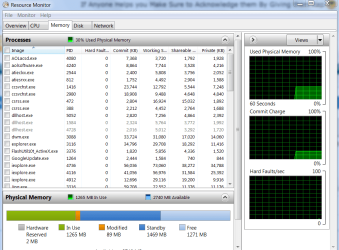
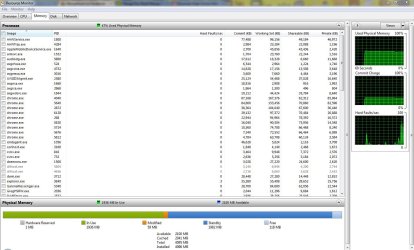
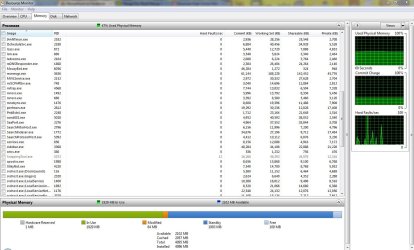
The task manager screenshot is not very telling. A screenshot of Resource Monitor > Memory tab would give more clues.

Example:
 

Attachments

  • 2011-07-13_1822.png
    2011-07-13_1822.png
    43.5 KB · Views: 29

My Computer

Computer Manufacturer/Model Number
HP, Dell, Gateway, Toshiba - 4 laptops and 2 desktops
OS
Vista, Windows7, Mint Mate, Zorin, Windows 8
CPU
from 1.6GHz Duo to i7
Monitor(s) Displays
2x HP w2207
Hard Drives
5x HDD, 7x SSD, 12x Externals
Keyboard
with trackball - no mices
Mouse
Trackball mice
Internet Speed
DSL 6000
Hi sorry for getting back to you all late, would these be suffice?
 

Attachments

  • ss3.JPG
    ss3.JPG
    142.4 KB · Views: 19
  • ss4.JPG
    ss4.JPG
    145.8 KB · Views: 15
  • ss5.JPG
    ss5.JPG
    147.9 KB · Views: 12

My Computer

Computer Manufacturer/Model Number
Acer Aspire M5800
OS
Windows 7 Home Premium 64bit
CPU
Processor Intel(R) Core(TM)2 Quad CPU Q9400 @ 2.66GHz, 2
Memory
Installed Physical Memory (RAM) 4.00 GB
Graphics Card(s)
Nvidia Geforce 210 1GB DDR3
Sound Card
NVIDIA High Definition Audio, Realtek High Definition Audio
Screen Resolution
1440 x 900 x 59 hertz
Hard Drives
Acer 458.21 GB
(D:) 458.21 GB
OK, so you have a lot of usage going to Chrome and running background processes, but no more than I would expect with that number of extra processes running. You're basically at half committed to running processes and half to cache, which is pretty normal. Either clean up all the stuff you have running, or accept the fact that you paid for 4 GB of RAM and your system is using it (wisely) ;). Nothing is actually "wrong" here, at all.
 

My Computer

Computer type
PC/Desktop
Computer Manufacturer/Model Number
Custom
OS
Windows 10 Pro x64
CPU
Intel Core i7 4790K @ 4.5GHz
Motherboard
Asus Maximus Hero VII
Memory
32GB DDR3
Graphics Card(s)
Nvidia GeForce GTX970
Sound Card
Realtek HD Audio
Screen Resolution
1920x1200
Hard Drives
1x Samsung 250GB SSD
4x WD RE 2TB (RAIDZ)
PSU
Corsair AX760i
Case
Fractal Design Define R4
Cooling
Noctua NH-D15
Good screenshots. But there is nothing unusual that I can discover. Look into Resource Monitor right after boot. If that is also around 2GB, then you should screen your startup programs. But I have the impression that you started a lot of processes before those screenshots were taken.

You might as well use all the RAM you have. That gives you best performance.
 

My Computer

Computer Manufacturer/Model Number
HP, Dell, Gateway, Toshiba - 4 laptops and 2 desktops
OS
Vista, Windows7, Mint Mate, Zorin, Windows 8
CPU
from 1.6GHz Duo to i7
Monitor(s) Displays
2x HP w2207
Hard Drives
5x HDD, 7x SSD, 12x Externals
Keyboard
with trackball - no mices
Mouse
Trackball mice
Internet Speed
DSL 6000
Back
Top