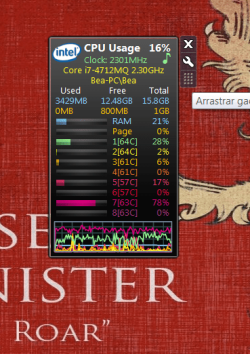
High temperature in Intel Core i7412mq

Beacanoh

New member
Local time
6:20 PM
Messages
18
Hello,
Since a few days ago my laptop fan runs very often and makes quite noise, even if I am only surfing in the internet, not playing games or something like that. I bought this laptop last January and it is a good machine and powerful, I think it is not normal this is happening. I'd like to ask you how can I diagnose if the core temperature is higher than normal values, why it is happening and how can I solve this.
 

My Computer My Computer

Computer type
Laptop
OS
Windoews 7 Home Premium 64 bits
CPU
Intel Core i7-4712MQ 2.30 Ghz
Motherboard
Clevo W35xSS/370SS
Memory
16 GB
Graphics Card(s)
GeForce GTX860M
Screen Resolution
1920x1080
Hard Drives
SSD Crucial_CT240M500SSD3 (223 GB)
HDD TOSHIBA MQ01ABD100 (931 GB)
You need to fill out your system specs with more detail so we know what we are dealing with.

You can use HWInfo64 to check temperatures and fan speeds.

Get it here. It's free.

HWiNFO, HWiNFO32/64 - Download

Are you sure the noise is coming from the fan?

Laptops run hot anyway. You could have a failing fan, clogged fan vents, or something that is causing your CPU to work harder than normal that is causing the fan to work hard.

Post a screen shot of what you see in HWInfo64, particularly the fan speeds.
 

My Computer My Computer

Computer type
PC/Desktop
Computer Manufacturer/Model Number
Ignatz Special; 4 speed manual gearbox; factory air conditioning; one of one
OS
Windows 7 Home Premium SP1, 64-bit
CPU
Intel Skylake i5-6600K, not overclocked
Motherboard
AsRock Z170M Extreme 4, micro ATX
Memory
8 GB HyperX DDR4-2666 (2 x 4 GB)
Graphics Card(s)
none; graphics are integrated on CPU
Sound Card
onboard: Realtek ALC1150; external: USB Behringer UF0-202
Monitor(s) Displays
Dell S2340M 23 inch IPS
Screen Resolution
1600 x 900
Hard Drives
System: Crucial MX100 series SSD, 128 GB;
Data: Samsung Spinpoint 103SJ, 1 TB;
Backup: WD Caviar Green WD30EZRX-00D8PB0, 3 TB
PSU
Rosewill SilentNight 500 watt fanless, semi-modular
Case
Antec Solo II
Cooling
Noctua NH-U12S; Noctua F12 intake, Noctua S12A exhaust
Keyboard
Microsoft 200 6JH-00001 USB
Mouse
Dell or Microsoft optical wired; USB
Antivirus
Microsoft Security Essentials and Malwarebytes Premium
Browser
Pale Moon
Other Info
All fans PWM; speeds at idle: CPU circa 500 rpm; intake circa 600 rpm; exhaust circa 600 rpm; CPU temps 27 idle and 47 C load in a warm room (27 C/81 F) when running Intel Extreme Tuning Utility stress test.
Thank you for your answer. I filled out all system specs I could, if there is any other you should know please let me know how can I find this information.
I am pretty sure the noise is coming from the fan, and it expels hot air. Here I send a screen shot of HWInfo64.
 

Attachments

  • Screen capture.png
    Screen capture.png
    156 KB · Views: 9

My Computer My Computer

Computer type
Laptop
OS
Windoews 7 Home Premium 64 bits
CPU
Intel Core i7-4712MQ 2.30 Ghz
Motherboard
Clevo W35xSS/370SS
Memory
16 GB
Graphics Card(s)
GeForce GTX860M
Screen Resolution
1920x1080
Hard Drives
SSD Crucial_CT240M500SSD3 (223 GB)
HDD TOSHIBA MQ01ABD100 (931 GB)
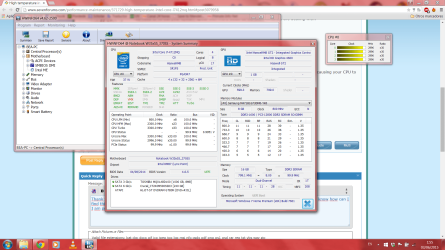
Start HWInfo with sensors and post them.
 

My Computer My Computer

Computer type
PC/Desktop
Computer Manufacturer/Model Number
Custom Build
OS
Windows 7 Ultimate x64 SP1
CPU
AMD Phenom 2 1090T
Motherboard
Gigabyte GA-890FXA-UD5
Memory
2x8GB Kingston HyperX Fury Black 1600Mhz Unganged
Graphics Card(s)
MSI GTX 970 Gaming 4G
Sound Card
Realtek On-Board HD 7.1 Audio / Logitech G35
Monitor(s) Displays
3xAcer GD245HQ
Screen Resolution
1920x1080
Hard Drives
Samsung 850 Pro 512GB SSD - OS /
WD Caviar Black SATA 3 - 1 TBx2 - Dynamic RAID 0 /
WD Caviar Green SATA 2 - 640GBx2 - Dynamic RAID 0 /
WD Caviar Green SATA 2 - 640GB - Internal Backup /
Seagate Barracude SATA 3 - 3TB - External Backup/ Sync
PSU
HighPower 1000W
Case
Cooler Master HAF 932
Cooling
Noctua NH-D14
Keyboard
Logitech G19
Mouse
Logitech G500
Internet Speed
100/4 Mbit Cable (100GB quota)
Antivirus
ZoneAlarm Extreme Security / MBAM Pro / MBAE Free / SAS Free
Browser
IE 11 - Firefox - Chrome
Other Info
Logitech F710/ G27/ G940/ Z5500 // TrackIR 5 // Nvidia 3D Surround Vision
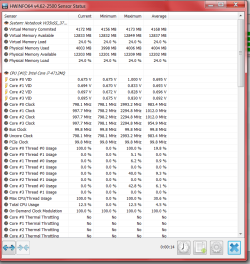
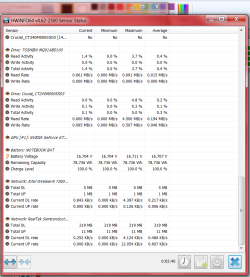
I think the fan was clogged. I applied some compressed air on it and it seems to work fine, it doesn't make noise now. Anyway, here are the screenshot of HWinfo sensors, in case you detect something wrong.
 

Attachments

  • Sensor 1.png
    Sensor 1.png
    32.6 KB · Views: 1
  • Sensor 2.png
    Sensor 2.png
    38.4 KB · Views: 1
  • Sensor 3.png
    Sensor 3.png
    43.2 KB · Views: 1
  • Sensor 4.png
    Sensor 4.png
    45.6 KB · Views: 1

My Computer My Computer

Computer type
Laptop
OS
Windoews 7 Home Premium 64 bits
CPU
Intel Core i7-4712MQ 2.30 Ghz
Motherboard
Clevo W35xSS/370SS
Memory
16 GB
Graphics Card(s)
GeForce GTX860M
Screen Resolution
1920x1080
Hard Drives
SSD Crucial_CT240M500SSD3 (223 GB)
HDD TOSHIBA MQ01ABD100 (931 GB)
Mmm I was wrong, when I started to play a game, the computer started to heat again and the fan making too noise. I wanted to check the temperature while playing with HWInfo but I don't know how (Ctrl + Tab doesn't work for this game). Now I have restarted my computer and core temperature was 61ºC, and getting down. Any suggestions?
 

My Computer My Computer

Computer type
Laptop
OS
Windoews 7 Home Premium 64 bits
CPU
Intel Core i7-4712MQ 2.30 Ghz
Motherboard
Clevo W35xSS/370SS
Memory
16 GB
Graphics Card(s)
GeForce GTX860M
Screen Resolution
1920x1080
Hard Drives
SSD Crucial_CT240M500SSD3 (223 GB)
HDD TOSHIBA MQ01ABD100 (931 GB)
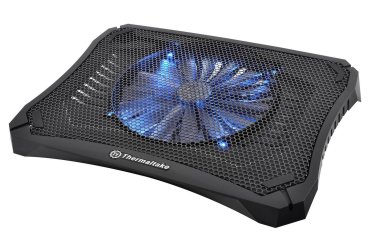
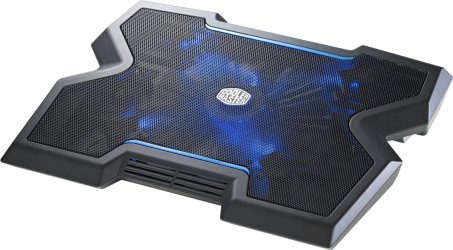
Laptops always get hot, the best thing you do do is clean it out real good and buy a chill pad.
 

Attachments

  • Laptop-Cooling-Pad1.jpg
    Laptop-Cooling-Pad1.jpg
    222.1 KB · Views: 0
  • 91xFdjolZSL._SL1500_-1.jpg
    91xFdjolZSL._SL1500_-1.jpg
    191.8 KB · Views: 0
  • 86a.jpg
    86a.jpg
    28 KB · Views: 17

My Computer My Computer

Computer type
PC/Desktop
Computer Manufacturer/Model Number
Skylake Special #666
OS
Windows 10 Pro x64
CPU
Intel Core i7 6700K
Motherboard
Asus Sabertooth Z170 Mark 1
Memory
GSkill TridentZ RGB 16GB 3600 16-16-16-36
Graphics Card(s)
EVGA GTX 980 Ti SC x2
Sound Card
Realtek High Definition
Monitor(s) Displays
AOC G2460PG
Screen Resolution
1920 x 1080 144Hz
Hard Drives
Samsung 860 Pro 256GB, Seagate Barracuda 4TB x2
PSU
EVGA 1000 P2, EVGA White Custom Braided Cables
Case
Corsair Vengeance C70 Gunmetal Black
Cooling
Corsair H100i v2, Corsair ML120 x2, Thermal Grizzly Kryonaut
Keyboard
Logitech G910 Orion Spectrum
Mouse
Logitech G700s
Internet Speed
Verizon Fios Quantum Gateway 75/75
Antivirus
Windows Defender, Malwarebytes Free 3.8.3
Browser
Chrome
Other Info
Corsair SP120 x4, LG Blu-ray Drive, Durabrand HT-395 100 Watt Dolby Digital Amp, Corsair H2100 Wireless 7.1 Headset
Thank you for your advice, I have already bought a chill pad and I hope I will receive it today. Anyway, how can I check the temperature while I am playing? Thanks.
 

My Computer My Computer

Computer type
Laptop
OS
Windoews 7 Home Premium 64 bits
CPU
Intel Core i7-4712MQ 2.30 Ghz
Motherboard
Clevo W35xSS/370SS
Memory
16 GB
Graphics Card(s)
GeForce GTX860M
Screen Resolution
1920x1080
Hard Drives
SSD Crucial_CT240M500SSD3 (223 GB)
HDD TOSHIBA MQ01ABD100 (931 GB)
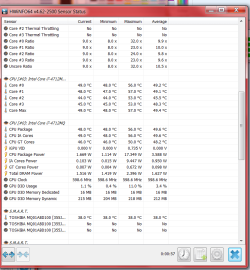
Run HWInfo 64 in sensor mode and minimize it. It will sit in your system tray at the lower right of your screen while you are playing.
 

My Computer My Computer

Computer type
PC/Desktop
Computer Manufacturer/Model Number
Ignatz Special; 4 speed manual gearbox; factory air conditioning; one of one
OS
Windows 7 Home Premium SP1, 64-bit
CPU
Intel Skylake i5-6600K, not overclocked
Motherboard
AsRock Z170M Extreme 4, micro ATX
Memory
8 GB HyperX DDR4-2666 (2 x 4 GB)
Graphics Card(s)
none; graphics are integrated on CPU
Sound Card
onboard: Realtek ALC1150; external: USB Behringer UF0-202
Monitor(s) Displays
Dell S2340M 23 inch IPS
Screen Resolution
1600 x 900
Hard Drives
System: Crucial MX100 series SSD, 128 GB;
Data: Samsung Spinpoint 103SJ, 1 TB;
Backup: WD Caviar Green WD30EZRX-00D8PB0, 3 TB
PSU
Rosewill SilentNight 500 watt fanless, semi-modular
Case
Antec Solo II
Cooling
Noctua NH-U12S; Noctua F12 intake, Noctua S12A exhaust
Keyboard
Microsoft 200 6JH-00001 USB
Mouse
Dell or Microsoft optical wired; USB
Antivirus
Microsoft Security Essentials and Malwarebytes Premium
Browser
Pale Moon
Other Info
All fans PWM; speeds at idle: CPU circa 500 rpm; intake circa 600 rpm; exhaust circa 600 rpm; CPU temps 27 idle and 47 C load in a warm room (27 C/81 F) when running Intel Extreme Tuning Utility stress test.
But how can I see the values while playing if I can't show the desk while the game is full screen?
 

My Computer My Computer

Computer type
Laptop
OS
Windoews 7 Home Premium 64 bits
CPU
Intel Core i7-4712MQ 2.30 Ghz
Motherboard
Clevo W35xSS/370SS
Memory
16 GB
Graphics Card(s)
GeForce GTX860M
Screen Resolution
1920x1080
Hard Drives
SSD Crucial_CT240M500SSD3 (223 GB)
HDD TOSHIBA MQ01ABD100 (931 GB)
When in HWInfo sensors page, click "Logging Start" - specify a name and let it start logging.
Go in game do what you do, and exit.
Stop logging with the same button.
Open the csv file, click "comma separated" when importing to excel/alternative ( I use OpenOffice)
Find:
CPU 0 - AO column CPU [C] - AQ column I guess AQ is what BIOS shows? For me they were 24 and 37 respectively. You can also check this [URL="http://www.overclockers.com/forums/showthread.php/717129-How-To-In-Game-CPU-Memory-Motherboard-Monitoring-Overlay"][U][COLOR=#0066cc]http://www.overclockers.com/forums/showthread.php/717129-How-To-In-Game-CPU-Memory-Motherboard-Monitoring-Overlay[/COLOR][/U][/URL] a bit complicated
 

My Computer My Computer

Computer type
PC/Desktop
Computer Manufacturer/Model Number
Custom Build
OS
Windows 7 Ultimate x64 SP1
CPU
AMD Phenom 2 1090T
Motherboard
Gigabyte GA-890FXA-UD5
Memory
2x8GB Kingston HyperX Fury Black 1600Mhz Unganged
Graphics Card(s)
MSI GTX 970 Gaming 4G
Sound Card
Realtek On-Board HD 7.1 Audio / Logitech G35
Monitor(s) Displays
3xAcer GD245HQ
Screen Resolution
1920x1080
Hard Drives
Samsung 850 Pro 512GB SSD - OS /
WD Caviar Black SATA 3 - 1 TBx2 - Dynamic RAID 0 /
WD Caviar Green SATA 2 - 640GBx2 - Dynamic RAID 0 /
WD Caviar Green SATA 2 - 640GB - Internal Backup /
Seagate Barracude SATA 3 - 3TB - External Backup/ Sync
PSU
HighPower 1000W
Case
Cooler Master HAF 932
Cooling
Noctua NH-D14
Keyboard
Logitech G19
Mouse
Logitech G500
Internet Speed
100/4 Mbit Cable (100GB quota)
Antivirus
ZoneAlarm Extreme Security / MBAM Pro / MBAE Free / SAS Free
Browser
IE 11 - Firefox - Chrome
Other Info
Logitech F710/ G27/ G940/ Z5500 // TrackIR 5 // Nvidia 3D Surround Vision
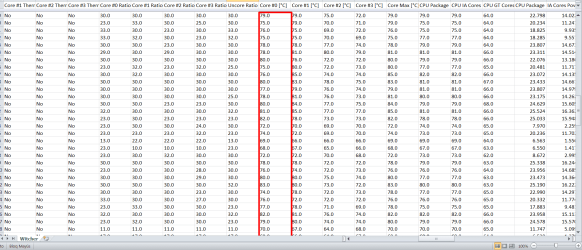
Thank very much GokAy. While in game, temperature raises until more than 80 ºC... It is normal?
 

Attachments

  • Witcher.png
    Witcher.png
    51.3 KB · Views: 5

My Computer My Computer

Computer type
Laptop
OS
Windoews 7 Home Premium 64 bits
CPU
Intel Core i7-4712MQ 2.30 Ghz
Motherboard
Clevo W35xSS/370SS
Memory
16 GB
Graphics Card(s)
GeForce GTX860M
Screen Resolution
1920x1080
Hard Drives
SSD Crucial_CT240M500SSD3 (223 GB)
HDD TOSHIBA MQ01ABD100 (931 GB)
For a laptop, it could be normal, laptops are not made for gaming.
 

My Computer My Computer

Computer type
PC/Desktop
Computer Manufacturer/Model Number
Skylake Special #666
OS
Windows 10 Pro x64
CPU
Intel Core i7 6700K
Motherboard
Asus Sabertooth Z170 Mark 1
Memory
GSkill TridentZ RGB 16GB 3600 16-16-16-36
Graphics Card(s)
EVGA GTX 980 Ti SC x2
Sound Card
Realtek High Definition
Monitor(s) Displays
AOC G2460PG
Screen Resolution
1920 x 1080 144Hz
Hard Drives
Samsung 860 Pro 256GB, Seagate Barracuda 4TB x2
PSU
EVGA 1000 P2, EVGA White Custom Braided Cables
Case
Corsair Vengeance C70 Gunmetal Black
Cooling
Corsair H100i v2, Corsair ML120 x2, Thermal Grizzly Kryonaut
Keyboard
Logitech G910 Orion Spectrum
Mouse
Logitech G700s
Internet Speed
Verizon Fios Quantum Gateway 75/75
Antivirus
Windows Defender, Malwarebytes Free 3.8.3
Browser
Chrome
Other Info
Corsair SP120 x4, LG Blu-ray Drive, Durabrand HT-395 100 Watt Dolby Digital Amp, Corsair H2100 Wireless 7.1 Headset
It could be dangerous? Don't say to me that I can't play with my laptop please... :cry:
 

My Computer My Computer

Computer type
Laptop
OS
Windoews 7 Home Premium 64 bits
CPU
Intel Core i7-4712MQ 2.30 Ghz
Motherboard
Clevo W35xSS/370SS
Memory
16 GB
Graphics Card(s)
GeForce GTX860M
Screen Resolution
1920x1080
Hard Drives
SSD Crucial_CT240M500SSD3 (223 GB)
HDD TOSHIBA MQ01ABD100 (931 GB)
Laptop will get hot while gaming, it should at worst shut down the laptop.
 

My Computer My Computer

Computer type
PC/Desktop
Computer Manufacturer/Model Number
Custom Build
OS
Windows 7 Ultimate x64 SP1
CPU
AMD Phenom 2 1090T
Motherboard
Gigabyte GA-890FXA-UD5
Memory
2x8GB Kingston HyperX Fury Black 1600Mhz Unganged
Graphics Card(s)
MSI GTX 970 Gaming 4G
Sound Card
Realtek On-Board HD 7.1 Audio / Logitech G35
Monitor(s) Displays
3xAcer GD245HQ
Screen Resolution
1920x1080
Hard Drives
Samsung 850 Pro 512GB SSD - OS /
WD Caviar Black SATA 3 - 1 TBx2 - Dynamic RAID 0 /
WD Caviar Green SATA 2 - 640GBx2 - Dynamic RAID 0 /
WD Caviar Green SATA 2 - 640GB - Internal Backup /
Seagate Barracude SATA 3 - 3TB - External Backup/ Sync
PSU
HighPower 1000W
Case
Cooler Master HAF 932
Cooling
Noctua NH-D14
Keyboard
Logitech G19
Mouse
Logitech G500
Internet Speed
100/4 Mbit Cable (100GB quota)
Antivirus
ZoneAlarm Extreme Security / MBAM Pro / MBAE Free / SAS Free
Browser
IE 11 - Firefox - Chrome
Other Info
Logitech F710/ G27/ G940/ Z5500 // TrackIR 5 // Nvidia 3D Surround Vision
Well I guess I will clean the fan and use the chill pad. If you think there is nothing else I should worry, I will mark the post as solved. Thank you very much for your help.
 

My Computer My Computer

Computer type
Laptop
OS
Windoews 7 Home Premium 64 bits
CPU
Intel Core i7-4712MQ 2.30 Ghz
Motherboard
Clevo W35xSS/370SS
Memory
16 GB
Graphics Card(s)
GeForce GTX860M
Screen Resolution
1920x1080
Hard Drives
SSD Crucial_CT240M500SSD3 (223 GB)
HDD TOSHIBA MQ01ABD100 (931 GB)
You might find this useful, from the developer of HWInfo:

Support of RTSS - Displaying HWiNFO32 sensor values in Games

"HWiNFO32/64 now introduces the support of RivaTuner OSD (Statistics) Server which allows displaying of any HWiNFO32/64 sensor values in DirectX applications/games..............".
 

My Computer My Computer

Computer type
PC/Desktop
Computer Manufacturer/Model Number
Ignatz Special; 4 speed manual gearbox; factory air conditioning; one of one
OS
Windows 7 Home Premium SP1, 64-bit
CPU
Intel Skylake i5-6600K, not overclocked
Motherboard
AsRock Z170M Extreme 4, micro ATX
Memory
8 GB HyperX DDR4-2666 (2 x 4 GB)
Graphics Card(s)
none; graphics are integrated on CPU
Sound Card
onboard: Realtek ALC1150; external: USB Behringer UF0-202
Monitor(s) Displays
Dell S2340M 23 inch IPS
Screen Resolution
1600 x 900
Hard Drives
System: Crucial MX100 series SSD, 128 GB;
Data: Samsung Spinpoint 103SJ, 1 TB;
Backup: WD Caviar Green WD30EZRX-00D8PB0, 3 TB
PSU
Rosewill SilentNight 500 watt fanless, semi-modular
Case
Antec Solo II
Cooling
Noctua NH-U12S; Noctua F12 intake, Noctua S12A exhaust
Keyboard
Microsoft 200 6JH-00001 USB
Mouse
Dell or Microsoft optical wired; USB
Antivirus
Microsoft Security Essentials and Malwarebytes Premium
Browser
Pale Moon
Other Info
All fans PWM; speeds at idle: CPU circa 500 rpm; intake circa 600 rpm; exhaust circa 600 rpm; CPU temps 27 idle and 47 C load in a warm room (27 C/81 F) when running Intel Extreme Tuning Utility stress test.
Thank you ignatzatsonic, I will check it.
I'm still worried, now the temperature reach 65 - 70 ºC when I'm only listening to music and working with Excel. I've already cleaned the fan.
:confused:
 

Attachments

  • Temperaturas.png
    Temperaturas.png
    113 KB · Views: 6

My Computer My Computer

Computer type
Laptop
OS
Windoews 7 Home Premium 64 bits
CPU
Intel Core i7-4712MQ 2.30 Ghz
Motherboard
Clevo W35xSS/370SS
Memory
16 GB
Graphics Card(s)
GeForce GTX860M
Screen Resolution
1920x1080
Hard Drives
SSD Crucial_CT240M500SSD3 (223 GB)
HDD TOSHIBA MQ01ABD100 (931 GB)
My Computer My Computer

Computer type
PC/Desktop
Computer Manufacturer/Model Number
Custom Build
OS
Windows 7 Ultimate x64 SP1
CPU
AMD Phenom 2 1090T
Motherboard
Gigabyte GA-890FXA-UD5
Memory
2x8GB Kingston HyperX Fury Black 1600Mhz Unganged
Graphics Card(s)
MSI GTX 970 Gaming 4G
Sound Card
Realtek On-Board HD 7.1 Audio / Logitech G35
Monitor(s) Displays
3xAcer GD245HQ
Screen Resolution
1920x1080
Hard Drives
Samsung 850 Pro 512GB SSD - OS /
WD Caviar Black SATA 3 - 1 TBx2 - Dynamic RAID 0 /
WD Caviar Green SATA 2 - 640GBx2 - Dynamic RAID 0 /
WD Caviar Green SATA 2 - 640GB - Internal Backup /
Seagate Barracude SATA 3 - 3TB - External Backup/ Sync
PSU
HighPower 1000W
Case
Cooler Master HAF 932
Cooling
Noctua NH-D14
Keyboard
Logitech G19
Mouse
Logitech G500
Internet Speed
100/4 Mbit Cable (100GB quota)
Antivirus
ZoneAlarm Extreme Security / MBAM Pro / MBAE Free / SAS Free
Browser
IE 11 - Firefox - Chrome
Other Info
Logitech F710/ G27/ G940/ Z5500 // TrackIR 5 // Nvidia 3D Surround Vision
Back
Top