High Temperatures, Please Help.

Dispo96

New member
Local time
4:17 AM
Messages
10
I have replaced the thermal paste on my laptop cpu/gpu. Until recently I had no issues with my laptop... Not sure what the issue could be, when I plug in my laptop it goes off the wall 90C in seconds, within a few minutes it starts freezing.

I found a pch ba62-00503A spot the last time I ripped it apart and saw I didn't change the thermal paste there but I don't think that is the issue, it's the actual CPU/GPU.

I took this summary basically at idle... Chrome with 6 tabs or so open, excel, speccy and notepad. Nothing intensive, used to do a lot more.

Summary
Operating System
Windows 7 Ultimate 64-bit SP1
CPU
Intel Core i7 3630QM @ 2.40GHz 74 °C
Ivy Bridge 22nm Technology
RAM
8.00GB Dual-Channel DDR3 (11-11-11-28)
Motherboard
SAMSUNG ELECTRONICS CO. LTD. NP700Z5C-S04CA (CPU Socket - U3E1) 76 °C
Graphics
Generic PnP Monitor (1600x900@60Hz)
Intel (Samsung)
1023MB NVIDIA GeForce GT 640M (Samsung) 78 °C
ForceWare version: 375.70
SLI Disabled
Storage
14GB SanDisk SSD i100 16GB ATA Device (SSD)
119GB Samsung SSD 840 PRO Series ATA Device (SSD) 30 °C
Optical Drives
TSSTcorp CDDVDW SU-B08AB ATA Device
Audio
Realtek High Definition Audio
 

My Computer

Computer type
Laptop
Computer Manufacturer/Model Number
Samsung 700Z5C
OS
7 Ultimate x64
CPU
i7-3635QM
Motherboard
Samsung NP700Z5C-S04CA
Memory
8GB
Graphics Card(s)
HD4000 & GT 640M
Hard Drives
Samsung SSD 840 Pro 120GB
Antivirus
N/A
Browser
Chrome/Firefox
Are your fan vents known to be clear of dust and goo?

Are your fan RPMs known to be within normal ranges?

I'd run something like HWInfo to get a better look at fan details, voltages, and temps of various components.

Did this problem show up before or after you replaced the thermal paste?

How confident are you that you did a decent job of replacing the paste?

Before this problem, how high did CPU temps get at idle or at load?
 

My Computer

Computer type
PC/Desktop
Computer Manufacturer/Model Number
Ignatz Special; 4 speed manual gearbox; factory air conditioning; one of one
OS
Windows 7 Home Premium SP1, 64-bit
CPU
Intel Skylake i5-6600K, not overclocked
Motherboard
AsRock Z170M Extreme 4, micro ATX
Memory
8 GB HyperX DDR4-2666 (2 x 4 GB)
Graphics Card(s)
none; graphics are integrated on CPU
Sound Card
onboard: Realtek ALC1150; external: USB Behringer UF0-202
Monitor(s) Displays
Dell S2340M 23 inch IPS
Screen Resolution
1600 x 900
Hard Drives
System: Crucial MX100 series SSD, 128 GB;
Data: Samsung Spinpoint 103SJ, 1 TB;
Backup: WD Caviar Green WD30EZRX-00D8PB0, 3 TB
PSU
Rosewill SilentNight 500 watt fanless, semi-modular
Case
Antec Solo II
Cooling
Noctua NH-U12S; Noctua F12 intake, Noctua S12A exhaust
Keyboard
Microsoft 200 6JH-00001 USB
Mouse
Dell or Microsoft optical wired; USB
Antivirus
Microsoft Security Essentials and Malwarebytes Premium
Browser
Pale Moon
Other Info
All fans PWM; speeds at idle: CPU circa 500 rpm; intake circa 600 rpm; exhaust circa 600 rpm; CPU temps 27 idle and 47 C load in a warm room (27 C/81 F) when running Intel Extreme Tuning Utility stress test.
Are your fan vents known to be clear of dust and goo?

Are your fan RPMs known to be within normal ranges? - I can't find an app that will tell me my fan speed. (I have tried many)

I'd run something like HWInfo to get a better look at fan details, voltages, and temps of various components.

- I have attatched that at the bottom.

Did this problem show up before or after you replaced the thermal paste?

- It was before, I figured it was the issue.

How confident are you that you did a decent job of replacing the paste?

I am very confident, I have been building my own desktops for 20 years. I suppose there could always be a possibility, I could re-do it.

Before this problem, how high did CPU temps get at idle or at load?

I never looked before to be honest, I just noticed a few days prior that my laptop charger and the laptop itself were extremely hot compared to nomal then it started stuttering and slowing down like crazy.

Open Hardware Monitor Report

--------------------------------------------------------------------------------

Version: 0.7.1.0

--------------------------------------------------------------------------------

Common Language Runtime: 4.0.30319.42000
Operating System: Microsoft Windows NT 6.1.7601 Service Pack 1
Process Type: 64-Bit

--------------------------------------------------------------------------------

Sensors

|
+- NP700Z5C-S04CA (/mainboard)
|
+- Intel Core i7-3635QM (/intelcpu/0)
| +- Bus Speed : 99.7762 99.7762 99.7839 (/intelcpu/0/clock/0)
| +- CPU Core #1 : 2394.63 2394.63 2394.81 (/intelcpu/0/clock/1)
| +- CPU Core #2 : 2394.63 2394.63 2394.81 (/intelcpu/0/clock/2)
| +- CPU Core #3 : 2394.63 2394.63 2394.81 (/intelcpu/0/clock/3)
| +- CPU Core #4 : 2394.63 2394.63 2394.81 (/intelcpu/0/clock/4)
| +- CPU Core #1 : 68 67 71 (/intelcpu/0/temperature/0)
| +- CPU Core #2 : 65 65 70 (/intelcpu/0/temperature/1)
| +- CPU Core #3 : 67 67 74 (/intelcpu/0/temperature/2)
| +- CPU Core #4 : 61 61 67 (/intelcpu/0/temperature/3)
| +- CPU Package : 68 68 74 (/intelcpu/0/temperature/4)
| +- CPU Total : 24.4231 24.4231 38.7963 (/intelcpu/0/load/0)
| +- CPU Core #1 : 46.9231 46.1538 60.9091 (/intelcpu/0/load/1)
| +- CPU Core #2 : 2.30769 2.30769 30.3872 (/intelcpu/0/load/2)
| +- CPU Core #3 : 42.3077 25 42.3077 (/intelcpu/0/load/3)
| +- CPU Core #4 : 6.15385 5.38461 33.3333 (/intelcpu/0/load/4)
| +- CPU Package : 12.277 12.277 16.2511 (/intelcpu/0/power/0)
| +- CPU Cores : 9.03834 9.03834 13.053 (/intelcpu/0/power/1)
| +- CPU Graphics : 0.122235 0.074144 0.44754 (/intelcpu/0/power/2)
|
+- Generic Memory (/ram)
| +- Memory : 60.9971 60.9967 61.0794 (/ram/load/0)
| +- Used Memory : 4.70198 4.70195 4.70832 (/ram/data/0)
| +- Available Memory : 3.00655 3.00021 3.00658 (/ram/data/1)
|
+- NVIDIA GeForce GT 640M (/nvidiagpu/0)
| +- GPU Core : (/nvidiagpu/0/clock/0)
| +- GPU Memory : (/nvidiagpu/0/clock/1)
| +- GPU Shader : (/nvidiagpu/0/clock/2)
| +- GPU Memory : 5.19409 5.19409 5.19409 (/nvidiagpu/0/load/3)
|
+- SanDisk SSD i100 16GB (/hdd/0)
|
+- Samsung SSD 840 PRO Series (/hdd/1)
| +- Temperature : 29 29 29 (/hdd/1/temperature/0)
| +- Used Space : 74.2924 74.2924 74.2924 (/hdd/1/load/0)

--------------------------------------------------------------------------------

Parameters

|
+- NP700Z5C-S04CA (/mainboard)
|
+- Intel Core i7-3635QM (/intelcpu/0)
| |
| +- CPU Core #1 (/intelcpu/0/temperature/0)
| | +- TjMax [°C] : 105 : 105
| | +- TSlope [°C] : 1 : 1
| |
| +- CPU Core #2 (/intelcpu/0/temperature/1)
| | +- TjMax [°C] : 105 : 105
| | +- TSlope [°C] : 1 : 1
| |
| +- CPU Core #3 (/intelcpu/0/temperature/2)
| | +- TjMax [°C] : 105 : 105
| | +- TSlope [°C] : 1 : 1
| |
| +- CPU Core #4 (/intelcpu/0/temperature/3)
| | +- TjMax [°C] : 105 : 105
| | +- TSlope [°C] : 1 : 1
| |
| +- CPU Package (/intelcpu/0/temperature/4)
| | +- TjMax [°C] : 105 : 105
| | +- TSlope [°C] : 1 : 1
|
+- Generic Memory (/ram)
|
+- NVIDIA GeForce GT 640M (/nvidiagpu/0)
|
+- SanDisk SSD i100 16GB (/hdd/0)
|
+- Samsung SSD 840 PRO Series (/hdd/1)
| |
| +- Temperature (/hdd/1/temperature/0)
| | +- Offset [°C] : 0 : 0

--------------------------------------------------------------------------------

Mainboard

SMBIOS Version: 2.7

BIOS Vendor: Phoenix Technologies Ltd.
BIOS Version: P04ABJ

System Manufacturer: SAMSUNG ELECTRONICS CO., LTD.
System Name: 700Z3C/700Z5C
System Version: 0.1

Mainboard Manufacturer: SAMSUNG ELECTRONICS CO., LTD.
Mainboard Name: NP700Z5C-S04CA
Mainboard Version: FAB1

Processor Manufacturer: Intel(R) Corporation
Processor Version: Intel(R) Core(TM) i7-3635QM CPU @ 2.40GHz
Processor Core Count: 4
Processor Core Enabled: 4
Processor Thread Count: 8
Processor External Clock: 100 Mhz

------------------------------------------------------

CPUID

Processor 0

Processor Vendor: Intel
Processor Brand: Intel(R) Core(TM) i7-3635QM CPU @ 2.40GHz
Family: 0x6
Model: 0x3A
Stepping: 0x9

CPUID Return Values

CPU Thread: 0
APIC ID: 0
Processor ID: 0
Core ID: 0
Thread ID: 0


CPU Thread: 1
APIC ID: 1
Processor ID: 0
Core ID: 0
Thread ID: 1

CPU Thread: 2
APIC ID: 2
Processor ID: 0
Core ID: 1
Thread ID: 0

CPU Thread: 3
APIC ID: 3
Processor ID: 0
Core ID: 1
Thread ID: 1

CPU Thread: 4
APIC ID: 4
Processor ID: 0
Core ID: 2
Thread ID: 0

CPU Thread: 5
APIC ID: 5
Processor ID: 0
Core ID: 2
Thread ID: 1

CPU Thread: 6
APIC ID: 6
Processor ID: 0
Core ID: 3
Thread ID: 0


CPU Thread: 7
APIC ID: 7
Processor ID: 0
Core ID: 3
Thread ID: 1


--------------------------------------------------------------------------------

Intel CPU

Name: Intel Core i7-3635QM
Number of Cores: 4
Threads per Core: 2
Timer Frequency: 2.338505 MHz
Time Stamp Counter: Invariant
Estimated Time Stamp Counter Frequency: 2394.81 MHz
Estimated Time Stamp Counter Frequency Error: 0.24578 Mhz
Time Stamp Counter Frequency: 2394.63 MHz


--------------------------------------------------------------------------------

AMD Display Library

Status: -1

--------------------------------------------------------------------------------

NVAPI

Version: NVidia Complete Version 1.10
Number of GPUs: 1

--------------------------------------------------------------------------------

Nvidia GPU

Name: NVIDIA GeForce GT 640M
Index: 0
Driver Version: 375.70
Driver Branch: r375_00-108

Thermal Settings

Sensor[0].Controller: GPU_INTERNAL
Sensor[0].DefaultMinTemp: 0
Sensor[0].DefaultMaxTemp: 127
Sensor[0].CurrentTemp: 53
Sensor[0].Target: GPU

Usages

Usage[1]: 1
Usage[3]: 60
Usage[4]: 50
Usage[5]: 1
Usage[7]: 58
Usage[8]: 22
Usage[9]: 1
Usage[11]: 58
Usage[12]: 53
Usage[13]: 1
Usage[15]: 100
Usage[16]: 100

Cooler Settings


Memory Info

Value[0]: 1048576
Value[1]: 994112
Value[2]: 0
Value[3]: 3145916
Value[4]: 994112

--------------------------------------------------------------------------------

GenericHarddisk

Drive name: SanDisk SSD i100 16GB
Firmware version: 11.56.04


SSDSamsung

Drive name: Samsung SSD 840 PRO Series
Firmware version: DXM03B0Q

Logical drive name: C:\
Format: NTFS
Total size: 127928365056
Total free space: 32887373824

&

CPUID HWMonitor Report
-------------------------------------------------------------------------

Binaries
-------------------------------------------------------------------------

HWMonitor version 1.3.0.0

Monitoring
-------------------------------------------------------------------------

Mainboard Model NP700Z5C-S04CA (0x0000036F - 0x2BD9AE08)

LPCIO
-------------------------------------------------------------------------

Hardware Monitors
-------------------------------------------------------------------------

Hardware monitor Battery
Voltage 0 14.43 Volts [0x385A] (Current Voltage)
Capacity 0 80216 mWh [0x13958] (Designed Capacity)
Capacity 1 42920 mWh [0xA7A8] (Full Charge Capacity)
Capacity 2 10301 mWh [0x283D] (Current Capacity)
Level 0 47 pc [0x35] (Wear Level)
Level 1 24 pc [0x18] (Charge Level)


Processors
-------------------------------------------------------------------------

Number of processors 1
Number of threads 8

APICs
-------------------------------------------------------------------------

Processor 0
-- Core 0
-- Thread 0 0
-- Thread 1 1
-- Core 1
-- Thread 0 2
-- Thread 1 3
-- Core 2
-- Thread 0 4
-- Thread 1 5
-- Core 3
-- Thread 0 6
-- Thread 1 7

Timers
-------------------------------------------------------------------------

Perf timer 2.339 MHz
Sys timer 1.000 KHz


Processors Information
-------------------------------------------------------------------------

Processor 1 ID = 0
Number of cores 4 (max 4)
Number of threads 8 (max 8)
Name Intel Core i3/i5/i7
Codename Ivy Bridge
Specification Intel(R) Core(TM) i7-3635QM CPU @ 2.40GHz
Package
CPUID 6.A.9
Extended CPUID 6.3A
Core Stepping E1/L1
Technology 22 nm
Tjmax 100.0 °C
Core Speed 2394.6 MHz
Stock frequency 2400 MHz
Instructions sets MMX, SSE, SSE2, SSE3, SSSE3, SSE4.1, SSE4.2, EM64T, VT-x, AVX
L1 Data cache 4 x 32 KBytes, 8-way set associative, 64-byte line size
L1 Instruction cache 4 x 32 KBytes, 8-way set associative, 64-byte line size
L2 cache 4 x 256 KBytes, 8-way set associative, 64-byte line size
L3 cache 6 MBytes, 12-way set associative, 64-byte line size
FID/VID Control yes


Turbo Mode not supported

Clock Speed 0 2394.63 MHz (Core #0)
Clock Speed 1 2394.66 MHz (Core #1)
Clock Speed 2 2394.56 MHz (Core #2)
Clock Speed 3 2394.61 MHz (Core #3)


Thread dumps
-------------------------------------------------------------------------

CPU Thread 0
APIC ID 0
Topology Processor ID 0, Core ID 0, Thread ID 0
Type 01020100h
Max CPUID level 0000000Dh
Max CPUID ext. level 80000008h
Cache descriptor Level 1, D, 32 KB, 2 thread(s)
Cache descriptor Level 1, I, 32 KB, 2 thread(s)
Cache descriptor Level 2, U, 256 KB, 2 thread(s)
Cache descriptor Level 3, U, 6 MB, 16 thread(s)

Storage
-------------------------------------------------------------------------

Drive 0
Device Path \\?\ide#disksamsung_ssd_840_pro_series______________dxm03b0q#5&b1d978&0&0.0.0#{53f56307-b6bf-11d0-94f2-00a0c91efb8b}
Type Fixed
Name Samsung SSD 840 PRO Series
Capacity 119.2 GB
SMART Support Yes
Volume c:\, 119.1 GBytes (25.7 percent available)

Drive 1
Device Path \\?\ide#disksandisk_ssd_i100_16gb___________________11.56.04#5&39c417ce&0&1.0.0#{53f56307-b6bf-11d0-94f2-00a0c91efb8b}
Type Fixed
Name SanDisk SSD i100 16GB
Capacity 14.9 GB
SMART Support Yes

USB Devices
-------------------------------------------------------------------------

USB Device Generic USB Hub, class=0x09, subclass=0x00, vendor=0x8087, product=0x0024
USB Device USB Composite Device, class=0xEF, subclass=0x02, vendor=0x2232, product=0x1035
USB Device Generic USB Hub, class=0x09, subclass=0x00, vendor=0x8087, product=0x0024
USB Device Generic Bluetooth Adapter, class=0xE0, subclass=0x01, vendor=0x8087, product=0x07DA

Graphic APIs
-------------------------------------------------------------------------


Display Adapters
-------------------------------------------------------------------------


Monitor 0
Model (Seiko Epson)
ID SEC0006
Serial
Manufacturing Date Week 0, Year 2002
Size 15.3 inches
Max Resolution 1600 x 900 @ 60 Hz
Horizontal Freq. Range 0-218 kHz
Vertical Freq. Range 0-60 Hz
Max Pixel Clock 110 MHz
Gamma Factor 3.5
 

My Computer

Computer type
Laptop
Computer Manufacturer/Model Number
Samsung 700Z5C
OS
7 Ultimate x64
CPU
i7-3635QM
Motherboard
Samsung NP700Z5C-S04CA
Memory
8GB
Graphics Card(s)
HD4000 & GT 640M
Hard Drives
Samsung SSD 840 Pro 120GB
Antivirus
N/A
Browser
Chrome/Firefox
I asked 5 questions in my first post.

What are the answers to those 5 questions?

Do you have any particular aversion to running HWInfo? It's a free download that will give useful details.
 

My Computer

Computer type
PC/Desktop
Computer Manufacturer/Model Number
Ignatz Special; 4 speed manual gearbox; factory air conditioning; one of one
OS
Windows 7 Home Premium SP1, 64-bit
CPU
Intel Skylake i5-6600K, not overclocked
Motherboard
AsRock Z170M Extreme 4, micro ATX
Memory
8 GB HyperX DDR4-2666 (2 x 4 GB)
Graphics Card(s)
none; graphics are integrated on CPU
Sound Card
onboard: Realtek ALC1150; external: USB Behringer UF0-202
Monitor(s) Displays
Dell S2340M 23 inch IPS
Screen Resolution
1600 x 900
Hard Drives
System: Crucial MX100 series SSD, 128 GB;
Data: Samsung Spinpoint 103SJ, 1 TB;
Backup: WD Caviar Green WD30EZRX-00D8PB0, 3 TB
PSU
Rosewill SilentNight 500 watt fanless, semi-modular
Case
Antec Solo II
Cooling
Noctua NH-U12S; Noctua F12 intake, Noctua S12A exhaust
Keyboard
Microsoft 200 6JH-00001 USB
Mouse
Dell or Microsoft optical wired; USB
Antivirus
Microsoft Security Essentials and Malwarebytes Premium
Browser
Pale Moon
Other Info
All fans PWM; speeds at idle: CPU circa 500 rpm; intake circa 600 rpm; exhaust circa 600 rpm; CPU temps 27 idle and 47 C load in a warm room (27 C/81 F) when running Intel Extreme Tuning Utility stress test.
I asked 5 questions in my first post.

What are the answers to those 5 questions?

Do you have any particular aversion to running HWInfo? It's a free download that will give useful details.

I did answer them, they just somehow ended up in a quote, I was using my phone at the time to respond. I do apologize.

Are your fan vents known to be clear of dust and goo? - Yes

Are your fan RPMs known to be within normal ranges? - I can't find an app that will tell me my fan speed. (I have tried many)

I'd run something like HWInfo to get a better look at fan details, voltages, and temps of various components.

- I have attatched that at the bottom. (Sorry I attatched hwmonitor, wrong one, this time I attatched a file)

Did this problem show up before or after you replaced the thermal paste?

- It was before, I figured it was the issue.

How confident are you that you did a decent job of replacing the paste?

I am very confident, I have been building my own desktops for 20 years. I suppose there could always be a possibility, I could re-do it.

Before this problem, how high did CPU temps get at idle or at load?
-I never looked before to be honest, I just noticed a few days prior that my laptop charger and the laptop itself were extremely hot compared to nomal then it started stuttering and slowing down like crazy.
 

Attachments

My Computer

Computer type
Laptop
Computer Manufacturer/Model Number
Samsung 700Z5C
OS
7 Ultimate x64
CPU
i7-3635QM
Motherboard
Samsung NP700Z5C-S04CA
Memory
8GB
Graphics Card(s)
HD4000 & GT 640M
Hard Drives
Samsung SSD 840 Pro 120GB
Antivirus
N/A
Browser
Chrome/Firefox
Hmmmm.........I looked through the thousands of words in that log and didn't see what I expected.

Can you run HWInfo 32 again in "sensor only" mode--that should be an option when you first open the app.

That will show much less info, but just sensor stuff--temps, voltages, fan speeds.

Either post screen shots of the sensor info or just report what it says about these temps:

CPU package current temp

Current total CPU usage %

Motherboard current temp

Vcore current voltage

PCH temp

Current temps for any hard drives

Current fan speeds

I don't necessarily know how to evaluate those for a laptop, but it will give someone else a chance to comment on them.

Laptops do run hot---commonly into the 80s as far as I know. I think your CPU has an absolute max temp of 105 before it shuts down.

But right now, I don't even know if your fans are spinning as they should.

Does it run hot both on batteries and on AC power?
 

My Computer

Computer type
PC/Desktop
Computer Manufacturer/Model Number
Ignatz Special; 4 speed manual gearbox; factory air conditioning; one of one
OS
Windows 7 Home Premium SP1, 64-bit
CPU
Intel Skylake i5-6600K, not overclocked
Motherboard
AsRock Z170M Extreme 4, micro ATX
Memory
8 GB HyperX DDR4-2666 (2 x 4 GB)
Graphics Card(s)
none; graphics are integrated on CPU
Sound Card
onboard: Realtek ALC1150; external: USB Behringer UF0-202
Monitor(s) Displays
Dell S2340M 23 inch IPS
Screen Resolution
1600 x 900
Hard Drives
System: Crucial MX100 series SSD, 128 GB;
Data: Samsung Spinpoint 103SJ, 1 TB;
Backup: WD Caviar Green WD30EZRX-00D8PB0, 3 TB
PSU
Rosewill SilentNight 500 watt fanless, semi-modular
Case
Antec Solo II
Cooling
Noctua NH-U12S; Noctua F12 intake, Noctua S12A exhaust
Keyboard
Microsoft 200 6JH-00001 USB
Mouse
Dell or Microsoft optical wired; USB
Antivirus
Microsoft Security Essentials and Malwarebytes Premium
Browser
Pale Moon
Other Info
All fans PWM; speeds at idle: CPU circa 500 rpm; intake circa 600 rpm; exhaust circa 600 rpm; CPU temps 27 idle and 47 C load in a warm room (27 C/81 F) when running Intel Extreme Tuning Utility stress test.
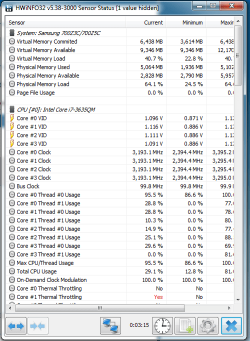
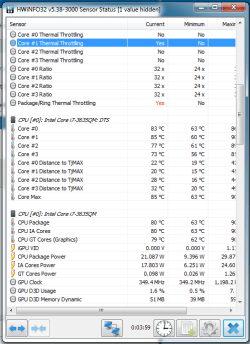
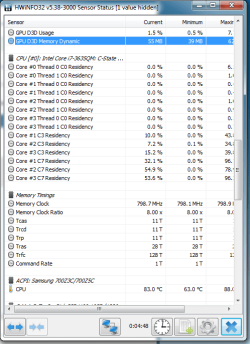
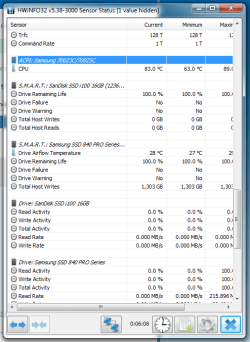
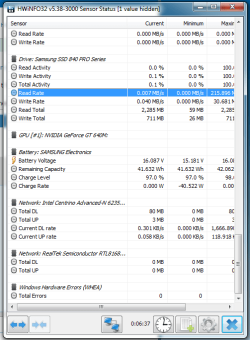
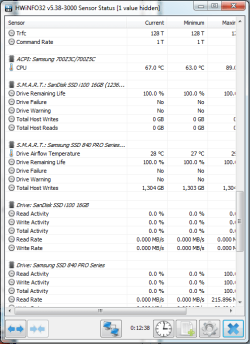
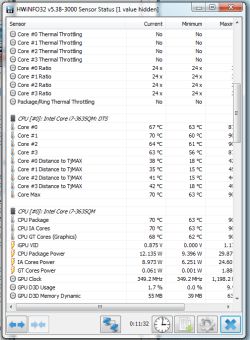
I've uploaded the entire thing 1st post is with power plugged in and 2nd is without just incase there's something else you can use that I miss.
 

Attachments

  • HWinfo1.png
    HWinfo1.png
    70.1 KB · Views: 18
  • HWinfo2.png
    HWinfo2.png
    65.8 KB · Views: 18
  • HWinfo3.png
    HWinfo3.png
    65.4 KB · Views: 18
  • HWinfo4.png
    HWinfo4.png
    70.6 KB · Views: 18
  • HWinfo5.png
    HWinfo5.png
    69.9 KB · Views: 19

My Computer

Computer type
Laptop
Computer Manufacturer/Model Number
Samsung 700Z5C
OS
7 Ultimate x64
CPU
i7-3635QM
Motherboard
Samsung NP700Z5C-S04CA
Memory
8GB
Graphics Card(s)
HD4000 & GT 640M
Hard Drives
Samsung SSD 840 Pro 120GB
Antivirus
N/A
Browser
Chrome/Firefox
Then these are the same readings with the power unplugged.
 

Attachments

  • nopwr3.png
    nopwr3.png
    58.4 KB · Views: 19
  • nopwr2.png
    nopwr2.png
    59.7 KB · Views: 19
  • nopowr1.png
    nopowr1.png
    57.7 KB · Views: 18

My Computer

Computer type
Laptop
Computer Manufacturer/Model Number
Samsung 700Z5C
OS
7 Ultimate x64
CPU
i7-3635QM
Motherboard
Samsung NP700Z5C-S04CA
Memory
8GB
Graphics Card(s)
HD4000 & GT 640M
Hard Drives
Samsung SSD 840 Pro 120GB
Antivirus
N/A
Browser
Chrome/Firefox
I notice that the CPU cores are running at 3193 on AC, but only 2394 on battery. Is that normal for laptops? I know nothing about them.

Core 1 is throttling on AC. No throttling on battery.

Drive temps are OK.

Core max temp 85 on AC, 70 on battery.

I don’t see any indication of fans at all.

For all I know, your fan is completely dead.

Other than the throttling and the differences between AC and battery, I don’t notice anything weird.

In post 7, second pic, the column for max temp for core 1 thermal throttling is cut off and not shown. I’m guessing it shows 105 or near that? That’s the TJmax temp at which I think the cores are supposed to throttle.

Sorry I can’t help more. Maybe someone else can.

I suppose it's possible your paste application is suspect.

And I guess we don't know if this is abnormal since you never looked at temps before.
 

My Computer

Computer type
PC/Desktop
Computer Manufacturer/Model Number
Ignatz Special; 4 speed manual gearbox; factory air conditioning; one of one
OS
Windows 7 Home Premium SP1, 64-bit
CPU
Intel Skylake i5-6600K, not overclocked
Motherboard
AsRock Z170M Extreme 4, micro ATX
Memory
8 GB HyperX DDR4-2666 (2 x 4 GB)
Graphics Card(s)
none; graphics are integrated on CPU
Sound Card
onboard: Realtek ALC1150; external: USB Behringer UF0-202
Monitor(s) Displays
Dell S2340M 23 inch IPS
Screen Resolution
1600 x 900
Hard Drives
System: Crucial MX100 series SSD, 128 GB;
Data: Samsung Spinpoint 103SJ, 1 TB;
Backup: WD Caviar Green WD30EZRX-00D8PB0, 3 TB
PSU
Rosewill SilentNight 500 watt fanless, semi-modular
Case
Antec Solo II
Cooling
Noctua NH-U12S; Noctua F12 intake, Noctua S12A exhaust
Keyboard
Microsoft 200 6JH-00001 USB
Mouse
Dell or Microsoft optical wired; USB
Antivirus
Microsoft Security Essentials and Malwarebytes Premium
Browser
Pale Moon
Other Info
All fans PWM; speeds at idle: CPU circa 500 rpm; intake circa 600 rpm; exhaust circa 600 rpm; CPU temps 27 idle and 47 C load in a warm room (27 C/81 F) when running Intel Extreme Tuning Utility stress test.
Yeah, it's 105.

I can't get any apps to show fan speeds but if I take the bottom off and turn it in the fans engage and I hear them speed up and slow down. The bottom is clear and clean.
 

My Computer

Computer type
Laptop
Computer Manufacturer/Model Number
Samsung 700Z5C
OS
7 Ultimate x64
CPU
i7-3635QM
Motherboard
Samsung NP700Z5C-S04CA
Memory
8GB
Graphics Card(s)
HD4000 & GT 640M
Hard Drives
Samsung SSD 840 Pro 120GB
Antivirus
N/A
Browser
Chrome/Firefox
I would say that most laptops don't have fan speed sensors.
As laptops has small heat sink and fans, I would also say that the temperatures are quite normal on a laptop with i7.
Witch Power plan are you running?
If you run High performance the CPU is always at max clock and, even if not used, CPU gets hot.
Change the Power plan to Balanced and edit settings:
Control Panel\All Control Panel Items\Power Options\Edit Plan Settings go to Processor Power Management and set minimum to 10% and Maximum to 100%. The clock will change as needed.
 

My Computers

System One System Two

  • Computer type
    PC/Desktop
    Computer Manufacturer/Model Number
    custom build
    OS
    Windows 7 HP 64
    CPU
    i5 6600K - 800MHz to 4200MHz
    Motherboard
    GA-Z170-HD3P
    Memory
    4+4G GSkill DDR4 3000
    Graphics Card(s)
    IG - Intel 530
    Monitor(s) Displays
    Samsung 226BW
    Screen Resolution
    1680x1050
    Hard Drives
    (1) -1 SM951 – 128GB M.2 AHCI PCIe SSD drive for Windows 7 and Lubuntu
    (2) -1 WD SATA 3 - 1T for Data
    (3) -1 WD SATA 3 - 1T for backup
    PSU
    Thermaltake 450W TR2 gold
    Keyboard
    Old and good Chicony mechanical keyboard
    Mouse
    Logitech mX performance - 9 buttons (had to disable some)
    Internet Speed
    500Mb/s
    Browser
    Firefox 64
    Other Info
    TinyWall firewall
  • Computer type
    Laptop
    System Manufacturer/Model Number
    Asus Q550LF
    OS
    Windows 7 Pro
    CPU
    i7-4500U 800MHz to 3.0GHz
    Motherboard
    Asus Q550LF
    Memory
    (4+4)G DDR3 1600
    Graphics Card(s)
    IG intel 4400 + NVIDIA GeForce GT 745M
    Sound Card
    Realtek
    Monitor(s) Displays
    LG Display LP156WF4-SPH1
    Screen Resolution
    1920 x 1080
    Hard Drives
    BX500 120G SSD for Windows and programs +
    1T HDD for data
    Internet Speed
    500 Mb/s
    Browser
    Firefox
    Other Info
    TinyWall firewall
I would say that most laptops don't have fan speed sensors.
As laptops has small heat sink and fans, I would also say that the temperatures are quite normal on a laptop with i7.
Witch Power plan are you running?
If you run High performance the CPU is always at max clock and, even if not used, CPU gets hot.
Change the Power plan to Balanced and edit settings:
Control Panel\All Control Panel Items\Power Options\Edit Plan Settings go to Processor Power Management and set minimum to 10% and Maximum to 100%. The clock will change as needed.

Ah ha! That was definitely set to 100% when plugged in, I thank you good sir.

I have ran in to another issue however that I think may be causing me some issues as well.

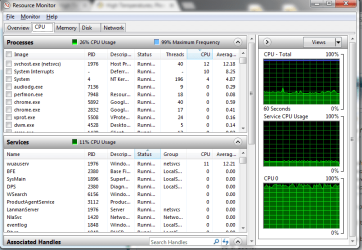
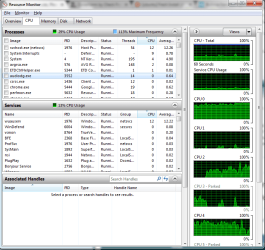
If I check out the resource monitor, I have a blue line that says CPU total 100%, my CPU 0 is consistently between 95 & 100%.

My CPU usage is only 29% I think the blue just means maximum frequency but why is my CPU 0 at 100% usage?

I've ran Malware bytes, tried microsofts scanner, downloaded two different free anti-viruses seperatly and ran them and I've found nothing that would say I have an issue.

This is off a fresh boot too.
 

Attachments

  • Untitled.png
    Untitled.png
    89.9 KB · Views: 0

My Computer

Computer type
Laptop
Computer Manufacturer/Model Number
Samsung 700Z5C
OS
7 Ultimate x64
CPU
i7-3635QM
Motherboard
Samsung NP700Z5C-S04CA
Memory
8GB
Graphics Card(s)
HD4000 & GT 640M
Hard Drives
Samsung SSD 840 Pro 120GB
Antivirus
N/A
Browser
Chrome/Firefox
Something is wrong.
I have seen on your post 7 that you're having thermal throttling. Also your virtual and physical memory usage is very high.
You have to find what service / program is using core0 so intense.
Try to disconnect from the net/ internet.

What antivirus and firewall you're using?
 

My Computers

System One System Two

  • Computer type
    PC/Desktop
    Computer Manufacturer/Model Number
    custom build
    OS
    Windows 7 HP 64
    CPU
    i5 6600K - 800MHz to 4200MHz
    Motherboard
    GA-Z170-HD3P
    Memory
    4+4G GSkill DDR4 3000
    Graphics Card(s)
    IG - Intel 530
    Monitor(s) Displays
    Samsung 226BW
    Screen Resolution
    1680x1050
    Hard Drives
    (1) -1 SM951 – 128GB M.2 AHCI PCIe SSD drive for Windows 7 and Lubuntu
    (2) -1 WD SATA 3 - 1T for Data
    (3) -1 WD SATA 3 - 1T for backup
    PSU
    Thermaltake 450W TR2 gold
    Keyboard
    Old and good Chicony mechanical keyboard
    Mouse
    Logitech mX performance - 9 buttons (had to disable some)
    Internet Speed
    500Mb/s
    Browser
    Firefox 64
    Other Info
    TinyWall firewall
  • Computer type
    Laptop
    System Manufacturer/Model Number
    Asus Q550LF
    OS
    Windows 7 Pro
    CPU
    i7-4500U 800MHz to 3.0GHz
    Motherboard
    Asus Q550LF
    Memory
    (4+4)G DDR3 1600
    Graphics Card(s)
    IG intel 4400 + NVIDIA GeForce GT 745M
    Sound Card
    Realtek
    Monitor(s) Displays
    LG Display LP156WF4-SPH1
    Screen Resolution
    1920 x 1080
    Hard Drives
    BX500 120G SSD for Windows and programs +
    1T HDD for data
    Internet Speed
    500 Mb/s
    Browser
    Firefox
    Other Info
    TinyWall firewall
When I disconnect from the internet nothing changes.

Edit : I get thermal throttling after computer runs for about 5-10 minutes. Maybe I should re-do the thermal paste, could have gotten a cotton sliver stuck in there or something, can't run perfect for life.

How do I figure out what service is using all my processor? I've never ran in to this before as an issue and google isn't really helping me out.

I tried avast free and avg free, I also used malwarebytes.

I'm not using any firewall and have windows firewall disabled.


Edit 2: I have found that the memory usage is windows update. I'm now down to 2.7gb usage / 8.

Still can't figure out why cpu 0 is always at 100%
 
Last edited:

My Computer

Computer type
Laptop
Computer Manufacturer/Model Number
Samsung 700Z5C
OS
7 Ultimate x64
CPU
i7-3635QM
Motherboard
Samsung NP700Z5C-S04CA
Memory
8GB
Graphics Card(s)
HD4000 & GT 640M
Hard Drives
Samsung SSD 840 Pro 120GB
Antivirus
N/A
Browser
Chrome/Firefox
Are you using more then one antivirus?
Not having any firewall is the worst thing you can do. Your computer may be in use for illegal purposes. Someone can be in control of your computer. Turn it on.
The best free firewall 2016 | TechRadar
I use an old Zone Alarm version (92_106) that I think is very good and it doesn't have anti malware.
Thermal paste may not be applied correctly, but isn't the reason it's getting hot. Thermal paste never needs to be replaced.
Launch Task Manager (Ctrl+Shift+Esc) and then Resource Monitor like on post 12. On Processes and Services, Click on CPU tab and then CPU utilization to put in CPU utilization sequence. Find out witch (Processes and Services) is using your CPU.
 

My Computers

System One System Two

  • Computer type
    PC/Desktop
    Computer Manufacturer/Model Number
    custom build
    OS
    Windows 7 HP 64
    CPU
    i5 6600K - 800MHz to 4200MHz
    Motherboard
    GA-Z170-HD3P
    Memory
    4+4G GSkill DDR4 3000
    Graphics Card(s)
    IG - Intel 530
    Monitor(s) Displays
    Samsung 226BW
    Screen Resolution
    1680x1050
    Hard Drives
    (1) -1 SM951 – 128GB M.2 AHCI PCIe SSD drive for Windows 7 and Lubuntu
    (2) -1 WD SATA 3 - 1T for Data
    (3) -1 WD SATA 3 - 1T for backup
    PSU
    Thermaltake 450W TR2 gold
    Keyboard
    Old and good Chicony mechanical keyboard
    Mouse
    Logitech mX performance - 9 buttons (had to disable some)
    Internet Speed
    500Mb/s
    Browser
    Firefox 64
    Other Info
    TinyWall firewall
  • Computer type
    Laptop
    System Manufacturer/Model Number
    Asus Q550LF
    OS
    Windows 7 Pro
    CPU
    i7-4500U 800MHz to 3.0GHz
    Motherboard
    Asus Q550LF
    Memory
    (4+4)G DDR3 1600
    Graphics Card(s)
    IG intel 4400 + NVIDIA GeForce GT 745M
    Sound Card
    Realtek
    Monitor(s) Displays
    LG Display LP156WF4-SPH1
    Screen Resolution
    1920 x 1080
    Hard Drives
    BX500 120G SSD for Windows and programs +
    1T HDD for data
    Internet Speed
    500 Mb/s
    Browser
    Firefox
    Other Info
    TinyWall firewall
I am not using more than one anti-virus, I just tried two different ones.

I have turned on my firewall and installed zone-alarm, same usage.

I have attatched my CPU usage, nothing indicates why it's at 100%
 

Attachments

  • cppu.png
    cppu.png
    99.1 KB · Views: 0

My Computer

Computer type
Laptop
Computer Manufacturer/Model Number
Samsung 700Z5C
OS
7 Ultimate x64
CPU
i7-3635QM
Motherboard
Samsung NP700Z5C-S04CA
Memory
8GB
Graphics Card(s)
HD4000 & GT 640M
Hard Drives
Samsung SSD 840 Pro 120GB
Antivirus
N/A
Browser
Chrome/Firefox
The only true temperature readings are in the bios.
 

My Computer

Computer type
PC/Desktop
Computer Manufacturer/Model Number
Skylake Special #666
OS
Windows 10 Pro x64
CPU
Intel Core i7 6700K
Motherboard
Asus Sabertooth Z170 Mark 1
Memory
GSkill TridentZ RGB 16GB 3600 16-16-16-36
Graphics Card(s)
EVGA GTX 980 Ti SC x2
Sound Card
Realtek High Definition
Monitor(s) Displays
AOC G2460PG
Screen Resolution
1920 x 1080 144Hz
Hard Drives
Samsung 860 Pro 256GB, Seagate Barracuda 4TB x2
PSU
EVGA 1000 P2, EVGA White Custom Braided Cables
Case
Corsair Vengeance C70 Gunmetal Black
Cooling
Corsair H100i v2, Corsair ML120 x2, Thermal Grizzly Kryonaut
Keyboard
Logitech G910 Orion Spectrum
Mouse
Logitech G700s
Internet Speed
Verizon Fios Quantum Gateway 75/75
Antivirus
Windows Defender, Malwarebytes Free 3.8.3
Browser
Chrome
Other Info
Corsair SP120 x4, LG Blu-ray Drive, Durabrand HT-395 100 Watt Dolby Digital Amp, Corsair H2100 Wireless 7.1 Headset
There's no bios readings on this laptop, that I have checked.

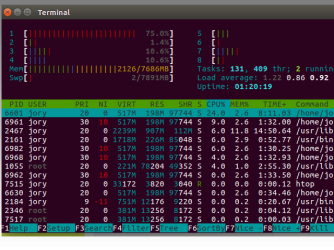
I know it's not windows anymore, I deleted windows and installed linux just because I don't care lol.

CPU load still sitting at 85-90C after a few minutes.

Just replaced the thermal paste again, checked the fans and they are good, cleaned them out again, double checked everything.

The CPU usage is around 10-15% now, consistently on all cores so it wasn't cpu-0 overheating it either.

I think it's just the laptop is 5 years old now, maybe the fans aren't operating 100%... They seem to be however, I watched them with the cover off speed up and slow down, they look perfectly operating.

Maybe it was always so warm... I don't believe so but who knows.

Edit : I lied, CPU 1 (No 0 in linux) is 76% + consistently but total CPU load is around 20%, why is this one thread consistently being overused...
 

Attachments

  • fixme.png
    fixme.png
    166.9 KB · Views: 3
Last edited:

My Computer

Computer type
Laptop
Computer Manufacturer/Model Number
Samsung 700Z5C
OS
7 Ultimate x64
CPU
i7-3635QM
Motherboard
Samsung NP700Z5C-S04CA
Memory
8GB
Graphics Card(s)
HD4000 & GT 640M
Hard Drives
Samsung SSD 840 Pro 120GB
Antivirus
N/A
Browser
Chrome/Firefox
Back
Top