"Home Group Listener" service won't start, error -2147023143

hkBattousai

New member
Member
Local time
4:36 AM
Messages
64
I am not able to start the "Home Group Listener" service, hence I can't use Home Group feature.

I get this error message:
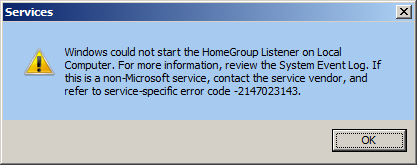
Windows could not start the HomeGroup Listener on Local Computer. For more information, review the System Event Log. If this is a non-Microsoft service, contact the service vendor, and refer to service-specific error code -2147023143.

IU13d9n.png


I checked the System Event Log, I found this entry:

Code:
- System 

  - Provider 

   [ Name]  Service Control Manager 
   [ Guid]  {555908d1-a6d7-4695-8e1e-26931d2012f4} 
   [ EventSourceName]  Service Control Manager 
 
  - EventID 7024 

   [ Qualifiers]  49152 
 
   Version 0 
 
   Level 2 
 
   Task 0 
 
   Opcode 0 
 
   Keywords 0x8080000000000000 
 
  - TimeCreated 

   [ SystemTime]  2013-03-14T11:16:20.932360800Z 
 
   EventRecordID 1411639 
 
   Correlation 
 
  - Execution 

   [ ProcessID]  636 
   [ ThreadID]  1640 
 
   Channel System 
 
   Computer <computer-name> 
 
   Security 
 

- EventData 

  param1 HomeGroup Listener 
  param2 %%-2147023143

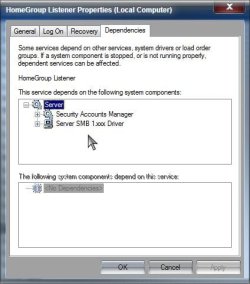
I looked at its dependent services, none of them are disabled.

Windows version: Windows 7 Ultimate x64 SP1

How do I fix this problem?
 

My Computer My Computer

At a glance

Windows 7 Ultimate x64Intel i5 7502x2GB DDR3 Dual-kitATI Radeon HD4670
OS
Windows 7 Ultimate x64
CPU
Intel i5 750
Motherboard
Gigabyte P55A U3DR
Memory
2x2GB DDR3 Dual-kit
Graphics Card(s)
ATI Radeon HD4670
Sound Card
Onboard
Monitor(s) Displays
Samsung SyncMaster P2350
Hard Drives
Western Digital 1TB, 64MB cache, internal
Samsung Story 1.5TB, external
PSU
400W rated, 460W max
Case
CoolerMaster
Cooling
Air
Check to be sure the Windows Firewall service is started and set to automatic. If that doesn't help, try running the Homegroup troubleshooter

Start> Control panel>

In category view> Network and internet> Homegroup> Start homegroup troubleshooter

In icon view> Homegroup> Start homegroup troubleshooter

A Guy
 

My Computer My Computer

At a glance

Windows 10 Home x64INTEL Core i5-750 Quad-Core 3.37GHzHyperX Fury Black Series 8GB (2 x 4GB) 1866MhzEVGA GeForce GTX 750 Superclocked 1GB 128-Bit...
Computer type
PC/Desktop
OS
Windows 10 Home x64
CPU
INTEL Core i5-750 Quad-Core 3.37GHz
Motherboard
ASUS P7P55D
Memory
HyperX Fury Black Series 8GB (2 x 4GB) 1866Mhz
Graphics Card(s)
EVGA GeForce GTX 750 Superclocked 1GB 128-Bit GDDR5
Monitor(s) Displays
LG 32MA68HY 32" IPS
Screen Resolution
1920 x 1080
Hard Drives
Samsung 840 Evo 120GB, SEAGATE 500GB Barracuda® 7200.12, SATA 3 Gb/s, 7200 RPM, 16MB cache
PSU
ANTEC TruePower New TP-550, 80 PLUS, 550W
Case
ANTEC Three Hundred Illusion
Cooling
COOLER MASTER Hyper 212 Plus, 4 x 120mm 1 x 140mm Noctua's
Internet Speed
85 + Mbps
Antivirus
Avast
Browser
Vivaldi
I have same problem right now and trying to fix it, the troubleshooter was useless.

Firewall service started, allowed listener to work, BUT what are the ramifications, since I use a 3rd party firewall program?

Next step was making sure these 4 services were enabled/started (use services.msc from RUN box):

UPnP Device Host (had disabled)

DNS Client, Function Discovery Resource Publication, SSDP Discovery

I was then able to turn on Network Discovery within the advanced home group settings.

Never got it actually working, given up for now.
 
Last edited:

My Computer My Computer

At a glance

Windows 7 Ultimate Retail Box (64-bit install...AMD FX-8350 CPU v1.15 (or 1.0F) BIOS was requ...8G CAS-7 G-Skill DDR3 @1333 (2 fours) [mobo n...Radeon HD 7950 [3 gigs of GDDR5] MSI Twin Fro...
Computer type
PC/Desktop
Computer Manufacturer/Model Number
Self Built Custom
OS
Windows 7 Ultimate Retail Box (64-bit installed) + Service Pack 1
CPU
AMD FX-8350 CPU v1.15 (or 1.0F) BIOS was required!
Motherboard
MSI 890FXA-GD70
Memory
8G CAS-7 G-Skill DDR3 @1333 (2 fours) [mobo nonOC max rec'd]
Graphics Card(s)
Radeon HD 7950 [3 gigs of GDDR5] MSI Twin Frozr model
Sound Card
Realtek High Definition Audio (onboard mobo, ALC-889 chip)
Monitor(s) Displays
2 WS LED Monitors: One LG One Viewsonic
Screen Resolution
1920 by 1080
Hard Drives
SSD for OS: Samsung 840 Pro
SSD for VM and utilities: Adata SX900
7200 RPM SATA HDs for the rest: Hitachi and Seagate
PSU
Corsair TX850 - 850W max, in service since August 2010.
Case
Thermaltake Armor A90
Cooling
Thermaltake Spin Q CPU Cooler, in service since August 2010
Keyboard
Logitech G11
Mouse
Logitech M310 Wireless
Internet Speed
100 Megabit broadband supposedly upgraded from 50 (Cable)
Antivirus
Bitdefender Internet Security 2014 suite
Browser
Pale Moon 64-bit main, also IceDragon, Opera, and Maxthon.
Other Info
CompTIA A+ certified (220-800 series) in July 2013.
I too use a 3rd party firewall, and my Firewall service is started and set to Automatic with no ill effects.

Confirm the dependency services are started and set to automatic

Dependencies.jpg

What is the exact error? (Screenshot)

A Guy
 

My Computer My Computer

At a glance

Windows 10 Home x64INTEL Core i5-750 Quad-Core 3.37GHzHyperX Fury Black Series 8GB (2 x 4GB) 1866MhzEVGA GeForce GTX 750 Superclocked 1GB 128-Bit...
Computer type
PC/Desktop
OS
Windows 10 Home x64
CPU
INTEL Core i5-750 Quad-Core 3.37GHz
Motherboard
ASUS P7P55D
Memory
HyperX Fury Black Series 8GB (2 x 4GB) 1866Mhz
Graphics Card(s)
EVGA GeForce GTX 750 Superclocked 1GB 128-Bit GDDR5
Monitor(s) Displays
LG 32MA68HY 32" IPS
Screen Resolution
1920 x 1080
Hard Drives
Samsung 840 Evo 120GB, SEAGATE 500GB Barracuda® 7200.12, SATA 3 Gb/s, 7200 RPM, 16MB cache
PSU
ANTEC TruePower New TP-550, 80 PLUS, 550W
Case
ANTEC Three Hundred Illusion
Cooling
COOLER MASTER Hyper 212 Plus, 4 x 120mm 1 x 140mm Noctua's
Internet Speed
85 + Mbps
Antivirus
Avast
Browser
Vivaldi
Back
Top