
merkurmaniac
New member
- Local time
- 6:16 PM
- Messages
- 17
Hello,
I have 3 pcs at my house that all ran win 7 and played fine together in a homegroup. Then I went and complicated things by re-installing my "main" desktop OS onto an SSD to get it to run faster. Well, I am quite happy with it, but for the last couple months I have been unable to share info between computers.
My setup is a U-verse internet gateway box thing, a switch, and 3 desktop pcs, main, kids, and the wall (A touchscreen that's wall mounted for playing music,) as well as a wi-fi printer and other wi-fi stuff. The main PC was my original homegroup.
On the main PC, I installed the OS on the SSD and kept my data on a regular 1 gig drive. I moved user accounts, data, temp files, as much as I could off the SSD as I installed win 7 to it. I pretty much went letter by letter following the SSD optimization instructions that I found on posts on this forum. I did standard stuff like turning off the defragging, and that kind of stuff, but I also did some stuff that was proposed in the write up that I was less familiar with....
Now, if I go to main, I cannot see the homegroup password. In fact, it cannot start the homegroup, and I got an error about peer to peer networking not having started. I started down the trail following the error messages, but I am wondering if I am better off doing some kind of repair install.
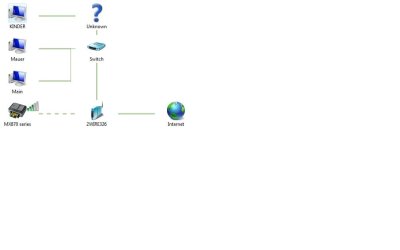
I am writing this from the kid's computer. If I tell it to show me computers on the network, I see (from the kids computer) the other 3 pcs, the printer, the gateway and my switch, I attached a network map. If I try to join a homegroup, it says that MAIN has already started a homegroup. If I try to join, it wants the password. If I go to main, it now knows nothing about homegroups.
Please advise on what I should try.
TIA,
Richard
I have 3 pcs at my house that all ran win 7 and played fine together in a homegroup. Then I went and complicated things by re-installing my "main" desktop OS onto an SSD to get it to run faster. Well, I am quite happy with it, but for the last couple months I have been unable to share info between computers.
My setup is a U-verse internet gateway box thing, a switch, and 3 desktop pcs, main, kids, and the wall (A touchscreen that's wall mounted for playing music,) as well as a wi-fi printer and other wi-fi stuff. The main PC was my original homegroup.
On the main PC, I installed the OS on the SSD and kept my data on a regular 1 gig drive. I moved user accounts, data, temp files, as much as I could off the SSD as I installed win 7 to it. I pretty much went letter by letter following the SSD optimization instructions that I found on posts on this forum. I did standard stuff like turning off the defragging, and that kind of stuff, but I also did some stuff that was proposed in the write up that I was less familiar with....
Now, if I go to main, I cannot see the homegroup password. In fact, it cannot start the homegroup, and I got an error about peer to peer networking not having started. I started down the trail following the error messages, but I am wondering if I am better off doing some kind of repair install.
I am writing this from the kid's computer. If I tell it to show me computers on the network, I see (from the kids computer) the other 3 pcs, the printer, the gateway and my switch, I attached a network map. If I try to join a homegroup, it says that MAIN has already started a homegroup. If I try to join, it wants the password. If I go to main, it now knows nothing about homegroups.
Please advise on what I should try.
TIA,
Richard
Attachments
My Computer
At a glance
Win 7 64 bit sp-1Intel Core i5 75016 gig Kingston 1600GeForce GTX 260 OC MaxCore 55 896MB GDDR3 PCI...
- Computer Manufacturer/Model Number
- built
- OS
- Win 7 64 bit sp-1
- CPU
- Intel Core i5 750
- Motherboard
- ASROCK P55 Pro
- Memory
- 16 gig Kingston 1600
- Graphics Card(s)
- GeForce GTX 260 OC MaxCore 55 896MB GDDR3 PCIe 2.0
- Sound Card
- on board
- Hard Drives
- SSD 128 Kingston V100
1 TB EcoGreen F2EG 5,400 rpm SATA
- PSU
- SLI Silencer 750W (610W continuous)
- Case
- Antec 200 ATX
- Cooling
- Copper CPU heat sink with adapter


