
homegroup will not take password

tad1976

New member
Local time
10:25 AM
Messages
3
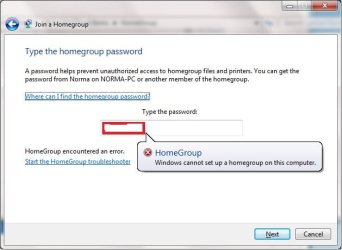
i have W7 ultimate on desktop, W7 home basic on new laptop. i create a homegroup on desktop and have the "avalible to join" on the laptop. i enter the password(which i changed to something easier to remember), hit Next and its "thinking" for about a minute, and i get this.....Windows cannot setup a homegroup on this computer.....its the same if i create it on the desktop or laptop...tried fixes in other threads to no avail...any ideas?
 

Attachments
  • WTF.jpg
    WTF.jpg
    29.4 KB · Views: 45

My Computer My Computer

At a glance

windows 7AMD Athlon 64 X2 5200+ 2.61GHz4 GNvidia 9800GT
Computer Manufacturer/Model Number
homemade
OS
windows 7
CPU
AMD Athlon 64 X2 5200+ 2.61GHz
Motherboard
asus
Memory
4 G
Graphics Card(s)
Nvidia 9800GT
Sound Card
intel
Monitor(s) Displays
Acer
Hard Drives
160G
PSU
el cheapo
Case
even cheaper
Cooling
2 80mm
to add more info:
i have ensured the times are set the same
tried to use the original password before i changed it...took about 3 seconds a character...too long for me but i tried anyway.
tried the trouble shooter on both systems.
left homegroup on desktop, restarted both machines and created one on the laptop, no luck there either, ran the troubleshooter on it too.
disabled windows firewall on both.
i can see either under networking, but i just cant join one to the other.
the desktop had W7 installed fresh about a week and a half ago, the laptop is new with W7 home preinstalled.
it doesnt tell me the password is wrong, just that it cant setup a homegroup on this computer.
tried to map a network drive from one to the other, but when i went to open it, it asks for a password....i havent set any passwords other than for the homegroup...which it wont take....

im fresh out of ideas...
 

My Computer My Computer

At a glance

windows 7AMD Athlon 64 X2 5200+ 2.61GHz4 GNvidia 9800GT
Computer Manufacturer/Model Number
homemade
OS
windows 7
CPU
AMD Athlon 64 X2 5200+ 2.61GHz
Motherboard
asus
Memory
4 G
Graphics Card(s)
Nvidia 9800GT
Sound Card
intel
Monitor(s) Displays
Acer
Hard Drives
160G
PSU
el cheapo
Case
even cheaper
Cooling
2 80mm

My Computer My Computer

At a glance

Windows 7 Home Premium x64Phenom II X4 955 BE8 GB OCZ BE 1667EVGA GeForce GTX470 SC
Computer Manufacturer/Model Number
Home built
OS
Windows 7 Home Premium x64
CPU
Phenom II X4 955 BE
Motherboard
Asus Sabertooth 990FX
Memory
8 GB OCZ BE 1667
Graphics Card(s)
EVGA GeForce GTX470 SC
Monitor(s) Displays
BenQ 19"
Screen Resolution
1280x1024
Hard Drives
256 GB OCZ Vertex 3 SSD
2x WD 1 TB
1x WD 2 TB
PSU
Thermaltake 850W
Case
Coolermaster Cosmos 1000
Cooling
Air
Keyboard
Logitech
Mouse
Cyborg R.A.T 7
Internet Speed
Standard RR
no errors in device manager, IPv6 is active...i gave up on homegrouping...created a work group...works for my purposes...thanks tho
 

My Computer My Computer

At a glance

windows 7AMD Athlon 64 X2 5200+ 2.61GHz4 GNvidia 9800GT
Computer Manufacturer/Model Number
homemade
OS
windows 7
CPU
AMD Athlon 64 X2 5200+ 2.61GHz
Motherboard
asus
Memory
4 G
Graphics Card(s)
Nvidia 9800GT
Sound Card
intel
Monitor(s) Displays
Acer
Hard Drives
160G
PSU
el cheapo
Case
even cheaper
Cooling
2 80mm
Same Boat

I am having the exact same problem, in addition to your steps I also ensured uPnP was enabled on the router. Have you seen any other threads on this elsewhere?
 

My Computer My Computer

At a glance

7 Ultimate
OS
7 Ultimate
What firewall software are you running?

I was running Norton, and I couldn't successfully do a homegroup until I removed it.

My symptoms were a little different, but you might want to shut down whatever firewall you are using and see if it works.
 

My Computer My Computer

At a glance

Windows 7 Home Premium (64 bit)AMD Athlon 56 X2 5000+4.0 GBSapphire HD 4350 fanless w/512MB
Computer Manufacturer/Model Number
Gateway GM5472
OS
Windows 7 Home Premium (64 bit)
CPU
AMD Athlon 56 X2 5000+
Motherboard
ECS MCP61P-AM
Memory
4.0 GB
Graphics Card(s)
Sapphire HD 4350 fanless w/512MB
Monitor(s) Displays
VeiwSonic VX2035WM
Screen Resolution
1680x1050
Other Info
Stock system except for the addition of 2GB memory, a Swann PCDVR 4 Card and a Hauppage dual HD tuner and a Sapphire HD 4550 video card

My Computer My Computer

At a glance

Windows 7 Home Premium (64 bit)AMD Athlon 56 X2 5000+4.0 GBSapphire HD 4350 fanless w/512MB
Computer Manufacturer/Model Number
Gateway GM5472
OS
Windows 7 Home Premium (64 bit)
CPU
AMD Athlon 56 X2 5000+
Motherboard
ECS MCP61P-AM
Memory
4.0 GB
Graphics Card(s)
Sapphire HD 4350 fanless w/512MB
Monitor(s) Displays
VeiwSonic VX2035WM
Screen Resolution
1680x1050
Other Info
Stock system except for the addition of 2GB memory, a Swann PCDVR 4 Card and a Hauppage dual HD tuner and a Sapphire HD 4550 video card
I have all firewalls disabled at the moment for troubleshooting. No luck, IP V6 is enabled on everything. I tried changing the password to something but that didn't make a difference.

How can it see the homegroup and not accept the password?
 

My Computer My Computer

At a glance

7 Ultimate
OS
7 Ultimate
Had same problem. In my case I went to Network and Sharing Centre under Control Panel then clicked on Advanced Sharing Settings. Under the 'File Sharing Connections' radio buttons I selected the second option "Enable File Sharing Devices that use 40 - or 56 bit encryption" and hey presto the computer which was failing to accept the password accepted and all was working. I suspect it's because my laptop is a 32 bit machine whereas my PC is a 64 bit. :D

Hope this helps you as I couldn't find a solution before trying this !
 

My Computer My Computer

At a glance

Windows 7
OS
Windows 7
Back
Top