Solved Homegrouping!

tammysu

New member
Is there anyway to homegroup computers running windows 7 when the router does not support Ipv6? Or is there a way to otherwise network them? :D Thanks.
 

My Computer

Computer type
Laptop
Computer Manufacturer/Model Number
Dell Latitude E6400
OS
Windows 7 Home Premium 32 bit
CPU
Intel
Memory
4 gigs
Monitor(s) Displays
1
Screen Resolution
1440x900
Hard Drives
320 gig
What router doesn't support it? Usually IPV6 is supported over IPV4, if the router doesn't actually support IPV6. Have you had difficulty getting home groups to work and think it's due to a problem with IPV6 on the router?
 

My Computer

Computer Manufacturer/Model Number
Dell XPS 15 L502x
OS
Windows 7 Ultimate x64 SP1
CPU
Core i7-2670QM
Memory
8GB DDR3 PC3-10600
Graphics Card(s)
Intel HD Graphics 3000 + GeForce GT 540M
Screen Resolution
1920x1080
Hard Drives
1TB 5400RPM Seagate

My Computer

Computer type
PC/Desktop
Computer Manufacturer/Model Number
Self built custom
OS
64-bit Windows 11 Pro for Workstations
CPU
Intel i7-8700K OC'd to 5 GHz
Motherboard
ASUS ROG Maximus XI Formula Z390
Memory
64 GB (4x16GB) G.SKILL TridentZ RGB DDR4 3600 MHz
Graphics Card(s)
ASUS ROG-STRIX-GTX1080TI-O11G-GAMING
Sound Card
Integrated
Monitor(s) Displays
2 x Samsung Odyssey G7 27"
Screen Resolution
2560x1440
Hard Drives
1TB Samsung 990 PRO M.2,
4TB Samsung 990 PRO PRO M.2,
TerraMaster F8 SSD Plus NAS
PSU
Seasonic Prime Titanium 850W
Case
Thermaltake Core P3
Cooling
Corsair Hydro H115i
Keyboard
Logitech wireless K800
Mouse
Logitech MX Master 4
Internet Speed
2 Gb/s Download and 100 Mb/s Upload
Antivirus
Malwarebyte Anti-Malware Premium
Browser
Google Chrome
Other Info
Logitech Z625 speaker system,
Logitech BRIO 4K Pro webcam,
HP Color LaserJet Pro MFP M477fdn,
APC SMART-UPS RT 1000 XL - SURT1000XLI,
Galaxy S23 Plus phone
None of that has worked, sorry, I tried it all. My router is an Innoband 8520-R1, it does not support Ipv6, I asked the company that made it. Does anyone have a solution as to how to network these computers, both running windows 7 and they are both laptops. Thank you.

Tammy
 

My Computer

Computer type
Laptop
Computer Manufacturer/Model Number
Dell Latitude E6400
OS
Windows 7 Home Premium 32 bit
CPU
Intel
Memory
4 gigs
Monitor(s) Displays
1
Screen Resolution
1440x900
Hard Drives
320 gig
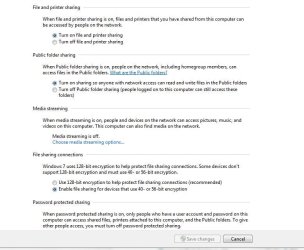
You can do it the old fashioned way without using Homegroup. I have a Windows XP PC on my network that doesn't support Homegroup so I don't use it at all. On my Windows 7 PCs I went to the Network and Sharing Center > Choose homegroup and sharing options > Change advanced sharing options > and then under Home or Work I checked the following:

Turn on network discovery
Turn on file and print sharing
Turn off Public folder sharing < optional, you could probably turn them on if you wish
Use 128-bit encryption......
Turn on password protected sharing

Now on the folders you want to share, go to properties > Sharing tab > Advanced sharing, check the box for Share this folder and set your permissions.

EDIT: What version of windows 7 are these two laptops running? The reason I ask is Windows 7 Starter can join a Homegroup but not create one. If both laptops have Windows 7 starter installed that would explain why you can't get it to work.
 

My Computer

Computer type
PC/Desktop
Computer Manufacturer/Model Number
Home Built
OS
Windows 10 Education 64 bit
CPU
AMD Phenom II X4 980 Black Edition Deneb 3.7GHz
Motherboard
Asus M4N68T-M V2 µATX Motherboard
Memory
8GB 4GBx2 Kingston PC10600 DDR3 1333 Memory
Graphics Card(s)
Zotac NVIDIA Geforce GT640 2 Gig DDR3 PCIe
Sound Card
VIA VT1708s High Definition Audio 8-channel Onboard
Monitor(s) Displays
22" LG E2242 1080p and 2 19" I-INC AG191D
Screen Resolution
1280x1024 - 1920x1080 - 1280x1024
Hard Drives
Crucial M100 256 GB SSD and 500 GB WD Blue SATA
PSU
Thermaltake TR 620
Case
Power Up Black ATX Mid-Tower Case
Cooling
Stock heatsink and fan
Keyboard
Logitech Wireless K350 Wave
Mouse
Logitech Wireless M570 Trackman Wheel
Internet Speed
80 Mbps Down 30 Mbps Up
Antivirus
Windows Defender
Browser
Internet Explorer 11
Other Info
HP DVD1040e Lightscribe - External USB2
One is using 7 Ultimate and 1 is using 7 Professional. Will I be able to printer share this way? Thank you.
 

My Computer

Computer type
Laptop
Computer Manufacturer/Model Number
Dell Latitude E6400
OS
Windows 7 Home Premium 32 bit
CPU
Intel
Memory
4 gigs
Monitor(s) Displays
1
Screen Resolution
1440x900
Hard Drives
320 gig
I'm sharing my Laser printer from my Windows 7 PC with no problems. Go to the Devices and Printers screen on the PC that the printer is connected too, right click its Icon and select Printer Properties. You should see a Sharing tab in the window that opens. Under that tab check mark Share this printer. On the other PC you'll have to select Add a printer at the top of the Devices and Printers screen. Then select Add a network printer, and follow along the wizard that opens.
 

My Computer

Computer type
PC/Desktop
Computer Manufacturer/Model Number
Home Built
OS
Windows 10 Education 64 bit
CPU
AMD Phenom II X4 980 Black Edition Deneb 3.7GHz
Motherboard
Asus M4N68T-M V2 µATX Motherboard
Memory
8GB 4GBx2 Kingston PC10600 DDR3 1333 Memory
Graphics Card(s)
Zotac NVIDIA Geforce GT640 2 Gig DDR3 PCIe
Sound Card
VIA VT1708s High Definition Audio 8-channel Onboard
Monitor(s) Displays
22" LG E2242 1080p and 2 19" I-INC AG191D
Screen Resolution
1280x1024 - 1920x1080 - 1280x1024
Hard Drives
Crucial M100 256 GB SSD and 500 GB WD Blue SATA
PSU
Thermaltake TR 620
Case
Power Up Black ATX Mid-Tower Case
Cooling
Stock heatsink and fan
Keyboard
Logitech Wireless K350 Wave
Mouse
Logitech Wireless M570 Trackman Wheel
Internet Speed
80 Mbps Down 30 Mbps Up
Antivirus
Windows Defender
Browser
Internet Explorer 11
Other Info
HP DVD1040e Lightscribe - External USB2
alphanumeric, I tried everything in your first post no luck! so I have no idea whats going on? Do I need to disable Ipv6, and if so how do I do it? I'm just grasping at straws here. Thank you again.
 

My Computer

Computer type
Laptop
Computer Manufacturer/Model Number
Dell Latitude E6400
OS
Windows 7 Home Premium 32 bit
CPU
Intel
Memory
4 gigs
Monitor(s) Displays
1
Screen Resolution
1440x900
Hard Drives
320 gig
tammysu,

Have you tried leaving the HomeGroup on each computer & then creating a Business type Work network ? There is a tutorial here somewhere in the tuts section.
 

Attachments

  • network_options.JPG
    network_options.JPG
    99 KB · Views: 8
  • Network_Options2.JPG
    Network_Options2.JPG
    82 KB · Views: 7
  • Network_computers_13.JPG
    Network_computers_13.JPG
    95.5 KB · Views: 8

My Computer

Computer type
PC/Desktop
Computer Manufacturer/Model Number
Built them myself, Science Experiments !
OS
Win7 Enterprise, Win7 x86 (Ult 7600), Win7 x64 Ult 7600, TechNet RTM on AMD x64 (2.8Ghz)
CPU
AMD fx8350 4ghz, AMD-32 2400mhz, AMD-64 3200mhz, AMDx64 2.8G
Motherboard
SIS 755, ECS-K8M890M-M (Ult 7600), GigaByte & others
Memory
2gb, 4gb on the Ult 7600, 4gb on Technet RTM, 32gb on FX8350
Graphics Card(s)
Draw my own Graphics, several nVidia cards
Sound Card
on motherboard
Monitor(s) Displays
19" flat scr, 28" I-Inc widescr,22" Emprex Widescr, 23" Acer
Screen Resolution
1280 x 1024, 1440 x 900, 1920 x 1080
Hard Drives
6 pata Ide HD's & 2 Sata HD's
added 80gb external on Ult 7600 computer,
numerous extra 1tb, 2TB, 3Tb SATA HD's
A collection of ext HD Docks w/ HDs
PSU
430w, 550w, 600w, 700, 800, etc
Case
All Generic Full Towers
Cooling
Open Air & a few fans, some w/ colored LEDs
Keyboard
Compaq & Dell recycled from GoodWill
Mouse
Made in China Optical Wired Mouse
Internet Speed
Fast Cable InterNet
Antivirus
AVG Free on 24 different Desktops, NO Problems!
Browser
IE 8 is preferred, but use FireFox sometimes
Other Info
Linksys Routers, switches, & Hubs
Too Many USB Flash Drives to count, Biggest is 64GB !
Eight computers in my home network.
Sixteen computers at my business network.
Linked via TeamViewer !
Lots of old used spare computer parts everywhere!
I'll try it now, Thank you for the suggestion.
 

My Computer

Computer type
Laptop
Computer Manufacturer/Model Number
Dell Latitude E6400
OS
Windows 7 Home Premium 32 bit
CPU
Intel
Memory
4 gigs
Monitor(s) Displays
1
Screen Resolution
1440x900
Hard Drives
320 gig
Ok, I did that and it's not working either? I don't know what the prob is?
 

My Computer

Computer type
Laptop
Computer Manufacturer/Model Number
Dell Latitude E6400
OS
Windows 7 Home Premium 32 bit
CPU
Intel
Memory
4 gigs
Monitor(s) Displays
1
Screen Resolution
1440x900
Hard Drives
320 gig
alphanumeric, I tried everything in your first post no luck! so I have no idea whats going on? Do I need to disable Ipv6, and if so how do I do it? I'm just grasping at straws here. Thank you again.

I don't have IPV6 disabled at the moment, but have had it disabled in the past. It didn't have any effect on my shared folder or printers. Disabling it didn't seem to affect anything on my windows 7 PC. It might break Homegroup but since I'm not using it I would never notice.

So where do you stand at the moment? Can you see the other PC on your network? What isn't working? It helps if both PCs are in the same Workgroup. Hit the Windows key and the Pause/Break key. Then click Advanced system settings in the list on the left. Under the Computer Name tab you can see your computer name and workgroup name. The Change button will let you change one or the other. You might also want to open the network and sharing center and check to see that your network type is set to "Home". If its set to Public that could be the problem.
 

My Computer

Computer type
PC/Desktop
Computer Manufacturer/Model Number
Home Built
OS
Windows 10 Education 64 bit
CPU
AMD Phenom II X4 980 Black Edition Deneb 3.7GHz
Motherboard
Asus M4N68T-M V2 µATX Motherboard
Memory
8GB 4GBx2 Kingston PC10600 DDR3 1333 Memory
Graphics Card(s)
Zotac NVIDIA Geforce GT640 2 Gig DDR3 PCIe
Sound Card
VIA VT1708s High Definition Audio 8-channel Onboard
Monitor(s) Displays
22" LG E2242 1080p and 2 19" I-INC AG191D
Screen Resolution
1280x1024 - 1920x1080 - 1280x1024
Hard Drives
Crucial M100 256 GB SSD and 500 GB WD Blue SATA
PSU
Thermaltake TR 620
Case
Power Up Black ATX Mid-Tower Case
Cooling
Stock heatsink and fan
Keyboard
Logitech Wireless K350 Wave
Mouse
Logitech Wireless M570 Trackman Wheel
Internet Speed
80 Mbps Down 30 Mbps Up
Antivirus
Windows Defender
Browser
Internet Explorer 11
Other Info
HP DVD1040e Lightscribe - External USB2
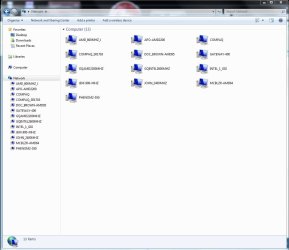
I can not see the other laptop. I don't know what isn't working? We are both in the same workgroup. Do the Computers have to have the same name too? they are both set to Home Network not Public. That is where I stand. Thank you again.
 

My Computer

Computer type
Laptop
Computer Manufacturer/Model Number
Dell Latitude E6400
OS
Windows 7 Home Premium 32 bit
CPU
Intel
Memory
4 gigs
Monitor(s) Displays
1
Screen Resolution
1440x900
Hard Drives
320 gig
No, the name doesn't matter other than being a way to identify which PC is which.
 

My Computer

Computer type
PC/Desktop
Computer Manufacturer/Model Number
Home Built
OS
Windows 10 Education 64 bit
CPU
AMD Phenom II X4 980 Black Edition Deneb 3.7GHz
Motherboard
Asus M4N68T-M V2 µATX Motherboard
Memory
8GB 4GBx2 Kingston PC10600 DDR3 1333 Memory
Graphics Card(s)
Zotac NVIDIA Geforce GT640 2 Gig DDR3 PCIe
Sound Card
VIA VT1708s High Definition Audio 8-channel Onboard
Monitor(s) Displays
22" LG E2242 1080p and 2 19" I-INC AG191D
Screen Resolution
1280x1024 - 1920x1080 - 1280x1024
Hard Drives
Crucial M100 256 GB SSD and 500 GB WD Blue SATA
PSU
Thermaltake TR 620
Case
Power Up Black ATX Mid-Tower Case
Cooling
Stock heatsink and fan
Keyboard
Logitech Wireless K350 Wave
Mouse
Logitech Wireless M570 Trackman Wheel
Internet Speed
80 Mbps Down 30 Mbps Up
Antivirus
Windows Defender
Browser
Internet Explorer 11
Other Info
HP DVD1040e Lightscribe - External USB2
OK, I'm not sure where to start, but I'll ask a few questions and see where it goes. Are both PCs are connected to a router and do they have a working Internet connection? What software are you using security wise? Does it have its own firewall? If yes, have you tried turning the firewall off as a test? Were you able to create a shared folder on each PC?
 
Last edited:

My Computer

Computer type
PC/Desktop
Computer Manufacturer/Model Number
Home Built
OS
Windows 10 Education 64 bit
CPU
AMD Phenom II X4 980 Black Edition Deneb 3.7GHz
Motherboard
Asus M4N68T-M V2 µATX Motherboard
Memory
8GB 4GBx2 Kingston PC10600 DDR3 1333 Memory
Graphics Card(s)
Zotac NVIDIA Geforce GT640 2 Gig DDR3 PCIe
Sound Card
VIA VT1708s High Definition Audio 8-channel Onboard
Monitor(s) Displays
22" LG E2242 1080p and 2 19" I-INC AG191D
Screen Resolution
1280x1024 - 1920x1080 - 1280x1024
Hard Drives
Crucial M100 256 GB SSD and 500 GB WD Blue SATA
PSU
Thermaltake TR 620
Case
Power Up Black ATX Mid-Tower Case
Cooling
Stock heatsink and fan
Keyboard
Logitech Wireless K350 Wave
Mouse
Logitech Wireless M570 Trackman Wheel
Internet Speed
80 Mbps Down 30 Mbps Up
Antivirus
Windows Defender
Browser
Internet Explorer 11
Other Info
HP DVD1040e Lightscribe - External USB2

My Computer

Computer type
PC/Desktop
Computer Manufacturer/Model Number
Home Built
OS
Windows 10 Education 64 bit
CPU
AMD Phenom II X4 980 Black Edition Deneb 3.7GHz
Motherboard
Asus M4N68T-M V2 µATX Motherboard
Memory
8GB 4GBx2 Kingston PC10600 DDR3 1333 Memory
Graphics Card(s)
Zotac NVIDIA Geforce GT640 2 Gig DDR3 PCIe
Sound Card
VIA VT1708s High Definition Audio 8-channel Onboard
Monitor(s) Displays
22" LG E2242 1080p and 2 19" I-INC AG191D
Screen Resolution
1280x1024 - 1920x1080 - 1280x1024
Hard Drives
Crucial M100 256 GB SSD and 500 GB WD Blue SATA
PSU
Thermaltake TR 620
Case
Power Up Black ATX Mid-Tower Case
Cooling
Stock heatsink and fan
Keyboard
Logitech Wireless K350 Wave
Mouse
Logitech Wireless M570 Trackman Wheel
Internet Speed
80 Mbps Down 30 Mbps Up
Antivirus
Windows Defender
Browser
Internet Explorer 11
Other Info
HP DVD1040e Lightscribe - External USB2
Ok, I tried turning the firewall off, it didn't help at all. Both PC's have a wireless internet connection through a wireless gateway. We are both using Avast the newest version and yes we have a file that we could share if the network would work. Thank you.
 

My Computer

Computer type
Laptop
Computer Manufacturer/Model Number
Dell Latitude E6400
OS
Windows 7 Home Premium 32 bit
CPU
Intel
Memory
4 gigs
Monitor(s) Displays
1
Screen Resolution
1440x900
Hard Drives
320 gig
OK, try this, open the network and sharing center and click the Troubleshoot problems Icon. Then try running the Shared folders and or the Printer trouble shooter. I have some stuff to do so i may no reply again until tomorrow some time.
 

My Computer

Computer type
PC/Desktop
Computer Manufacturer/Model Number
Home Built
OS
Windows 10 Education 64 bit
CPU
AMD Phenom II X4 980 Black Edition Deneb 3.7GHz
Motherboard
Asus M4N68T-M V2 µATX Motherboard
Memory
8GB 4GBx2 Kingston PC10600 DDR3 1333 Memory
Graphics Card(s)
Zotac NVIDIA Geforce GT640 2 Gig DDR3 PCIe
Sound Card
VIA VT1708s High Definition Audio 8-channel Onboard
Monitor(s) Displays
22" LG E2242 1080p and 2 19" I-INC AG191D
Screen Resolution
1280x1024 - 1920x1080 - 1280x1024
Hard Drives
Crucial M100 256 GB SSD and 500 GB WD Blue SATA
PSU
Thermaltake TR 620
Case
Power Up Black ATX Mid-Tower Case
Cooling
Stock heatsink and fan
Keyboard
Logitech Wireless K350 Wave
Mouse
Logitech Wireless M570 Trackman Wheel
Internet Speed
80 Mbps Down 30 Mbps Up
Antivirus
Windows Defender
Browser
Internet Explorer 11
Other Info
HP DVD1040e Lightscribe - External USB2
That didn't work either, sorry.
 

My Computer

Computer type
Laptop
Computer Manufacturer/Model Number
Dell Latitude E6400
OS
Windows 7 Home Premium 32 bit
CPU
Intel
Memory
4 gigs
Monitor(s) Displays
1
Screen Resolution
1440x900
Hard Drives
320 gig
Uninstall Avast from both computers and reboot. (Do not disable it.) See if your sharing problems go away.
 

My Computer

Computer Manufacturer/Model Number
Dell XPS 15 L502x
OS
Windows 7 Ultimate x64 SP1
CPU
Core i7-2670QM
Memory
8GB DDR3 PC3-10600
Graphics Card(s)
Intel HD Graphics 3000 + GeForce GT 540M
Screen Resolution
1920x1080
Hard Drives
1TB 5400RPM Seagate
Back
Top