How can I change keyboard/numberpad mapping?

aegisknight

New member
Local time
12:39 PM
Messages
3
I need to use a lot of greek letters (alpha, beta, ect) on a regular basis, along with modifications of these. It is a pain to have to use the numpad codes every time (when working with many of my formulas, I need to put in multiple codes for the same character due to recurring accents, bars, ect), so I would like to map them directly to my keyboard to make things easier.

I have looked into some programs such as SharpKeys and KeyTweak, but as far as I can tell they only let me move one key to another, not add entirely new characters.

Windows has the Microsoft Keyboard Layout Creator, which so far has been the best alternative (I can map anything I want to any key), but it does not seem to allow me to edit the numberpad.

I can't really get rid of any functions of any other keys, so I need to map to previously "unmapped" locations. Originally I wanted to use control + (x) (for example, control + a = alpha), but because most software has so many keyboard shortcuts this has been rendered more or less impossible to practically use. The number pad seems to be the logical choice, but the windows editor does not allow me to change my numberpad.

Is there any way around this, or some other program I can't find? If I could get this sorted, it could change how work is conducted across my entire university.
 

My Computer My Computer

At a glance

windows 7 64 bit
OS
windows 7 64 bit
Since no one replied, I googled your request and this is all that came up.

Google
 

My Computer My Computer

At a glance

Windows 10 Pro x64Intel Core i7 6700KGSkill TridentZ RGB 16GB 3600 16-16-16-36EVGA GTX 980 Ti SC x2
Computer type
PC/Desktop
Computer Manufacturer/Model Number
Skylake Special #666
OS
Windows 10 Pro x64
CPU
Intel Core i7 6700K
Motherboard
Asus Sabertooth Z170 Mark 1
Memory
GSkill TridentZ RGB 16GB 3600 16-16-16-36
Graphics Card(s)
EVGA GTX 980 Ti SC x2
Sound Card
Realtek High Definition
Monitor(s) Displays
AOC G2460PG
Screen Resolution
1920 x 1080 144Hz
Hard Drives
Samsung 860 Pro 256GB, Seagate Barracuda 4TB x2
PSU
EVGA 1000 P2, EVGA White Custom Braided Cables
Case
Corsair Vengeance C70 Gunmetal Black
Cooling
Corsair H100i v2, Corsair ML120 x2, Thermal Grizzly Kryonaut
Keyboard
Logitech G910 Orion Spectrum
Mouse
Logitech G700s
Internet Speed
Verizon Fios Quantum Gateway 75/75
Antivirus
Windows Defender, Malwarebytes Free 3.8.3
Browser
Chrome
Other Info
Corsair SP120 x4, LG Blu-ray Drive, Durabrand HT-395 100 Watt Dolby Digital Amp, Corsair H2100 Wireless 7.1 Headset

My Computer My Computer

At a glance

Windows 10x64 Build 1709Intel i7 7700HQ Kaby Lake16 GB DDR4 @2400Nvidia Geforce GTX 1060
Computer type
Laptop
Computer Manufacturer/Model Number
MSI GE72VR Apache Pro-416
OS
Windows 10x64 Build 1709
CPU
Intel i7 7700HQ Kaby Lake
Motherboard
Micro-Star Intl. MS-179B (U3C1)
Memory
16 GB DDR4 @2400
Graphics Card(s)
Nvidia Geforce GTX 1060
Screen Resolution
1920x1080 120Hz
Hard Drives
256 GB Nvme M.2 SSD

1TB HDD@7200
Cooling
Cooler Blast 4
Keyboard
Steel Series
Antivirus
Bit Defender Free
Browser
Edge
That isn't really want I want. I can already get the special characters, and I do have a numberpad (at least half the time). I want to specifically map the characters to my keyboard in a special keyboard layout.

The best way to do it is any of the software out there that lets me re-map, but so far they either won't let me map to the numberpad (microsoft keyboard creator), or only let me move keys around (rather than adding something new).

If I could find a way to map new keys to the numberpad, so if I hold shift and press it I can get my special characters, those ~12 buttons would give me all the extras I need.
 

My Computer My Computer

At a glance

windows 7 64 bit
OS
windows 7 64 bit
AutoHotkey seems to be able to do that. It can intercept most keys and send another different key combination instead to simulate a different char. I have only very little experience with it, but I think it can handle the numpad keys and replace those by alt+number combination to transform keypad into Greek alphabet.
 

My Computer My Computer

At a glance

Windows 7 Ultimate x64Intel Core i7-740QM8 GB DDR3NVIDIA GeForce 330GT
Computer type
Laptop
Computer Manufacturer/Model Number
Toshiba Sattelite A665-S6092
OS
Windows 7 Ultimate x64
CPU
Intel Core i7-740QM
Memory
8 GB DDR3
Graphics Card(s)
NVIDIA GeForce 330GT
Screen Resolution
1366x768
Hard Drives
Samsung 840 SSD 500GB
1TB USB3 external HD
Cooling
Coolermaster Notepal U3 notebook cooling pad
Internet Speed
3mbps ASDL
Antivirus
ClamWin 0.98.7
Browser
Opera 12.17 x86 (main), Firefox 38 (sec), IE11 (last resort)
This very likely will be what I need, it might take a bit of effort to get down (matlab is the only coding I've even touched, and even that just barely) but seems much more comprehensive than anything else I've seen. Thanks!
 

My Computer My Computer

At a glance

windows 7 64 bit
OS
windows 7 64 bit
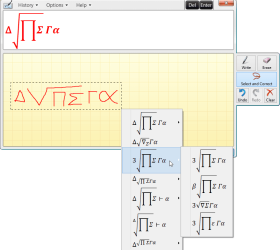
Most probably this is not what you want to but at least you could do something with it: Type Maths Input Panel to Start Menu > Search and press enter to open Maths Input Panel, use mouse to draw your formulas, click Insert to paste to document for instance Word:

MathInput.png
 

My Computer My Computer

At a glance

Windows 10 Pro x64 EN-GB1.6 GHz Intel Core i7-720QM Processor6 GBATI Mobility Radeon HD 5850 Graphics
Computer type
Laptop
Computer Manufacturer/Model Number
HP ENVY 17-1150eg
OS
Windows 10 Pro x64 EN-GB
CPU
1.6 GHz Intel Core i7-720QM Processor
Memory
6 GB
Graphics Card(s)
ATI Mobility Radeon HD 5850 Graphics
Sound Card
Beats sound system with integrated subwoofer
Monitor(s) Displays
17" laptop display, 22" LED and 32" Full HD TV through HDMI
Screen Resolution
1600*900 (1), 1920*1080 (2&3)
Hard Drives
Internal: 2 x 500 GB SATA Hard Disk Drive 7200 rpm
External: 2TB for backups, 3TB USB3 network drive for media
Cooling
As Envy runs a bit warm, I have it on a Cooler Master pad
Keyboard
Logitech diNovo Media Desktop Laser (bluetooth)
Mouse
Logitech Performance Mouse MX
Internet Speed
50/10 Mbps VDSL
Antivirus
Windows Defender 4.3.9431.0
Browser
Maxthon 3.5.2., IE11
Back
Top